Suitecrm: Campaign wizard - step 4 (marketing) Missing required field: Start Date
v 7.6, Using the latest version of Chrome, i cant get past this stage in the wizard .
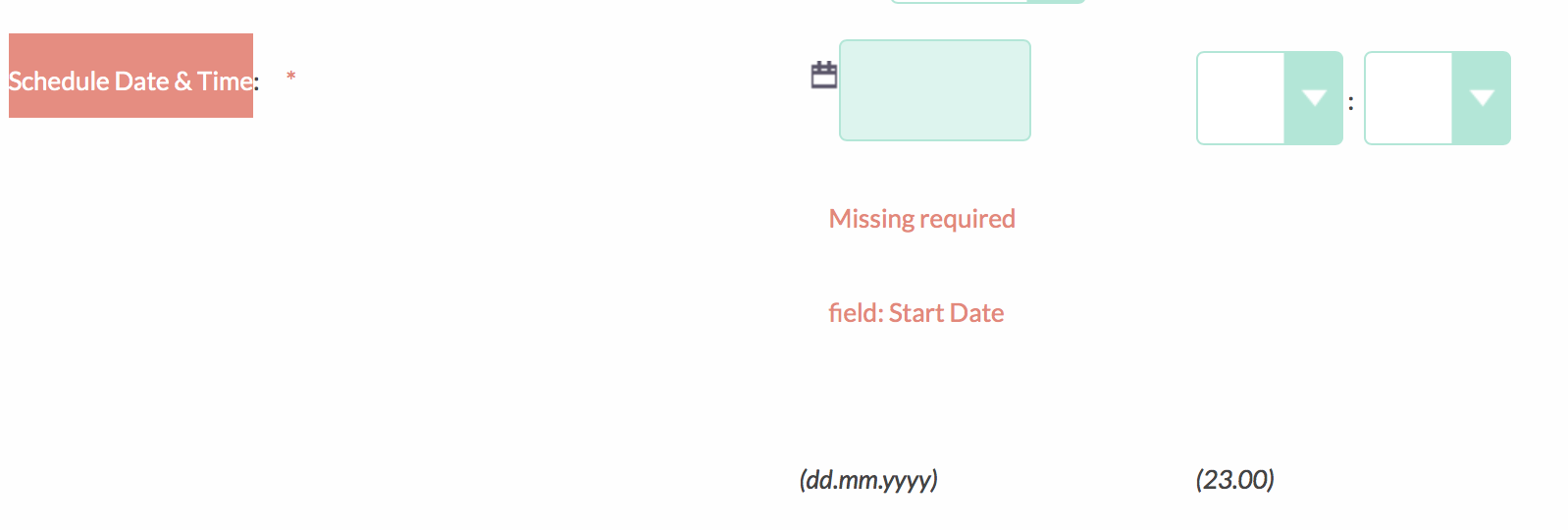
Doesn't matter if i use the calendar or type it manually, on clicking next, the field empties and shows an error in red below "Missing required field: Start Date".
 gremlinuk
All 23 comments
Just to update this - it's still present in v7.6.2 and it seems the start date doesn't even save when not using the wizard and just editing the email campaign field - this way doesn't show the error, but after save, it's still blank.
Any eta on a fix?
gremlinuk
on 13 May 2016
@gremllinuk Are you referring to the Start Date on the Marketing Email Campaign screen of the wizard? This is actually the start date of the Marketing Email record and not the start date of the actual campaign itself.
 samus-aran
on 16 May 2016
samus-aran
on 16 May 2016
No, it's the "Schedule Date & Time" for the email campaign.
The same thing happens whether i use the campaign wizard or not - even if i go to edit the email campaign record, it does the same thing. The only way I can get a campaign email to queue/schedule is by inserting the date/time manually in the MySQL database.
On load:

Date/Time entered:

After clicking "next":

gremlinuk
on 16 May 2016
@gremlinuk Ahh ok, thanks for the screenshots.
samus-aran
on 16 May 2016
No problem - if you need any more help debugging, please let me know. Its worth mentioning it was upgraded from its original install of 7.5.3 to 7.6, then 7.6.1, 7.6.2 and now 7.6.3 and used to work fine until after the update to 7.6.2.
gremlinuk
on 16 May 2016
Just to update this again - i'm still having this issue now i've updated to v7.6,3
gremlinuk
on 21 May 2016
Hi @gremlinuk what is your user's date/time formatted to? i.e dd/mm/yyyy 24 hours or 12 hour (am/pm)
samus-aran
on 21 May 2016
Hi @samus-aran I think you are onto something! i've just changed the time format from 24 hour to 12 hour clock and it's now working!!
The odd thing i see is that the 24 hour option seems to be listed twice in the drop down:

But thanks for the suggestion - it means its usable again now!
gremlinuk
on 21 May 2016
I been tested this issue in recent version SuiteCRM(7.7.5) and it not appear,
@gremlinuk , can you confirm is this issue is still exist in recent version of SuiteCRM,
if not can you close an issue.
Thanks for your contribution.
 shogunpol
on 29 Sep 2016
shogunpol
on 29 Sep 2016
Due to no activity to this issue, we will close this if more information is given and the issue still exists this can be reopened to be resolved.
Thanks
 ijdavie
on 11 Oct 2016
ijdavie
on 11 Oct 2016
Hi,
have just updated on 7.7.6 (from 7.7.4)
In my installation (coming from 7.6.1) the problem still appears also after the update. I updated, logged off and on again. Same error. I changed time format (or better: tried to) but that didn't help. ("Tried to" meant I changed in the admin panel, but in the campaign assistant the german date time format dd.mm.yyyy still apears.
I then changed to english UI. But still the problem.
Wantetd to start an email campaign on monday for the first time. But by now the campain function is useless for me... *sic
Regards
 okoester
on 28 Oct 2016
okoester
on 28 Oct 2016
Hi y'all, I'm on 7.7.8 and bumped into this problem last month, too. My campaign function would be REALLY useful right now and it's flat broken. I will try changing to the 24:00 hour format. Please keep this post up for updates. Thanks,
-L.
 lisakirkman
on 3 Jan 2017
lisakirkman
on 3 Jan 2017
Hello all, I have tested this on 7.7.8 but didn't find any issue at all. @lisakirkman, kindly check and test it one more time.
 ChangezKhan
on 3 Jan 2017
ChangezKhan
on 3 Jan 2017
I did get two tests to work once i changed the time to 24:00.
More importantly, I noticed that I had two names working within the same campaign: the Marketing Email Name (on Step 4 of 5) and the Campaign Name (Step 1) were slightly different. When I made those the exact same, the test worked and the date stayed in place.
It would be helpful if there was an info tab advising us to keep those two the same, or if the wizard pre-populated that second field if it was so important. Breaking the date field really did not lead me to suspect the various names requested. Thank you for the discussion.
-L.
lisakirkman
on 3 Jan 2017
Hi,
I do have this issue - I have changed the Linux timezone to Europe/Zurich and after that it is not working anymore... keeps saying missing field.
can you please suggest how to fix this?
Thanks and regards,
SDiogo
 SDiogo
on 8 Mar 2017
SDiogo
on 8 Mar 2017
I am experiencing the date problem with SuiteCRM version 7.8.2.
The server php.ini has "date.timezone = UTC"
The profile time zone was set Europe/Berlin GMT +2h
The problem disappeared only after the timezone in the profile was also set to UTC.
Setting the clock to 12h or 24h within the profile settings didn't have an effect on the error.
So a possible workaround is:
- whilst in the campaign wizard, to open a second browser tab, edit the profile timezone to that of the server and save it,
- go to first tab, update the window, and then add the date, to move on within the wizard
 wizian
on 31 Mar 2017
wizian
on 31 Mar 2017
7.9.1 still the problem with the dates and confusing display.
 janbarendse
on 22 Jun 2017
janbarendse
on 22 Jun 2017
@ijdavie @daniel-samson the problem is still in version 7.9.8. can you reopen this issue and we try to fix it?
 ManAnRuck
on 10 Jan 2018
ManAnRuck
on 10 Jan 2018
Thanks for re-opening. It remans a problem. I work around by setting up the emails to send and manually forcing them out through the admin email queue. Really lame. A lot of hours spent getting to this point.
 ghost
on 10 Jan 2018
ghost
on 10 Jan 2018
Hi @alexisdrake, is this issue a duplicate of #3703? if so would you be able to try out this fix: #4702 and see if it solves your issue?
Thanks.
 Dillon-Brown
on 10 Jan 2018
Dillon-Brown
on 10 Jan 2018
Hi,
This fix did not appear to work for me. I can test more later but I put in one email in the target list and got this error “you cannot send a marketing email until your target list has at least one entry. You can populate your list after finishing.”
From the Summary page, the date didn’t fall out like usual, but the “Send mail at scheduled time” did not queue up email or obviously send. Can try again with multiple users. I also created a template the first time and not on the following tests… don’t see how that could make a difference.
Thanks,
-L.
Lisa Kirkman
National Accounts Director
Ruby Radio Corporation
http://www.rubyradio.fm/ www.RubyRadio.fm
Serving Northeastern Nevada: KHIX-FM, KBGZ-FM, KZBi-FM, ez107.7 (KBGZ-HD2), Coyote 101.1 (KBGZ-HD3) and True Country Classics 100.5 FM (KBGZ-HD4)
ONLINE: http://www.rubywantads.com/ www.RubyWantAds.com
Cell: (775) 340-8001
Fax: (775) 777-9587
Email: lisa@rubyradio.fm [email protected]
Social: http://www.linkedin.com/in/lisakirkman www.linkedin.com/in/lisakirkman
From: Dillon-Brown [mailto:[email protected]]
Sent: Wednesday, January 10, 2018 8:02 AM
To: salesagility/SuiteCRM SuiteCRM@noreply.github.com
Cc: lisakirkman lisa@rubyradio.fm; Mention mention@noreply.github.com
Subject: Re: [salesagility/SuiteCRM] Campaign wizard - step 4 (marketing) Missing required field: Start Date (#1317)
Hi @alexisdrake https://github.com/alexisdrake , is this issue a duplicate of #3703 https://github.com/salesagility/SuiteCRM/issues/3703 ? if so would you be able to try out this fix: #4702 https://github.com/salesagility/SuiteCRM/pull/4702 and see if it solves your issue?
Thanks.
—
You are receiving this because you were mentioned.
Reply to this email directly, view it on GitHub https://github.com/salesagility/SuiteCRM/issues/1317#issuecomment-356647172 , or mute the thread https://github.com/notifications/unsubscribe-auth/AXvtQsqUPsUbDDsa81Qg379rjDHRWs_fks5tJN7ngaJpZM4IVRYc .
lisakirkman
on 11 Jan 2018
Thanks for your tests. I think that for this issue, we need to concentrate on the filed being functional, not on whether the Campaign sends or not, because many other factors go into that.
So I would say, if you can enter a data value, save it, and then go back to that screen and see the value correctly saved, that's the critical thing for this Issue here. Or am I mistaken?
 pgorod
on 11 Jan 2018
pgorod
on 11 Jan 2018
We have found that this is no longer an issue in our latest 7.8 version and advise upgrading to that if you still find this an issue.
 cameronblaikie
on 4 Feb 2019
cameronblaikie
on 4 Feb 2019
Related issues
 Mausino
·
3Comments
Mausino
·
3Comments
pgorod
·
3Comments
Mausino
·
3Comments
Mausino
·
3Comments
pgorod
·
3Comments
 ArturoBurela
·
3Comments
ArturoBurela
·
3Comments
 project-banana
·
3Comments
project-banana
·
3Comments