Subtitleedit: Shortcut for increasing/decreasing subtitle duration frame by frame
Hello, I'm wondering if it's possible to do the following shortcuts for subtitles with less than 100/150ms gaps:
- Increase/decrease a subtitle frame by frame at the start of subtitle, but dragging the previous together maintaining gap. (If the gap beetween subtitles is bigger than 100/150ms, only selected subtitle is affected)
- Increase/decrease a subtitle frame by frame at the end of subtitle, but dragging the following together maintaining gap. (If the gap beetween subtitles is bigger than 100/150ms, only selected subtitle is affected)
Original subtitle:

For the first shortcut:
Increasing one frame forward in subtitle 2 and decreasing one frame in subtitle 3.
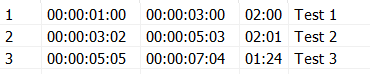
Or the opposite. Decreasing one frame in subtitle 2 and increasing one frame in subtitle 3.

For the second shortcut:
Increasing one frame backward in subtitle 2 and decreasing one frame in subtitle 1.

Or the opposite. Decreasing one frame in subtitle 2 and increasing one frame in subtitle 1.

I don't know if I was clear, but I think this would help lots of people. Thank you.
 matmaggi
All 13 comments
I totally agree. The possibility to adjust just one frame with the shortcuts options it would be a incredible feature, now that Subtitle Edit is working better with shotchanges (Scene Changes).
Right now those "overwrite" shortcuts for previous and next subtitle doesn't exist, but neither the option to move just one frame and that would be a great start!
 Fhining
on 1 May 2020
Fhining
on 1 May 2020
I think it's an amazing idea for those who works with frames.
This would be a nice tool, to be able to move frames with shortcut as the same to move ms.
Nice idea @matmaggi !
 btsix
on 2 May 2020
btsix
on 2 May 2020
Beta updated with shortcuts for move start/end by 1 frame: https://github.com/SubtitleEdit/subtitleedit/releases/download/3.5.15/SubtitleEditBeta.zip
Is keeping the gap to prev/next important? If yes, that should be other shortcuts, right?
 niksedk
on 5 May 2020
niksedk
on 5 May 2020
Beta updated with shortcuts for move start/end by 1 frame: https://github.com/SubtitleEdit/subtitleedit/releases/download/3.5.15/SubtitleEditBeta.zip
Is keeping the gap to prev/next important? If yes, that should be other shortcuts, right?
@niksedk
Nikolaj! Thank you soooo much for this amazing update. This is exactly what matmaggi was saying (I think) and what I asked too. This feature + the new update with "snapping shot scene changes (shot changes)" is a powerfull combination.
About your question. I tested some other software with this shortcuts and what they do is keeping this combination "locking" the gap. And they create other shortcuts for "overriding" the previous or next subtitle (still keeping the gap). Don't know if I'm explaining myself.
That shortcut will allow you to move one frame of the end of a subttitle and "eat" 1 frame of the next one. This way you don't have to go to the next one, substract one frame from the start, go back to your sub and add the last frame at the end.
So I think it should be 4 shortcuts more like these ones but with this "override" function.
Again, THANK you so much for your tremendous work. :)
Fhining
on 5 May 2020
Thanks @niksedk! This is awesome!
My point of view is the same as @Fhining. If could adjust that, I'd appreciate!
matmaggi
on 5 May 2020
@niksedk I think the idea of the second set of 4 shortcuts would be a match for this: https://github.com/SubtitleEdit/subtitleedit/issues/3027
It is exactly like moving the gap... I think.
 OmrSi
on 5 May 2020
OmrSi
on 5 May 2020
@OmrSi: yes, seems to be the same :)
New beta with four new shotcuts:
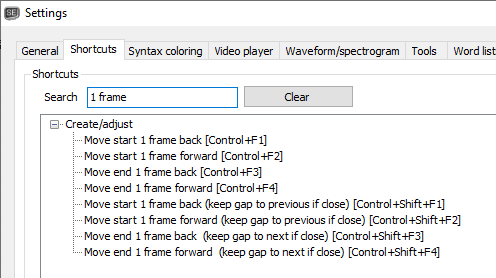
Beta updated: https://github.com/SubtitleEdit/subtitleedit/releases/download/3.5.15/SubtitleEditBeta.zip
Let me know how it works!
niksedk
on 5 May 2020
@niksedk I've tested now and it's working fine, which is awesome. Thank you so much!
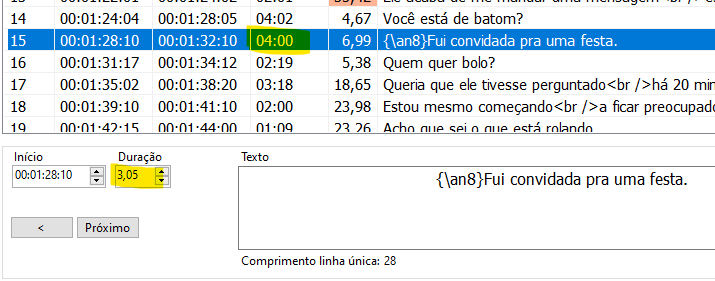
I've found a bug. Duration of the subtitle not selected doesn't change in list view when I use the shortcuts. Just in the bottom.
EDIT: Timing as well
matmaggi
on 5 May 2020
@matmaggi: thx for testing :)
Hopefully fixed now: https://github.com/SubtitleEdit/subtitleedit/releases/download/3.5.15/SubtitleEditBeta.zip
niksedk
on 5 May 2020
@niksedk It's working fine now. Thank you! Have a great day.
matmaggi
on 5 May 2020
Thank you so much for this amazing update. Tested this last version and the shortcuts are exactly what I was saying. Such a great combo with "snap to scenechange feature".
Once again, thanks a lot @niksedk
Fhining
on 5 May 2020
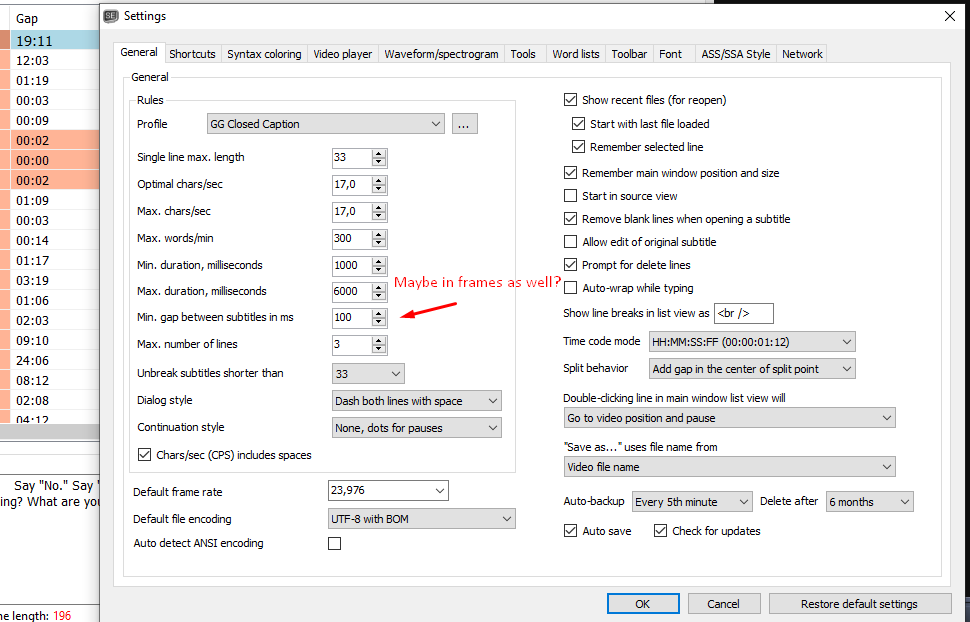
@niksedk I was thinking that maybe, regarding this same "frame topic" is it possible to set "gap" in frame as well? Because if people want to have an exact frame separation, they need to calculate them to get a near MS number.
Fhining
on 5 May 2020
Great idea, @Fhining. Maybe it should be linked with time code mode. When working with frames, use gap between subtitles in frames. When working in miliseconds, use gap between subtitles in miliseconds.
matmaggi
on 5 May 2020
Related issues
 SubEdict
·
3Comments
SubEdict
·
3Comments
 teodargent
·
5Comments
teodargent
·
5Comments
 depeo
·
5Comments
depeo
·
5Comments
 dvjrickkraft
·
4Comments
dvjrickkraft
·
4Comments
 darkred
·
4Comments
darkred
·
4Comments
Most helpful comment
@matmaggi: thx for testing :)
Hopefully fixed now: https://github.com/SubtitleEdit/subtitleedit/releases/download/3.5.15/SubtitleEditBeta.zip