Subtitleedit: Google translation stopped!
Google translation stopped working. I traced the code, and found that the returned text from google doesn't contaim "
Seems that google changed something in the page format. I coppied the request url from code and pasted it in the browser , and I got the translated text in the browser page !
Hope you find what has changed.
Thanks
 ghost
ghost
All 151 comments
I'm affraid this is becuase #3200 . If there is a problem in the fix and loop keeps requesting the same translation 5 times regardless the success of the translation, Google will conseder this as some attack or undesired load. I think the break condition is not placed in all if statement branches. I hope you use my original suggested code, after you find what is changed in google translation format.
ghost
on 29 Nov 2018
I think it is better to use Google translate cloud service:
https://cloud.google.com/translate/docs/quickstart-client-libraries
ghost
on 29 Nov 2018
It's not translating a single line of any subtitle. This was a very useful tool, can it be fixed?
 Ormendahl
on 29 Nov 2018
Ormendahl
on 29 Nov 2018
It's not translating a single line of any subtitle. This was a very useful tool, can it be fixed?
yeah I got same sisuation too ...
 bluekar
on 29 Nov 2018
bluekar
on 29 Nov 2018
it does not work here either
 svenverslype
on 29 Nov 2018
svenverslype
on 29 Nov 2018
Unable to translate,
 cgkelei
on 29 Nov 2018
cgkelei
on 29 Nov 2018
I think google sendback some java script functions to excute the translation in the browser. If you don't have a solution, I suggest to use the Webbrowser cintrol to view the returned html and execute java script functions, then read the result from the control.
ghost
on 29 Nov 2018
@MohammadHamdyGhanem: Please do give it a try...
In the meantime, I've added support for Google Clould API keys: https://github.com/SubtitleEdit/subtitleedit/releases/download/3.5.7/SubtitleEditBeta.zip
Check here for how to create an API key: https://support.google.com/googleapi/answer/6158862?hl=en
Also, you can do translate here: https://www.nikse.dk/SubtitleEdit/Online
 niksedk
on 29 Nov 2018
niksedk
on 29 Nov 2018
OK. I'm trying it now, but the API key will be hard for most users. Try the WebControl solution. I don't have time now to write it myself.
And don't forget to fix the break condition of the retrial loop.
Thanks.
ghost
on 29 Nov 2018
I couldn't create the key. I don't think this is a practical solution!
ghost
on 29 Nov 2018
I created the api key and when i try to translate is says: "System: The remote server returned an error: (400) Bad Request."
 Alket69
on 29 Nov 2018
Alket69
on 29 Nov 2018
@niksedk
What about Microsoft translate? I see it in code but not in auto-translate menu?.. How to use it?
ghost
on 29 Nov 2018
The website's design changed a lot: https://translate.google.com/
I'm guessing it's not just the design and that's what caused the problem.
This is a hard blow for SE.
I don't use google translate because of the inaccuracy in my language, but I imagine many people do.
 OmrSi
on 29 Nov 2018
OmrSi
on 29 Nov 2018
R.I.P Subtitle Edit ;-(
 mm9919
on 29 Nov 2018
mm9919
on 29 Nov 2018
@mm9919 Come on, now. If you only use subtitle edit to use google translate, then that's a problem for you.
Many, many translators don't even use google translate...
Plus, SE isn't Google Translate, it's so, so much more.
OmrSi
on 29 Nov 2018
I do agree with @OmrSi ! It is agood program, i started many translations thru auto translation first... lol guess i have to start learning to quick type than first! @niksedk : All respect to you! Still believe in SE!
 Hanzeeo
on 29 Nov 2018
Hanzeeo
on 29 Nov 2018
SE is the best program I have ever seen, I used it already voor many translates, now it's not working anymore and that's a big problem, let's hope you can fix it
 oneilboy
on 29 Nov 2018
oneilboy
on 29 Nov 2018
A temporary workaround for those interested: You can export just the text from a subtitle file (file, export, plain text), and translate it through Google Translate itself in chunks, replacing each chunk in the text file with the translated text. Then you can import the text file (file, import plain text), and then add to it the time codes from the original subtitle (file, import time codes).
 darnn
on 29 Nov 2018
darnn
on 29 Nov 2018
@darnn Using the online version as Nikolaj said would be easier.
OmrSi
on 29 Nov 2018
Why the online version only translates small part of the subtitles?
mm9919
on 29 Nov 2018
@mm9919 the same problem here
svenverslype
on 29 Nov 2018
@OmrSi Oh, I hadn't noticed that link! That does certainly seem like it would be easier! But, I am noticing that translating the text in Google Translate itself and doing it through the online SE version actually produces different results (and in Hebrew, for instance, the difference is substantial, and the translation SE produces is far less coherent).
darnn
on 29 Nov 2018
@OmrSi Oh, I hadn't noticed that link! That does certainly seem like it would be easier! But, I am noticing that translating the text in Google Translate itself and doing it through the online SE version actually produces different results (and in Hebrew, for instance, the difference is substantial, and the translation SE produces is far less coherent).
I'm noticing that in my case, translating through the SE program itself would produce a more coherent and accurate translation than through the site given above for some reason.
Ormendahl
on 29 Nov 2018
Weird!
darnn
on 29 Nov 2018
api key paying only???
 marb99
on 30 Nov 2018
marb99
on 30 Nov 2018
No wonder. I thought I was the only one so I had to uninstall and downloaded new SE version.
Should have seen this topic earlier!
 glowxixi
on 30 Nov 2018
glowxixi
on 30 Nov 2018
The problem is not the SE, google tanslator now need a api key v2 and its pay.
the free api key v1 its over, I guess.
marb99
on 30 Nov 2018
I do not think that SE is either. I have used another program and it does not work either. they also use google translator. I hope they find a solution.
svenverslype
on 30 Nov 2018
untill now SE use the free api key v1 set in the "Settings.xml" file.
Now the api key v1 its over.
Is need now the api key v2 to access and you need to pay for it.
Now is to wait for other solutions.
marb99
on 30 Nov 2018
How much is it for api key v2
svenverslype
on 30 Nov 2018
@svenverslype
US$ 20 for 1.000.000 characters
but see here: https://cloud.google.com/translate/pricing
marb99
on 30 Nov 2018
Can SE not purchase a license so that we can use it.
And then that we have to buy the SE software for a price maybe once a year.
svenverslype
on 30 Nov 2018
@svenverslype
US$ 20 for 1.000.000 characters
but see here: https://cloud.google.com/translate/pricing
If nikesedk has that v2 key can he place it in the program to be used by all of us ?
Alket69
on 30 Nov 2018
@svenverslype
US$ 20 for 1.000.000 characters
but see here: https://cloud.google.com/translate/pricingIf nikesedk has that v2 key can he place it in the program to be used by all of us ?
@Alket69
I do not know this
svenverslype
on 30 Nov 2018
Is there nothing else than google translate that we can use?
svenverslype
on 30 Nov 2018
Microsoft "bing" is to pay also, and as good as google and free I do not know
marb99
on 30 Nov 2018
I don't think it's fair to ask Nikolaj to pay for it...
OmrSi
on 30 Nov 2018
I don't think it's fair to ask Nikolaj to pay for it...
We would then pay to Nikolaj to use the software from him, example $ 30 per year.
svenverslype
on 30 Nov 2018
I don't think it's fair to ask Nikolaj to pay for it...
We would then pay to Nikolaj to use the software from him, example $ 30 per year.
I think it is not a realistic wish, for now, all we can do is master the language, start typing and make the long hours of translating manually! Good luck!
Hanzeeo
on 30 Nov 2018
There is another translator, https://www.deepl.com/translator. Maybe this is something
svenverslype
on 30 Nov 2018
You can already find deepl integration as a plugin in the plugin list.
OmrSi
on 30 Nov 2018
I believe i have the same issue, i hope this gets fixed soon enough.
 benzyb59
on 30 Nov 2018
benzyb59
on 30 Nov 2018
is not a realistic, and you can still use the google translator in SE.
buy an api key put in SE and use the google translator like before.
The problem is not SE, Is the google, they changed their policies.
I have never paid in the past for any google service nor will I ever pay in the future.
marb99
on 30 Nov 2018
@niksedk
This is another solution #3212
ghost
on 1 Dec 2018
You can already find deepl integration as a plugin in the plugin list.
Where?
Ormendahl
on 1 Dec 2018
Deepl translator is also a payed feature/service and only 7 languages. (Dutch, English, German, Spanish, French, Italian and Polish)
Hanzeeo
on 1 Dec 2018
You can download my Video And Subtitle Edit (VASE) executables from here, use the translation and save the file and reopen in your SE, until this problem is solved:
http://www.mediafire.com/file/jjrqrfjw6j1jzh9/Video+And+Subtitle+Edit.zip
Note: If a problem happens in translation, reopen exe as adminstrator so it can access the registery to make the WebBrowser use the latest IE on your PC.
Hope it helps.
ghost
on 1 Dec 2018
I've updated latest beta version: https://github.com/SubtitleEdit/subtitleedit/releases/download/3.5.7/SubtitleEditBeta.zip
Could someone please test the Google Translate with an API key?
See https://support.google.com/googleapi/answer/6158862?hl=en
You'll need to start a trial with payment to enable the API key (sorry, annoying I know)
You can then enter the Google Cloud API key in SE via Options - Settings - Tools.
It's probably easier to get a Microsoft Bing Translator client secret - See https://docs.microsoft.com/en-us/azure/cognitive-services/translator/translator-text-how-to-signup
You can then enter the Microsoft Bing Translator client secret in SE via Options - Settings - Tools.
Also, I would be nice if someone tested this too.
Note: Google translate will also kind of work without key... but slowly and probably only for a while.
@MohammadHamdyGhanem: Nice you got it working :) Can it translate long subtitles or does it stop working after a while? I'll test it soon. I think a plugin would be ideal for this.
niksedk
on 1 Dec 2018
Has anything changed in the latest beta regarding Bing Translator? I've used it with the key from Azure before, it seemed to work fine.
darnn
on 1 Dec 2018
@niksedk
So far, it works fine with 45 minutes subtitles. But IE 11 or edge must exist on the PC.
ghost
on 1 Dec 2018
@darnn: Yes, Bing translator has been updated to use their latest api (v3) - does it still work for you?
niksedk
on 1 Dec 2018
It doesn't work ("System: The request was aborted: The request was canceled."), but I think that's just because I reached my character limit. I actually gave my key to somebody else because I don't normally use the automatic translation myself, and I guess they used it up.
I assume this is the case because the same error shows up in the version of SE from October 14th, which is when I tested the key before I gave it to him, and the key worked in that version back then. Sorry I couldn't be more helpful.
darnn
on 1 Dec 2018
@niksedk Sadly, I can't help you there, the site is blocked here.
It's working without a key as you said, but maybe you should make the warning show up only one time when you first use the section, it's annoying to see it every time.
Not for me of course, I don't even use automatic translation...
OmrSi
on 1 Dec 2018
google work without an paid key, but is limited to a number of characters.
can not translate an entire subtitle
marb99
on 1 Dec 2018
Just a thought, since I have no idea if this would work with the new API, or how much work it would be to code it, but could it be feasible to have SE carry out automatically the thing I describe here (https://github.com/SubtitleEdit/subtitleedit/issues/3209#issuecomment-442930963)? That is to say, send queries in chunks of 5000 characters, instead of sending each individual subtitle?
darnn
on 1 Dec 2018
you can use the "google translation toolkit" its very good and for now its free.
just need one google account.
marb99
on 1 Dec 2018
I already implemented this by using WebBrowser control which is a wrapper of Internet Explorer, and it works fine for me.
http://www.mediafire.com/file/jjrqrfjw6j1jzh9/Video+And+Subtitle+Edit.zip
But IE 11 or Edge must be installed on the PC.
ghost
on 1 Dec 2018
I already implemented this by using WebBrowser control which is a wrapper of Internet Explorer, and it works fine for me.
http://www.mediafire.com/file/jjrqrfjw6j1jzh9/Video+And+Subtitle+Edit.zip
But IE 11 or Edge must be installed on the PC.
Hi how does this program work i did as i usually do but the translation took over 40 minutes and I did not get any text translated. And I have IE 11 installed.
 MrClinton578
on 1 Dec 2018
MrClinton578
on 1 Dec 2018
@MrClinton578
You need to give the app permission to access registry for once to upgrade the webbrowser control to use IE 11 instead of IE 7. To do so, right-click the exe and choose Open As Administrator command, then try to translate. If it worked, you will not need to do so again.
ghost
on 2 Dec 2018
the remote server has returned an error 503 server is not available
svenverslype
on 2 Dec 2018
I've been trying to figure out for a few days why SE wasn't working with Google. Now I know. Very bad. BTW, I have a paid API key for Bing translator and I am having problems with that too. When the translation completes (English to Chinese Simplified), there are several gaps of about 3-4 minutes without subtitles. Very frustrating.
 Maniac8888
on 2 Dec 2018
Maniac8888
on 2 Dec 2018
@Maniac8888: Are you using Bing translate with latest beta?
https://github.com/SubtitleEdit/subtitleedit/releases/download/3.5.7/SubtitleEditBeta.zip
If it still fails please upload a screenshot + source english sub (or email it to me).
niksedk
on 2 Dec 2018
@Maniac8888: Are you using Bing translate with latest beta?
https://github.com/SubtitleEdit/subtitleedit/releases/download/3.5.7/SubtitleEditBeta.zip
If it still fails please upload a screenshot + source english sub (or email it to me).
No, I am not but I will download in the morning are report back. Thanks a lot for your reply.
Maniac8888
on 2 Dec 2018
@MrClinton578
You need to give the app permission to access registry for once to upgrade the webbrowser control to use IE 11 instead of IE 7. To do so, right-click the exe and choose Open As Administrator command, then try to translate. If it worked, you will not need to do so again.
Doesent work same problem.
MrClinton578
on 2 Dec 2018
Sorry, I don't know what is wrong! It works fine on my PC!
ghost
on 2 Dec 2018
@niksedk : Are you using Bing translate with latest beta?
https://github.com/SubtitleEdit/subtitleedit/releases/download/3.5.7/SubtitleEditBeta.zip
If it still fails please upload a screenshot + source english sub (or email it to me).
Again, thanks for the prompt reply. This fixed the problem for most video files. On other files I get a pop-up error; "System: The request was aborted. The Request was Cancelled." For a specific file, this occurs about halfway through the translation (about 30 minutes play time). Not sure if this has to do with the source file or not. But, other files work fine. If you would like screen shots or anything else, let me know.
Again, I appreciate. This mostly gets me up and running.
Maniac8888
on 3 Dec 2018
Nikolaj,
Thanks for your help.
As I posted on Github, using the latest beta version helped dramatically with Bing Translate. I thought the problem I was experiencing regarding the System error “System: The request ws aborted. The Request was Cancelled” was sporadic. Unfortunately, that does not seem to be the case. Sometimes it happens (random locations in the translated file) and sometimes it is perfect (with other files). It can be replicated at the same place in the same file. Below is a screen shot. While it is certainly better than it was, it is still a problem.
[cid:[email protected]]
If I can be of assistance, just ask. Thanks again.
Regards,
Kevin
From: Nikolaj Olsson notifications@github.com
Sent: Sunday, December 2, 2018 17:04
To: SubtitleEdit/subtitleedit subtitleedit@noreply.github.com
Cc: Maniac8888 exec1884@hotmail.com; Mention mention@noreply.github.com
Subject: Re: [SubtitleEdit/subtitleedit] Google translation stopped! (#3209)
@Maniac8888https://github.com/Maniac8888: Are you using Bing translate with latest beta?
https://github.com/SubtitleEdit/subtitleedit/releases/download/3.5.7/SubtitleEditBeta.zip
If it still fails please upload a screenshot + source english sub (or email it to me).
—
You are receiving this because you were mentioned.
Reply to this email directly, view it on GitHubhttps://github.com/SubtitleEdit/subtitleedit/issues/3209#issuecomment-443492376, or mute the threadhttps://github.com/notifications/unsubscribe-auth/Ara-eSVdRDXZ4CI_u4Lrx1Uvn6LaYQmhks5u05eGgaJpZM4Y4x2B.
Maniac8888
on 3 Dec 2018
For: Nikolaj Olsson: I used bing translator with the latest version of your program, however it works freezes the translation every 69 lines of translation. If I click ok the translation continues for another 69 lines, but it becomes a very long operation. I have also sent an e-mail to your personal address.
 renatosottile
on 3 Dec 2018
renatosottile
on 3 Dec 2018
Now a subtitle of 890 lines always stops exactly at line 341 and if I also try to restart it by clicking ok, it starts again from the beginning and stops again at line 341.
This using the Microsoft service.
renatosottile
on 3 Dec 2018
@MohammadHamdyGhanem: Please do give it a try...
In the meantime, I've added support for Google Clould API keys: https://github.com/SubtitleEdit/subtitleedit/releases/download/3.5.7/SubtitleEditBeta.zip
Check here for how to create an API key: https://support.google.com/googleapi/answer/6158862?hl=enAlso, you can do translate here: https://www.nikse.dk/SubtitleEdit/Online
I tried the beta version ,but why "Tools"panel,there is no "Google translate url" to chose? please add it.
because chinese mainland zone can't open the url “translate.google.com” but only "translate.google.cn" ,
please...
 eaglepie
on 3 Dec 2018
eaglepie
on 3 Dec 2018
Sorry, I don't know what is wrong! It works fine on my PC!
How did you do it to work? Operating system? The folder on C :? added something in regedit?
MrClinton578
on 3 Dec 2018
it also does not work via google translator without api key in SE new version3.5.7 build 157 he translates around 70 sentences and I get this the remote server has returned an error 503 server is not available.
OS: windows 10, Folder C:\SubtitleEdit but I do not know what to add in regedit.
svenverslype
on 3 Dec 2018
@MrClinton578
Win 7 sp1, with IE 11
Did you trun run the exe as adminstrator?
I also have .NET Framework 4.7.2 installed on my PC. SE usues V 4.0, but maybe V 4.7.2 update the WebBrowser control or did someother things that affects the App!
The last thisg to do, is to update your win 7.
ghost
on 3 Dec 2018
I tried it on another Win 7, and there is already a problem, but I can't figure it out yet!
ghost
on 3 Dec 2018
I got it. That win 7 has IE 9 !
IE 11 is a must. Make sure of the IE version installed on your windows.
ghost
on 3 Dec 2018
I got it. That win 7 has IE 9 !
IE 11 is a must. Make sure of the IE version installed on your windows.
I have Win 8.1 and yes i run it with adminstrator. Do you use bing key?
MrClinton578
on 3 Dec 2018
No.
Try this test. Open this url in IE and see if you got the translation to frensh:
https://translate.google.com/?hl=en&eotf=1&sl=en&tl=fr&q=Hey!%20l'm%20all%20packed%20and%20ready%20to%20go.%0A%0A%0A%20That%20is%20right.%20Daddy%20and%20Uncle%20Joey%20are%20going%20on%20a%20trip%20today.%0A%0A%0A%20We%20are%20going%20to%20a%20conference%20in%20Barbados.%0D%0ARight%3F%20Can%20you%20say%2C%20''Barbados''%3F%0A%0A%0A%20Barbados.%0A%0A%0A%20Okay.%20l've%20gotta%20say%2C%20it%20means%20so%20much%20to%20me%20that%20you%20guys%20are%20coming...%0A%0A%0A%20...all%20the%20way%20over%20there%20to%20hear%20me%20give%20my%20speech.%0A%0A%0A%20And%20l%20have%20a%20surprise.%0D%0Al%20had%20to%20pull%20some%20strings...%0A%0A%0A%20...but%20l%20was%20able%20to%20get%20everyone%20passes%20to%20the%20entire%20conference.%20That%20is%20right!%0A%0A%0A%20These%20babies%20will%20get%20you%20into%20all%20the%20paleontology%20lectures%20and%20seminars.%0A%0A%0A%20Do%20you%20have%20anything%20that%20will%20get%20us%20out%20of%20them%3F%0A%0A%0A%20We%20are%20excited%20to%20hear%20the%20speech%2C%20but%20the%20rest%20of%20the%20time...
ghost
on 3 Dec 2018
Yes its in frensh.
MrClinton578
on 3 Dec 2018
@MohammadHamdyGhanem Same thing here with Win 10.
Taking a lot of time but not showing any results.
And the link worked.
OmrSi
on 3 Dec 2018
FYI, Use a VPN like I do and have access to any Google domain. I just wish SE w/Bing API key worked consistently (with or without VPN).
From: eaglepie notifications@github.com
Sent: Tuesday, December 4, 2018 00:38
To: SubtitleEdit/subtitleedit subtitleedit@noreply.github.com
Cc: Maniac8888 exec1884@hotmail.com; Mention mention@noreply.github.com
Subject: Re: [SubtitleEdit/subtitleedit] Google translation stopped! (#3209)
@MohammadHamdyGhanemhttps://github.com/MohammadHamdyGhanem: Please do give it a try...
In the meantime, I've added support for Google Clould API keys: https://github.com/SubtitleEdit/subtitleedit/releases/download/3.5.7/SubtitleEditBeta.zip
Check here for how to create an API key: https://support.google.com/googleapi/answer/6158862?hl=en
Also, you can do translate here: https://www.nikse.dk/SubtitleEdit/Online
I tried the beta version ,but why "Tools"panel,there is no "Google translate url" to chose? please add it.
because chinese mainland zone can't open the url “translate.google.com” but only "translate.google.cn" ,
please...
—
You are receiving this because you were mentioned.
Reply to this email directly, view it on GitHubhttps://github.com/SubtitleEdit/subtitleedit/issues/3209#issuecomment-443776723, or mute the threadhttps://github.com/notifications/unsubscribe-auth/Ara-eemggc2GiiHbMOndZOK6PSu-O6t0ks5u1VN3gaJpZM4Y4x2B.
Maniac8888
on 4 Dec 2018
I believe the show is over.
Google stopped their free services.
What a loss for people.
 b7398564
on 4 Dec 2018
b7398564
on 4 Dec 2018
The subtitle online also does not work, it only translates 217 rows out of 713 With code page UTf-8
https://www.nikse.dk/SubtitleEdit/Online#
MrClinton578
on 4 Dec 2018
The subtitle online also does not work, it only translates 217 rows out of 713 With code page UTf-8
https://www.nikse.dk/SubtitleEdit/Online#
yes,i tried too ,the same to you
eaglepie
on 4 Dec 2018
Hi
So the current beta does work! thank you!
But the translation sequence do skip some lines...
Can it be fixed by going over again (or running a method to discover empty lines and translate again ONLY them?)
thx
P.S - now just needing the BATCH Google Translate
I take it back, seems there's a quota for this...
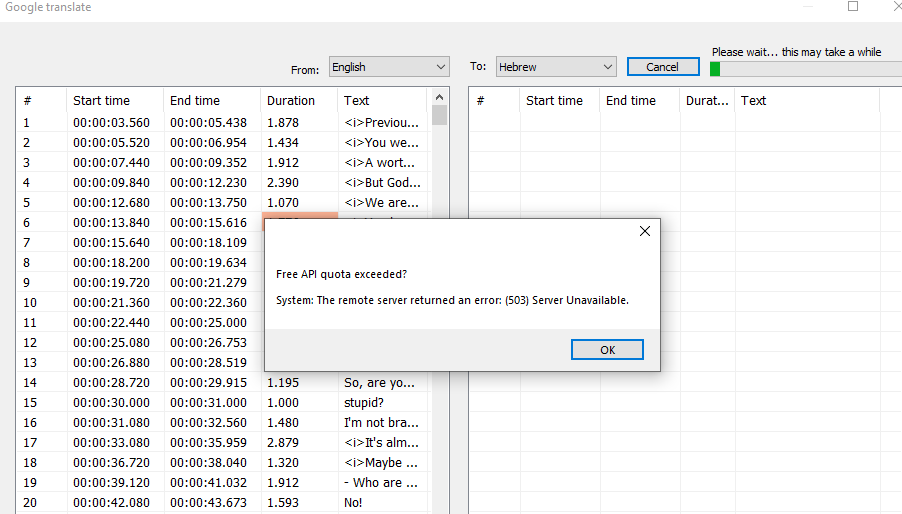
maybe there's a way to generate tokens of FREE gt, and use them in SE?
 orbittwz
on 4 Dec 2018
orbittwz
on 4 Dec 2018
you can also translate subs here: http://subtitlecat.com/upload.html
 Lookwest1
on 4 Dec 2018
Lookwest1
on 4 Dec 2018
you can also translate subs here: http://subtitlecat.com/upload.html
Thanks, but the only problem is that you can only translate 2 files per hour
MrClinton578
on 4 Dec 2018
Hi
So the current beta does work! thank you!
But the translation sequence do skip some lines...
Can it be fixed by going over again (or running a method to discover empty lines and translate again ONLY them?)
thx
The current beta does not work because on a subtitle of 910 lines it always stops at line 801 and therefore we hope that a new beta will come out.
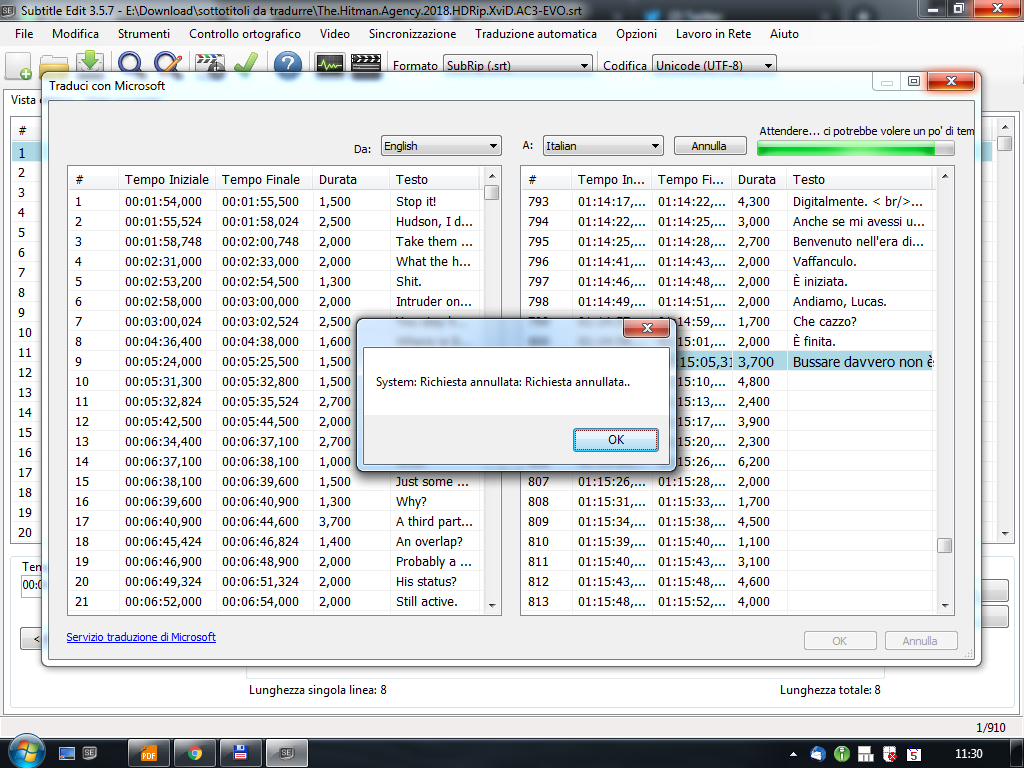 renatosottile
on 5 Dec 2018
renatosottile
on 5 Dec 2018
I've updated latest beta version: https://github.com/SubtitleEdit/subtitleedit/releases/download/3.5.7/SubtitleEditBeta.zip
Could someone please test the Google Translate with an API key?
See https://support.google.com/googleapi/answer/6158862?hl=en
You'll need to start a trial with payment to enable the API key (sorry, annoying I know)
You can then enter the Google Cloud API key in SE via Options - Settings - Tools.It's probably easier to get a Microsoft Bing Translator client secret - See https://docs.microsoft.com/en-us/azure/cognitive-services/translator/translator-text-how-to-signup
You can then enter the Microsoft Bing Translator client secret in SE via Options - Settings - Tools.
Also, I would be nice if someone tested this too.Note: Google translate will also kind of work without key... but slowly and probably only for a while.
@MohammadHamdyGhanem: Nice you got it working :) Can it translate long subtitles or does it stop working after a while? I'll test it soon. I think a plugin would be ideal for this.
Tested Google API and working fine (English to Spanish) with no errors or warnings.
ghost
on 5 Dec 2018
I've updated latest beta version: https://github.com/SubtitleEdit/subtitleedit/releases/download/3.5.7/SubtitleEditBeta.zip
Could someone please test the Google Translate with an API key?
See https://support.google.com/googleapi/answer/6158862?hl=en
You'll need to start a trial with payment to enable the API key (sorry, annoying I know)
You can then enter the Google Cloud API key in SE via Options - Settings - Tools.
It's probably easier to get a Microsoft Bing Translator client secret - See https://docs.microsoft.com/en-us/azure/cognitive-services/translator/translator-text-how-to-signup
You can then enter the Microsoft Bing Translator client secret in SE via Options - Settings - Tools.
Also, I would be nice if someone tested this too.
Note: Google translate will also kind of work without key... but slowly and probably only for a while.
@MohammadHamdyGhanem: Nice you got it working :) Can it translate long subtitles or does it stop working after a while? I'll test it soon. I think a plugin would be ideal for this.Tested Google API and working fine (English to Spanish) with no errors or warnings.
I tried both Google and Microsoft English to Italian and nothing has changed.
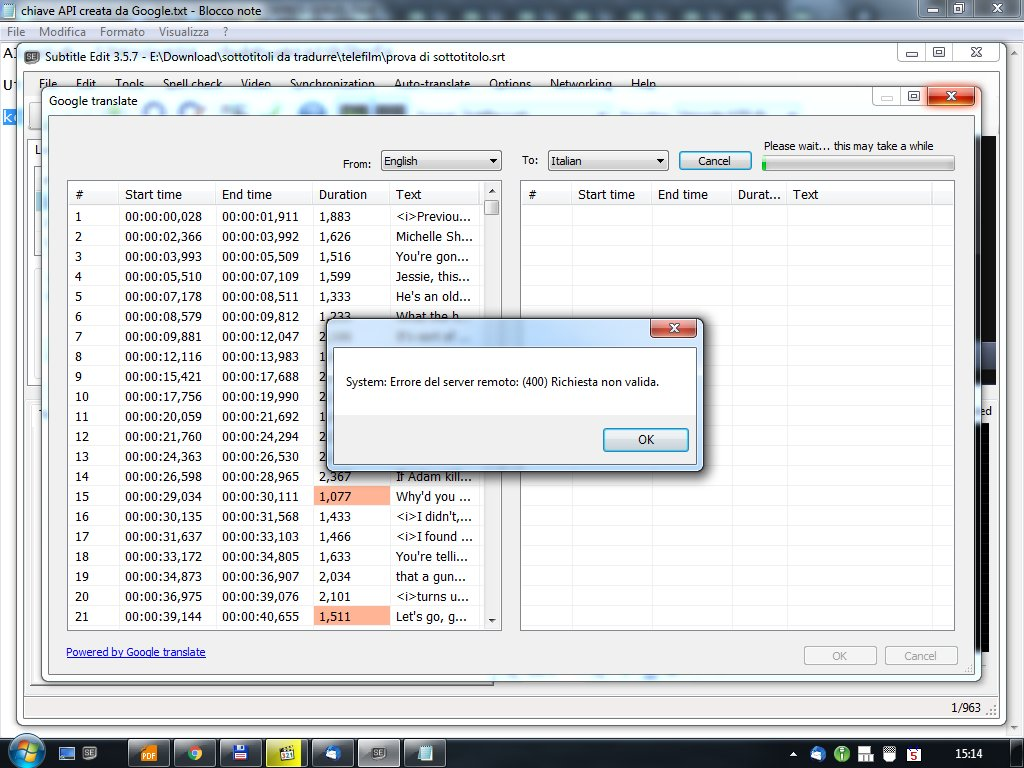
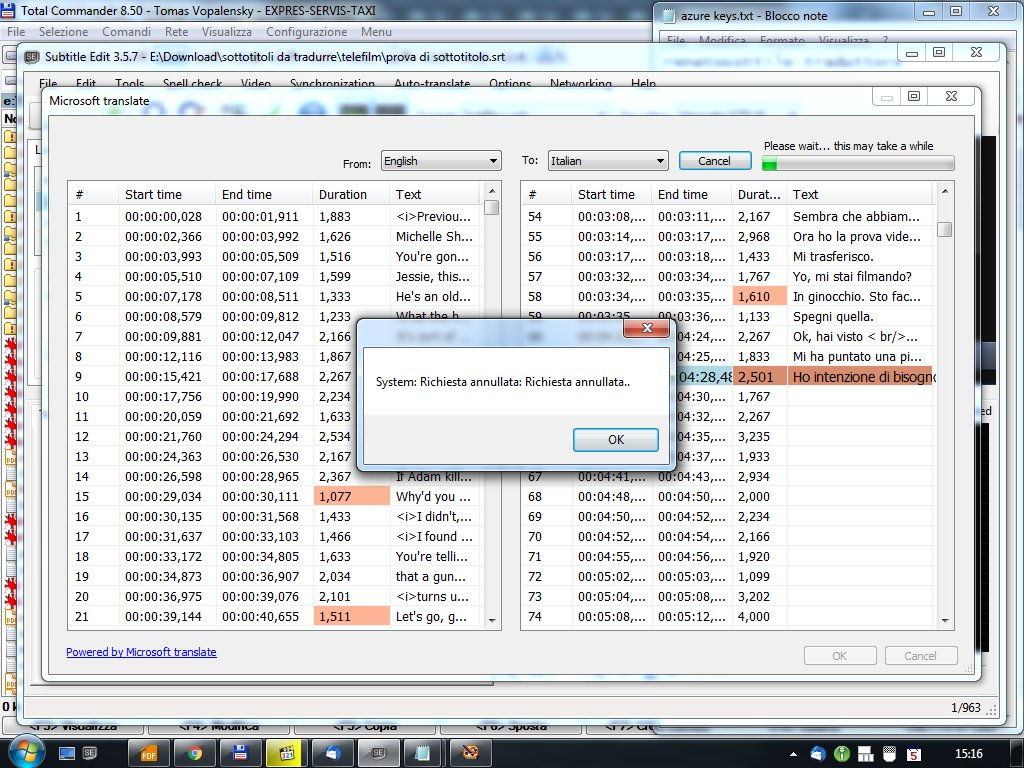
renatosottile
on 5 Dec 2018
Why don´t you try English to Spanish to know if the problem is the final language or another thing?
ghost
on 5 Dec 2018
Why don´t you try English to Spanish to know if the problem is the final language or another thing?
Done. Same identical result.
renatosottile
on 5 Dec 2018
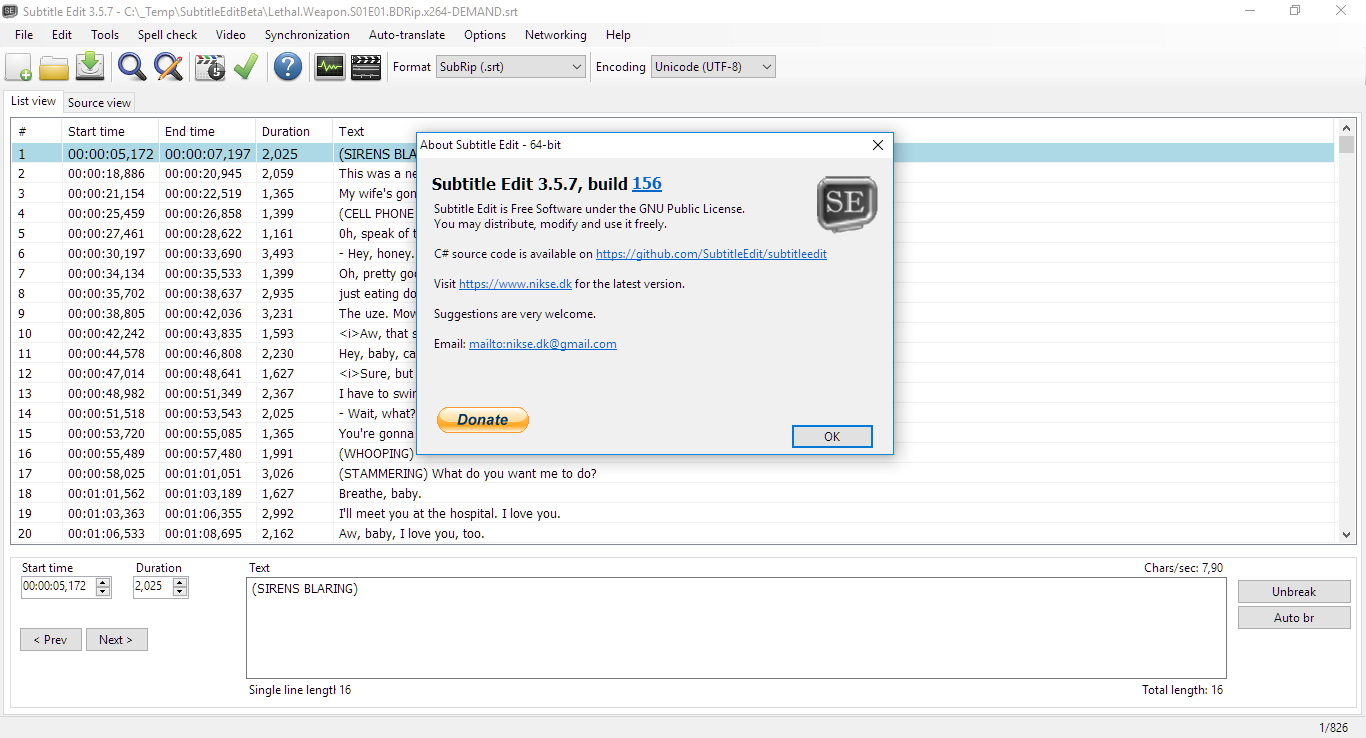
Well ... I´m on W10 x64 and with the beta version of SE 3.5.7 (x64 also) with no modification except the Google API added and it worked fine at the first try.
ghost
on 5 Dec 2018
Well ... I´m on W10 x64 and with the beta version of SE 3.5.7 (x64 also) with no modification except the Google API added and it worked fine at the first try.
The only substantial difference is that I use Windows 7.
renatosottile
on 5 Dec 2018
Well ... I´m on W10 x64 and with the beta version of SE 3.5.7 (x64 also) with no modification except the Google API added and it worked fine at the first try.
The only substantial difference is that I use Windows 7.
I will do a test with Windows 10 and I will write the result
renatosottile
on 5 Dec 2018
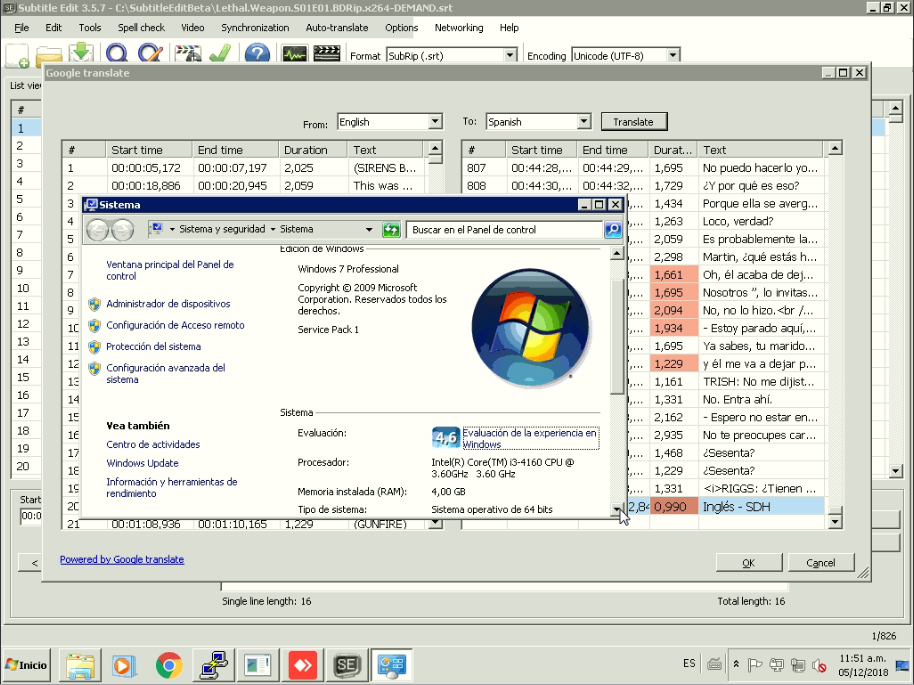
Tested on W7 Pro SP1 x64 and works fine too at the first try (English to Spanish)
ghost
on 5 Dec 2018
Tested on W7 Pro SP1 x64 and works fine too at the first try (English to Spanish)
Tested on Windows 10 x64 with the same result as Windows 7: it does not work. Tested in Spanish
renatosottile
on 5 Dec 2018
Well maybe exist a problem with your generated API ...
ghost
on 5 Dec 2018
Did you try several .SRT files ? I´m also could translate from English to Italian with no problems. I´m using Lethal.Weapon.S01E01.BDRip.x264-DEMAND.srt just for testing purposes if you want to do a test with the same scenario.
ghost
on 5 Dec 2018
Did you try several .SRT files ? I´m also could translate from English to Italian with no problems. I´m using Lethal.Weapon.S01E01.BDRip.x264-DEMAND.srt just for testing purposes if you want to do a test with the same scenario.
I will do further tests and I'll be able to tell you
renatosottile
on 5 Dec 2018
Still giving me the quota exceeded error... latest version from 18:49 5/12
orbittwz
on 5 Dec 2018
I have the same problem I’ve been having with a paid Bing Translate Key. I’m translating from English to Chinese Mandarin. The translation stops at about 200 (it varies) lines with the following popup error:
“System: The request was aborted. The request was cancelled.”
From: thegringo notifications@github.com
Sent: Wednesday, December 5, 2018 22:07
To: SubtitleEdit/subtitleedit subtitleedit@noreply.github.com
Cc: Maniac8888 exec1884@hotmail.com; Mention mention@noreply.github.com
Subject: Re: [SubtitleEdit/subtitleedit] Google translation stopped! (#3209)
I've updated latest beta version: https://github.com/SubtitleEdit/subtitleedit/releases/download/3.5.7/SubtitleEditBeta.zip
Could someone please test the Google Translate with an API key?
See https://support.google.com/googleapi/answer/6158862?hl=en
You'll need to start a trial with payment to enable the API key (sorry, annoying I know)
You can then enter the Google Cloud API key in SE via Options - Settings - Tools.
It's probably easier to get a Microsoft Bing Translator client secret - See https://docs.microsoft.com/en-us/azure/cognitive-services/translator/translator-text-how-to-signup
You can then enter the Microsoft Bing Translator client secret in SE via Options - Settings - Tools.
Also, I would be nice if someone tested this too.
Note: Google translate will also kind of work without key... but slowly and probably only for a while.
@MohammadHamdyGhanemhttps://github.com/MohammadHamdyGhanem: Nice you got it working :) Can it translate long subtitles or does it stop working after a while? I'll test it soon. I think a plugin would be ideal for this.
Tested Google API and working fine (English to Spanish) with no errors or warnings.
—
You are receiving this because you were mentioned.
Reply to this email directly, view it on GitHubhttps://github.com/SubtitleEdit/subtitleedit/issues/3209#issuecomment-444496699, or mute the threadhttps://github.com/notifications/unsubscribe-auth/Ara-eYlbaXIBu5LQs2ULtCHYtLmKWx06ks5u19MKgaJpZM4Y4x2B.
Maniac8888
on 6 Dec 2018
I already implemented this by using WebBrowser control which is a wrapper of Internet Explorer, and it works fine for me.
http://www.mediafire.com/file/jjrqrfjw6j1jzh9/Video+And+Subtitle+Edit.zip
But IE 11 or Edge must be installed on the PC.
Hi, I've got it working. I did this. I installed Oracle VM VirtualBox and Windows 7 32 bit updated explorer to 11 and downloaded network 4.7.1 and some important updates from win update. The only problem is that in some lines of text, it might look like this, I gotmilk today.
But that's just fix it in subtitle edit.
I came across a thing. There are some lines missing in the translation. But it does not matter. easier to translate them.
MrClinton578
on 6 Dec 2018
hmm, seems it doesn't want to work again, it skips many lines, and connecting several translated lines to one big line, or translating the previous line for the current line..
still needs to be fixed...
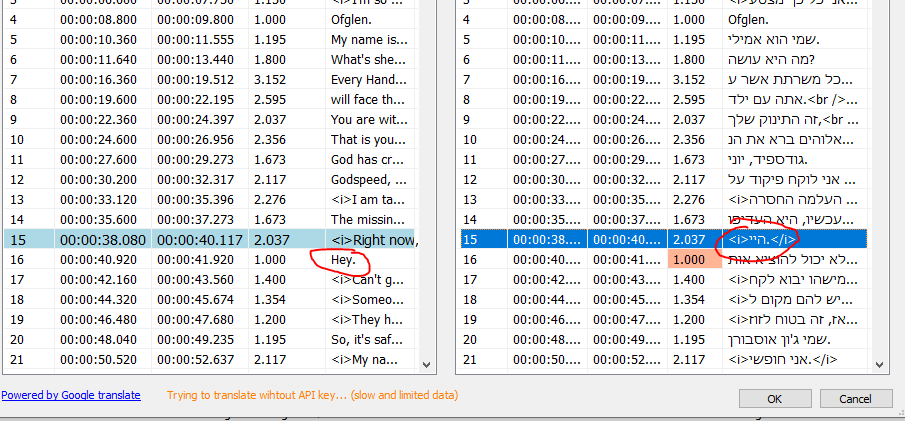
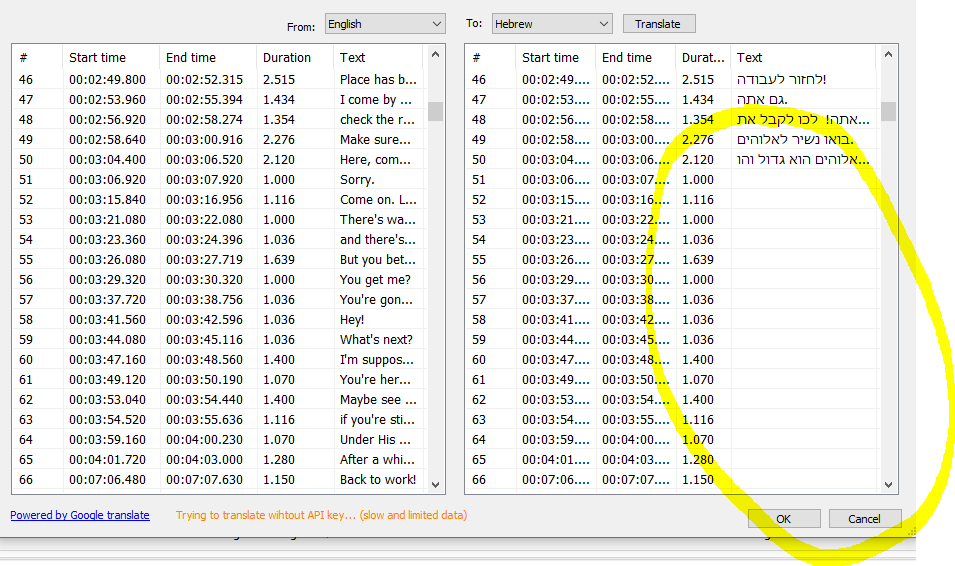
orbittwz
on 6 Dec 2018
@orbittwz: I've tried to improve the missing lines a bit - this latest beta better: https://github.com/SubtitleEdit/subtitleedit/releases/download/3.5.7/SubtitleEditBeta.zip ?
niksedk
on 6 Dec 2018
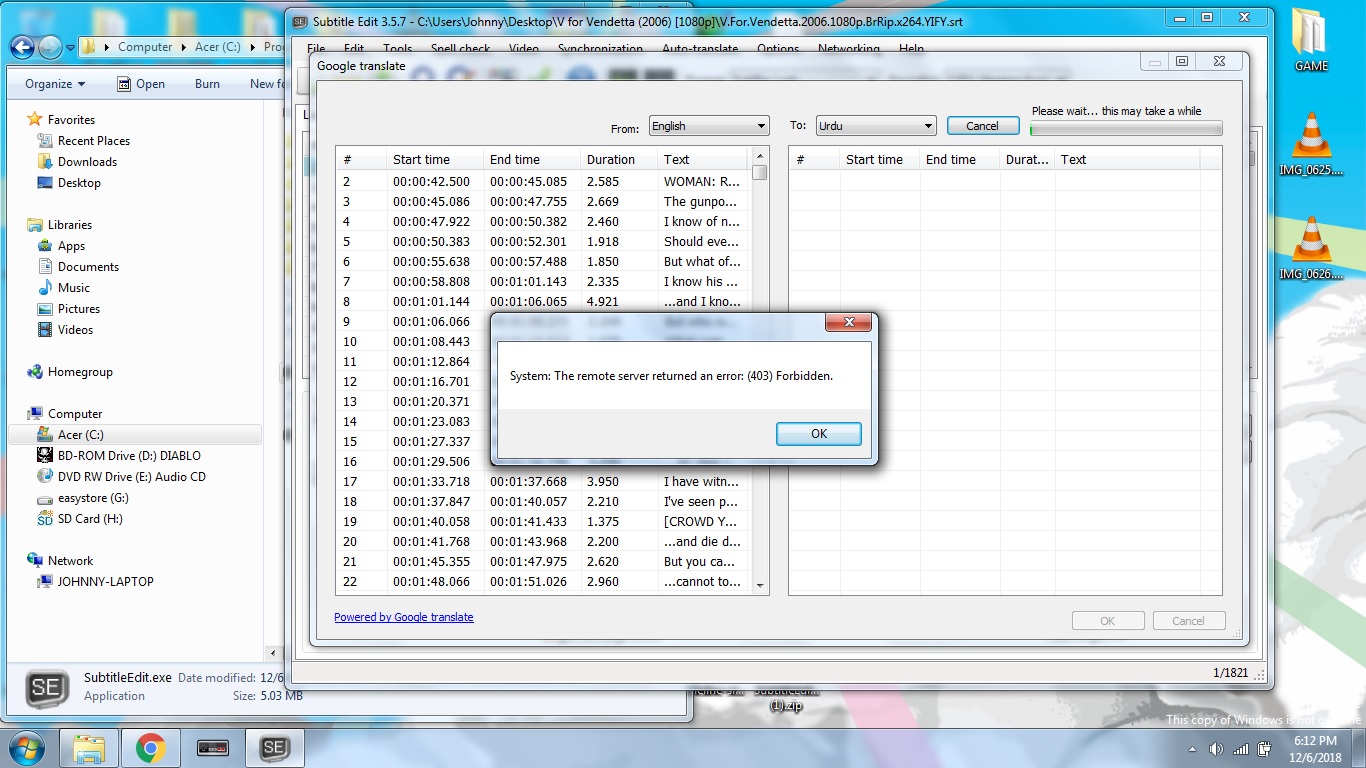
I set up a Google API key and I keep on getting this error message, I even signed up for their free trial and it's STILL not working! Any ideas? Without API it stops after line 1744 with "exceeded limit" message. }:-(>
 JProctor666
on 7 Dec 2018
JProctor666
on 7 Dec 2018
@niksedk , Thanks but this still occurs
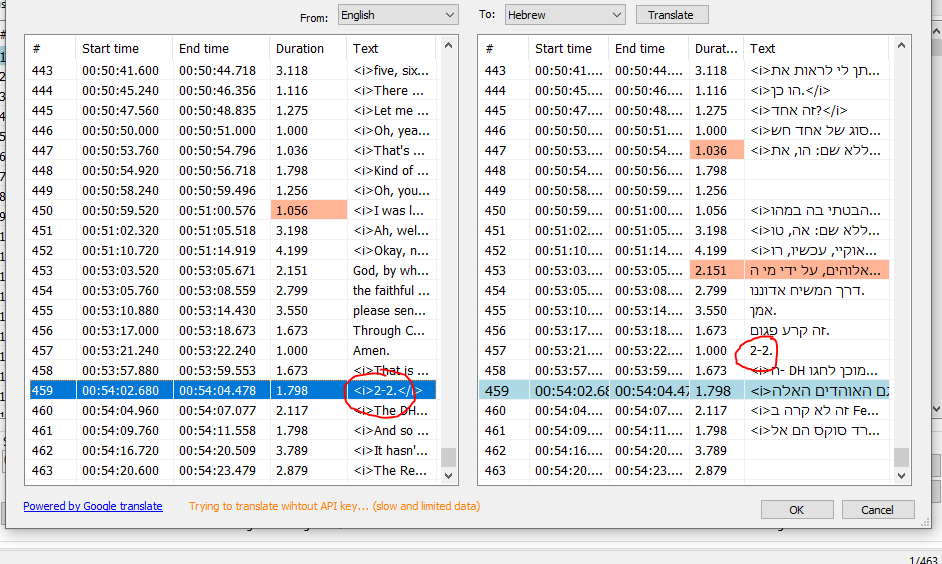
skips lines, and wrong lines
orbittwz
on 7 Dec 2018
But what if you add a Yandex translation?
 surikat1978
on 9 Dec 2018
surikat1978
on 9 Dec 2018
@surikat1978: Have you checked the plugins? I think it's already there...
@orbittwz: As we only have a limited number of requests SE sends chunks separated by a special char as separator - but sometimes that char is removed in the translation which makes it hard to match texts (the paid version should not have this problem).
I've tried to improve it in latest beta: https://github.com/SubtitleEdit/subtitleedit/releases/download/3.5.7/SubtitleEditBeta.zip
Also, did you check the plugins?
Also, it's now possible to translate extra blocks in translator mode:

niksedk
on 9 Dec 2018
some are right and others translated subtitles are in the wrong lines...
translation of line 10 it is at line 7
Alket69
on 9 Dec 2018
@orbittwz: Did you try the GT plugin? Or fix the code ;)
niksedk
on 9 Dec 2018
@niksedk can you please add portuguese to DeepL plug-in and see the problem of too many blank lines
marb99
on 9 Dec 2018
Latest beta seems to avoid blank lines: https://github.com/SubtitleEdit/subtitleedit/releases/download/3.5.7/SubtitleEditBeta.zip :)
niksedk
on 9 Dec 2018
@niksedk yes it does. Well done 👌
Alket69
on 9 Dec 2018
@Alket69: thx for verifying :)
niksedk
on 9 Dec 2018
is needed add portuguese to DeepL plug-in
marb99
on 9 Dec 2018
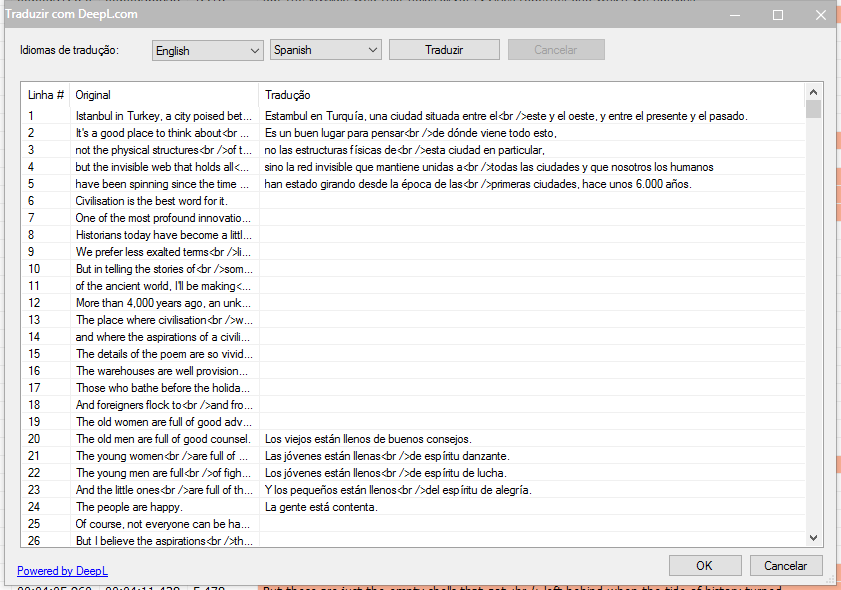
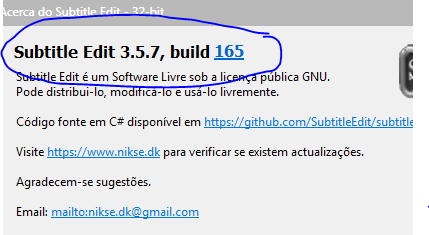
and too many blank lines was not fixed still the same in the latest build (165)
marb99
on 9 Dec 2018
@marb99 in my pc the latest beta doesn't have any blank lines anymore...
Alket69
on 9 Dec 2018
@Alket69 see
marb99
on 9 Dec 2018
He's talking about Google translate, what does DeepL have to do with it?
OmrSi
on 9 Dec 2018
@OmrSi
because the niksedk answered my request about DeepL and the Alket69 answered
but maybe it was my mistake and Alket69 wasn't responding about it.
marb99
on 9 Dec 2018
Yo it's working! the regular limited GT don't miss a word
The GT plugin does have success but it's missing some lines...
Overall i think there's an improvement...
Thank you!
Sorry for being upset earlier, i deserve the purge :(
In any case, how about implementing the batch translate feature @MohammadHamdyGhanem added in his release?
EDIT1: and there some lines with addition of : "Show more Show less Suggest an edit Share translation"?? and also "Submit Cancel Your contribution will be used to improve translation quality and may be shown (without identifying you) to other users"
why?
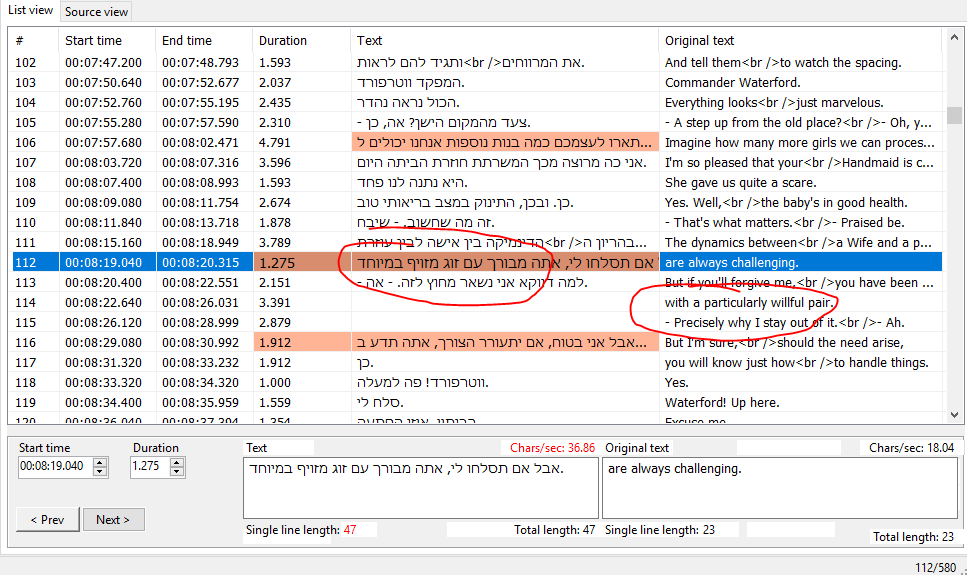
seems the plugin just squeezes the translated line to one line and two lines ahead???
orbittwz
on 9 Dec 2018
@orbittwz First of all just wanna say, SE isn't all about GT.
GT in my language is very bad and most of us don't even use it.
Secondly, The plugin isn't missing some lines, it's merging lines together, try lowering the bulk value.
(I'm just testing)
OmrSi
on 9 Dec 2018
@OmrSi , didn't said SE is only GT for...
i use GT for things i want to be quickly translated...
i love many features of SE, the multiple replace is awesome with regex, the wizard for common errors, and the ease of use...
i will try...
orbittwz
on 9 Dec 2018
@OmrSi
I agree with you, automatic translations "machine translation" are very bad in any language
But GT or others are help tools
marb99
on 9 Dec 2018
@OmrSi , doesn't work, i lowered to 200, same result...
it's still merging lines, and still missing lines, maybe because of the former...
orbittwz
on 9 Dec 2018
@niksedk
Just an idea here, and not sure it'll work, but....
I wanted to translate an English srt file to Danish, and as such, renamed mymovie.en.srt to mymovie.en.srt.txt
Then uploaded it as a file to https://translate.google.com seems to do the trick, but:
It returns from https://translate.googleusercontent.com/translate_f an almost perfect translation, where only timestamps needs to get the aditional space removed
No idea yet as how to set the languages, and timestamps seems to have a space after each colon
 ukdtom
on 9 Dec 2018
ukdtom
on 9 Dec 2018
@orbittwz Try 1 or 2, see what happens.
OmrSi
on 10 Dec 2018
@OmrSi , you mean 1 or 2 bulk max bytes?? that's way too slow...
with 50 still the same results....
orbittwz
on 10 Dec 2018
Yeah, slow but accurate. :\
OmrSi
on 10 Dec 2018
well it doesn't work well, and it's merging lines...
the normal GT works great, doesn't skips lines, and doesn't merge them...
if there was only a way to prevent from going 503, it will be awesome...
orbittwz
on 11 Dec 2018
https://github.com/SubtitleEdit/subtitleedit/releases/download/3.5.7/SubtitleEditBeta.zip
@niksedk thank you for this link, Google Translate works great with API Key, translation even better somehow. Thank you!
 NikitaT
on 11 Dec 2018
NikitaT
on 11 Dec 2018
The GT plugin does have success but it's missing some lines...
@orbittwz I can confirm @OmrSi words - lines are not skipped, they just merged for better translation.
NikitaT
on 11 Dec 2018
@orbittwz The plugin has a new version, try updating and testing...
OmrSi
on 12 Dec 2018
@OmrSi , i'm checking, will feedback here...

still merging lines...

still skips lines by merging them... seems to be worse on quoted lines...
the max bytes was on 200 (which is bearable i guess)
again... thank you very much for helping us.
orbittwz
on 12 Dec 2018
works perfectly with me without api key with vpn 😉👍
svenverslype
on 12 Dec 2018
@orbittwz: What version of the plugin are you using? (File -> Plugins...)
Please attach a non working subtitle.
niksedk
on 12 Dec 2018
I just tested again with a bulk of 1000 and it translated a whole file with no problems at all...
OmrSi
on 12 Dec 2018
Checking with the newest version again....
Well, seems working this time.
Thank you very much!
Set to max bytes 1000 as @OmrSi .
@svenverslype , you mean the VPN is replacing your GT token right?
so maybe there could be Batch GT scraping / normal translation option, just like @MohammadHamdyGhanem did implemented?
orbittwz
on 12 Dec 2018
@orbittwz Some of Google's services are blocked in some countries, like mine.
That's probably why he's using a VPN.
Well, I think the Batch thing could be a separate feature request.
@niksedk I think this is closed. No one has any issues with both ways now.
@marb99 By the way, @niksedk added Portuguese to DeepL, you can find the commit in the plugins section. But now you can use the scrapper plugin, as it is working fine...
OmrSi
on 12 Dec 2018
Well yeah, sure, i can request this as a feature.
Thank you for all your support so far @OmrSi and @niksedk
orbittwz
on 12 Dec 2018
@OmrSi thanks,, but I got the error too many requests on DeepL
scrapper plugin need Edge, I'm under windows 7 I don't have the Edge
marb99
on 13 Dec 2018
any solution for auto translate by google ?
 codered21
on 18 Dec 2018
codered21
on 18 Dec 2018
Latest beta now works again (but with limited amount of data or an API key): https://github.com/SubtitleEdit/subtitleedit/releases/download/3.5.7/SubtitleEditBeta.zip
You can also try the plugin "GT screen-scraper" - see File -> Plugins... (requires .net framework 4.6.2 or later + Win10 with April update)
Or you can use Subtitle Edit Online to translate: https://www.nikse.dk/SubtitleEdit/Online (in the translate window, scroll down to see all text before pressing OK or not all text might not be translated)
niksedk
on 18 Dec 2018
thanks bro
codered21
on 18 Dec 2018
最新测试版现在再次运行(但数据量有限或API密钥有限):https://github.com/SubtitleEdit/subtitleedit/releases/download/3.5.7/SubtitleEditBeta.zip
您也可以尝试插件“GT screen-scraper” - 请参阅文件 - >插件...(需要.net框架4.6.2或更高版本+ Win10与4月更新)
或者您可以使用Subtitle Edit Online进行翻译:https://www.nikse.dk/SubtitleEdit/Online (在翻译窗口中,向下滚动以查看所有文本,然后按OK或不是所有文本都可能无法翻译)
@MohammadHamdyGhanem:请试一试......
与此同时,我添加了对Google Clould API密钥的支持:https://github.com/SubtitleEdit/subtitleedit/releases/download/3.5.7/SubtitleEditBeta.zip
在此处查看如何创建API密钥:https: //support.google.com/googleapi/answer/6158862?hl=en此外,你可以在这里翻译:https://www.nikse.dk/SubtitleEdit/Online
\\\\\\\\\\\\\\\\
API After getting it, the translation prompt 403
 heiyutian
on 19 Dec 2018
heiyutian
on 19 Dec 2018
Sorry for my bad English. I would like to present an alternative. would it be possible to use the translator embedded in Ecxel to assist in the translation of subtitles?
 Dinodo
on 5 Jan 2019
Dinodo
on 5 Jan 2019
I confirm. English -> Polish, showing empty cells.
 MESWEB
on 7 Jan 2019
MESWEB
on 7 Jan 2019
@MESWEB: Be sure that you have latest version of SE: https://github.com/SubtitleEdit/subtitleedit/releases
@heiyutian: Make sure you have enabled billing and the "Cloud translation API" (also check the link below)
Just to repeat myself... get latest version of SE and you'll have limited free translation via Google Translate (you'll get 2 info messages in SE).
Do read this carefully: https://www.nikse.dk/SubtitleEdit/Help#translation
You can also try the translate plugins (File -> Plugins). E.g. "GT screen-scraper" or "BT screen-scraper" (requires .net framework 4.6.2 or later + Win10 with April update).
Also, the copy-paste translate plugin should work with most translation pages - see https://github.com/SubtitleEdit/subtitleedit/issues/3246#issuecomment-451738571
Or you can use Subtitle Edit Online to translate: https://www.nikse.dk/SubtitleEdit/Online (in the translate window, scroll down to see all text before pressing OK or not all text might not be translated)
niksedk
on 12 Jan 2019
The translation function of this wonderful software ( the best) is gone forever. It is the true. This "plugin" put ALL lines in ONE LOOONG line. Not working at all. Sorry. Thanks for your efforts. The translation function is go away... irreversible. Because of the greed of these greedy mfuck...es (google an Microsuft) . SAD.
 Paupertino
on 15 Jan 2019
Paupertino
on 15 Jan 2019
@MESWEB: Be sure that you have latest version of SE: https://github.com/SubtitleEdit/subtitleedit/releases
@heiyutian: Make sure you have enabled billing and the "Cloud translation API" (also check the link below)
Just to repeat myself... get latest version of SE and you'll have limited free translation via Google Translate (you'll get 2 info messages in SE).
Do read this carefully: https://www.nikse.dk/SubtitleEdit/Help#translationYou can also try the translate plugins (File -> Plugins). E.g. "GT screen-scraper" or "BT screen-scraper" (requires .net framework 4.6.2 or later + Win10 with April update).
Also, the copy-paste translate plugin should work with most translation pages - see #3246 (comment)Or you can use Subtitle Edit Online to translate: https://www.nikse.dk/SubtitleEdit/Online (in the translate window, scroll down to see all text before pressing OK or not all text might not be translated)
Thank you for this wonderful software. No one is ungrateful.
Paupertino
on 15 Jan 2019
@Paupertino: Did you try both the "GT screen-scraper" and the "BT screen-scraper" ?
Could you attach a screenshot of the error?
niksedk
on 15 Jan 2019
Related issues
 LeonCheung
·
5Comments
LeonCheung
·
5Comments
 rgfx
·
5Comments
rgfx
·
5Comments
 teodargent
·
5Comments
teodargent
·
5Comments
 taxen
·
6Comments
taxen
·
6Comments
 dvjrickkraft
·
4Comments
dvjrickkraft
·
4Comments
Most helpful comment
SE is the best program I have ever seen, I used it already voor many translates, now it's not working anymore and that's a big problem, let's hope you can fix it