Subscriptions-transport-ws: PubSub returning [object Object] sometimes null
I'm following this tutorial
https://dev-blog.apollodata.com/tutorial-graphql-subscriptions-server-side-e51c32dc2951
but it seems it always returns null or an [object Object] string any ideas?
here's how i publish to the subscription
pubsub.publish('createdUser',result)
and in the resolver
i use the
pubsub.asyncIterator('createdUser')
to return the value inside the subscribe prop of the Subscription resolver
 ralphchristianeclipse
All 20 comments
Same problem as @ralphchristianeclipse ... Normal queries work like a charm but all subscriptions return [object Object] inside GraphiQL:

This is my schema.ts:
import {makeExecutableSchema} from 'graphql-tools';
import resolvers from './resolvers';

const typeDefs = `
type Location {
    locationPLZ: Int!
    locationName: String!
    locationAddress: String
    locationPhone: String
    locationEMail: String
    locationOpeningHours: String
}

type ConfigurationItem {
    configurationItemId: Int!
    configurationItemName: String!
    configurationItemDescription: String
}

type DeviceModel {
    deviceModelId: Int!
    deviceModelName: String!

    deviceType: DeviceType!
}

type DeviceType {
    deviceTypeId: Int!
    deviceTypeName: String!
    deviceTypeIconName: String!
    templateName: String!
    startNumber: Int!
}

type Device {
    deviceSerialNumber: String!
    deviceMacAddress: String
    deviceLocationDescription: String
    deviceDescription: String
    deviceName: String!

    location: Location
    deviceType: DeviceType
    deviceModel: DeviceModel
    configurationItem: ConfigurationItem
    logEntries: [LogEntry]
}

// Removed more types to save space

type Query {
    locationByPLZ(locationPLZ: Int): Location
    configurationItemById(configurationItemId: Int): ConfigurationItem
    deviceModelById(deviceModelId: Int): DeviceModel
    deviceTypeById(deviceTypeId: Int): DeviceType

    deviceBySerialNumber(deviceSerialNumber: String): Device
    devices: [Device]
}

type Subscription {
    deviceAdded: Device
}

schema {
  query: Query
  subscription: Subscription
}

`;

export default makeExecutableSchema({ typeDefs, resolvers });
And resolvers.ts:
const resolvers = {
    Device: {
        location(obj: any, args: any, context: any, info: any) {
            return getLocationByPLZ(obj.locationPLZ);
        },
        deviceType(obj: any, args: any, context: any, info: any) {
            return getDeviceTypeById(obj.deviceTypeId);
        },
        deviceModel(obj: any, args: any, context: any, info: any) {
            return getDeviceModelById(obj.deviceModelId);
        },
        configurationItem(obj: any, args: any, context: any, info: any) {
            return getConfigurationItemById(obj.configurationItemId);
        },
        logEntries(obj: any, args: any, context: any, info: any) {
            return getLogEntriesBySerialNumber(obj.deviceSerialNumber);
        },
    },
    // More resolvers removed to save space
    Query: {
        locationByPLZ(obj: any, args: any, context: any, info: any) {
            return getLocationByPLZ(args.locationPLZ);
        },
        // More queries removed to save space
    },
    Subscription: {
        deviceAdded: {
            subscribe(obj: any, args: any, context: any, info: any) {
                return pubSub.asyncIterator('deviceAdded');
            },
        },
    },
};

// Removed functions unrelated to issue to save space

export default resolvers;
All combined in my index.ts:
import * as bodyParser from 'body-parser';
import * as express from 'express';
import {execute, subscribe} from 'graphql';
import {graphiqlExpress, graphqlExpress} from 'graphql-server-express';
import {PubSub} from 'graphql-subscriptions';
import {createServer} from 'http';
import {SubscriptionServer} from 'subscriptions-transport-ws';
import graphqlSchema from './schema';

const PORT = 3000;

const app = express();
const pubSub = new PubSub();

app.use('/graphql', bodyParser.json(), graphqlExpress({
    context: {
        pubSub,
    },
    schema: graphqlSchema,
}));
app.use('/graphiql', graphiqlExpress({
    endpointURL: '/graphql',
    subscriptionsEndpoint: `ws://localhost:${PORT}/graphql/subscriptions`,
}));

const ws = createServer(app);
ws.listen(PORT, () => {
    console.log('Listening on ' + PORT);

    // Setup WebSocket for handling GraphQL subscriptions
    const subServer = new SubscriptionServer({
        execute,
        schema: graphqlSchema,
        subscribe,
    }, {
        path: '/graphql/subscriptions',
        server: ws,
    });
});

setInterval(() => {
    let text = '';
    const possible = 'ABCDEFGHIJKLMNOPQRSTUVWXYZabcdefghijklmnopqrstuvwxyz0123456789';

    for (let i = 0; i < 5; i++)
        text += possible.charAt(Math.floor(Math.random() * possible.length));

    pubSub.publish('deviceAdded', {
        deviceName: text,
        deviceSerialNumber: text,
    });
}, 500);

export default pubSub;
 ItsEcholot
on 11 Aug 2017
ItsEcholot
on 11 Aug 2017
Fixed by moving the pubSub variable and initialization to resolvers.ts
ItsEcholot
on 11 Aug 2017
try change payload to
````
pubSub.publish('deviceAdded', {'deviceAdded': {
deviceName: text,
deviceSerialNumber: text,
}});
`````
what im observe root key for payload data should be same like subscription name
 agborkowski
on 22 Aug 2017
agborkowski
on 22 Aug 2017
Did anyone get this to work? I'm consistently getting back undefined, on the client-side, even though I'm publishing a hard-coded object on the server.
 gilbert
on 24 Aug 2017
gilbert
on 24 Aug 2017
Nevermind, it was working correctly after all! I was just pulling data from the wrong place in my component 🎉
gilbert
on 24 Aug 2017
I am also following the GraphQL Subscriptions tutorial mentioned above and getting the same issue - graphiql is displaying [object Object] when I run the following subscription:
subscription {
  authorAdded {
    id
    name
  }
}
In my case, I do see the expected message for a fraction of a second:
"Your subscription data will appear here after server publication!"
However, right after that the response turns into [object Object]. I also tried @agborkowski's suggestion, but that didn't help.
I don't know where to go from here. My full project is published here. I would really appreciate a quick review to see what I am doing wrong.
 nareshbhatia
on 4 Sep 2017
nareshbhatia
on 4 Sep 2017
I do see the expected message for a fraction of a second:
"Your subscription data will appear here after server publication!"
However, right after that the response turns into [object Object]
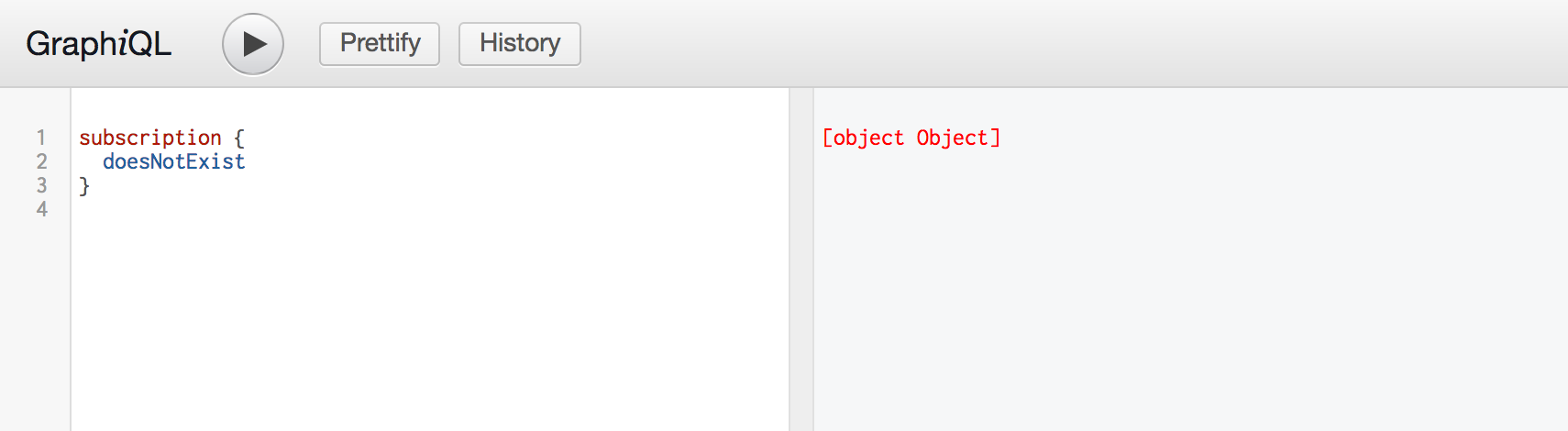
I think this is because the query is invalid, or there's an error when processing the subscription, but the library didn't report it.
Example with these two subscriptions, the valid one will work, and the not exists one shows [object Object]:

 namnm
on 5 Sep 2017
namnm
on 5 Sep 2017
And if the subscription is successful and show "Your subscription data will appear here after server publication!", then it only turns into [object Object] when we publish some data. The problem can be solved as @agborkowski mentioned:
// typeDef
`
type Subscription {
  fieldName: FieldData
}
`

// resolver
{
  Subscription: {
    fieldName: {
      subscribe: () => pubSub.asyncIterator('eventName'),
    },
  },
}

// somewhere in our app
pubSub.publish('eventName', {
  fieldName: {
    // field data
    // ...
  },
})
A little more on my thoughts is that I think the team has designed the flow like this, so we can publish multiple values in one event. And the eventName is also a filter identity as well. Many people (included me at the first place) think that the eventName is actually the fieldName, but it's not.
This flow can give us the ability to efficiently filter unnecessary loop through all subscriptions. We can also use this implementation to publish dynamic event name as well. Imagine that we have a chat system, every user will subscribe for their message event. With the tutorial from the team's blog, we can implement our system like this:
// typeDef
`
type Subscription {
  message: Message!
}
`

// resolver
{
  Subscription: {
    message: {
      subscribe: withFilter(
        pubSub.asyncIterator('messageAdded'),
        (published, args, ctx, info) => published.toUserId === getUserId(ctx),
      ),
    },
  },
}

// somewhere in our app
pubSub.publish('messageAdded', {
  message: {
    toUserId: 'namnm',
    content: 'hello, how are you?',
  },
})
So every message added will trigger an event then the pubsub system will loop through all subscriptions and find out the right user to send by comparing the userId.
If we modify the event name so it can be identical to the user, we can avoid the loop as you can see:
// resolver
{
  Subscription: {
    message: {
      subscribe: (published, args, ctx, info) => {
        const currentUserId = getUserId(ctx)
        return pubSub.asyncIterator(`messageAdded-${currentUserId}`)
      },
    },
  },
}

// somewhere in our app
const toUserId = 'namnm'
pubSub.publish(`messageAdded-${toUserId}`, {
  message: {
    toUserId,
    content: 'hello, how are you?',
  },
})
Sorry for a long comment instead of a blog link, and I havent tried it out yet, but hope it helps somewhere.
namnm
on 5 Sep 2017
- I am having the same problem.
- With the correct message flashing for a split second and then
[object object]message. - What is weird as I have two different servers.
- One that gives the aforementioned error in graphiql, and the other that works correctly.
I am struggling to find the differences between the two node js server setups.
The Only Differences
the one that doesn't work uses an async await structure to initialize the server
- all my resolvers use mongodb vs mongoose in the one that works
- my resolvers also use async await vs callbacks/promises in the one that works
I am really curious to see what is going on here.
 benjaminadk
on 5 Sep 2017
benjaminadk
on 5 Sep 2017
I am finding that my app is not working because I am using the latest versions of the libraries. So I went back to graphql-tutorial and started playing with version numbers there. As it stands right now, graphql-tutorial has following dependencies:
    "graphql": "^0.10.1",
    "graphql-server-core": "^0.8.2",
    "graphql-server-express": "^0.8.2",
    "graphql-server-module-graphiql": "^0.8.2",
    "graphql-subscriptions": "^0.4.3",
    "graphql-tools": "^1.0.0",
    "subscriptions-transport-ws": "^0.7.3"
- Upgrading
graphqlto the latest version 0.11.3, breaks the server completely. - Upgrading
subscriptions-transport-wsto the latest version 0.8.2 also breaks the server. - Upgrading
graphql-server-core,graphql-server-expressandgraphql-server-module-graphiqlto latest versions 1.1.x also breaks the server.
So the big question in my mind is how far can we push the version numbers and not break graphql-tutorial!
nareshbhatia
on 8 Sep 2017
@nareshbhatia, Thanks for you post. I decided to take a look at my dependencies, since I have once again ran into a subscription problem in my latest project. I simply uninstalled "graphql": "0.11.3" and then ran npm i -S [email protected].
- Now my subscription works.
- I did a little research and found this BREAKING CHANGE GRAPHQL v0.11.0
- Apparently, the change alters the
subscribefunction. - It now returns a promise instead of simply an asyncIterator
- I am not experienced enough to fully understand what all this means, but I can confirm that switching to the earlier version of
graphqlsolves my subscription problem
I think the Subscription Resolvers have to be written differently in this new version of graphql, however, I am not sure how. Maybe, someone more experienced can chime in.
benjaminadk
on 13 Sep 2017
You are right @benjaminadk. I am now sticking with the following - it's working well for me:
    "graphql": "^0.10.5",
    "graphql-server-express": "^0.8.5",
    "graphql-subscriptions": "^0.4.4",
    "graphql-tools": "^1.2.2",
    "subscriptions-transport-ws": "^0.7.3"
I have dropped "graphql-server-core": "^0.8.2", & "graphql-server-module-graphiql": "^0.8.2" - seems like they are getting pulled in other ways.
I am not planning to upgrade to latest versions until I see a solid example move to them, such as https://github.com/apollographql/graphql-tutorial.
nareshbhatia
on 13 Sep 2017
I'm having the same issues. My graphql subscriptions returns [object object] despite using the dependencies highlighted by @nareshbhatia. Any idea how to work around or debug this issue?
Thanks all!
 bwoodlt
on 14 Nov 2017
bwoodlt
on 14 Nov 2017
guys to finish ur problem, with subscriptions (its all about schema miss when u see [object] and wrong nested object in publication payload..)
schema:
```
type NotifyPayload {
model: String
action: String
id: String
}
type Mutation {
notify(
model: String!,
action: String!,
id: String!,
): NotifyPayload
}
type Subscription {
notified(filter: String): NotifyPayload
}
````
resolver
````
Mutation: {
notify: async (parent, notification, {user}) => {
const notify = await {
model: 'user',
action: 'delete',
id: '1'
};
pubsub.publish(ACTION_NOTIFIED_TOPIC, {notified: notify});
return notify;
},
Subscription: {
notified : {
//test it ! @url http://dev.apollodata.com/tools/graphql-subscriptions/subscriptions-to-schema.html#subscription-server
// resolve: (payload) => {
// console.log('payload', payload)
// return {
// notify: payload,
// };
// },
subscribe: withFilter(() => pubsub.asyncIterator([ACTION_NOTIFIED_TOPIC]), (payload, args) => {
// @todo unit test needs for differents inputs
if (args.filter && _.isString(args.filter) && args.filter !== '' && payload.notified && _.isString(payload.notified.model)) {
return payload.notified.model === args.filter;
}
return true;
}),
}
agborkowski
on 16 Nov 2017
My issue fixed! thanks to @agborkowski. He went all the way to assist me. I'm grateful!
bwoodlt
on 17 Nov 2017
To all: when you say PubSub returns [object Object], you do actually mean GraphiQL shows [object Object] instead of anything readable, right? If so, it looks like there's a bug in GraphiQL as well.
I checked websocket messages and it seems like a server returns correct messages with the details of an error:

And because of GraphiQL swallowing error messages and showing [object Object] it's hard to debug this kind of issues.
 lebedev
on 26 Nov 2017
lebedev
on 26 Nov 2017
@angly-cat Any issue has been opened for this in graphiql repo? If not you can go there open one 👍
namnm
on 27 Nov 2017
For googlers, this error can also occur if you won't return an AsyncIterable in your subscribe resolver.
I was improperly using withFilter like so, which caused this:
...
    subscribe: () => withFilter(
      () => pubsub.asyncIterator('newToken'),
      (payload, args) =>
        payload.key === args.key
    )
...
Which wasn't giving an AsyncIterable but was returning a () => AsyncIterable. Anyway, check that, too.
 shrugs
on 28 Apr 2018
shrugs
on 28 Apr 2018
I was able to debug with @angly-cat method and found the actual error.
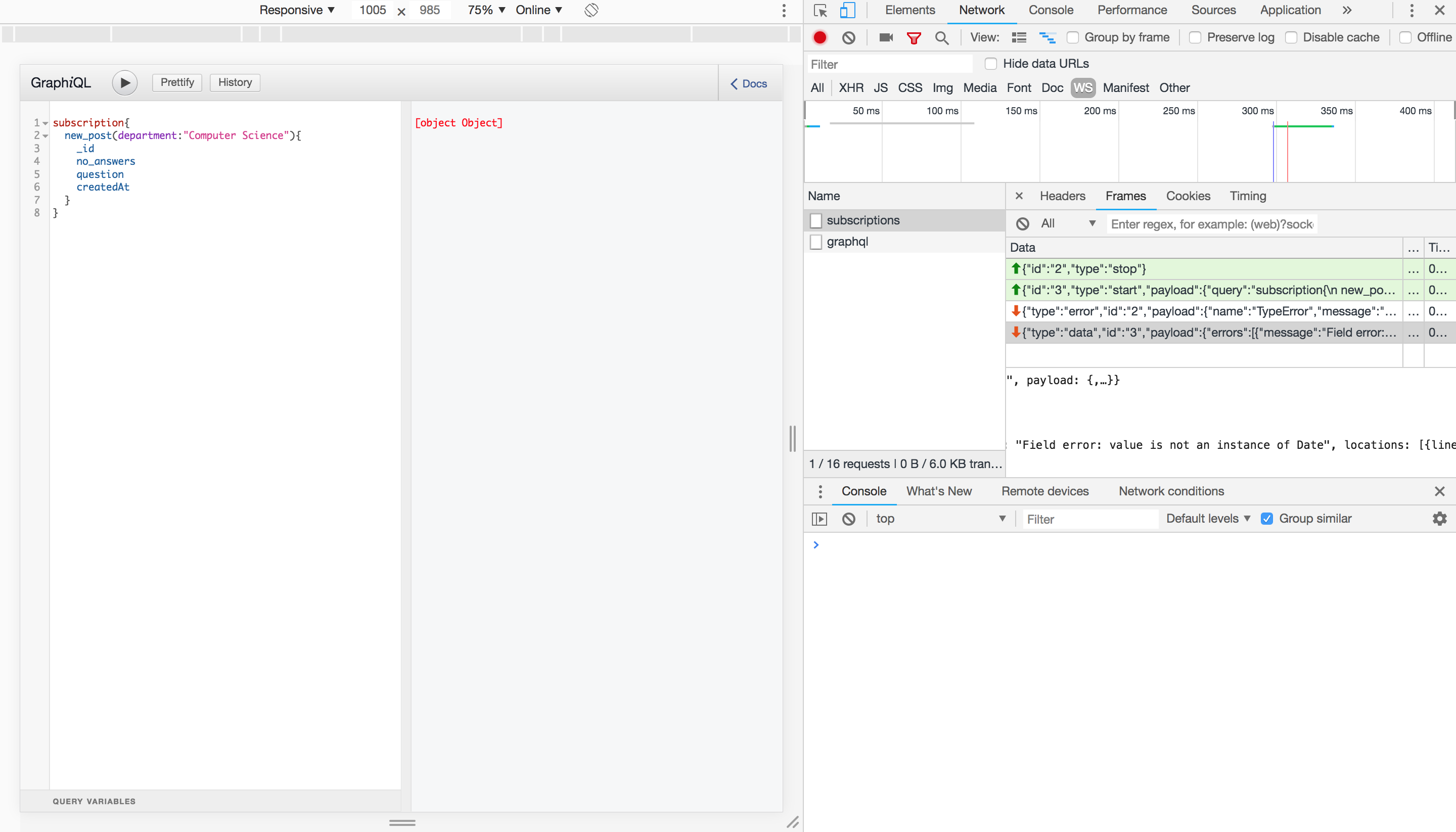 . The error was causing [object object] "Field error: value is not an instance of Date". After removing the field it worked.
 softpreneur
on 6 Aug 2018
softpreneur
on 6 Aug 2018
after trying a lot i finally got it! You just need to
const Subscription={
myRequest2:{
        subscribe(parent,args,{PubSubs },info){

               const payload={
                   message:"lakdlakdl"
               }

               setInterval(() => PubSubs.publish('HERE_WHATEVER',{'myRequest2':payload}),2000)
               return PubSubs.asyncIterator('HERE_WHATEVER')
           }
}
The pubsub publish needs to have exactly the same name of your subscription name.
 humbertoarizah
on 22 Jun 2019
humbertoarizah
on 22 Jun 2019
Related issues
 thebigredgeek
·
5Comments
thebigredgeek
·
5Comments
 farzd
·
3Comments
farzd
·
3Comments
 AruXc
·
3Comments
AruXc
·
3Comments
 jedwards1211
·
4Comments
jedwards1211
·
4Comments
 mjasnikovs
·
5Comments
mjasnikovs
·
5Comments
Most helpful comment
try change payload to
````
pubSub.publish('deviceAdded', {'deviceAdded': {
deviceName: text,
deviceSerialNumber: text,
}});
`````
what im observe root key for payload data should be same like subscription name