Styled-jsx: Storybook StyleSheetRegistry: styleId: `jsx-undefined` not found
Bug
Describe the bug
External styles using styled-jsx in storybook throw HMR error.
To Reproduce
Steps to reproduce the behavior:
- Go to the test repo: https://github.com/nicolastelfer/storybook-test
- yarn install or npm install
- yarn storybook
- Open new localhost window and see error in Storybook
Expected behavior
It should show correct component styling, no errors.
Screenshots

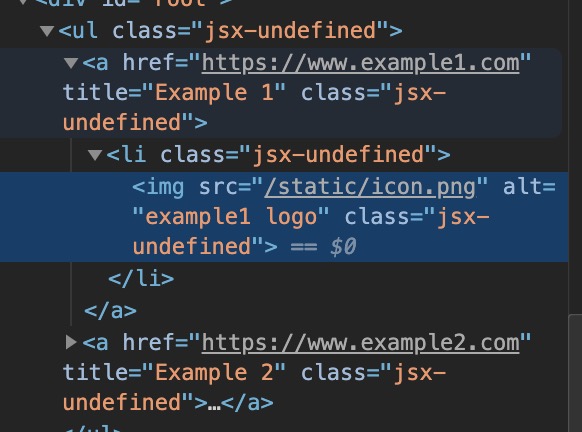
Code snippets
// .babelrc
{
  "presets": [
    [
      "next/babel",
      {
        "styled-jsx": {
          "plugins": ["styled-jsx-plugin-sass"]
        }
      }
    ]
  ]
}
// .storybook/webpack.config.js
const path = require('path');
const includePath = path.resolve(__dirname, '..');
module.exports = {
  module: {
    rules: [
      {
        test: /\.scss$/,
        include: includePath,
        loaders: [
          "style-loader",
          "css-loader",
          "sass-loader"
        ]
      }
    ]
  }
}
System:
System:
OS: macOS 10.14
CPU: (8) x64 Intel(R) Core(TM) i7-7920HQ CPU @ 3.10GHz
Binaries:
Node: 8.11.1
Yarn: 1.6.0
npm: 5.6.0
Browsers:
Chrome: 75.0.3770.142
Firefox: 67.0
Safari: 12.0
 nicolastelfer
All 4 comments
hi does it work without the sass plugin?
 giuseppeg
on 8 Aug 2019
giuseppeg
on 8 Aug 2019
Another repro:
// empty:
const { styles, className } = css.resolve`
`
// usage of empty
export default () => <header><h1 className={className}>Hello world</h1>{styles}</header>
casuses class name: jsx-undefined to be added to the header element and subsequently crash when more styled-jsx is dynamically loaded/used.
 haf
on 16 Jan 2020
haf
on 16 Jan 2020
This is not an issue specific with Storybook.
As @haf pointed out, this can happen in any project that import styles from separate JS files.
 herodrigues
on 29 May 2020
herodrigues
on 29 May 2020
I encounter this problem in my HOC.
const myHoc = (Component, style) => (props) => (
    <div classname="hoc">
        <Component {...props} />
        <style jsx>{style}</style>
    </div>
)
The style argument may be undefined in case that no style injection is needed, which is decided by the user. So the jsx-undefined is generated, but without corresponding style.
Finally, I work this out by using an empty style as the default value of style argument:
import css from 'styled-jsx/css'

const emptyStyle = css``

const myHoc = (Component, style = emptyStyle) => (props) => (
    // ...
)
 Cheau
on 23 Sep 2020
Cheau
on 23 Sep 2020
Related issues
 stevensacks
·
4Comments
stevensacks
·
4Comments
 callumlocke
·
5Comments
callumlocke
·
5Comments
 davibe
·
5Comments
davibe
·
5Comments
 pungggi
·
4Comments
pungggi
·
4Comments
 straxico
·
4Comments
straxico
·
4Comments
Most helpful comment
This is not an issue specific with Storybook.
As @haf pointed out, this can happen in any project that import styles from separate JS files.