Would be great to have docs on supporting syntax highlighting in vim 😄
 danawoodman
All 6 comments
I use this for jsx. Has been working fine with styled-jsx too:
 pak11273
on 12 Jun 2017
pak11273
on 12 Jun 2017
@pak11273 that plugin just runs prettier doesn't it? I don't see how/why it would add syntax highlighting?
danawoodman
on 12 Jun 2017
no syntax highlighting. I thought it did at first because I put the css values in quotes. But I just found out those values don't need quotes. I guess we have to wait til someone builds a plugin for it.
pak11273
on 12 Jun 2017
I'm _horrible_ with vim syntax, but I started messing around with the vim-jsx syntax and made a tiny amount of progress on this. Here's what I modified:
diff --git after/syntax/jsx.vim after/syntax/jsx.vim
index 5813a67..69d6f9c 100644
--- after/syntax/jsx.vim
+++ after/syntax/jsx.vim
@@ -40,6 +40,11 @@ syn region xmlString contained start=+{+ end=++ contains=jsBlock,javascriptBlock
 syn region jsxChild contained start=+{+ end=++ contains=jsBlock,javascriptBlock
   \ extend

+syn include @CssSyntax $VIMRUNTIME/syntax/css.vim
+
+syn region styledJsxTag start=/<style.*jsx>/ end=+</style>+ containedin=jsxRegion contains=@CssSyntax,jsxCssTemplateString transparent
+syn region jsxCssTemplateString start=+`+ end=+`+ containedin=styledJsxTag contains=@CssSyntax
+
 " Highlight JSX regions as XML; recursively match.
 "
 " Note that we prohibit JSX tags from having a < or word character immediately
With this change, the syntax was identified correctly as a jsxCssTemplateString, but I couldn't get it to recognize the contents as CSS. 🤷♂️
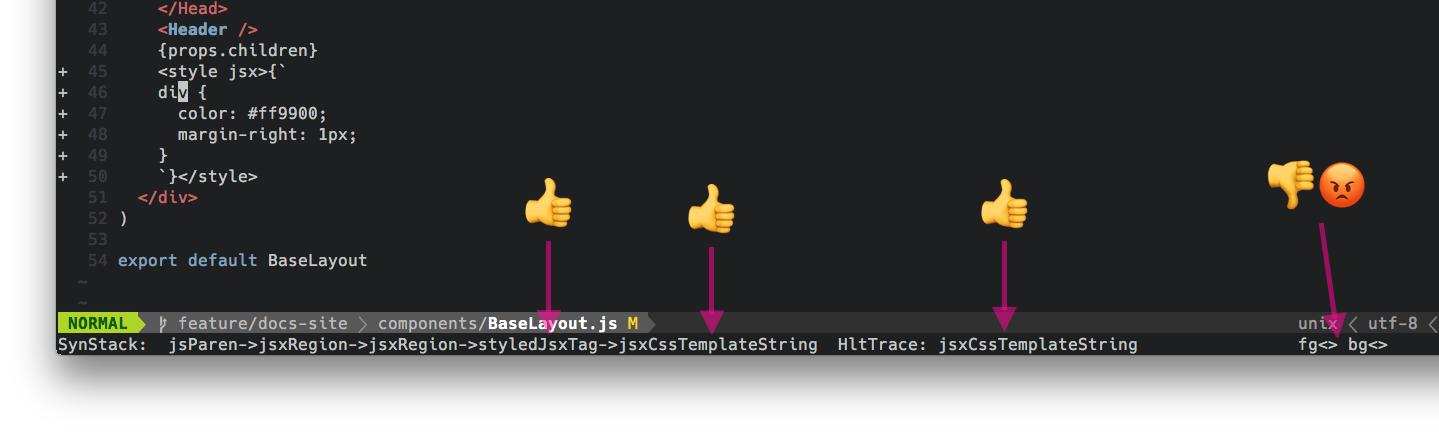
Anybody have any ideas as to how I might get this working?
 alampros
on 14 Jun 2017
alampros
on 14 Jun 2017
Hmmm... might be able to take a page from the vim-styled-components plugin. They have to detect an import of their module, while here we would only have to detect the jsx attribute on the <style> tag.
alampros
on 14 Jun 2017
 alampros
on 15 Jun 2017
alampros
on 15 Jun 2017
Related issues
 davibe
·
5Comments
davibe
·
5Comments
 ryandeussing
·
3Comments
ryandeussing
·
3Comments
 corysimmons
·
4Comments
corysimmons
·
4Comments
 stevensacks
·
4Comments
stevensacks
·
4Comments
 etiennejcharles
·
3Comments
etiennejcharles
·
3Comments
Most helpful comment
🙌
I got it working and pushed it to a new repo: alampros/vim-styled-jsx
Screenshot: