Styled-components-website: TS examples need an update after 4.1
Hi There!
It looks like the Typescript typings are broken since the upgrade to 4.1. There is an issue over at the @types repo, but I just wanted to make an issue here as well because I have the feeling that it otherwise would be overlooked.
Please feel free to close this issue if you don't think there should be an issue here.
The issue I'm referring to is:
https://github.com/DefinitelyTyped/DefinitelyTyped/issues/30536
Thanks a lot for all the effort!!
 JeroenReumkens
All 25 comments
They are not broken, and that issue has already been fixed on master. However, the documentation on styled-components is now outdated.
In particular, the types now prefer dealing with component types directly instead of their props for purposes of ensuring the refs are correct.
 Jessidhia
on 24 Nov 2018
Jessidhia
on 24 Nov 2018
@Kovensky can you share an updated example of how we should specify props moving forward?
 jimjeffers
on 26 Nov 2018
jimjeffers
on 26 Nov 2018
Is there any way to use the css prop with typescript now?
 ralexand56
on 29 Nov 2018
ralexand56
on 29 Nov 2018
So how to use theming with latest updates?
 Ky6uk
on 13 Dec 2018
Ky6uk
on 13 Dec 2018
Alright I found some kind of the solution here. We can just use declaration merging and @types/styled-components v4.1.4 and up.
- Create declaration file (I name it
styled.d.ts)
// import original module declaration
import 'styled-components';

// and extend it
declare module 'styled-components' {
  export interface DefaultTheme {
    borderRadius: string;

    colors: {
      main: string;
      secondary: string;
    };
  }
}
- Create a theme
import { DefaultTheme } from 'styled-components';

const theme : DefaultTheme = {
  borderRadius: '5px',

  colors: {
    main: 'cyan',
    secondary: 'magenta'
  }
};

export default theme;
- Just use original module as is
import styled from 'styled-components';

export const Component = styled.div`
  color: ${props => props.theme.colors.main};
`;

// `createGlobalStyle` and `css` also works fine
@probablyup can we update documentation about it in case this is the right solution? I'm not good in writing docs.
Ky6uk
on 13 Dec 2018
@Ky6uk thanks.
I a little bit modified your code and got this solution:
import * as styledComponents from 'styled-components';
import { ThemeType } from 'my/ui/theme';

declare module 'styled-components' {
  interface DefaultTheme extends ThemeType {}
}

const {
  default: styled,
  css,
  createGlobalStyle,
  keyframes,
  ThemeProvider,
} = styledComponents as styledComponents.ThemedStyledComponentsModule<ThemeType>;

type ThemedStyledProps<P> = styledComponents.ThemedStyledProps<P, ThemeType>;

export { css, createGlobalStyle, keyframes, ThemeProvider, ThemedStyledProps };
export default styled;
 Voronar
on 18 Dec 2018
Voronar
on 18 Dec 2018
@Voronar latest typings allow us to not use re-export at all. So this is much more convenient way to import just original module along the codebase.
Ky6uk
on 18 Dec 2018
@Ky6uk thanks for that solution, had been struggling with this for hours but that's a really elegant way to solve it. 👍
 rovansteen
on 19 Dec 2018
rovansteen
on 19 Dec 2018
@Ky6uk Thank you! This worked like a charm.
 therealparmesh
on 14 Feb 2019
therealparmesh
on 14 Feb 2019
I can't seem to get vscode to autocomplete / intellisense my theme properties - anyone able to? (I'm using the above mentioned declaration merging to make s-c aware of my theme interface)
 bwillem
on 27 Feb 2019
bwillem
on 27 Feb 2019
@Ky6uk I'm not able to get your solution to work with createGlobalStyles. I'm getting
error TS2339: Property 'colors' does not exist on type 'DefaultTheme'
only when using the theme inside of createGlobalStyles.
 cloutiertyler
on 8 Mar 2019
cloutiertyler
on 8 Mar 2019
@cloutiertyler can you provide a code example?
Ky6uk
on 9 Mar 2019
@Ky6uk The issue was that I was using ts-node which apparently was unable to pick up the types (but oddly only in some contexts). I switched to tsc and had no issues.
cloutiertyler
on 11 Mar 2019
I modified @Ky6uk's solution and DRYed it by using typeof:
import 'styled-components';
import { MyTheme } from 'theme'

declare module 'styled-components' {
  export interface DefaultTheme extends MyTheme {}
}
const theme = {
  borderRadius: '5px',

  colors: {
    main: 'cyan',
    secondary: 'magenta'
  }
};

export type MyTheme = typeof theme
 fabb
on 13 Mar 2019
fabb
on 13 Mar 2019
I'm finding that, using the suggested declaration merging method, props are being reported as type anywithin my styled components. Any clues as to why this might be? (My apologies if this is not the appropriate place to discuss.)
I've included a very simply example.
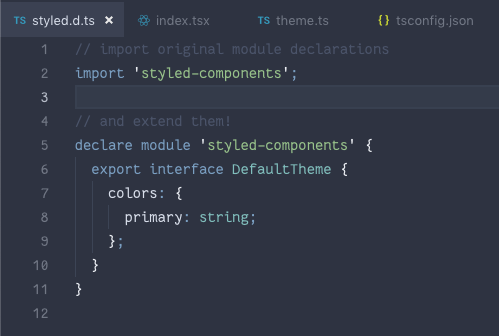
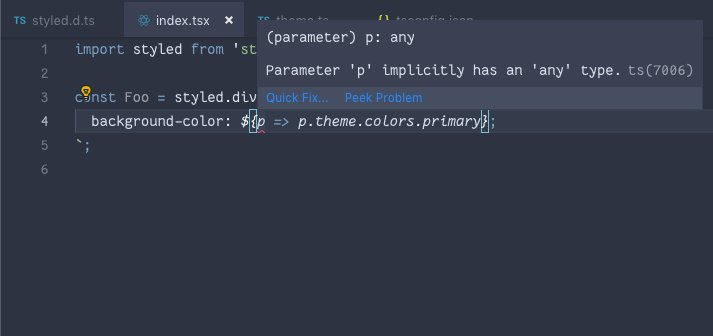
Tried rolling back to 4.0.3 with the method of exporting a ThemedStyledComponentsModule and the props are typed correctly.
 SethGunnells
on 24 Mar 2019
SethGunnells
on 24 Mar 2019
I'm finding I can use styled components 4.2.0 and typescript 3.3.4000 without issues when exporting ThemedStyledComponentsModule.
It doesn't seem to work following the documentation and exporting DefaultTheme. By doesn't work, props is behaving as any with no typing.
 realfresh
on 14 May 2019
realfresh
on 14 May 2019
@Ky6uk I'm not able to get your solution to work with
createGlobalStyles. I'm gettingerror TS2339: Property 'colors' does not exist on type 'DefaultTheme'only when using the theme inside of
createGlobalStyles.
Had there been a solution to this? I'm getting the same problem. --trying to learn TypeScript with CRA
 djasuncion
on 9 Mar 2020
djasuncion
on 9 Mar 2020
Can this issue be reopened?
 bduffany
on 6 Apr 2020
bduffany
on 6 Apr 2020
I'm able to get this working using createGlobalStyle<{theme: ThemeType}> ... but this seems cumbersome, and it also breaks syntax highlighting in VS Code (with local TypeScript version), compared to createGlobalStyle without the angle brackets. Using styled-components and types version ^5.01
bduffany
on 6 Apr 2020
Solved it by upgrading
"fork-ts-checker-webpack-plugin": "^4.1.4",
and forcing it
"resolutions": {
    "fork-ts-checker-webpack-plugin": "^4.1.4"
  }
 gastonmorixe
on 17 May 2020
gastonmorixe
on 17 May 2020
I modified @Ky6uk's solution and DRYed it by using
typeof:import 'styled-components'; import { MyTheme } from 'theme' declare module 'styled-components' { export interface DefaultTheme extends MyTheme {} }const theme = { borderRadius: '5px', colors: { main: 'cyan', secondary: 'magenta' } }; export type MyTheme = typeof theme
Thanks!! That helped me a lot
 LauraBeatris
on 26 May 2020
LauraBeatris
on 26 May 2020
None of the solutions worked well for me.
For internal components, it works fine, but I'm still trying to use custom theme inside GlobalStytles without success.
C:/projects/iws/tchan/prototype/my-app/src/styles/GlobalStyles.ts
TypeScript error in C:/projects/iws/tchan/prototype/my-app/src/styles/GlobalStyles.ts(21,48):
Property 'colors' does not exist on type 'DefaultTheme'.  TS2339

    19 |   html, body, #root {
    20 |     height: 100%;
  > 21 |     background-color: ${(props) => props.theme.colors.background.page};
       |                                                ^
    22 |   }
    23 | `;
    24 |
:/
 ivoneijr
on 15 Jul 2020
ivoneijr
on 15 Jul 2020
None of the solutions worked well for me.
For internal components, it works fine, but I'm still trying to use custom theme inside
GlobalStytleswithout success.C:/projects/iws/tchan/prototype/my-app/src/styles/GlobalStyles.ts TypeScript error in C:/projects/iws/tchan/prototype/my-app/src/styles/GlobalStyles.ts(21,48): Property 'colors' does not exist on type 'DefaultTheme'. TS2339 19 | html, body, #root { 20 | height: 100%; > 21 | background-color: ${(props) => props.theme.colors.background.page}; | ^ 22 | } 23 | `; 24 |:/
just add the tsconfig.json in root folder
{
  "compilerOptions": {
    "baseUrl": "src",
    "target": "es5",
    "lib": [
      "dom",
      "dom.iterable",
      "esnext"
    ],
    "allowJs": true,
    "skipLibCheck": true,
    "esModuleInterop": true,
    "allowSyntheticDefaultImports": true,
    "strict": true,
    "forceConsistentCasingInFileNames": true,
    "module": "esnext",
    "moduleResolution": "node",
    "resolveJsonModule": true,
    "isolatedModules": true,
    "noEmit": true,
    "jsx": "react"
  },
  "include": [
    "src"
  ],
  "files": [
    "src/styles/styled.d.ts"
  ]
}
 t-nunes
on 25 Jul 2020
t-nunes
on 25 Jul 2020
I modified @Ky6uk's solution and DRYed it by using
typeof:import 'styled-components'; import { MyTheme } from 'theme' declare module 'styled-components' { export interface DefaultTheme extends MyTheme {} }const theme = { borderRadius: '5px', colors: { main: 'cyan', secondary: 'magenta' } }; export type MyTheme = typeof theme
Thx! It is work for me 👍🏼
 Jay-flow
on 19 Mar 2021
Jay-flow
on 19 Mar 2021
Related issues
 mxstbr
·
7Comments
mxstbr
·
7Comments
 kitten
·
6Comments
kitten
·
6Comments
 x3388638
·
5Comments
x3388638
·
5Comments
 pronevich
·
3Comments
mxstbr
·
4Comments
pronevich
·
3Comments
mxstbr
·
4Comments
Most helpful comment
Alright I found some kind of the solution here. We can just use declaration merging and
@types/styled-componentsv4.1.4 and up.styled.d.ts)