Stylecopanalyzers: SA1300 - '_Page_Views_Shared__Layout_cshtml'
Hi
I'm gettings this warning in my file Views\Shared\_Layout.cshtml
SA1300 Element '_Page_Views_Shared__Layout_cshtml' must begin with an uppercase letter.
I understand the rule, but i tried including this line on the top of the file with no success.
// <auto-generated />
<!DOCTYPE html>   ...
(This isn't working, I guess because the view is compiled and thats is not thr first line)
@{
// <auto-generated />
}
Microsoft .NET Core Shared Framework Host
  Version  : 1.1.0
  Build    : 928f77c4bc3f49d892459992fb6e1d5542cb5e86

Windows 7 x64
Visual Studio 2017
Thanks in advance... 😃
 huchim
All 10 comments
This appears to be a larger issue in general, at least for me. Using either version 1.0.2 or 1.1.0-beta001 of the StyleCop analyzers, all generated code based on Razor views is getting analyzed with StyleCop and failing all sorts of things - from documentation rules to code ordering rules.
It looks like the VS tooling folks have a related issue here and it even mentions that StyleCop is getting kicked off against the generated code.
 tillig
on 8 Jun 2017
tillig
on 8 Jun 2017
Note that, at least for me, many of the problems go away if I just _close the file in VS_. The doc warnings and StyleCop errors appear when the .cshtml file is open but not when it's closed, which is odd.
tillig
on 8 Jun 2017
@tillig Does it occur when you compile the project? By default, VS only analyzes open files. You can have it analyze all files by enabling Full Solution Analysis in the advanced C# options pages.
 sharwell
on 8 Jun 2017
sharwell
on 8 Jun 2017
If I have a view open I see analysis errors. Rebuilding the solution doesn't get those errors to disappear.
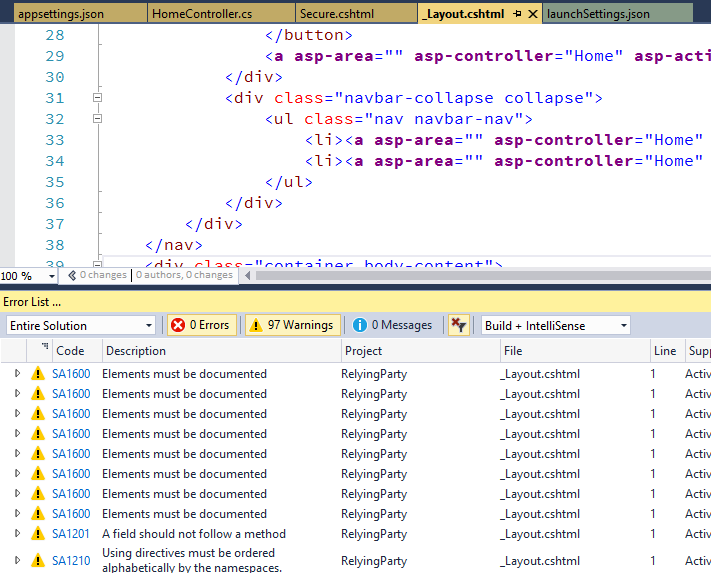
If I close all the views and/or build the project from the command line, I don't see those warnings.
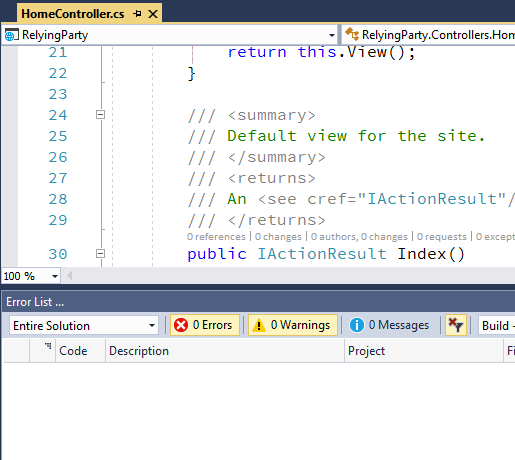
The challenge is just that if there actually _are_ warnings in there that I should pay attention to, there's no way to filter through and see what they are. It generates a lot of noise that shouldn't be there.
tillig
on 8 Jun 2017
my feeling is that this noise is entirely a result of the fact that the code generated by razor simply doesn't include
// <auto-generated/>
on the first line.
CS1591 warnings are also shown while the file(s) are open, creating a very annoying amount of noise.
It's a pity there is no easy way of excluding all .cshtml files from code analysis as an interim measure?
 jimmymain
on 20 Jun 2017
jimmymain
on 20 Jun 2017
@jimmymain I'm not aware of a way to exclude things like that. We removed all of the exclusions code from version 1.1 in favor of allowing Roslyn to decide what to exclude (or not).
sharwell
on 20 Jun 2017
@sharwell, of course you're correct, that's exactly how it should work. I suspect just getting razor to add the auto-generated will actually solve all the problems, including 1591.
jimmymain
on 20 Jun 2017
@jimmymain The <auto-generated/> header does not affect CS1591. See dotnet/roslyn#12702 for more information.
sharwell
on 20 Jun 2017
FYI we are tracking this feedback on Razor at aspnet/Razor#1449
 rynowak
on 21 Jun 2017
rynowak
on 21 Jun 2017
FYI for anyone watching this, this will be fixed in a later preview of Visual Studio 2017 15.3
rynowak
on 28 Jun 2017
Related issues
 Genarij
·
7Comments
Genarij
·
7Comments
 drewnoakes
·
3Comments
drewnoakes
·
3Comments
 batwad
·
5Comments
batwad
·
5Comments
 DirtyPiece
·
7Comments
DirtyPiece
·
7Comments
 wmjordan
·
6Comments
wmjordan
·
6Comments
Most helpful comment
FYI for anyone watching this, this will be fixed in a later preview of Visual Studio 2017 15.3