Sts4: STS 4.6.0 shows empty the `Preferences` window [MacOS]
Hello STS team!
I have:
- El Capitan 10.11.6
- Amazon Corretto Java 11
openjdk 11.0.6 2020-01-14 LTS
OpenJDK Runtime Environment Corretto-11.0.6.10.1 (build 11.0.6+10-LTS)
OpenJDK 64-Bit Server VM Corretto-11.0.6.10.1 (build 11.0.6+10-LTS, mixed mode)
I just migrated from STS 4.5.1 (this version and previous such as 4.5.0 had worked in peace with all software listed above) to 4.6.0.
When I open Preferences

Always show nothing


First time throughout these years I got this behaviour in Mac, BTW I got the expected Preferences window in Ubuntu 18.04 and Windows 10 (both with Corretto Java 11 too), the problem is only in Mac
For these three OS I did do a clean or new installation process, for Mac 3 times and sadly the same behaviour. Even if in Mac I import a .epf file this strange behaviour happens
Is it a bug?
Thanks
 manueljordan
All 33 comments
Is it a bug?
Hard to argue otherwise.
The real question is what causes it (and from where should a fix come).
Have you tried a different JVM than 'Amazon Corretto Java 11' ? We have not had anyone else report this kind of problem. And arguably that JVM may not be the one that most people use, so it may be because of this that you seem to be getting hit by this bug that most people don't run into.
 kdvolder
on 27 Mar 2020
kdvolder
on 27 Mar 2020
Hi
I see, but the point would be, why only fails in Mac, the other 2 OS have the same Corretto Java 11 and works fine.
Again in Mac the previous STS 3.5.0 and 3.5.1 worked fine with this Java 11 too. As follows:

Please two requests:
- Some special command (and parameters) to enable logging when I start up the IDE? Perhaps some clue arises through there
- What JVM distribution do you suggest? Be explicit about the version too, it to have both of us the same settings
Thanks for your support
manueljordan
on 27 Mar 2020
I did realize the following,
If I put something in the _search_ field and press enter happens the following
For Java

For Java
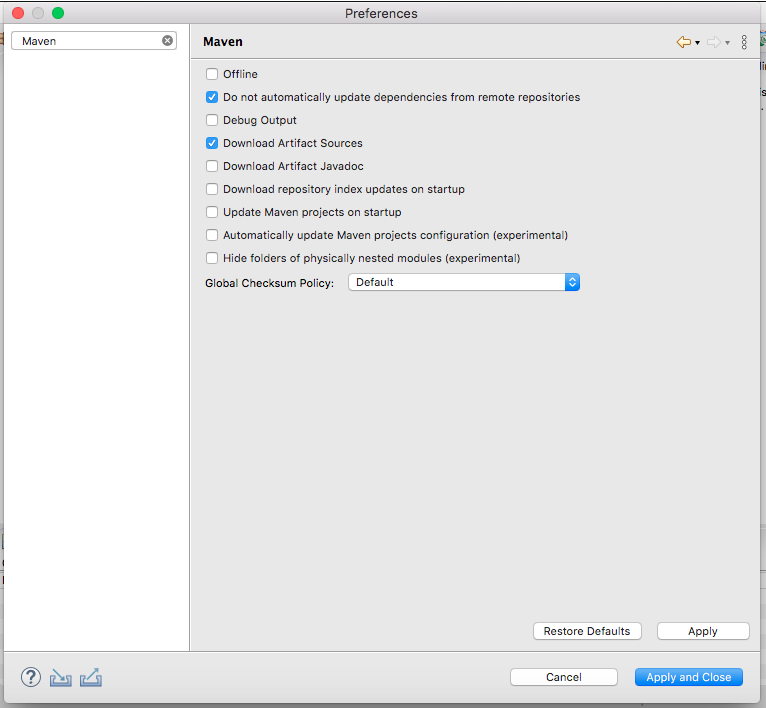
Therefore, the set of items of Preferences are not visible
manueljordan
on 27 Mar 2020
I see, but the point would be, why only fails in Mac, the other 2 OS have the same Corretto Java 11 and works fine.
This has all the signs of being some kind of 'glitch' in how the GUI widgets are drawing on the screen and the Eclipse GUI widgets (SWT) are largely implemented by very OS specific native libraries that use different low-level widget toolkits. So its not that surprising a bug in this sort of thing to be specific to Mac OS.
Regardless... my coleagues who are using Macs have never seen this problem, and we also haven't seen any reports from other folks. So the question to me right now is, what so specific about your setup? The thing that stands out at first sight is the Amazon VM. Maybe it is a red-herring, I don't know. But that's why I asked if you could try a different VM, so we can see if it makes a difference.
kdvolder
on 27 Mar 2020
What JVM distribution do you suggest? Be explicit about the version too, it to have both of us the same settings
The one that most people use. I think its probably OpenJDK. And I'd say try to stick as close as possible to what you are using now in terms of version. So, I'd say go for the latest build JDK 11.
So try this maybe:
https://download.java.net/java/GA/jdk11/9/GPL/openjdk-11.0.2_osx-x64_bin.tar.gz
it to have both of us the same settings
I don't have a Mac myself. But that doesn't mean I can't ask you to try some things to try and narrow down what may be the cause of this bug.
Some of my coleagues do have Macs though (and they may join in the discussion / trouble-shooting later, but I already checked with them and they say they've not seen this issue ever. They did tell me they aren't using the Amzon VM, and I think it is a bit of an unusual choice.
From what I know so far, I'd say this is probably a bug in Eclipse SWT that is triggered only by an unusual combination of factors. I think what we'll end up doing is forwarding this bug ticket to Eclipse. Before we do that, its good to try a few things and narrow down the conditions to make the bug happen.
kdvolder
on 27 Mar 2020
Actually instead of the link I posted higher up. I think you'll get a closer 'match' to your Amzaon JDK version if you get the latest JDK 11 for mac os from https://adoptopenjdk.net/releases.html?variant=openjdk11&jvmVariant=hotspot
kdvolder
on 27 Mar 2020
Ok
I got the OpenJDK11U-jdk_x64_mac_hotspot_11.0.6_10.tar.gz file and unpacked in
the /Library/Java/JavaVirtualMachines/ directory such as the others JVM how Corretto.
I updated the .bash_profile file
And I can confirm the following in the same terminal
>>>. .bash_profile

>>> echo $JAVA_HOME
/Library/Java/JavaVirtualMachines/openjdk_11.0.6_10/Contents/Home/

>>> java -version
openjdk version "11.0.6" 2020-01-14
OpenJDK Runtime Environment AdoptOpenJDK (build 11.0.6+10)
OpenJDK 64-Bit Server VM AdoptOpenJDK (build 11.0.6+10, mixed mode)

>>> javac -version
javac 11.0.6
The problem is, when I execute the open SpringToolSuite4.app/ command I get:
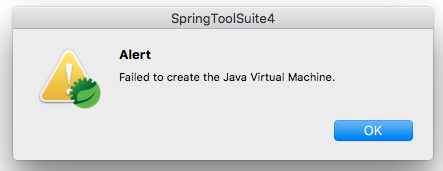
If execute the SpringToolSuite4.app file through the GUI, as usual, again happens:

What is missing or wrong?
Thanks in advance
manueljordan
on 28 Mar 2020
Hey Manuel, maybe this is just a weird redraw issue on Mac? Can you try to resize the dialog window after opening it? Does that make the tree items appear again?
I observed something like this in another dialog (one that we implemented), so maybe you are hitting the same underlying issue, but in the preference dialog?
 martinlippert
on 30 Mar 2020
martinlippert
on 30 Mar 2020
Hello Marten
I remember I had the same problem years ago due the same 'resize' problem, thanks for the remind ... and yes, in the same Preferences window/dialog, if my memory does not fail me, I waited the next release ... not sure If I reported that issue.
As you requested:
Completely resized to small

After to resize to more bigger
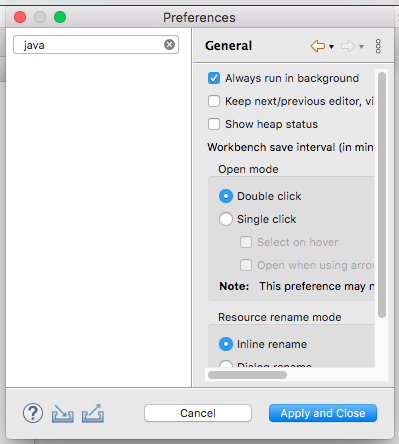
The menu items in the left part, are hidden ...
I did do this twice (editing the .bash_profile file) with Amazon Corretto and AdoptJDK
Someway to enable logs? I think a clue should appear through there ..
manueljordan
on 30 Mar 2020
@manueljordan
What I usually do to try out a different JVM for Eclipse is to simply download the JVM and unzip it somewhere in my home directory rather than trying to overwrite files into where my OS installs them normally (to avoid potentially breaking stuff in the process).
Then you can edit the STS.ini (or eclipse.ini depending on how you installed STS) to point to that specific JVM.
Details on how to do this can be found here:
https://wiki.eclipse.org/Eclipse.ini
Summary:
- find STS / eclipse .ini file (on mac is should be in the
Eclipse.app/Contents/MacOSdirectory in your case). - Add a
-vmon the first line of the ini file. - Add a pointer to the
javaexecutable on the second line (e.g./Library/Java/JavaVirtualMachines/jdk1.7.0_71.jdk/Contents/Home/bin/java - These two must be on separate lines.
kdvolder
on 30 Mar 2020
Someway to enable logs? I think a clue should appear through there ..
You can check Eclipse error log by opening the 'Error Log' view via Windows >> Show View >> Other >> Error Log
kdvolder
on 30 Mar 2020
Thanks for the valuable support:
Ok, in the directory:
/Users/..../sts-4.6.0.RELEASE/SpringToolSuite4.app/Contents/Eclipse
Currently the SpringToolSuite4.ini file contains:
../Eclipse/plugins/org.eclipse.equinox.launcher_1.5.700.v20200207-2156.jar
--launcher.library
../Eclipse/plugins/org.eclipse.equinox.launcher.cocoa.macosx.x86_64_1.1.1100.v20190907-0426
-product
org.springframework.boot.ide.branding.sts4
--launcher.defaultAction
openFile
-vmargs
-Dosgi.requiredJavaVersion=1.8
-Xms256m
-Xmx1024m
-XX:+UseG1GC
-XX:+UseStringDeduplication
--add-modules=ALL-SYSTEM
-XstartOnFirstThread
-Dorg.eclipse.swt.internal.carbon.smallFonts
-Xdock:icon=../Resources/sts4.icns
Amazon Corretto
Working through:
/Library/Java/JavaVirtualMachines/amazon-corretto-11.0.6.10.1-2.jdk/Contents/Home/bin/java
Therefore
/Library/Java/JavaVirtualMachines/amazon-corretto-11.0.6.10.1-2.jdk/Contents/Home/bib/java
-startup
../Eclipse/plugins/org.eclipse.equinox.launcher_1.5.700.v20200207-2156.jar
--launcher.library
../Eclipse/plugins/org.eclipse.equinox.launcher.cocoa.macosx.x86_64_1.1.1100.v20190907-0426
-product
org.springframework.boot.ide.branding.sts4
--launcher.defaultAction
openFile
-vmargs
-Dosgi.requiredJavaVersion=1.8
-Xms256m
-Xmx1024m
-XX:+UseG1GC
-XX:+UseStringDeduplication
--add-modules=ALL-SYSTEM
-XstartOnFirstThread
-Dorg.eclipse.swt.internal.carbon.smallFonts
-Xdock:icon=../Resources/sts4.icns
After to start the STS, in the Error Log view I can see the following:

Seems the third line is the clue

Opening that third line appears:
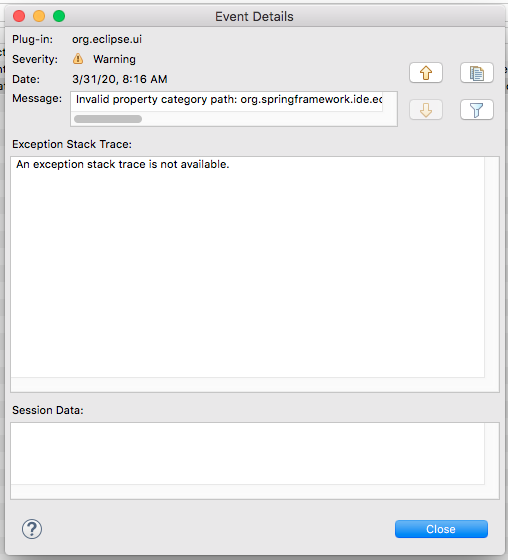
From above, the Message complete content is:
Invalid property category path:
 org.springframework.ide.eclipse.beans.ui.properties.ProjectPropertyPage
(bundle: org.springframework.ide.eclipse.xml.namespaces,
 propertyPage: org.springframework.ide.eclipse.beans.ui.namespaces.projectPropertyPage)
AdoptJDK
Working through:
/Library/Java/JavaVirtualMachines/openjdk_11.0.6_10/Contents/Home/bin/java
Therefore
/Library/Java/JavaVirtualMachines/openjdk_11.0.6_10/Contents/Home/bin/java
-startup
../Eclipse/plugins/org.eclipse.equinox.launcher_1.5.700.v20200207-2156.jar
--launcher.library
../Eclipse/plugins/org.eclipse.equinox.launcher.cocoa.macosx.x86_64_1.1.1100.v20190907-0426
-product
org.springframework.boot.ide.branding.sts4
--launcher.defaultAction
openFile
-vmargs
-Dosgi.requiredJavaVersion=1.8
-Xms256m
-Xmx1024m
-XX:+UseG1GC
-XX:+UseStringDeduplication
--add-modules=ALL-SYSTEM
-XstartOnFirstThread
-Dorg.eclipse.swt.internal.carbon.smallFonts
-Xdock:icon=../Resources/sts4.icns
Just shows:
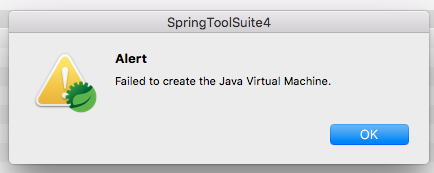
I press Ok and stops all.
I checked/verified twice the AdoptJDK's path, and is valid.
About the .ini file - even when I returned to Amazon Corretto (loads/opens well how in the beginning) and then If I return again to AdoptJDK the same error appears
manueljordan
on 31 Mar 2020
For open JDK -vm parameter in the .ini try:
/Library/Java/JavaVirtualMachines/openjdk_11.0.6_10/Contents/Home/bin
no java end segment.
 BoykoAlex
on 31 Mar 2020
BoykoAlex
on 31 Mar 2020
Hi Alex
Thanks for the suggestion, therefore with:
/Library/Java/JavaVirtualMachines/openjdk_11.0.6_10/Contents/Home/bin
-startup
../Eclipse/plugins/org.eclipse.equinox.launcher_1.5.700.v20200207-2156.jar
.... ... ...
Same result...
manueljordan
on 31 Mar 2020
@manueljordan Can you please post the download page link for the Open JDK 11.0.6_10 that you have?
I'll download it and try to run STS with it...
(Tried to find it myself and i only saw 11.0.2 and 11.0.3)
BoykoAlex
on 31 Mar 2020
Actually I think it is this one: https://adoptopenjdk.net/?variant=openjdk11&jvmVariant=hotspot correct?
(Saw AdoptJDK in the comments)
BoykoAlex
on 31 Mar 2020
I think is correct, thus the file downloaded and unpacked by my side is:
OpenJDK11U-jdk_x64_mac_hotspot_11.0.6_10.tar.gz
manueljordan
on 31 Mar 2020
@manueljordan There seems to be an issue between Eclipse and AdoptOpenJDK for mac. See https://bugs.eclipse.org/bugs/show_bug.cgi?id=559482
Comment 11 suggests a workaround.
Any chance you can get Oracle JDK 11?
BoykoAlex
on 31 Mar 2020
Interesting, thanks a lot for the link! ...
I can try with other _free_ JVM, that's why I don't use Oracle JDK anymore, it is not free.
Due this I use Amazon Corretto, but I used AdopJDK by suggestion of kdvolder to accomplish a Test
with the IDE. Let me know if you have a suggestion about what JVM I would test/use.
Furthermore remember my latest post with Figures, it has a warning about Spring Eclipse UI ... that is a clue ... I guess
manueljordan
on 31 Mar 2020
Maybe try Azul's Open JDK: https://www.azul.com/downloads/zulu-community/?architecture=x86-64-bit&package=jdk
Just tried it. The -vm parameter is:
/Library/Java/JavaVirtualMachines/zulu11.37.17-ca-jdk11.0.6-macosx_x64/bin
(No /Contenta/Home segment)
It launched fine for me and Preferences UI shows up fine...
BoykoAlex
on 31 Mar 2020
Huge thanks again @BoykoAlex
In
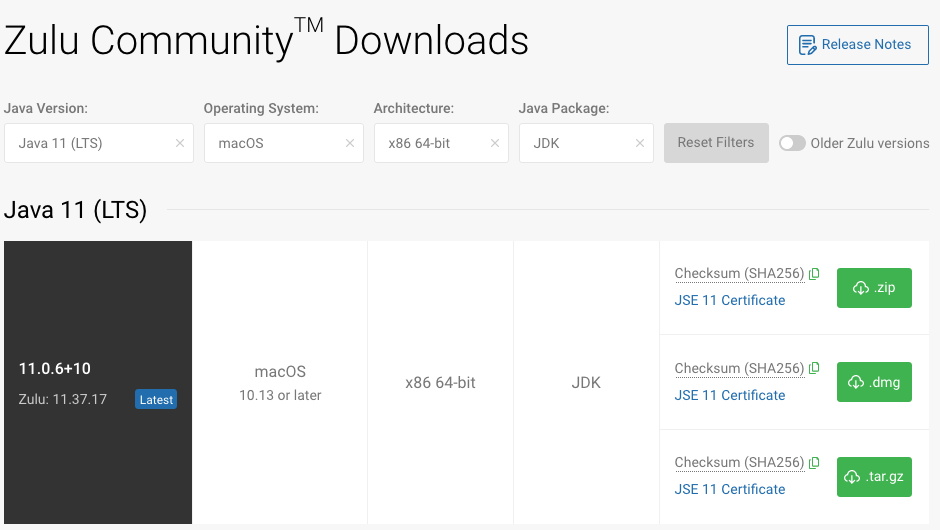
I got the zulu11.37.17-ca-jdk11.0.6-macosx_x64.tar.gz file
Therefore in the .ini file
/Library/Java/JavaVirtualMachines/zulu-jdk11.0.6/bin
-startup
../Eclipse/plugins/org.eclipse.equinox.launcher_1.5.700.v20200207-2156.jar
--launcher.library
../Eclipse/plugins/org.eclipse.equinox.launcher.cocoa.macosx.x86_64_1.1.1100.v20190907-0426
-product
org.springframework.boot.ide.branding.sts4
--launcher.defaultAction
openFile
-vmargs
-Dosgi.requiredJavaVersion=1.8
-Xms256m
-Xmx1024m
-XX:+UseG1GC
-XX:+UseStringDeduplication
--add-modules=ALL-SYSTEM
-XstartOnFirstThread
-Dorg.eclipse.swt.internal.carbon.smallFonts
-Xdock:icon=../Resources/sts4.icns
The same situation happens yet
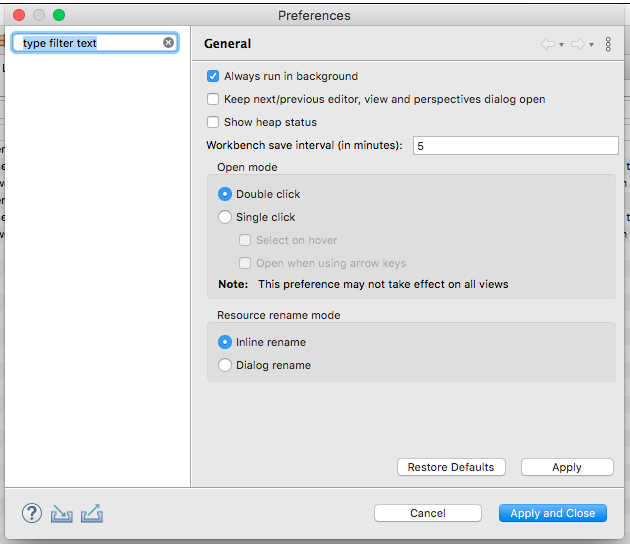
After to previously have deleted the report available in the Error Log view, it to see the new for Azul, appears the following.

From above observe the .ui error did not appear how in Amazon Corretto happened
Something curious, when I close the IDE, only with Azul appears the following:
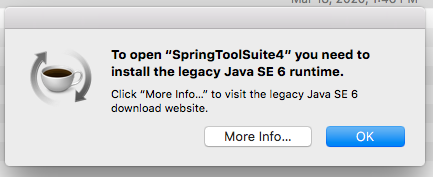
I got that message each time I close the IDE and working _only_ with Azul
Question being curious how through the IDE itself: Where I can see with what JDK the IDE was started? It to confirm that the value shown must be the same configured through the .ini file
manueljordan
on 31 Mar 2020
Preferences -> Java -> Installed JREs will show by default if no other JREs specified the JRE that launched STS. Otherwise under JRE installation folder find and launch /bin/jconsole - launches a GUI through which you can connect to running java processes on your machine, connect to them and then VM Summary tab will provide the info about the JVM, classpath, etc.
It's time to try plain Eclipse with the same VM. It's very likely that it is just issue with your platform and Eclipse SWT and should be reported to Eclipse. Download Eclipse for Java developers: https://www.eclipse.org/downloads/ and give it a try, open Preferences dialog.
BoykoAlex
on 31 Mar 2020
I always go to the About dialog, press Installation Details and then Configuration. That reveals all the system properties, where some point to the exact JDK/JRE that is used to run the IDE. I don't trust the JRE preferences very much, since that easily finds all the various JDKs installed somewhere on your machine.
martinlippert
on 31 Mar 2020
Thanks again Alex
About Preferences -> Java -> Installed JREs I always assumed that configuration section was to establish the JRE to be used for different projects about its compilation and execution
About plain Eclipse, would be enough Eclipse IDE for Java Developers right?
Thanks for the information @martinlippert , I confirmed the output is complete and valuable
manueljordan
on 31 Mar 2020
Yes, Eclipse for Java Developers should be ok.
BoykoAlex
on 31 Mar 2020
Seems is an Eclipse bug
I got the eclipse-java-2020-03-R-macosx-cocoa-x86_64.dmg file
Through the Error Log view does not appear none 'warning'

The weird situation happens again
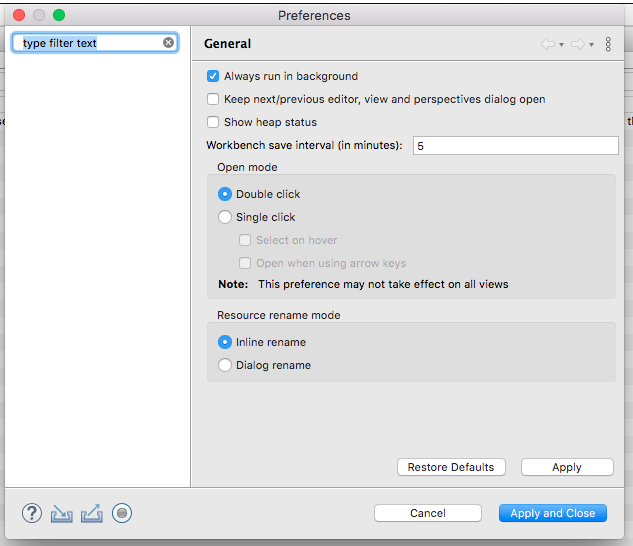
It for Amazon Corretto
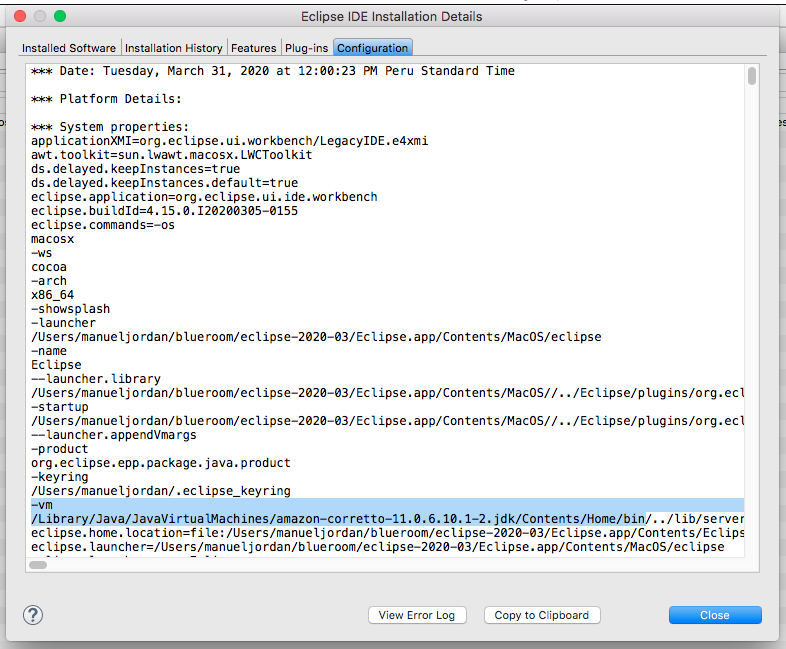
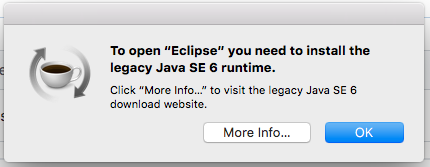
If for AdoptJDK - well really same bug about start error
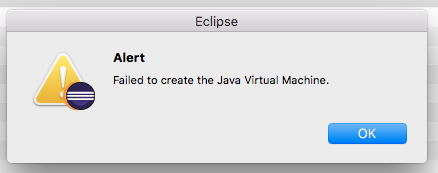
it for Azul
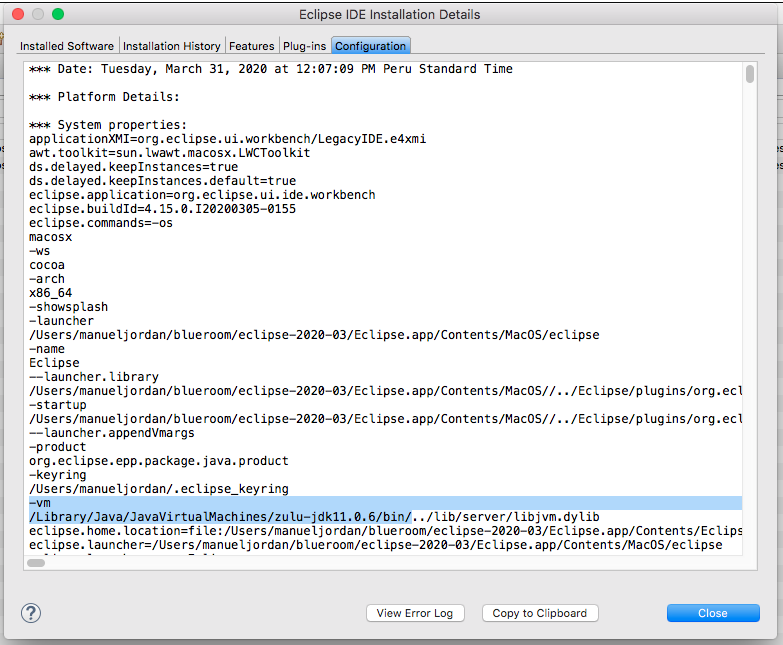
And even with the _close_ event behaviour
manueljordan
on 31 Mar 2020
I think it is time to raise bugs against Eclipse SWT component: https://bugs.eclipse.org/bugs/
Your mac OSX version is sort of old and the JVM + Eclipse/STS version your are trying are recent.
I'd try Java 8 with your current setup.
And then perhaps try updating the OSX. Yours is El Caspitan -> Sierra -> High Sierra -> Mojave -> Catalina (ours). Given there are so many versions of it came out in the past 4-5 years... it might be just some incompatibility of SWT with the OS
BoykoAlex
on 31 Mar 2020
Thanks for the feedback, I understand the situation, but I can't upgrade my Mac anymore, it is from 2012, when I did do an upgrade fromLion to El Capitan is became slower ... so if I try a new upgrade I am sure I am going to put more slower ...
My worst scenario is work through Virtual Box with Ubuntu
Here the Eclipse Bug issue for track controls:
Thanks to all for the polite support.
manueljordan
on 31 Mar 2020
@manueljordan Aside from the widget problem on the preference pages, you might run into this when trying to start STS with specific versions of adoptopenjdk or OracleJDK: https://twitter.com/springtools4/status/1245628387432886274 - there is a link to the Eclipse bug, where comment 11 explains the solution to the "failed to load JVM" issue: https://bugs.eclipse.org/bugs/show_bug.cgi?id=559482#c11 - Hope this helps, independent of the preference page issue.
martinlippert
on 2 Apr 2020
Thanks Martin, valuable the link ....
Well, I am going to keep working with STS 4.5.1 and Corretto, I had none problems with the latter
To be honest I chosen Corretto because James Gosling is involved in there ...
My post in Eclipse is closed, it is duplicate. I hope Eclipse guys consider the MacOS users/developers with old hardware where an upgrade of OS is not possible. I don't have idea if that fix is trivial or not.
As usual Martin and the rest. Thanks for your friendly and polite support.
manueljordan
on 2 Apr 2020
Always happy to help! Hope the issue at Eclipse can be fixed for the next release.
martinlippert
on 2 Apr 2020
As a summary, I double checked all this on my old MacBook Pro (running macOS El Capitan 10.11.6) (I tested Spring Tools 4 for Eclipse 4.6.0):
- runs fine on AdoptOpenJDK-8
- runs fine on a patched AdoptOpenJDK-11 (patch: https://bugs.eclipse.org/bugs/show_bug.cgi?id=559482#c11)
- runs fine on a patched AdoptOpenJDK-14 (patch: https://bugs.eclipse.org/bugs/show_bug.cgi?id=559482#c11)
Running Spring Tools 4 for Eclipse 4.6.0 on top of Eclipse 4.15 causes the issue with the preference dialog, described above (empty nodes tree).
Running Spring Tools 4 for Eclipse 4.6.0 on top of Eclipse 4.14 works fine (with all the mentioned AdoptOpenJDKs and with a working preference dialog).
In case you want to grab a distribution of STS4 on Eclipse 4.14 for macOS, here is the download URL:
If you want to use one of the latest CI builds on top of Eclipse 4.14, you can find them here:
https://dist.springsource.com/snapshot/STS4/nightly-distributions.html
Hope this helps all folks running into this issue.
martinlippert
on 6 Apr 2020
As usual, huge thanks @martinlippert , really huge thanks .... I will test it in these days ....
manueljordan
on 6 Apr 2020
Related issues
 MahatmaFatalError
·
8Comments
MahatmaFatalError
·
8Comments
 khe817
·
11Comments
khe817
·
11Comments
 playdev-co-kr
·
10Comments
playdev-co-kr
·
10Comments
 dsyer
·
7Comments
dsyer
·
7Comments
 youngm
·
9Comments
youngm
·
9Comments
Most helpful comment
I always go to the
Aboutdialog, pressInstallation Detailsand thenConfiguration. That reveals all the system properties, where some point to the exact JDK/JRE that is used to run the IDE. I don't trust the JRE preferences very much, since that easily finds all the various JDKs installed somewhere on your machine.