Stryker: File permissions are not copied correctly to the sandbox
Couldn't immediately find the name of the package for the babel transpiler from docs, so I googled it and got https://www.npmjs.com/package/stryker-babel-transpiler . But that doesn't work. Eventually found it is @stryker-mutator/babel-transpiler.
I guess all the packages moved to an org scope recently. Maybe deprecate the old ones + put a big disclaimer in the readme pointing to the correct package?
 connorjclark
All 9 comments
Actually, I am have more issues, the above package didn't work.
Trying to run against terser.
10:54:39 (66028) ERROR StrykerCli an error occurred { Error: Could not inject "InitialTestExecutor". Inner error: Could not inject "TranspilerFacade". Inner error: Cannot load Transpiler plugin "babel". In fact, no Transpiler plugins were loaded. Did you forget to install it?
    at ClassProvider.injectClass (/Users/cjamcl/src/terser/node_modules/typed-inject/src/InjectorImpl.js:35:19)
    at ClassProvider.injectClass (/Users/cjamcl/src/terser/node_modules/typed-inject/src/InjectorImpl.js:95:22)
    at Stryker.<anonymous> (/Users/cjamcl/src/terser/node_modules/@stryker-mutator/core/src/Stryker.js:74:30)
    at step (/Users/cjamcl/src/terser/node_modules/tslib/tslib.js:133:27)
    at Object.next (/Users/cjamcl/src/terser/node_modules/tslib/tslib.js:114:57)
    at fulfilled (/Users/cjamcl/src/terser/node_modules/tslib/tslib.js:104:62)
    at <anonymous>
module.exports = function(config) {
  config.set({
    mutator: "javascript",
    packageManager: "npm",
    reporters: ["html", "clear-text", "progress"],
    testRunner: "command",
    transpilers: ["babel"],
    coverageAnalysis: "all"
  });
};
diff --git a/package.json b/package.json
index d05e452e..92f99546 100644
--- a/package.json
+++ b/package.json
@@ -35,6 +35,10 @@
     "source-map-support": "~0.5.9"
   },
   "devDependencies": {
+    "@stryker-mutator/babel-transpiler": "^1.1.1",
+    "@stryker-mutator/core": "^1.1.1",
+    "@stryker-mutator/html-reporter": "^1.1.1",
+    "@stryker-mutator/javascript-mutator": "^1.1.1",
     "acorn": "^6.0.4",
     "coveralls": "^3.0.2",
     "cross-env": "^5.2.0",
any idea what's wrong here?
connorjclark
on 21 Mar 2019
Thanks for letting us know! It looks like our deprecation of the old package wasn't successful.
You should see a similar warning like this on the npmjs page for stryker-babel-transpiler:

(taken from https://www.npmjs.com/package/stryker)
We'll fix this.
How do you run Stryker? Do you have a npm script in your package.json like this:
"scripts": {
    "test": "....",
    "stryker": "stryker run"
  },
or do you use the stryker-cli package?
stryker run
If you use the stryker-cli, could you check the version for me please?
npm list -g stryker-cli
If this is below 1.0.0, could you upgrade that to 1.0.0 as well?
 simondel
on 22 Mar 2019
simondel
on 22 Mar 2019
It looks like our deprecation of the old package wasn't successful.
Well... it was. I just decided to only deprecate the Stryker core package. I first wanted to see how it looked in the console, and it took a while to propagate. I will deprecate the rest when I find some time.
 nicojs
on 26 Mar 2019
nicojs
on 26 Mar 2019
I have deprecated the old packages, so the only thing to do is make sure that @Hoten can run Stryker
simondel
on 26 Mar 2019
@Hoten Are you still having issues?
simondel
on 2 Apr 2019
Separate issue
Minor UI issue with the option [optional] What kind transformations should be applied to your code? in init. As a user, of course I don't fully read instructions (heh) and I hit "Enter" on babel with the intention of selecting Babel. This required me to manually install babel when getting the error in run.
Mixing "Enter" with "yes, select this currently selected option" (most of the setup questions) and "yes, submit the options I've toggled" (the multi-select questions) is leads easily to this user error. Not sure of the best solution, but what about swapping Enter/Space bar for multi select questions?
Running Stryker against terser
I actually don't need or want the babel transform for this :)
My config now:
module.exports = function(config) {
  config.set({
    mutator: "javascript",
    packageManager: "npm",
    reporters: ["html", "clear-text", "progress"],
    testRunner: "command",
    transpilers: [],
    coverageAnalysis: "off",
  });
};
npm run test does work, but I get this on npx stryker run:
10:08:15 (32494) INFO ConfigReader Using stryker.conf.js in the current working directory.
10:08:16 (32494) INFO InputFileResolver Found 11 of 258 file(s) to be mutated.
10:08:16 (32494) INFO InitialTestExecutor Starting initial test run. This may take a while.
10:08:17 (32494) ERROR InitialTestExecutor One or more tests failed in the initial test run:
    All tests

> [email protected] test /Users/cjamcl/src/terser/.stryker-tmp/sandbox26726
> rimraf dist/* && npm run prepare


> [email protected] prepare /Users/cjamcl/src/terser/.stryker-tmp/sandbox26726
> rollup -c && cd dist && cross-env TERSER_NO_BUNDLE=1 ../bin/uglifyjs bundle.js -mc --source-map 'content=bundle.js.map,includeSources=true,url=bundle.min.js.map' -o bundle.min.js


main.js → dist/bundle.js...

(!) Circular dependency: lib/ast.js -> lib/utils.js -> lib/ast.js

(!) Circular dependency: lib/ast.js -> lib/parse.js -> lib/ast.js

created dist/bundle.js in 1.1s

internal/child_process.js:313
    throw errnoException(err, 'spawn');
    ^

Error: spawn EACCES
    at ChildProcess.spawn (internal/child_process.js:313:11)
    at Object.exports.spawn (child_process.js:503:9)
    at spawn (/Users/cjamcl/src/terser/node_modules/cross-spawn/index.js:12:24)
    at crossEnv (/Users/cjamcl/src/terser/node_modules/cross-env/dist/index.js:32:38)
    at Object.<anonymous> (/Users/cjamcl/src/terser/node_modules/cross-env/dist/bin/cross-env.js:6:1)
    at Module._compile (module.js:653:30)
    at Object.Module._extensions..js (module.js:664:10)
    at Module.load (module.js:566:32)
    at tryModuleLoad (module.js:506:12)
    at Function.Module._load (module.js:498:3)

npm
ERR! code ELIFECYCLE

npm ERR! errno 1

npm ERR!
 [email protected] prepare: `rollup -c && cd dist && cross-env TERSER_NO_BUNDLE=1 ../bin/uglifyjs bundle.js -mc --source-map 'content=bundle.js.map,includeSources=true,url=bundle.min.js.map' -o bundle.min.js`
npm ERR!
 Exit status 1

npm
 ERR!

npm
 ERR!
 Failed at the [email protected] prepare script.
npm
 ERR!
 This is probably not a problem with npm. There is likely additional logging output above.


npm ERR! A complete log of this run can be found in:
npm ERR!
     /Users/cjamcl/.npm/_logs/2019-04-03T17_08_17_902Z-debug.log

npm
 ERR! Test failed.  See above for more details.

10:08:17 (32494) ERROR StrykerCli an error occurred Error: There were failed tests in the initial test run.
    at InitialTestExecutor.validateResult (/Users/cjamcl/src/terser/node_modules/@stryker-mutator/core/src/process/InitialTestExecutor.js:100:27)
    at InitialTestExecutor.<anonymous> (/Users/cjamcl/src/terser/node_modules/@stryker-mutator/core/src/process/InitialTestExecutor.js:46:30)
    at step (/Users/cjamcl/src/terser/node_modules/tslib/tslib.js:133:27)
    at Object.next (/Users/cjamcl/src/terser/node_modules/tslib/tslib.js:114:57)
    at fulfilled (/Users/cjamcl/src/terser/node_modules/tslib/tslib.js:104:62)
    at <anonymous>
    at process._tickCallback (internal/process/next_tick.js:189:7)
I then realize that stryker moves everything into a temporary folder. I can see the true error if I remove cross-env from the npm script.
sh: ../bin/uglifyjs: Permission denied
aha!
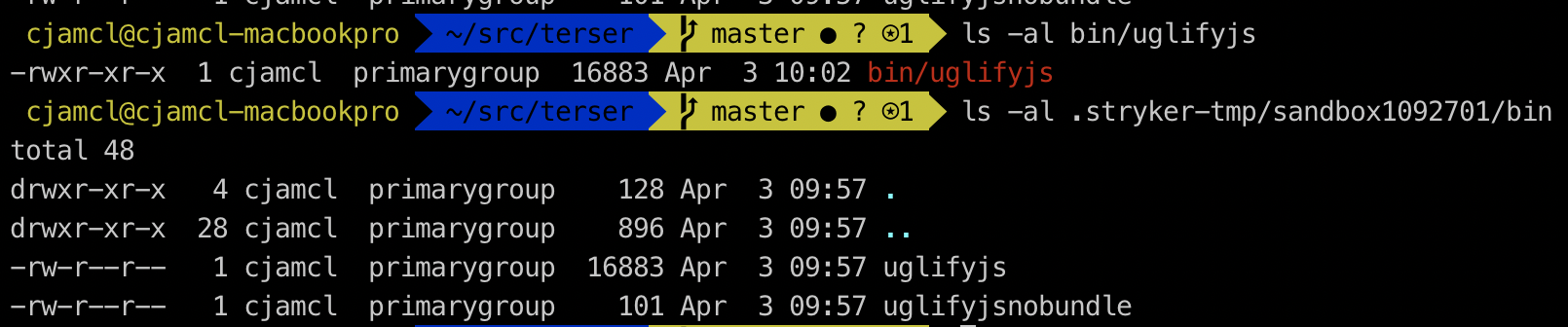
The execute bits are not set when Stryker copies files to its temp directory.
connorjclark
on 3 Apr 2019
I'm experiencing the same file permissions issue with @stryker-mutator/[email protected]. In my scenario, I am intentionally coupling my node module with an executable with execute permissions. I'll look into what could be causing this bug and send a PR back if I figure it out.
 anthony-telljohann
on 22 Oct 2020
anthony-telljohann
on 22 Oct 2020
It looks like instead of copying files withfs.copyFile, stryker writes new files with the same name and contents with fs.writeFile. So to fix this, we'll need to figure out how to read the file permissions of every file so that we can then write new files with the same file permissions. Shouldn't be too difficult to do.
anthony-telljohann
on 27 Oct 2020
I'm experiencing the same problem here too, I can help testing if needed.
About the solution, i think @anthony-telljohann is in the right direction. I know we can use fs.access to get file permissions and fs.chmod to change it.
Infortunatly I do not know the stryker project enough to make a pull request, but I'll be trying to do it. But feel free to anyone do this.
 victorperin
on 6 Dec 2020
victorperin
on 6 Dec 2020
Related issues
simondel
·
25Comments
 Djaler
·
20Comments
Djaler
·
20Comments
 davesag
·
17Comments
davesag
·
17Comments
 wolf-off
·
18Comments
wolf-off
·
18Comments
 Chowarmaan
·
18Comments
Chowarmaan
·
18Comments
Most helpful comment
I'm experiencing the same file permissions issue with
@stryker-mutator/[email protected]. In my scenario, I am intentionally coupling my node module with an executable with execute permissions. I'll look into what could be causing this bug and send a PR back if I figure it out.