Strongbox: [Bug] iOS creating new entries in apps don't save
so I have encountered this twice recently. I created a new entry in app that I need to create password for. Mechanics are pretty basic:
1-Open app - need to sign in or sign up
2-on sign in screen tap field for username to get "Passwords" option form QuickType
3-Tap Create new entry - give it a name user name and auto gen password
4-Tap save
5-Now click sign up
6-fields don't normally show Quicktype for whatever reason...annoying, but I digress. I switch over to Strongbox top copy password
7-Search for entry....no entry....
Not sure if this Strongbox or limitation of Autofill/QuickType feature. Wonder if this is why some app use Share extensions instead. It's as though the entry is in memory, but never gets written out to the file.
 georgesnow
All 40 comments
Can you tell me what Storage Provider method you use? e.g. iCloud, Dropbox, iOS Files etc
 mmcguill
on 20 Dec 2019
mmcguill
on 20 Dec 2019
I am using iCloud.
georgesnow
on 20 Dec 2019
Thanks, aI presume you're using standard iCloud, and not using a database resident on iCloud somewhere but added via iOS Files?
mmcguill
on 20 Dec 2019
Correct. It is in the Strongbox iCloud folder.
georgesnow
on 20 Dec 2019
Cheers, that sounds odd, I'll take a look shortly
mmcguill
on 20 Dec 2019
Awesome thanks. Let me know if there is anything else you need or want me to try.
georgesnow
on 20 Dec 2019
@mmcguill wanted to mention I ran into this again. Oddly I can't remember if I changed anything since you added this feature. Do you happen to know a set known working settings when using this feature? In the meantime I am willing to modify my settings to avoid the issue.
georgesnow
on 17 Jan 2020
Haven't gotten around to looking into this yet @georgesnow - might take another while
mmcguill
on 17 Jan 2020
I have not been able to reproduce this on latest iOS using an iCloud database, though I have received another complaint via email about this...
Does it happen always for you?
Or does it work sometimes, or is it possible that it updates eventually?
Is your database a large file which could take time to sync over a bad network?
mmcguill
on 2 Feb 2020
I am able to reproduce it every time. I have never seen the entry be there even after some time. Database is about 400 entries and 10mb. I believe I can reproduce with other databases in iCloud (these are test ones with 3-4 entries). I will confirm that though and let you know.
georgesnow
on 2 Feb 2020
@mmcguill could you provide all the settings you used for the situation it works you? I have tried modifying a few. No change.
However, I have run into this issue a few more times and at risk of creating a new account and not having the password would be rather unfortunate.
georgesnow
on 23 Feb 2020
It was just a brand new (Express) database. Added like 1 entry. Then tried to add one in the Auto Fill context and it worked. Does that work for you?
I'm fairly sure the problem here is an Auto Fill crash during Save, but I'm going to add some messaging/logic to prove it.
mmcguill
on 23 Feb 2020
@mmcguill so I tried your example it does works properly. So we are getting there.
I went back to same site and tried with my other database and the create new was greyed out. I went back to strongbox and the database is not marked read only. Not sure it is related but now I can’t attempt to make an entry
georgesnow
on 7 Mar 2020
@georgesnow - if you're running the latest version there is new crash detection code. It will tell you when you open it up after a crash if it crashed last time
mmcguill
on 7 Mar 2020
Just downloaded it I will give it go
georgesnow
on 7 Mar 2020
so create new is still greyed our. I tried disabling the cache but that made no impact.
georgesnow
on 7 Mar 2020
Create New is disabled for some providers. Where is your database stored? I thought you were using iCloud (which is available for new entry creation)
mmcguill
on 7 Mar 2020
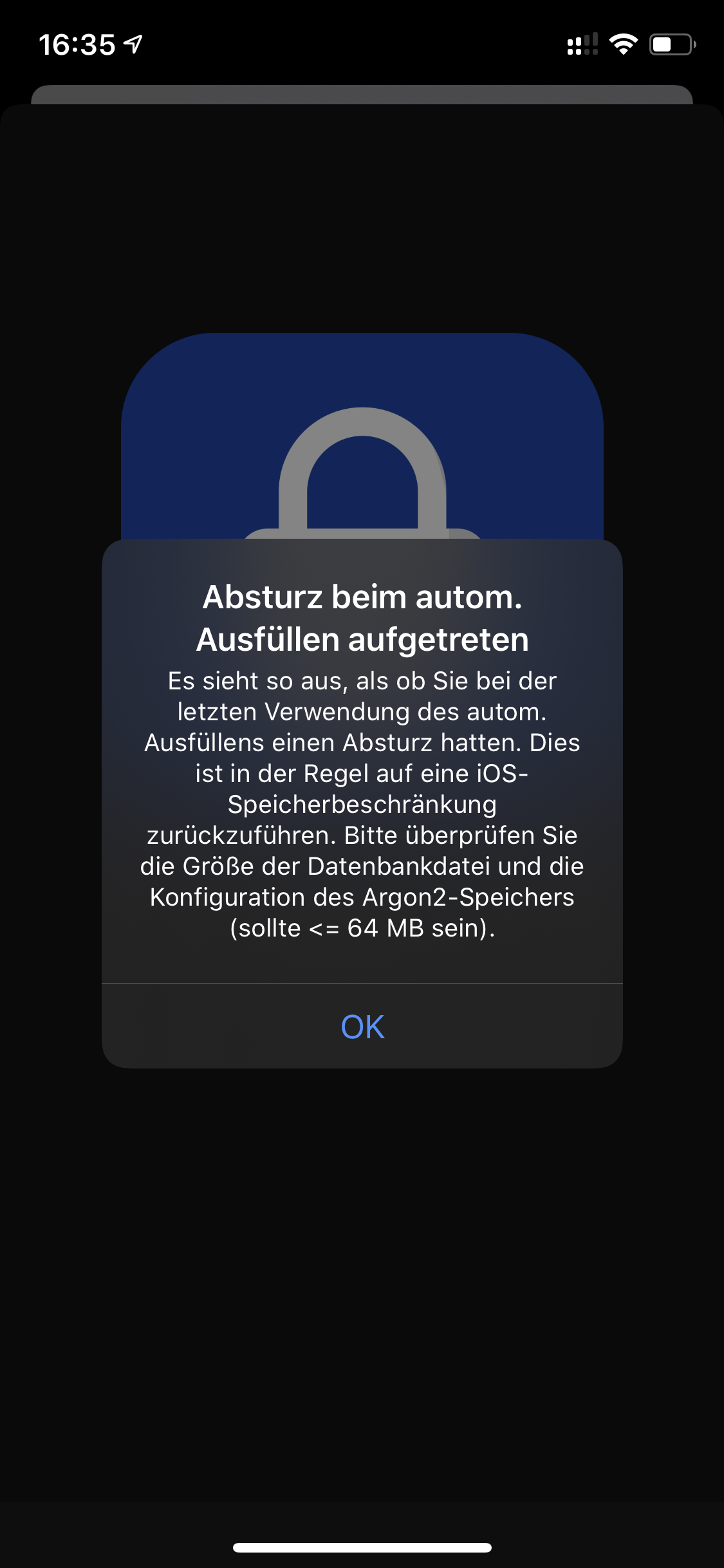
@mmcguill
do you mean this message ?
I have seen that today the first time . But don’t know what to do 🤔
 F3000
on 7 Mar 2020
F3000
on 7 Mar 2020
Yes iCloud
georgesnow
on 7 Mar 2020
Actually all the databases I have are iCloud now looking at them in strongbox
georgesnow
on 7 Mar 2020
Are you using native iCloud or via iOS Files?
I see the 'Create New' button enabled if I create a new iCloud database...
mmcguill
on 7 Mar 2020
Also, make sure you don't have 'Auto-Fill: Always use cache' checked inside Database Management (Spanner/Tool icon in the bottom left)
mmcguill
on 7 Mar 2020
I fixed the create new. Apparently there is limit to number of databases you can have providing credentials for auto fill. And upon retrying auto fill immediately crashed
georgesnow
on 7 Mar 2020
Yeah, so right now you can create a new entry in a new database, but using your other larger database you get a crash, right?
mmcguill
on 7 Mar 2020
And now it crashes every time. My database is only about 7mb. So something else is tripping it off.
As side note and just an idea. I don’t use Touch ID I have iPhone 7. However, my hone button is broken and I replaced it (no Touch ID) and I know this problem was been apparent since I got locked out of my database when it broke. Is extension checking by for the biometric on launch even though I don’t have one and it’s gettinf hung up that?
georgesnow
on 7 Mar 2020
Correct the new single entry express database works. My everyday one does not work
georgesnow
on 7 Mar 2020
Really difficult to say without a crash log. Can you send/submit to Apple?
Navigate to your device Settings > Privacy > Analytics > Analytics Data.Scroll through this list to find 'Strongbox' events. The list is alphabetical. Tap one of these events. Tap the share icon at the top right.
mmcguill
on 7 Mar 2020
So there is only 2 for strong box from feb 13. Are they of any value to send to you?
georgesnow
on 7 Mar 2020
No harm to send them I’ll take a look
mmcguill
on 7 Mar 2020
Sent.
georgesnow
on 7 Mar 2020
@mmcguill so I tried whole bunch changes. It is only this database. I tried from iCloud and loading from the files app. Same behavior. What’s the limitation of size for the database? It says 64mb in the error, but my database (compressed) is 10.4mb. Is there way for me to see how much space it is once it is decompressed and unlocked?
georgesnow
on 8 Mar 2020
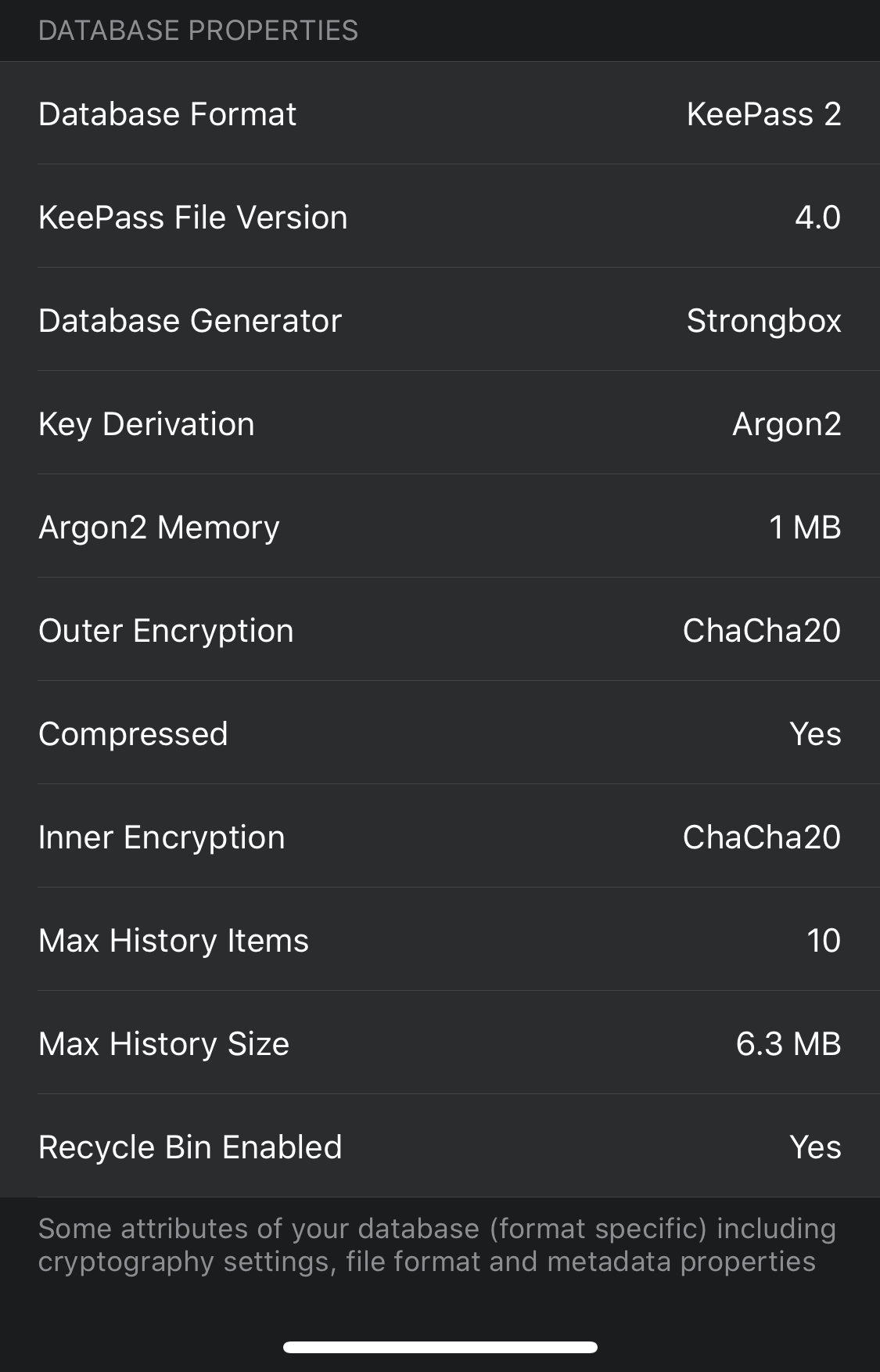
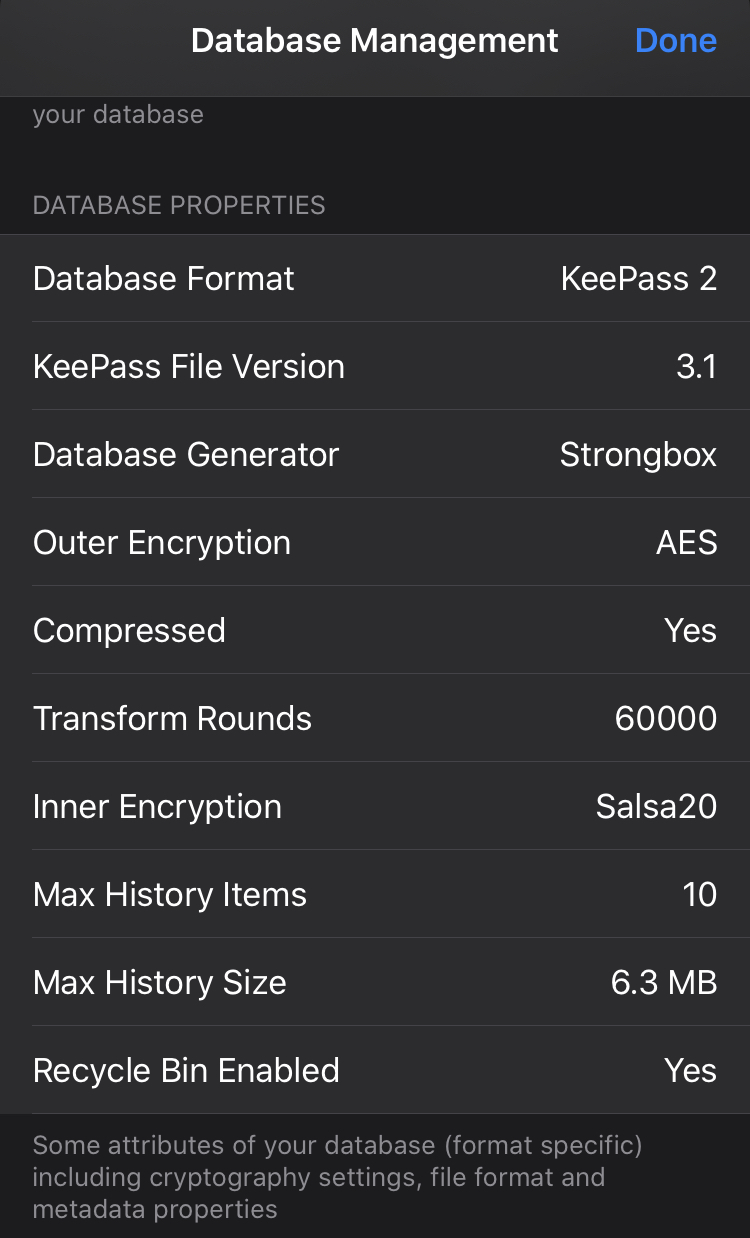
What are your encryption settings/parameters?
mmcguill
on 8 Mar 2020
You can find these by opening it up in say a desktop KeePass client or by scrolling to the bottom of the Database Management screen in Strongbox iOS. Looks like this:
mmcguill
on 8 Mar 2020
georgesnow
on 8 Mar 2020
Interesting... Do you have access to KeePass on desktop?
There's a couple of things you could try that might help...
1) Try running Maintenance in KeePass, your database may have collected a lot of cruft over time and this can help
2) If you have access to KeePass or KeePassXC, you could try upgrading the KDBX format from 3.1 to 4 which might improve performance too.
I'd be interested to hear if either of these helped.
mmcguill
on 8 Mar 2020
Will do. Didn’t know there was a maintenance feature.
I have back up copies so I can try it multiple ways and see if it’s one or combo of those to fix it. I will report back what I find.
georgesnow
on 8 Mar 2020
alright Database maintenance worked! I ran both options and with the delete entries (I made it older then 800days). this seems to have fixed the issue. thanks @mmcguill
georgesnow
on 9 Mar 2020
Great to hear. I guess your database is significantly reduced in size now?
mmcguill
on 9 Mar 2020
@mmcguill yes it went from ~10mb to ~4 mb
I had previously deleted a zip file I had in there and old entries. So something in there ballooning the size above the auto fill threshold.
georgesnow
on 10 Mar 2020
Thanks for the update
mmcguill
on 10 Mar 2020
Related issues
 shad0whawk
·
5Comments
F3000
·
3Comments
shad0whawk
·
5Comments
F3000
·
3Comments
 brogers5
·
6Comments
F3000
·
5Comments
brogers5
·
6Comments
F3000
·
5Comments
 rob3c
·
3Comments
rob3c
·
3Comments