Strongbox: Audit Passwords
KeePass has an option to find duplicate passwords in your DB.
It groups the entries with the same password by the password.
I'm using it right now to try to finish them off and make every password unique finally.
It's probably something every password manager should have.
 mlfreeman2
All 28 comments
Good idea!
 mmcguill
on 18 Oct 2019
mmcguill
on 18 Oct 2019
Example from 1password : They have a function called „watchtower“. This function list all passwords that are duplicated or weak in a different app view.
 F3000
on 23 Feb 2020
F3000
on 23 Feb 2020
Probably a good idea in general to have a way to audit your database in general. We could use this issue to track what should be included. I'll start with:
- Reused Passwords
- Weak Passwords (below a certain entropy)
- Weak Passwords (in well known lists or simple dictionary)
- No Password
- An option to check against HaveIBeenPwned
open to further audit suggestions...
mmcguill
on 7 Mar 2020
A way to turn it off for certain entries or folder or group of entries. 1Password drove me nuts with it because I had 3 separate entries that shared a password it was same account but I needed them to be separate entries. And it hounded me with the watchtower alert.
 georgesnow
on 7 Mar 2020
georgesnow
on 7 Mar 2020
Yes, this would be something you'd actively seek out and initiate, not some kind of ongoing annoyance
mmcguill
on 7 Mar 2020
@mmcguill
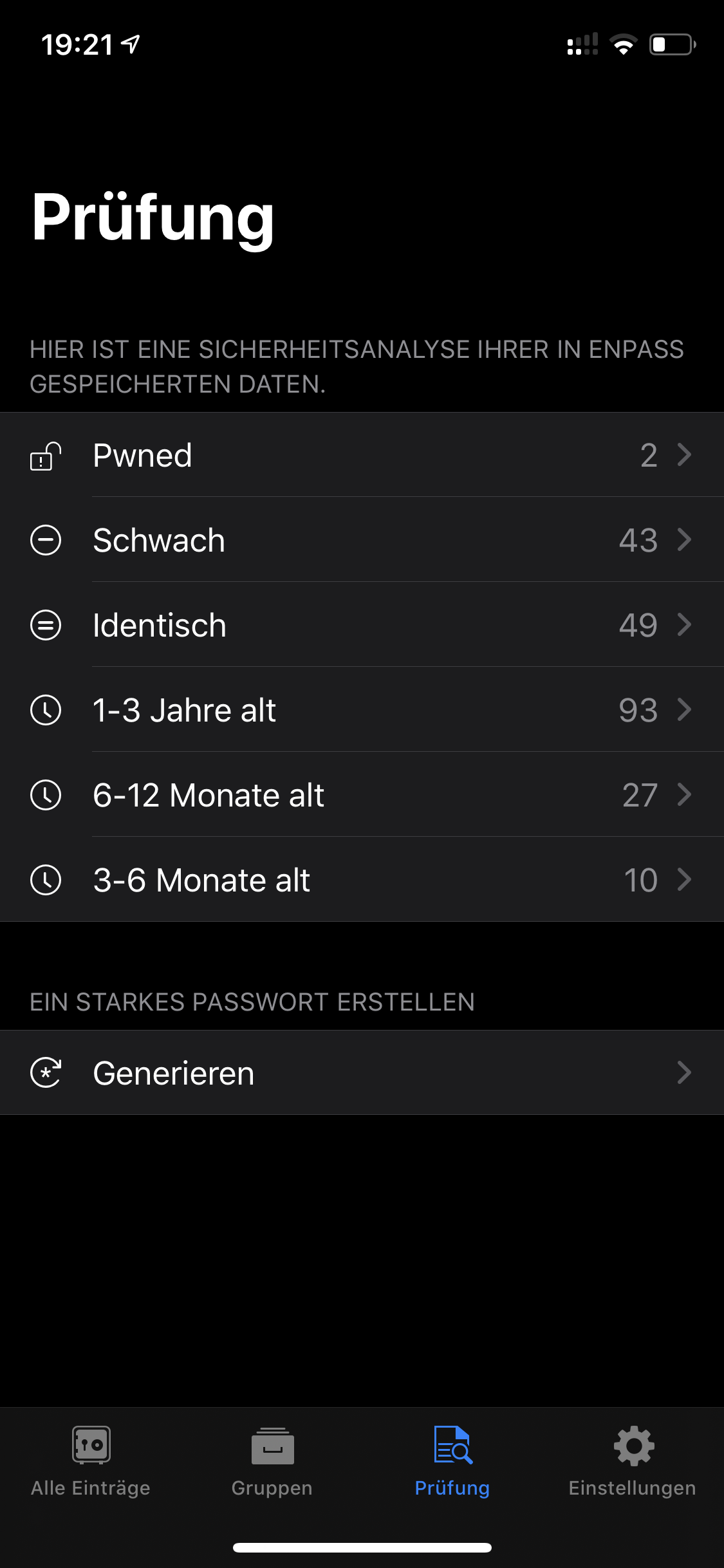
Here is an example what Enpass is filtering :
1) pawned -> they check against : https://haveibeenpwned.com/
2) Schwach = weak
3) Identisch= identic
4) 1-3 years old
5) 6-12 month old
6) 3-6 month old
Enpass has this view on one separated page (view controller)
F3000
on 7 Mar 2020
HaveIBeenPwned is a good idea.
I'd suggest "identical if case-insensitively compared" as a possible addition too.
KeePass also has "similar passwords (duplicate)" and "similar passwords (clusters)".
Those seems to reliably find passwords one or two characters off from each other, perhaps using an implementation of Levenshtein distance (https://en.wikipedia.org/wiki/Levenshtein_distance).
mlfreeman2
on 7 Mar 2020
This feature is now available with 1.48.0. You'll need to explicitly go to the App Store to update to that version rather than wait on an automatic update.
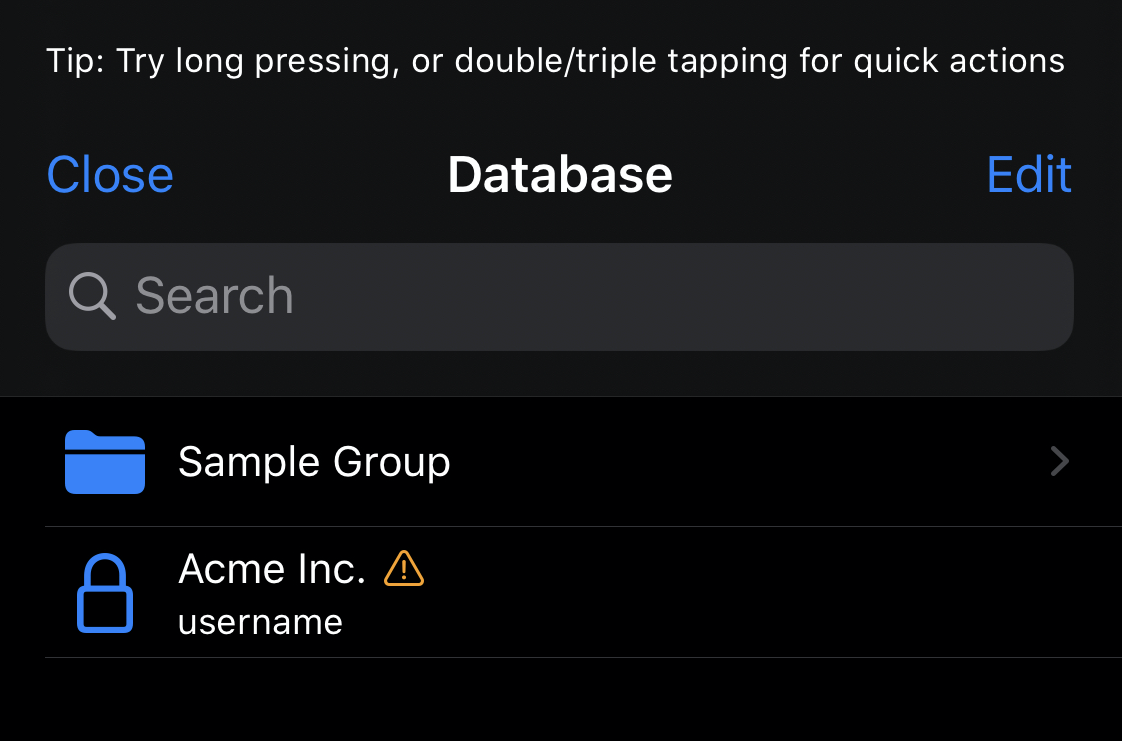
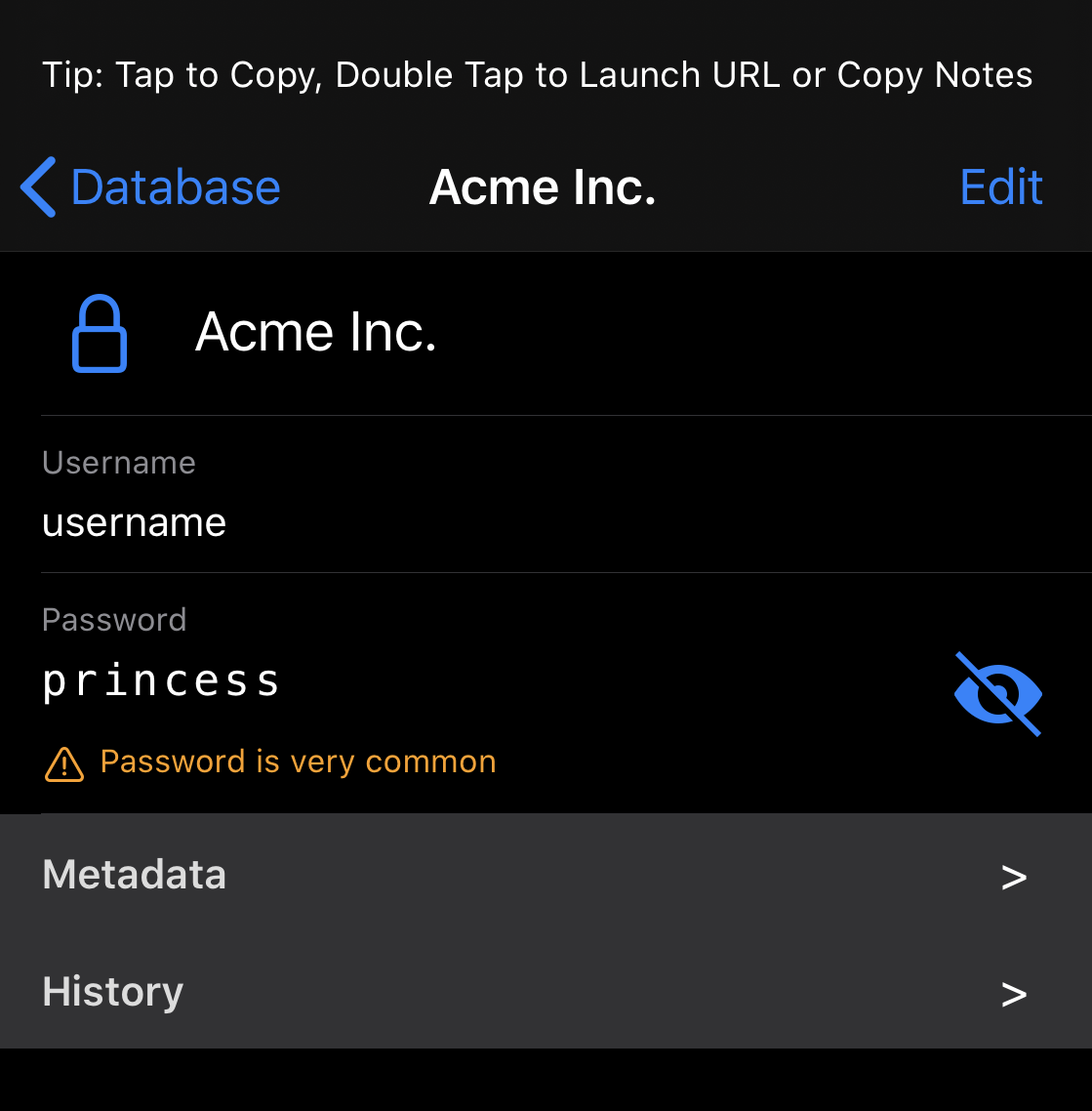
Would appreciate any feedback you have. Here's what the Browse & Details screens look like when there is an audit issue (notice the orange warning indication).
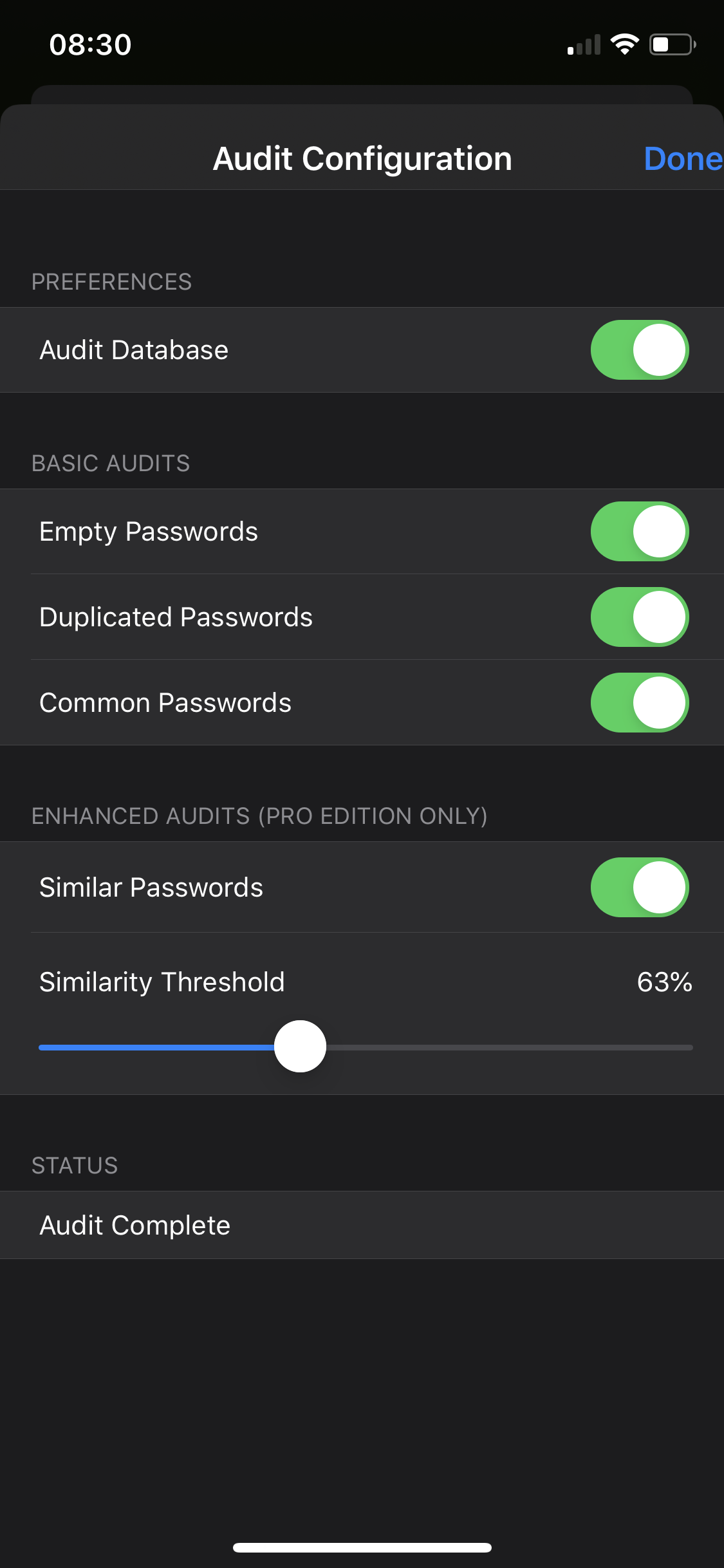
In this iteration it includes (empty, weak/common, duplicates (case insensitive) & similar checks)... You can find the configuration under Preferences > Database Auditing. You can turn it on/off and configure individual checks.
Currently the best way to see all audit issues is to tap into the search bar, once it's empty, you will get the (new!) quick views view, where you'll see "Audit Issues" as an option.
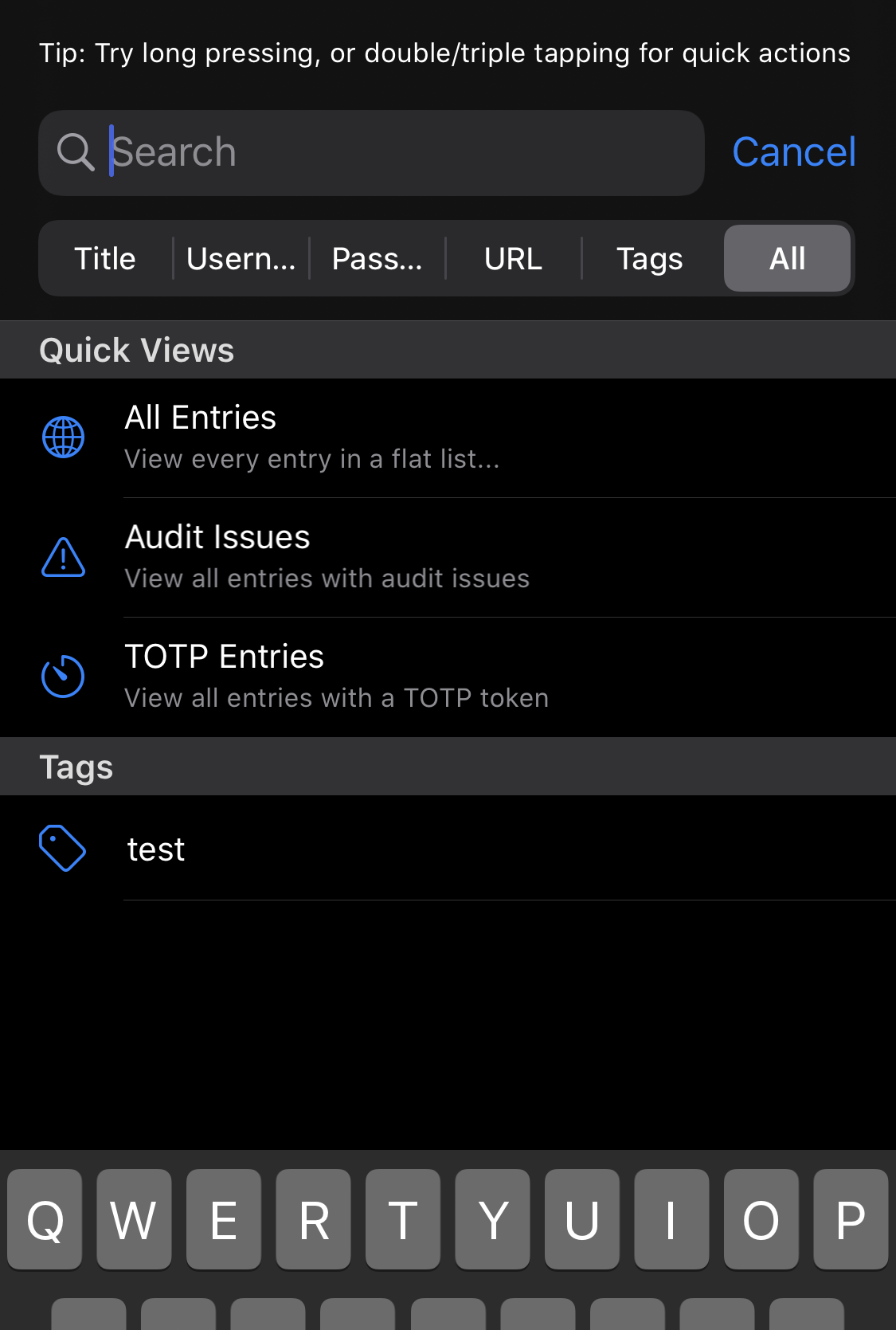
Cheers!
mmcguill
on 26 Apr 2020
The “password is duplicated in another entry” message could use improvement.
At a minimum it should tell me how many other entries have the same password (eg “password is reused in 5 other entries”).
Ideally there’d be a quick way to jump to the other entries to see which ones they are.I turned off the empty passwords audit because I have non password based authentication in some entries (SSH keys, certificates, etc)
mlfreeman2
on 26 Apr 2020
@mlfreeman2 You can disable empty passwords audit in the audit configuration.
 Slummi
on 26 Apr 2020
Slummi
on 26 Apr 2020
Yeah, i saw that after I submitted the initial comment.
Any idea when the equivalent will come to the MacOS version?
mlfreeman2
on 26 Apr 2020
@mmcguill Perfect thanks .
Here are some points that I have found :
- missing German translation
- shifted button in the up-right corner
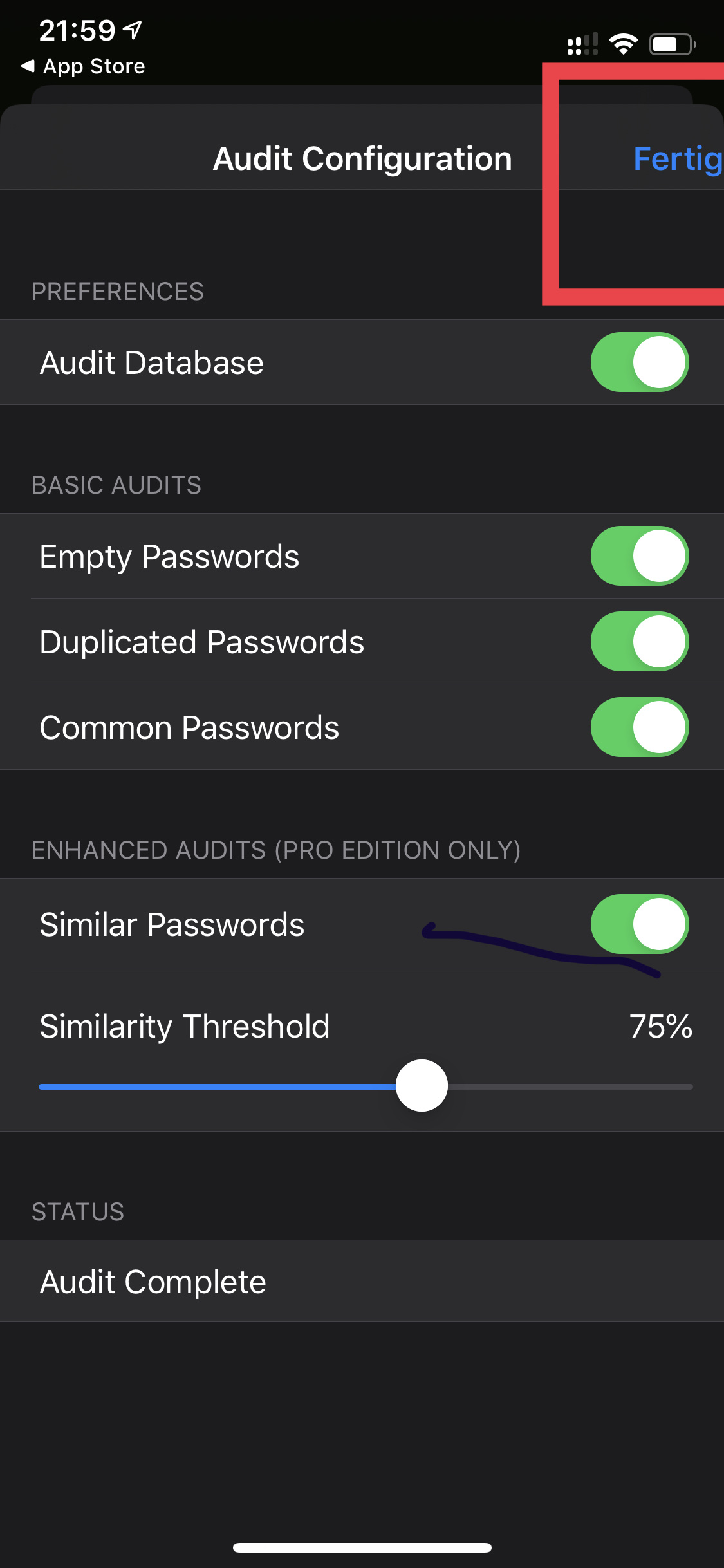
Feature request for this topic :
- mark password which are not created via the diceware method . So a user can directly see which are not created with this method
F3000
on 26 Apr 2020
Side question : they audit is made for every device or do you sync this via the database ?
F3000
on 26 Apr 2020
@mlfreeman2 Yes, definitely we're at an early stage here and lots of improvements to be made. Focused on the core functionality right now and that appears to be going well, no crashes, no major issues.
For Mac, it's on the way for sure, but we're talking months, this needs to be 100% on iOS before I look at the Mac, and there are other more pressing Mac issues before this.
Agreed, we need better drill down/detail on the Audit issues, this is on the way.
@F3000 -Thanks, yes, translations are always an iteration or two behind... they're on the way but this feature is pretty fluid, so expect delays and things to settle in a month or so... Done/Fertig button issue is noted and will be fixed.
Pretty difficult one to be able to detect none Diceware passwords! Which dictionary, what languages, what separator, how many words, any prefixes/suffixes? If you can ocme up with an algorithm for this, then cool, raise an issue and we'll look at implementing... Probably the focus should be on weak/low entropy and known breached passwords. All of which are on the way or in some sense available.
I don't understand your last comment/question. But you can audit any/every database.
 strongbox-mark
on 26 Apr 2020
strongbox-mark
on 26 Apr 2020
I think there should be a "Start Audit" button in the "Database Auditing" menu. At the moment it does the audit automatically if the menu option is opened which is a bit unintuitive.
I am also not sure if "Database Auditing" is best put under the "Preferences" heading in "Preferences & Management" - maybe it would also fit under "Operations"? After all it's a process. Not sure about it though.
The default should be "Audit Database" = OFF in my opinion. Also because at the moment we don't know when the audit is triggered since there is no "Start Audit" button/switch. Does Strongbox audit on every database change? -->with the default being "OFF" the app could take me to the "Audit COnfiguration" area if I click on the "Audit Issues" search field without ever having done an audit.
Bottomline:
Very cool feature, but it feels a bit unfinished in the current state. I'd love to see a dedicated button to start the auditing process but I am not sure how to implement it in a good way.
 dan-el
on 26 Apr 2020
dan-el
on 26 Apr 2020
Thanks @dan-el
The database audit is done automatically on Unlock, not on menu option being opened. So it's a background process, which I think makes sense.
If you want to be manual about audits, just turn it off. Then when you want to audit, turn it on, and have a look. I think the default here is probably correct, given it doesn't cause any real interference to the normal flow but makes clear to naive users there are issues with their passwords, I don't think I want to change that.
Fair enough on the location of the menu item, this is a perennial UX issue for me! Minor.
Audit is redone on every change/edit yes... I do think if there are no Audit issues the Search button "Audit Issues..." should not be present.
Thanks, I really like this feature and have been looking forward to making it available for feedback, it is a little unfinished but I hope useful as is, and polishing comes next.
strongbox-mark
on 26 Apr 2020
@F3000 -Thanks, yes, translations are always an iteration or two behind... they're on the way but this feature is pretty fluid, so expect delays and things to settle in a month or so... Done/Fertig button issue is noted and will be fixed.
Pretty difficult one to be able to detect none Diceware passwords! Which dictionary, what languages, what separator, how many words, any prefixes/suffixes? If you can ocme up with an algorithm for this, then cool, raise an issue and we'll look at implementing... Probably the focus should be on weak/low entropy and known breached passwords. All of which are on the way or in some sense available.
I don't understand your last comment/question. But you can audit any/every database.
All right 👍 you are right . For the first version with this feature it is very stable.
To make it easier :
Can your app “see” which passwords are generated in strongbox and which are copied from other sources etc..?
So the filter mark all entry’s where the password is not generated via strongbox .
When it’s not working it’s also ok . It was just an idea 😉
F3000
on 27 Apr 2020
The database audit is done automatically on Unlock, not on menu option being opened. So it's a background process, which I think makes sense.
Thanks for letting me know.
If you want to be manual about audits, just turn it off. Then when you want to audit, turn it on, and have a look. I think the default here is probably correct, given it doesn't cause any real interference to the normal flow but makes clear to naive users there are issues with their passwords, I don't think I want to change that.
I can absolutely work with that!
Fair enough on the location of the menu item, this is a perennial UX issue for me! Minor.
Sure thing. I understand it's the first iteration of the feature.
Audit is redone on every change/edit yes... I do think if there are no Audit issues the Search button "Audit Issues..." should not be present.
Yes this sounds good too.
Thanks, I really like this feature and have been looking forward to making it available for feedback, it is a little unfinished but I hope useful as is, and polishing comes next.
Thank's for releasing it, it is certainly useful and I am looking forward to the macOS version of the feature --> One step closer to becoming independent of KeePass on Windows.
One thing that somebody else mentioned already:
Maybe a way to exclude database entries from the Audit would be cool.I am thinking of a custom field with something like: name=audit, content=ignore (as I imagine that there is no way to implement this within the kdbx specification)
The reason why this would be useful has already been mentioned as well: sometimes we need to split a single entry into multiple ones and I would like to not see the Audit feature nagging me about it all the time. Personally I also save some passwords of people who I support on their computers and despite what I tell them they want to keep the same/similar passwords for their stuff... Another candidate to be excluded from the Audit feature.
dan-el
on 27 Apr 2020
@mmcguill maybe a simpler solution :
when a password is generated via Diceware method you offer the possibility to add a word boundary character.
So when you add a new audit setting “word boundary character” I think it should work .
What do you think ?
Otherwise I will do that about the password length
F3000
on 28 Apr 2020
Yes, I see where you’re going, I just don’t think this is a common enough to requirement for anyone, nor one that can easily fit everyone’s particular Diceware setup.
On 28 Apr 2020, 21:39 +0200, F3000 notifications@github.com, wrote:
@mmcguill maybe a simpler solution :
when a password is generated via Diceware method you offer the possibility to add a word boundary character.
So when you add a new audit setting “word boundary character” I think it should work .
What do you think ?
Otherwise I will do that about the password length
—
You are receiving this because you commented.
Reply to this email directly, view it on GitHub, or unsubscribe.
strongbox-mark
on 29 Apr 2020
Now that we have the HIBP audit feature I am wondering if it was possible to select single entries to check against HIBP.
As written in the description it involves sending a portion of your password hashes to a 3rd party service which might or might not be a problem - I am uncomfortable sending that portion for every password in my database though... Allowing users to do the check for single passwords would be a huge plus for me.
Not sure how to integrate it into the UI.
- Maybe the "slide left" oder "slide right" menu can have additional buttons next to "pin as favourite".
- Maybe adding a bottom bar to the "single entry" view is a more consistent option for the app?
(on a side note: this could be useful for several actions like the favicon download, other audit options ("audit one password against the rest"), as an entry point for a sharing menu, etc.)
dan-el
on 8 May 2020
@mmcguill
one of your audit “warnings” is the message : password is used in another entry .
is it possible to show the “other” entry
where it is used ?
F3000
on 11 May 2020
Yes, this is forthcoming :)
strongbox-mark
on 11 May 2020
And i wrote to you on twitter that the time how long the badge is displayed how many items are infected is to short.
I have seen now that this is only on the iPhone. On my iPad the duration is longer (ca. 3 sec)
F3000
on 11 May 2020
@mmcguill I have some more suggestion to this topic :
do you plan to add a feature to exclude a specific entry/password ?
Use case :
some password in my database are chosen from my company and I don’t have the right to change these.
Because they are short the audit feature display this every time to me .
Would be cool when I can say “ don’t audit this password/entry 👌
F3000
on 12 May 2020
Hi @F3000 - Yes, that's coming soon for sure, seems to be very highly requested!
strongbox-mark
on 13 May 2020
Can we also exclude folders from audit?
 cjdshaw
on 23 Jul 2020
cjdshaw
on 23 Jul 2020
@cjdshaw - At the moment this isn't possible - #382 created to track...
strongbox-mark
on 24 Jul 2020
Related issues
F3000
·
5Comments
mmcguill
·
7Comments
 brogers5
·
6Comments
brogers5
·
6Comments
 ronbreault
·
3Comments
ronbreault
·
3Comments
 Ben-Voris
·
4Comments
Ben-Voris
·
4Comments
Most helpful comment
Thanks for letting me know.
I can absolutely work with that!
Sure thing. I understand it's the first iteration of the feature.
Yes this sounds good too.
Thank's for releasing it, it is certainly useful and I am looking forward to the macOS version of the feature --> One step closer to becoming independent of KeePass on Windows.
One thing that somebody else mentioned already:
Maybe a way to exclude database entries from the Audit would be cool.I am thinking of a custom field with something like: name=audit, content=ignore (as I imagine that there is no way to implement this within the kdbx specification)
The reason why this would be useful has already been mentioned as well: sometimes we need to split a single entry into multiple ones and I would like to not see the Audit feature nagging me about it all the time. Personally I also save some passwords of people who I support on their computers and despite what I tell them they want to keep the same/similar passwords for their stuff... Another candidate to be excluded from the Audit feature.