Stripe-ios: 20.0.0 XCFramework - Missing binary for catalyst
The Stripe.xcframework.zip available for version 20.0.0 is missing catalyst symbols:
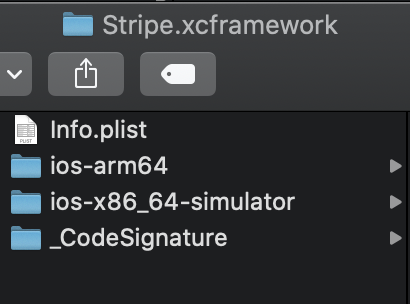
Now the problem isn't missing symbols but missing framework for Catalyst:

I can't use SPM for now, this is something we have triaged but we have some blockers so I'm using Stripe by installing manually.
_Originally posted by @fermoya in https://github.com/stripe/stripe-ios/issues/1640#issuecomment-692668787_
 fermoya
All 14 comments
Thank you for reporting! This was intentional, as I was worried about support across our various package managers for .xcframeworks, but after testing them I think it will work. We'll add the Catalyst slice back into the .xcframework with the next minor update, probably right after Xcode 12 GM is out.
Unfortunately, the Stripe3DS2.xcframework bundled with the repo is built with Xcode 11, so it won't solve your issue in #1640. If we distributed an Xcode 12-built library, the bitcode version used wouldn't be compatible with Xcode 11. But here's a workaround:
- Check out the
davidme/enable-catalystbranch. (We'll merge it intomastersoon.) - Download Stripe3DS2.xcframework from the URL in Package.swift. (This one is built with Xcode 12.)
- Drop it in ./InternalFrameworks, replacing the existing .xcframework.
- Run
./ci_scripts/export_builds.sh, and copyStripe.xcframeworkfrom the build directory.
This should get better in ~May 2021 when Apple starts requiring Xcode 12 for App Store submissions, but we'll keep monitoring for feedback — if more people run into this issue, we might start distributing separate Xcode 11 and 12 .xcframeworks.
 davidme-stripe
on 15 Sep 2020
davidme-stripe
on 15 Sep 2020
Thanks @davidme-stripe , I’ll try that. I’m not sure how many people will run into this too, it’s unusual to install a framework manually nowadays. But I’d say that developers tend to update Xcode ASAP, so in one month you might have 90% of users on Xcode 12. It would be helpful to have both binaries in case you still want to support Xcode 11
fermoya
on 15 Sep 2020
@davidme-stripe Package.swift in davidme/enable-catalyst points to version 19.9.9 of Stripe3DS which doesn’t include App Silicon symbols (catalyst arm64)
fermoya
on 15 Sep 2020
I just downloaded it again, and it looks like it does — if you decompress it, you should see an ios-arm64_x86_64-maccatalyst folder.
davidme-stripe
on 15 Sep 2020
apologies @davidme-stripe , you're right. I read too fast...
I'm having a problem, though. For starters, I need to change one of the conditions inside ./ci_scripts/export_builds.sh to let me compile with _Xcode 12_.
if ! xcodebuild -version | grep -q 'Xcode 12' &> /dev/null; then
  die "Please xcode-select a copy of Xcode 12."
fi
When executing, it gives me this error:
▸ Linking Stripe

❌  ld: building for iOS Simulator, but linking in object file built for iOS, file '/Users/fernando.moyaderivas/Downloads/stripe-ios-master/InternalFrameworks/libStripe3DS2.a' for architecture arm64


❌  clang: error: linker command failed with exit code 1 (use -v to see invocation)
I've noticed that inside ./InternalFrameworks there's a file called libStripe3DS2.a. Stripe.xcworkspace links libStripe3DS2.a, not Stripe3DS2.xcframework. To execute the script, you also need to change this in _Build Phases_. When doing that, it skips this error but there's a new one after...
fermoya
on 15 Sep 2020
Are you using the davidme/enable-catalyst branch? That one should link with Stripe3DS2.xcframework instead of libStripe3DS2.a, and it also has removed that error from export_builds.sh.
davidme-stripe
on 15 Sep 2020
Apologies again @davidme-stripe , wrong branch. Anyway, same error at the end:
*** Building scheme "StripeiOS" in Stripe.xcworkspace
Build Failed
    Task failed with exit code 65:
    /usr/bin/xcrun xcodebuild -workspace /Users/fernando.moyaderivas/Downloads/stripe-ios-davidme-enable-catalyst/Stripe.xcworkspace -scheme StripeiOS -configuration Release -sdk iphonesimulator -destination platform=iOS\ Simulator,id=918E2D6E-44AB-4AAA-BD9D-CEA39D1B575C -destination-timeout 3 ONLY_ACTIVE_ARCH=NO CODE_SIGNING_REQUIRED=NO CODE_SIGN_IDENTITY= CARTHAGE=YES build (launched in /Users/fernando.moyaderivas/Downloads/stripe-ios-davidme-enable-catalyst)

This usually indicates that project itself failed to compile. Please check the xcodebuild log for more details: /var/folders/8x/_l6zk2sx7nl1yqvbrljf7ybn4h0ft0/T/carthage-xcodebuild.0cU0nG.log
Weird enough, the workspace compiled for Any Mac, Any iOS Device and the simulator. Then in the log:
Ld /Users/fernando.moyaderivas/Library/Developer/Xcode/DerivedData/Stripe-cotvsvnxotsldyepvmvixosalwmg/Build/Intermediates.noindex/Stripe.build/Release-iphonesimulator/StripeiOS.build/Objects-normal/arm64/Binary/Stripe normal arm64 (in target 'StripeiOS' from project 'Stripe')
    cd /Users/fernando.moyaderivas/Downloads/stripe-ios-davidme-enable-catalyst
    /Users/fernando.moyaderivas/Downloads/Xcode-beta.app/Contents/Developer/Toolchains/XcodeDefault.xctoolchain/usr/bin/clang -target arm64-apple-ios11.0-simulator -dynamiclib -isysroot /Users/fernando.moyaderivas/Downloads/Xcode-beta.app/Contents/Developer/Platforms/iPhoneSimulator.platform/Developer/SDKs/iPhoneSimulator14.0.sdk -L/Users/fernando.moyaderivas/Library/Developer/Xcode/DerivedData/Stripe-cotvsvnxotsldyepvmvixosalwmg/Build/Products/Release-iphonesimulator -L/Users/fernando.moyaderivas/Downloads/stripe-ios-davidme-enable-catalyst/InternalFrameworks -F/Users/fernando.moyaderivas/Library/Developer/Xcode/DerivedData/Stripe-cotvsvnxotsldyepvmvixosalwmg/Build/Products/Release-iphonesimulator -F/Users/fernando.moyaderivas/Downloads/stripe-ios-davidme-enable-catalyst/InternalFrameworks -filelist /Users/fernando.moyaderivas/Library/Developer/Xcode/DerivedData/Stripe-cotvsvnxotsldyepvmvixosalwmg/Build/Intermediates.noindex/Stripe.build/Release-iphonesimulator/StripeiOS.build/Objects-normal/arm64/Stripe.LinkFileList -install_name @rpath/Stripe.framework/Stripe -Xlinker -rpath -Xlinker @executable_path/Frameworks -Xlinker -rpath -Xlinker @loader_path/Frameworks -dead_strip -Xlinker -object_path_lto -Xlinker /Users/fernando.moyaderivas/Library/Developer/Xcode/DerivedData/Stripe-cotvsvnxotsldyepvmvixosalwmg/Build/Intermediates.noindex/Stripe.build/Release-iphonesimulator/StripeiOS.build/Objects-normal/arm64/Stripe_lto.o -Xlinker -objc_abi_version -Xlinker 2 -fobjc-arc -fobjc-link-runtime -fapplication-extension -ObjC -lStripe3DS2-static-sim -framework Contacts -framework CoreLocation -framework Foundation -framework PassKit -framework Security -framework WebKit -compatibility_version 1 -current_version 1 -Xlinker -dependency_info -Xlinker /Users/fernando.moyaderivas/Library/Developer/Xcode/DerivedData/Stripe-cotvsvnxotsldyepvmvixosalwmg/Build/Intermediates.noindex/Stripe.build/Release-iphonesimulator/StripeiOS.build/Objects-normal/arm64/Stripe_dependency_info.dat -o /Users/fernando.moyaderivas/Library/Developer/Xcode/DerivedData/Stripe-cotvsvnxotsldyepvmvixosalwmg/Build/Intermediates.noindex/Stripe.build/Release-iphonesimulator/StripeiOS.build/Objects-normal/arm64/Binary/Stripe
ld: library not found for -lStripe3DS2-static-sim
clang: error: linker command failed with exit code 1 (use -v to see invocation)

** BUILD FAILED **


The following build commands failed:
    Ld /Users/fernando.moyaderivas/Library/Developer/Xcode/DerivedData/Stripe-cotvsvnxotsldyepvmvixosalwmg/Build/Intermediates.noindex/Stripe.build/Release-iphonesimulator/StripeiOS.build/Objects-normal/arm64/Binary/Stripe normal arm64
(1 failure)
Ah, sorry, I'm not sure why that error isn't happening with Swift Package Manager. You can work around this by renaming each of the 3 .a slice files in the Stripe3DS2.xcframework to libStripe3DS2.a (removing the -static-sim bits), then modifying the 3 LibraryPath keys in Stripe3DS2.xcframework/Info.plist to libStripe3DS2.a as well.
I'll build a new .xcframework with these changes soon.
davidme-stripe
on 15 Sep 2020
Here's an updated Stripe3DS2.xcframework built with Xcode 12 GM.
It looks like Xcode 12 GM removed the macOS Big Sur SDK, so it no longer builds a Catalyst/arm64 slice. It still builds an arm64 sim slice, though.
davidme-stripe
on 16 Sep 2020
I think I can't build this myself. At the end of the script, it tries to sign the the archives before creating the xcframework. I've commented those lines (101-109 and 116-144) and the xcframework gets generated but I'm not sure if it should have been signed or not. This could lead to problems on submission to the App Store
fermoya
on 16 Sep 2020
I don't think that matters: The final app is signed by you at the archive step, and the signature on any attached frameworks is overwritten.
davidme-stripe
on 16 Sep 2020
@davidme-stripe is this meant to be merged into master? As soon as you start using the Xcode 12, at some point they’ll reenable the Big Sur compilation and you’ll start compiling for both Apple Silicon and Intel.
fermoya
on 17 Sep 2020
Yep! We plan to distribute compiled binaries for Catalyst/arm64 as soon as Apple re-enables the Big Sur SDK in Xcode.
davidme-stripe
on 17 Sep 2020
Please try Stripe 20.1.0, it should fix this. The InternalFrameworks/Stripe3DS2.xcframework in the repo supports both Xcode 11 and 12. The pre-compiled Stripe.xcframework.zip on the Releases page is built with Xcode 12, and we're also shipping a Stripe-Xcode11.xcframework.zip for Xcode 11.
davidme-stripe
on 16 Oct 2020
Related issues
davidme-stripe
·
6Comments
 tommanuel92
·
4Comments
tommanuel92
·
4Comments
 marcglasberg
·
7Comments
marcglasberg
·
7Comments
 levisbotio
·
6Comments
levisbotio
·
6Comments
 imhugofonseca
·
7Comments
imhugofonseca
·
7Comments
Most helpful comment
Please try Stripe 20.1.0, it should fix this. The
InternalFrameworks/Stripe3DS2.xcframeworkin the repo supports both Xcode 11 and 12. The pre-compiled Stripe.xcframework.zip on the Releases page is built with Xcode 12, and we're also shipping a Stripe-Xcode11.xcframework.zip for Xcode 11.