Stripe-android: Incorrect Google Pay with the Payment Intents API Documentation
Contrast to the Stripe documentation here:
https://stripe.com/docs/payments/payment-intents/android#using-google-pay-with-the-payment-intents-api
There is no setToken(tokenString) method in PaymentMethodCreateParams.Card.Builder class. See:
https://github.com/stripe/stripe-android/blob/v9.2.0/stripe/src/main/java/com/stripe/android/model/PaymentMethodCreateParams.java
 jackcsk
All 22 comments
@jackcsk thank you for pointing this out. I'll update the docs to use the static create method for tokens, PaymentMethodCreateParams.Card#create(String)
 mshafrir-stripe
on 11 Jun 2019
mshafrir-stripe
on 11 Jun 2019
@jackcsk https://stripe.com/docs/payments/payment-intents/android#using-google-pay-with-the-payment-intents-api has now been updated
mshafrir-stripe
on 11 Jun 2019
@jackcsk FYI I just published 10.2.0, which adds the method PaymentMethodCreateParams#createFromGooglePay(JSONObject) to facilitate creating a PaymentMethodCreateParams from a Google Pay PaymentData JSONObject. This method ensures that any available billing details are included in the PaymentMethod. I will also update our Google Pay integration docs.
mshafrir-stripe
on 5 Aug 2019
Thanks @mshafrir-stripe. Do you know if I can apply the same method call for Samsung Pay?
jackcsk
on 6 Aug 2019
@jackcsk I'm not familiar with Samsung Pay
mshafrir-stripe
on 7 Aug 2019
Thanks @mshafrir-stripe . Further question on Google Pay usage.
Our scenario is: mobile app accept Google Pay, using Stripe as payment gateway. Server receives callback from stripe when the transaction is passed.
After calling stripe.createPaymentMethod(paymentMethodCreateParams, apiResultCallback), I created the confirmPaymentIntentParams by calling ConfirmPaymentIntentParams.createWithPaymentMethodCreateParams
and then call `stripe.confirmPayment(activity, confirmedPaymentIntentParams)
I've observed the transaction on the dashboard, and the last transaction:
POST /v1/payment_intents/<pi redacted>/confirm returns HTTP 400 with the following error:
The token <token redacted> has already been used. Each token can only be used once to create a source.
My question is:
- Is the usage above the right way to handle
paymentMethodreceived fromApiResultCallback? - why do I receive the "token has already been used" error? I've searched the dashboard and it was unique
jackcsk
on 8 Aug 2019
Another approach is - can stripe provide a full Google Pay example that captures the transaction, just to ensure that I am doing it the right way?
jackcsk
on 8 Aug 2019
@jackcsk if you are creating a ConfirmPaymentIntentParams object using PaymentMethodCreateParams, you don’t need to call stripe.createPaymentMethod() in advance. Simply get the token from Google Pay, create the ConfirmPaymentIntentParams object, then pass it to stripe.confirmPayment().
I like your idea of a full example app for Google Pay. This is something we can add.
mshafrir-stripe
on 8 Aug 2019
thx @mshafrir-stripe : after I made the change as you suggested (using ConfirmPAymentIntentParams, the transaction works successfully.
Just to confirm, does both approach (i.e. stripe.createPaymentMethod() and ConfirmPaymentIntentParams require launching web browser for 3DS)?
We want to reduce the hurdles users have to go through on shopping via the app, since Google Pay usually doesn't require OTP for 3DS verification
(the web browser just prompt that the transaction is done without the need for further verification)
jackcsk
on 8 Aug 2019
@jackcsk I'm glad to hear you worked through your issues. Payment authentication will only trigger when required, and will be handled automatically for you when it is required (you won't need to manage launching a web browser yourself).
mshafrir-stripe
on 8 Aug 2019
Hi Jackcsk,
Can you help me to fix the google pay issue? Me also facing the same issue. Thank you.
 RAJESHKUMAR21TL
on 14 Aug 2020
RAJESHKUMAR21TL
on 14 Aug 2020
@RAJESHKUMAR21TL hello!
Could you say more, what exact issue are you facing? What is the error message you get back?
Any small code snippets you could paste here to show where the error is occurring would be helpful!
 aliriaz-stripe
on 14 Aug 2020
aliriaz-stripe
on 14 Aug 2020
https://stripe.com/docs/google-pay
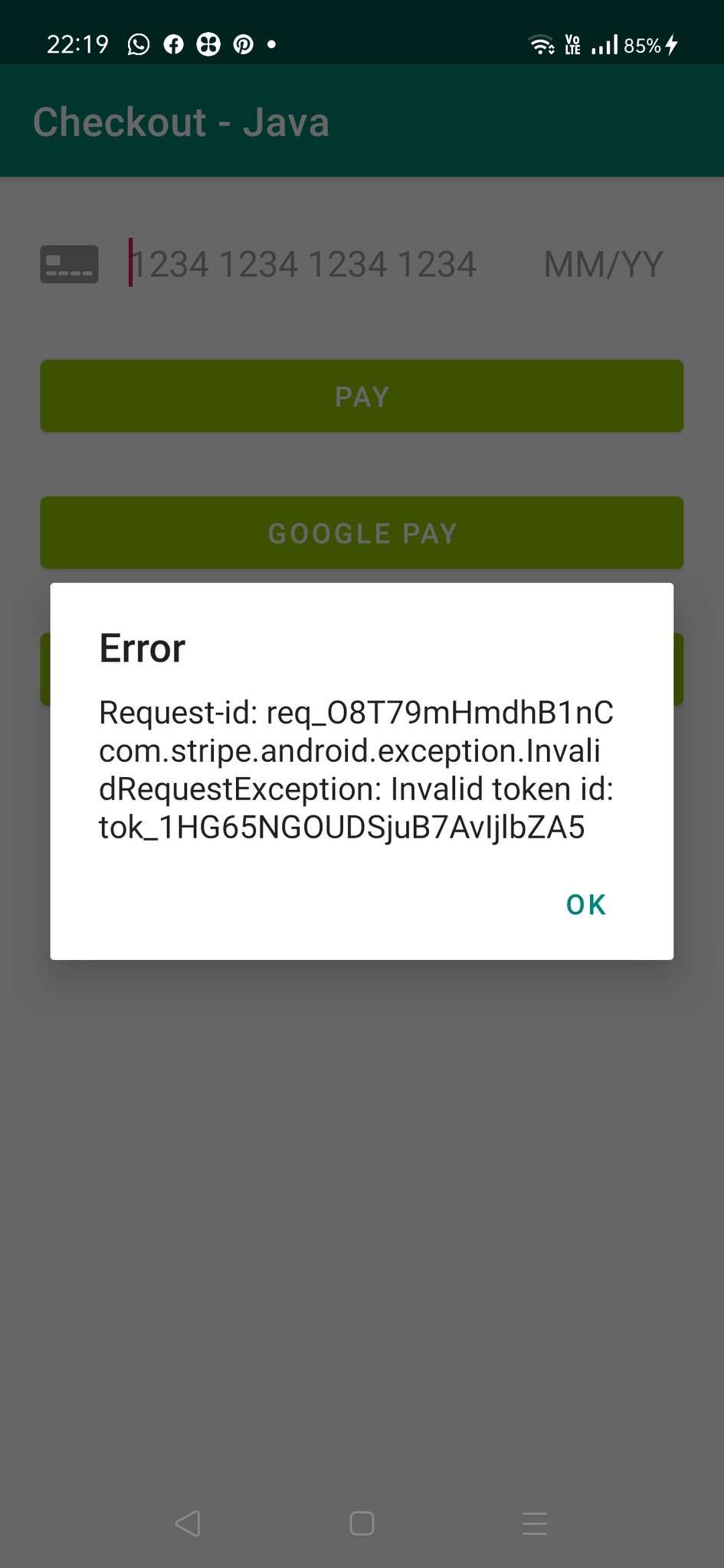
I followed this above link I could not make it because after google payment is done from android the status is not getting updated in server and we are not able to get payment status of it. After I see this issues/1085 I tried with the below code but got invalid token error. Please look at the screen attached
stripe = new Stripe(
getApplicationContext(),
Objects.requireNonNull(stripePublishableKey),vendorStripeID
);
    final PaymentMethodCreateParams paymentMethodCreateParams =

            PaymentMethodCreateParams.createFromGooglePay(
                    new JSONObject(paymentData.toJson()));


    ConfirmPaymentIntentParams confirmParams = ConfirmPaymentIntentParams
            .createWithPaymentMethodCreateParams(paymentMethodCreateParams,paymentIntentClientSecret);
    stripe.confirmPayment(this, confirmParams);
RAJESHKUMAR21TL
on 14 Aug 2020
@RAJESHKUMAR21TL ah I think I know what the issue is, it is Connect related, in that your Google Pay token is created on your Platform account but you want to use it on a Connect account
What version of the Android SDK are you on?
aliriaz-stripe
on 14 Aug 2020
@RAJESHKUMAR21TL ah I think I know what the issue is, it is Connect related, in that your Google Pay token is created on your Platform account but you want to use it on a Connect account
What version of the Android SDK are you on?
SDK version is 29
RAJESHKUMAR21TL
on 14 Aug 2020
@RAJESHKUMAR21TL sorry I meant the stripe-android SDK version (e.g Stripe Android is v15.1.0 latest)
aliriaz-stripe
on 14 Aug 2020
implementation 'com.stripe:stripe-android:15.0.2'
and
implementation 'com.google.android.gms:play-services-wallet:18.0.0'
RAJESHKUMAR21TL
on 17 Aug 2020
@RAJESHKUMAR21TL so from what I can tell, when your Google Pay token is initially created, it is created on your Platform account.
However, in your later request to confirm the PaymentIntent, your integration is using a PaymentIntent that was created on the Connect account, and your stripe-android SDK is also initialized as the Connect account in
stripe = new Stripe(
getApplicationContext(),
Objects.requireNonNull(stripePublishableKey),vendorStripeID
);
Can you double check that when you call your createPaymentDataRequest , you construct GooglePayConfig with the Platform's publishable key, and the Connect account's ID e.g. acct_123?
new GooglePayConfig("pk_test_123", "acct_1234").getTokenizationSpecification();
aliriaz-stripe
on 17 Aug 2020
@aliriaz-stripe Thanks a lot. It is working now!
RAJESHKUMAR21TL
on 18 Aug 2020
@aliriaz-stripe I am facing an issue in card payment for android,
I need to sent billing details like owner name, email, phone number. I didn't find any solution for this in the strip SDK dock.
Following is my code to initiate a card payment
PaymentMethodCreateParams params = cardInputWidget.getPaymentMethodCreateParams();
if (params != null) {
               ConfirmPaymentIntentParams confirmParams = ConfirmPaymentIntentParams
                        .createWithPaymentMethodCreateParams(params, paymentIntentClientSecret);
                stripe.confirmPayment(Context, confirmParams);
}
where can I add user details?
in ios we used -(let paymentMethodParams = STPPaymentMethodParams(card: cardParams, billingDetails: getBillingDetails(), metadata: nil)) this code to set billing details.
The main reason for this I need to show the owner details in the strip vendor dashboard, payment created with google pay showing owner details but card payment not showing any info.
 soorajaj
on 27 Aug 2020
soorajaj
on 27 Aug 2020
@RAJESHKUMAR21TL so from what I can tell, when your Google Pay token is initially created, it is created on your Platform account.
However, in your later request to confirm the PaymentIntent, your integration is using a PaymentIntent that was created on the Connect account, and your stripe-android SDK is also initialized as the Connect account in
stripe = new Stripe(
getApplicationContext(),
Objects.requireNonNull(stripePublishableKey),vendorStripeID
);
Can you double check that when you call your
createPaymentDataRequest, you constructGooglePayConfigwith the Platform's publishable key, and the Connect account's ID e.g. acct_123?
new GooglePayConfig("pk_test_123", "acct_1234").getTokenizationSpecification();
The initialization of GooglePayConfig with stripeAccountID resolved the issue for me. Thanks a lot.
 sushmasatish
on 2 Jan 2021
sushmasatish
on 2 Jan 2021
Getting null pointer exception error (PaymentMethodCreateParams doesn't getting card value ) How to fix.
PaymentMethodCreateParams(type=Card, card=Card(number=null, expiryMonth=null, expiryYear=null, cvc=null, token=tok_1IFvBNKxupsjK3gAwqIq2xXz, attribution=[GooglePay]), ideal=null, fpx=null, sepaDebit=null, auBecsDebit=null, bacsDebit=null, sofort=null, upi=null, netbanking=null, billingDetails=BillingDetails(address=null, [email protected], name=null, phone=null), metadata=null, productUsage=[])
 Irfanhaidermomin
on 29 Jan 2021
Irfanhaidermomin
on 29 Jan 2021
Related issues
 GuillaumeWrobel
·
8Comments
GuillaumeWrobel
·
8Comments
 freszu
·
3Comments
freszu
·
3Comments
 paynd
·
9Comments
paynd
·
9Comments
 dlambeth
·
6Comments
dlambeth
·
6Comments
 odedharth
·
10Comments
odedharth
·
10Comments
Most helpful comment
@RAJESHKUMAR21TL so from what I can tell, when your Google Pay token is initially created, it is created on your Platform account.
However, in your later request to confirm the PaymentIntent, your integration is using a PaymentIntent that was created on the Connect account, and your stripe-android SDK is also initialized as the Connect account in
Can you double check that when you call your
createPaymentDataRequest, you constructGooglePayConfigwith the Platform's publishable key, and the Connect account's ID e.g. acct_123?https://stripe.dev/stripe-android/com/stripe/android/GooglePayConfig.html#getTokenizationSpecification--
new GooglePayConfig("pk_test_123", "acct_1234").getTokenizationSpecification();