Streetmerchant: npm ERR! missing script: start
Description
re installed everything and now this message
npm ERR! missing script: start
npm ERR! A complete log of this run can be found in:
npm ERR!     C:\Users\...
------------------------------------------------------------------
package.json

{
  "name": "nvidia-snatcher",
  "description": "🔮 For all your Nvidia needs",
  "main": "src/index.ts",
  "scripts": {
    "all": "npm run build && npm run lint",
    "build": "tsc",
    "lint": "xo",
    "lint:fix": "xo --fix",
    "start": "npm run build && node build/index.js",
    "start:dev": "nodemon --config nodemon.json",
    "test:notification": "npm run build && node build/__test__/notification-test.js"
  },
  "repository": {
    "type": "git",
    "url": "git+https://github.com/jef/nvidia-snatcher.git"
  },
  "keywords": [],
  "author": "jef",
  "license": "MIT",
  "bugs": {
    "url": "https://github.com/jef/nvidia-snatcher/issues"
Possible solution
 480s
480s
All 30 comments
I have this issue too, im not sure how to fix it.
 ViperRegained
on 2 Nov 2020
ViperRegained
on 2 Nov 2020
use npm i && npm run start
 jef
on 2 Nov 2020
jef
on 2 Nov 2020
The same issue still persists for me. Not sure about the other guy though.
ViperRegained
on 2 Nov 2020
@ViperRegained, can you give me the output?
jef
on 2 Nov 2020
"ERR: missing script: start"
A complete log of this run can be found in:
ViperRegained
on 2 Nov 2020
When i type npm i it says "up to date in 406ms"
ViperRegained
on 2 Nov 2020
When i type npm i it says "up to date in 406ms"
npm should give something like this:
❯ npm

Usage: npm <command>

where <command> is one of:
    access, adduser, audit, bin, bugs, c, cache, ci, cit,
    clean-install, clean-install-test, completion, config,
    create, ddp, dedupe, deprecate, dist-tag, docs, doctor,
    edit, explore, fund, get, help, help-search, hook, i, init,
    install, install-ci-test, install-test, it, link, list, ln,
    login, logout, ls, org, outdated, owner, pack, ping, prefix,
    profile, prune, publish, rb, rebuild, repo, restart, root,
    run, run-script, s, se, search, set, shrinkwrap, star,
    stars, start, stop, t, team, test, token, tst, un,
    uninstall, unpublish, unstar, up, update, v, version, view,
    whoami

npm <command> -h  quick help on <command>
npm -l            display full usage info
npm help <term>   search for help on <term>
npm help npm      involved overview
I would make sure that your installation was correct. And perhaps a restart if you're on Windows.
jef
on 2 Nov 2020
Going to close this issue as it's not a bug in the program, but rather user error (not intended to be harsh). Please feel free to continue the communication as I will try to help!
jef
on 2 Nov 2020
Ok, thank you for your help!
ViperRegained
on 2 Nov 2020
You're welcome, did you get it working on your end?
jef
on 2 Nov 2020
No sadly, im not sure whats causing it. I just didnt want to bother you.
ViperRegained
on 2 Nov 2020
It's okay. Continue to ask. I get to these questions as best I can, but it also allows others to help! I'm actually going to open back up for visibility so others can comment.
jef
on 2 Nov 2020
Oh ok. Thank you! Im just trying to think of whats causing the issue. Ill try to re install everything again from scratch.
ViperRegained
on 2 Nov 2020
Sounds good! Unfortunately I'm not well versed in Windows side of things, only use it to play games mostly. Let me know if it ends up working. Otherwise, we could try to figure out what's going on.
jef
on 2 Nov 2020
Yeah still the same issue, even after installing it freshly. I followed the instructions on the page. Do I have to make some sort of bat file that will load something up?
ViperRegained
on 2 Nov 2020
0 verbose cli [
0 verbose cli   'C:\\Program Files\\nodejs\\node.exe',
0 verbose cli   'C:\\Program Files\\nodejs\\node_modules\\npm\\bin\\npm-cli.js',
0 verbose cli   'run',
0 verbose cli   'start'
0 verbose cli ]
1 info using [email protected]
2 info using [email protected]
3 timing config:load:defaults Completed in 15ms
4 timing config:load:file:C:\Program Files\nodejs\node_modules\npm\npmrc Completed in 0ms
5 timing config:load:builtin Completed in 0ms
6 timing config:load:cli Completed in 0ms
7 timing config:load:env Completed in 0ms
8 timing config:load:project Completed in 0ms
9 timing config:load:file:C:\Users\Administrator\.npmrc Completed in 0ms
10 timing config:load:user Completed in 0ms
11 timing config:load:file:C:\Users\Administrator\AppData\Roaming\npm\etc\npmrc Completed in 0ms
12 timing config:load:global Completed in 0ms
13 timing config:load:cafile Completed in 0ms
14 timing config:load:validate Completed in 0ms
15 timing config:load:setUserAgent Completed in 0ms
16 timing config:load:setEnvs Completed in 0ms
17 timing config:load Completed in 15ms
18 verbose npm-session b0ced3cdce59ceb4
19 timing npm:load Completed in 15ms
20 timing command:run-script Completed in 0ms
21 verbose stack Error: missing script: start
21 verbose stack     at runScript (C:\Program Files\nodejs\node_modules\npm\lib\run-script.js:53:11)
22 verbose cwd C:\Users\Administrator
23 verbose Windows_NT 6.3.9600
24 verbose argv "C:\\Program Files\\nodejs\\node.exe" "C:\\Program Files\\nodejs\\node_modules\\npm\\bin\\npm-cli.js" "run" "start"
25 verbose node v15.0.1
26 verbose npm  v7.0.3
27 error missing script: start
28 verbose exit 1
cwd C:\Users\Administrator
Looks like you're not in the right folder. Make sure you run the npm i and npm run start inside the nvidia-snatcher folder.
jef
on 2 Nov 2020
Thank you! I think that might be the issue. Sorry to be a pest but how do i do it inside the folder? Thanks!
ViperRegained
on 2 Nov 2020
No worries!
What you wanna do is CD into it.
Some basic instructions are found here: https://github.com/jef/nvidia-snatcher/wiki/Installation:-Windows
jef
on 2 Nov 2020
Thank you! Its working now. Only one question. I have it started and its only searching the nvidia store. I renamed the .env-example file and re named to to config.env and I have listed the stores like this: STORES="amazon,asus,bandh,bestbuy,evga,microcenter,newegg,nvidia,officedepot,zotac"
Have I done something wrong? Thank you!
Edit; I renamed it to just .env using command prompt and still no change.
ViperRegained
on 3 Nov 2020
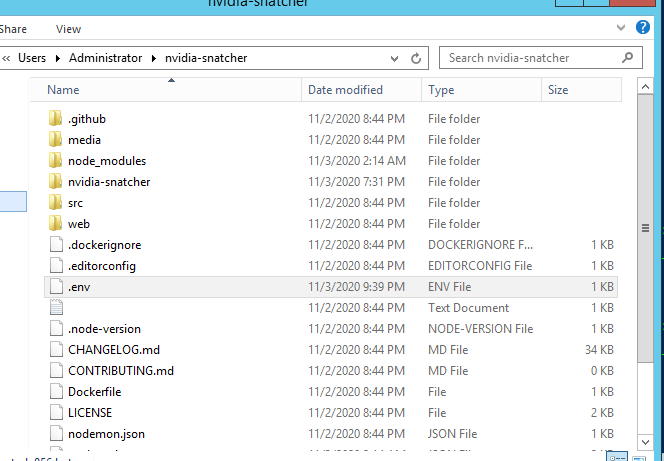
Make sure the .env file is file type ENV vs TXT.
jef
on 3 Nov 2020
It says its an env file, ill send a picture.
ViperRegained
on 3 Nov 2020
Thank you so much for your help by the way, I know im being a pest.
ViperRegained
on 3 Nov 2020
No problem! Really. This is be good to pin after we're done solving.
Can you post your whole .env? Redacted any personal information.
jef
on 3 Nov 2020
# ** All configuration variables are optional **
# Read https://github.com/jef/nvidia-snatcher#customization for help on customizing this file
#############################################################################################

COUNTRY="usa"
DESKTOP_NOTIFICATIONS=false
DISCORD_NOTIFY_GROUP=@stock
DISCORD_WEB_HOOK=************
EMAIL_PASSWORD=************
EMAIL_TO=*********
EMAIL_USERNAME=*******
IN_STOCK_WAIT_TIME=20
MAX_PRICE_SERIES_3070=
MAX_PRICE_SERIES_3080=900
MICROCENTER_LOCATION=houston
PHONE_CARRIER=att,att
PHONE_NUMBER=******************
PLAY_SOUND=
STORES="amazon,asus,bandh,bestbuy,evga,microcenter,newegg,nvidia,officedepot,zotac"
USER_AGENT=
I deleted the other things that I wasnt using. That didnt seem to be the issue before though.
ViperRegained
on 3 Nov 2020
Overall, it looks pretty good. One thing I would suggest is getting the id for the DISCORD_NOTIFY_GROUP, but that's outside of your problem.
Oh thing I would do is get your user agent.
Next thing I would do is copy this .env, back it up on your desktop or something, then use something like this:
STORES=amazon,bestbuy,zotac
USER_AGENT=your results from above
and see if you get more than nvidia.
jef
on 3 Nov 2020
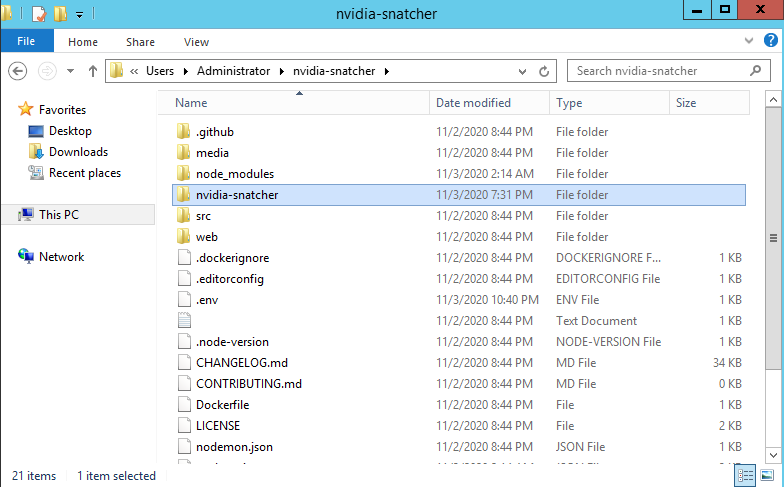
Thank you! I think I figured out what happened, For people in the future what happened was that my brain was turned off and I was saving the .env file in the wrong place. I had to go to the nvidia-snatcher file inside of the current nvidia snatcher file I was already in. Here is a picture so you can see what file to get to:
Edit; This happened to me because I was an idiot and saved the snatcher file inside the currently existing snatcher files.
ViperRegained
on 3 Nov 2020
Could be relevant to https://github.com/jef/nvidia-snatcher/issues/658
jef
on 3 Nov 2020
Glad to hear it's finally working.
jef
on 3 Nov 2020
Related issues
 AlphaOmega2020
·
4Comments
AlphaOmega2020
·
4Comments
AlphaOmega2020
·
4Comments
AlphaOmega2020
·
4Comments
 wdrury-uk
·
4Comments
wdrury-uk
·
4Comments
 RealityMyx
·
3Comments
RealityMyx
·
3Comments
 gahmee
·
3Comments
gahmee
·
3Comments
Most helpful comment
Thank you! I think I figured out what happened, For people in the future what happened was that my brain was turned off and I was saving the .env file in the wrong place. I had to go to the nvidia-snatcher file inside of the current nvidia snatcher file I was already in. Here is a picture so you can see what file to get to:
Edit; This happened to me because I was an idiot and saved the snatcher file inside the currently existing snatcher files.
