Streetmerchant: Issues running from Digital Ocean server
Nvidia-snatcher is running fine on my laptop but I'm attempting to get it setup from a Digital Ocean droplet and I'm encountering issues.
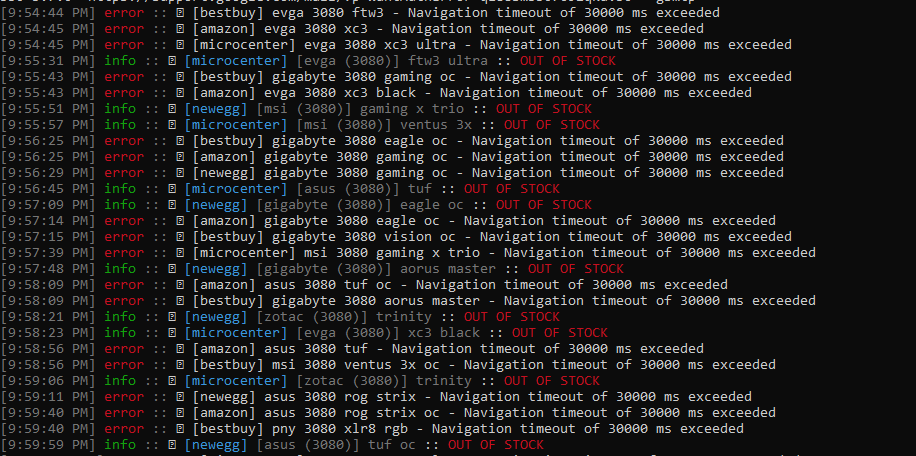
Right off the bat, I noticed the frequency of requests is much lower with about 5 being made each minute.
Likewise, between my selected stores: "amazon,bestbuy,microcenter,newegg", only newegg and microcenter don't timeout but even then that's only 25% of the time.
I noticed in #501 it was mentioned that the stores were most likely blocking the ip range for cloud servers. How would I use the proxy option in the .env file to get around that? What would I need to use to set it up on my end?
Likewise, since Microcenter and Newegg only occasionally work, is there a different issues preventing them from working every time?
Output
 NicolasNewman
All 9 comments
I could potentially see a couple problems here:
- IP blocking like you said (or special rate limiting for those IPs)
- The RAM on the droplet is so low (< 1GB), that there are potential memory issues
I would consider trying on your local computer first to ensure that config is correct, then go from there.
There is some documentation on proxying, but I don't use one, so I don't know much about it. (Sorry.) But there are issues out there that have similar questions I believe.
 jef
on 30 Oct 2020
jef
on 30 Oct 2020
Set the timeout to 0 and that will fix your issue
 ibowline
on 31 Oct 2020
ibowline
on 31 Oct 2020
How would setting the timeout to zero fix that? Wouldn't they just time out instantly and never actually check? And I see in the .env file there is PROXY_ADDRESS and PROXY_PORT. Is there any documentation on how I can set that up, assuming it would mask my ip?
NicolasNewman
on 31 Oct 2020
digital ocean really limits you, I'd set it up on AWS. if you want to use a proxy, lookup scrapoxy. You will set it up in another droplet and it will rotate your ip for you. Setting the option to 0 makes it not time out giving it enough time to respond back.
ibowline
on 31 Oct 2020
Is there any documentation on how I can set that up, assuming it would mask my ip?
Unfortunately, no. But it should be whatever your proxy's IP and port is.
jef
on 2 Nov 2020
https://scrapoxy.readthedocs.io/en/master/standard/providers/digitalocean/index.html not sure if this is what you meant. It can be set up in AWS as well.
ibowline
on 2 Nov 2020
digital ocean really limits you, I'd set it up on AWS. if you want to use a proxy, lookup scrapoxy. You will set it up in another droplet and it will rotate your ip for you. Setting the option to 0 makes it not time out giving it enough time to respond back.
I tried AWS. Same thing. I feel like the sites themselves are blacklisting AWS/DO sets of CIDR ranges. But I could be wrong. I just decided to go the route of running it from my server at my house. Works so much better.
 CoreyJ87
on 2 Nov 2020
CoreyJ87
on 2 Nov 2020
I feel like the sites themselves are blacklisting AWS/DO sets of CIDR ranges. But I could be wrong.
Most likely not. This is common. Especially through selinium/puppeteer, etc (i.e., not through API + tokens).
I just decided to go the route of running it from my server at my house. Works so much better.
This was the main intent of nvidia-snatcher and probably will remain to be for awhile.
Good luck!
jef
on 2 Nov 2020
I'm going to close this out due to this being more than likely an issue with IP denied listings. Not something on the program's end that it can do to combat this other than a. not use chrome as a backend (unlikely to change in the near future) or b. use a proxy; in which case, is feasible now.
jef
on 3 Nov 2020
Related issues
 lngchn
·
3Comments
lngchn
·
3Comments
 wdrury-uk
·
4Comments
wdrury-uk
·
4Comments
 louij2
·
3Comments
louij2
·
3Comments
 FawnPat
·
4Comments
FawnPat
·
4Comments
 poly-mathic
·
5Comments
poly-mathic
·
5Comments