Streetmerchant: Navigation Timeout of X exceeded
Description
I'm on Windows 10, using WSL2 to run an ubuntu distro.
Config:
BROWSER_TRUSTED="true"
COUNTRY="netherlands"
DISCORD_NOTIFY_GROUP=""
DISCORD_WEB_HOOK=""
EMAIL_USERNAME=""
EMAIL_TO=""
EMAIL_PASSWORD=""
HEADLESS="true"
IN_STOCK_WAIT_TIME=""
LOG_LEVEL="debug"
LOW_BANDWIDTH=""
MICROCENTER_LOCATION=""
NVIDIA_ADD_TO_CART_ATTEMPTS=""
NVIDIA_SESSION_TTL=""
OPEN_BROWSER=""
PAGE_BACKOFF_MIN=""
PAGE_BACKOFF_MAX=""
PAGE_SLEEP_MIN=""
PAGE_SLEEP_MAX=""
PAGE_TIMEOUT="40000"
PHONE_NUMBER=""
PHONE_CARRIER=""
PLAY_SOUND=""
PROXY_ADDRESS=""
PROXY_PORT=""
PUSHBULLET=""
PUSHOVER_TOKEN=""
PUSHOVER_USER=""
PUSHOVER_PRIORITY=""
SCREENSHOT="false"
SHOW_ONLY_BRANDS=""
SHOW_ONLY_MODELS=""
SHOW_ONLY_SERIES="3080"
SLACK_CHANNEL=""
SLACK_TOKEN=""
STORES="nvidia,nvidia-api"
TELEGRAM_ACCESS_TOKEN="my token"
TELEGRAM_CHAT_ID="my id"
TWILIO_ACCOUNT_SID=""
TWILIO_AUTH_TOKEN=""
TWILIO_FROM_NUMBER=""
TWILIO_TO_NUMBER=""
TWITTER_CONSUMER_KEY=""
TWITTER_CONSUMER_SECRET=""
TWITTER_ACCESS_TOKEN_KEY=""
TWITTER_ACCESS_TOKEN_SECRET=""
TWITTER_TWEET_TAGS=""
USER_AGENT="Mozilla/5.0 (Windows NT 10.0; WOW64) AppleWebKit/537.36 (KHTML, like Gecko) Chrome/85.0.4183.84 Safari/537.36"
After 6 "Out of stocks" for the nvidia store it always gives back "Navigation Timeout of X exceeded"
as shown in the screenshot: https://imgur.com/a/NWwv0Vv
and one with debug logging on: https://imgur.com/a/pkcAON8
 Kelsinga
All 23 comments
Nvidia has problems in general, but also looking at your user agent, I doubt that's what the WSL uses to look things up. This could be potentially cause problems.
 jef
on 2 Oct 2020
jef
on 2 Oct 2020
Hello,
i have the same problem with a fresh install this day on ubuntu. 6 response "OUT OF STOCKS" then "Navigation timeout of 30000 ms exceeded". If I interrupt the process and restart it, same result after 6 responses.
 MeloMeli
on 2 Oct 2020
MeloMeli
on 2 Oct 2020
Same Here. I think I had the best result at PAGE_TIMEOUT=""6"0000" settings but still. I stopped have the issue yesterday when I set the NVIDIA_SESSION_TTL= "60000" but that is the default and for the API not sure why it helped.
 Droz23-Real
on 2 Oct 2020
Droz23-Real
on 2 Oct 2020
Same Here. I think I had the best result at PAGE_TIMEOUT=""6"0000" settings but still. I stopped have the issue yesterday when I set the NVIDIA_SESSION_TTL= "60000" but that is the default and for the API not sure why it helped.
I tried this, but sadly does not help
Kelsinga
on 3 Oct 2020
Hello,
i have the same problem with a fresh install this day on ubuntu. 6 response "OUT OF STOCKS" then "Navigation timeout of 30000 ms exceeded". If I interrupt the process and restart it, same result after 6 responses.
exactly this, 6 tries and it fails. restart fixes it
Kelsinga
on 3 Oct 2020
Nvidia has problems in general, but also looking at your user agent, I doubt that's what the WSL uses to look things up. This could be potentially cause problems.
default agent doesn't help
Kelsinga
on 3 Oct 2020
After changing my config to:
PAGE_SLEEP_MIN="1000"
PAGE_SLEEP_MAX="3000"
PAGE_TIMEOUT="20000"
I noticed I get more "OUT_OF_STOCK" notifications before it starts saying "navigation timeout exceeded"
https://imgur.com/a/orHpMHM
It seems to be some issue that starts after 2-3 minutes.
Kelsinga
on 4 Oct 2020
I have the same problem running on a headless centos 8 installation.
 antolu
on 5 Oct 2020
antolu
on 5 Oct 2020
Nvidia is blocking your requests. This is related most likely related to browser caching/cookies (maybe, just a guess).
Will look into it later.
As for nvidia-api, you will continually get 504s until their API is back online.
jef
on 5 Oct 2020
was having these issues running gentoo, so i hacked the lookup function where it displays the error to clear browser cookies cache from the page context. not a javascript/typescript person at all, so don't yell at me if this sucks:
https://gist.github.com/resinbeard/bb4f597f53fa537f359c2a45a13d3453
 resinbeard
on 6 Oct 2020
resinbeard
on 6 Oct 2020
was having these issues running gentoo, so i hacked the lookup function where it displays the error to clear browser cookies cache from the page context. not a javascript/typescript person at all, so don't yell at me if this sucks:
https://gist.github.com/resinbeard/bb4f597f53fa537f359c2a45a13d3453
and did it fix it?
Kelsinga
on 6 Oct 2020
looks like it, i see the timeout exceeded error but 'OUT OF STOCK' messages resume logging
EDIT: i'm watching for 3090 FE's on the official nvidia store
EDIT: i think it would be a good idea to lower the timeout length when trying to compete on launch days
resinbeard
on 6 Oct 2020
I applied the fix and seems to be working mostly.
sometimes an exceeded, but stocks are showing again
@jef resinbeard seems to have the, mostly, fix
Kelsinga
on 6 Oct 2020
I'm scraping "amazon-de" and "nvidia" stores, and I get loads of "_Navigation timeout of 30000 ms exceeded_" errors. Please advise.
 Rusna
on 6 Oct 2020
Rusna
on 6 Oct 2020
Good evening,
I tested with additional lines proposed by @resinbeard and I confirm, it seems more stable even if we still have some timeout.
Before modification: 6 to 8 interrogations then always in timeout
After modification: 3 random timeouts on more than 20 interrogations and the interrogations continue
MeloMeli
on 6 Oct 2020
How do I apply the fix?
Rusna
on 7 Oct 2020
@Rusna
the gist i posted has everything you need. it's known as a 'git diff'. it describes changes made to code in a git repository.
on line 1, you will see the file that's been modified.
on line 5, you will see the line numbers that have been modified
on lines 11-13, you will see the appended changes marked with a '+' on the left-most side.
(ignore line 10, i hastily re-indented this line with white space and there are no functional changes)
so, the diff is telling you to:
modify file 'src/store/lookup.ts', add the three new lines (omitting the '+') below line 55
after you save, run npm start. nvidia-snatcher should rebuild and begin running.
if you still have trouble DM me so we don't clutter up this issue thread.
resinbeard
on 7 Oct 2020
was having these issues running gentoo, so i hacked the lookup function where it displays the error to clear browser cookies cache from the page context. not a javascript/typescript person at all, so don't yell at me if this sucks:
I think this is the right approach. Looks like they also took this approach in the documentation.
jef
on 10 Oct 2020
I got the same issue and fixed it with the linked gist.
Is there any reason why this is not integrated? I mean it is trivial, but I can share the result with a merge request?
 eckig
on 11 Oct 2020
eckig
on 11 Oct 2020
no opinion, but nvidia has offloaded online sales to best buy for the time being and this change might become irrelevant.
resinbeard
on 11 Oct 2020
This happens on more than just the nvidia store. In my case, both newegg and bestbuy, eventually. Haven't tried the fix here since I'm using the docker build.
 dwatley
on 12 Oct 2020
dwatley
on 12 Oct 2020
I got the same issue and fixed it with the linked gist.
Is there any reason why this is not integrated? I mean it is trivial, but I can share the result with a merge request?
Yeah, please do. I work multiple jobs so getting everything in is pretty difficult for me.
jef
on 13 Oct 2020
hey what exactly is PAGE_TIMEOUT/navigation timeout?
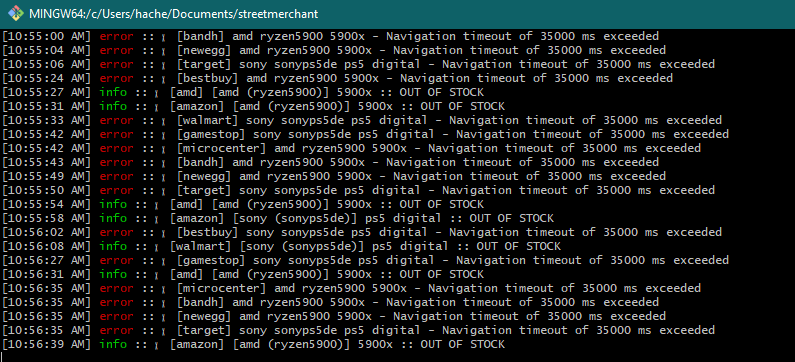
im getting a lot of these errors when scraping for 5900x and ps5
 mooditech
on 19 Nov 2020
mooditech
on 19 Nov 2020
Related issues
 gahmee
·
3Comments
gahmee
·
3Comments
 flatspotting
·
4Comments
flatspotting
·
4Comments
 zhirzzh
·
5Comments
zhirzzh
·
5Comments
 RealityMyx
·
3Comments
RealityMyx
·
3Comments
 ATLTVHEAD
·
4Comments
ATLTVHEAD
·
4Comments
Most helpful comment
was having these issues running gentoo, so i hacked the lookup function where it displays the error to clear browser cookies cache from the page context. not a javascript/typescript person at all, so don't yell at me if this sucks:
https://gist.github.com/resinbeard/bb4f597f53fa537f359c2a45a13d3453