Streetmerchant: Snatcher gets stuck if more than one store exceeds navigation timeout
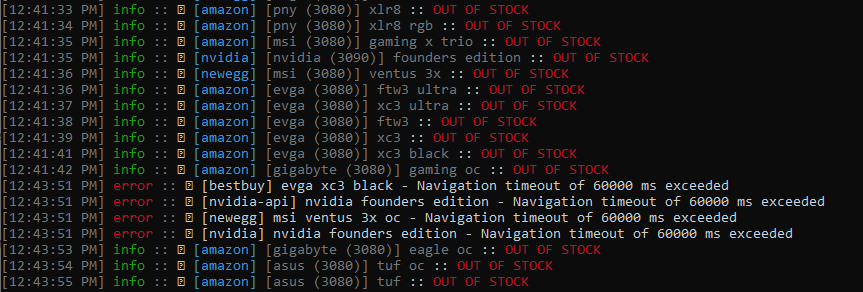
I've noticed that the snatcher will stop running if more than one store exceeds the navigation timeout at the same time. I have to press Enter to get it running again. Has anyone else seen this?
 Intruder2110
All 17 comments
No issue here. Running it on 3 computers. 2 running the latest version of Windows 10 and one on macOS Big Sur Latest Dev Beta.
 MRizkBV
on 1 Oct 2020
MRizkBV
on 1 Oct 2020
Doesn't look like you pressed enter or that it's stuck. I'm a little lost 😞
 jef
on 2 Oct 2020
jef
on 2 Oct 2020
Doesn't look like you pressed enter or that it's stuck. I'm a little lost 😞
The timestamp of the first timeout (12:43:51) is more than 60 seconds after the last successful check (12:41:51).
The snatcher was basically stuck for 2 minutes and 9 seconds at the 12:41:42 line. At that point I hit Enter and it spit out the 4 timeouts then resumed as usual.
Intruder2110
on 2 Oct 2020
Happened again. This time I was away for ~1 hour. Note the gap in the time stamps.

Intruder2110
on 3 Oct 2020
Kind of strange... Not sure if I can reproduce. Are you on the latest version?
jef
on 3 Oct 2020
I had the same issue tonight. 3 or 4 sites were stacked with "Navigation timeout" alerts. You do not see the timeout alerts until you hit enter. You might be able to reproduce the issue if you pull your ethernet from your PC to mimic a timeout. (latest build as of this date)
 OmenLW
on 4 Oct 2020
OmenLW
on 4 Oct 2020
Sounds like an internet issue more than a nvidia-snatcher issue. I suppose we could try to hard reset the browser if it doesn't move anywhere. I don't know where it's getting stuck either though.
I'll do some digging and report back. Thanks!
jef
on 4 Oct 2020
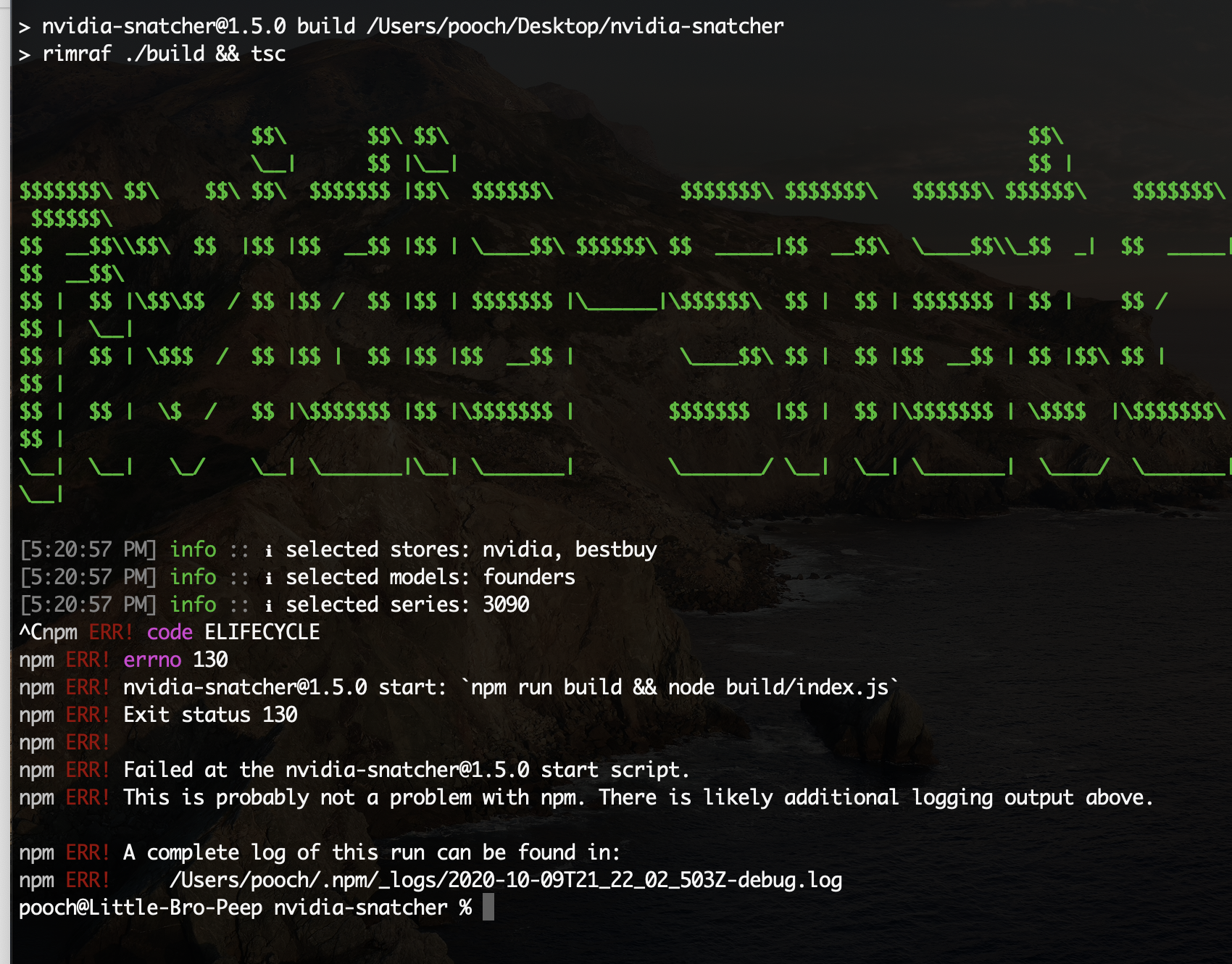
Having the same issue here. Hanging on-start, have tried with multiple networks (home and office), also tried every configuration of stores/models that I'm looking for and all yield the same hanging. Just have to control-C, traceback doesn't appear to be helpful (to my eyes anyway).
Thanks very much for this, I started the company Coursicle to do exactly this but for college classes (getting notified when seats open up) and didn't really want to recreate the effort to get myself a damn graphics card!
 monstermac77
on 9 Oct 2020
monstermac77
on 9 Oct 2020
Here's the full output of one of the logs after control+Cing when it's stuck:
pooch@Little-Bro-Peep _logs % cat 2020-10-10T01_19_52_413Z-debug.log
0 info it worked if it ends with ok
1 verbose cli [ '/usr/local/bin/node', '/usr/local/bin/npm', 'run', 'start' ]
2 info using [email protected]
3 info using [email protected]
4 verbose run-script [ 'prestart', 'start', 'poststart' ]
5 info lifecycle [email protected]~prestart: [email protected]
6 info lifecycle [email protected]~start: [email protected]
7 verbose lifecycle [email protected]~start: unsafe-perm in lifecycle true
8 verbose lifecycle [email protected]~start: PATH: /usr/local/lib/node_modules/npm/node_modules/npm-lifecycle/node-gyp-bin:/Users/pooch/Desktop/nvidia-snatcher/node_modules/.bin:/usr/local/bin:/usr/bin:/bin:/usr/sbin:/sbin:/Library/Apple/usr/bin
9 verbose lifecycle [email protected]~start: CWD: /Users/pooch/Desktop/nvidia-snatcher
10 silly lifecycle [email protected]~start: Args: [ '-c', 'npm run build && node build/index.js' ]
11 silly lifecycle [email protected]~start: Returned: code: 130  signal: null
12 info lifecycle [email protected]~start: Failed to exec start script
13 verbose stack Error: [email protected] start: `npm run build && node build/index.js`
13 verbose stack Exit status 130
13 verbose stack     at EventEmitter.<anonymous> (/usr/local/lib/node_modules/npm/node_modules/npm-lifecycle/index.js:332:16)
13 verbose stack     at EventEmitter.emit (events.js:314:20)
13 verbose stack     at ChildProcess.<anonymous> (/usr/local/lib/node_modules/npm/node_modules/npm-lifecycle/lib/spawn.js:55:14)
13 verbose stack     at ChildProcess.emit (events.js:314:20)
13 verbose stack     at maybeClose (internal/child_process.js:1021:16)
13 verbose stack     at Process.ChildProcess._handle.onexit (internal/child_process.js:286:5)
14 verbose pkgid [email protected]
15 verbose cwd /Users/pooch/Desktop/nvidia-snatcher
16 verbose Darwin 19.3.0
17 verbose argv "/usr/local/bin/node" "/usr/local/bin/npm" "run" "start"
18 verbose node v12.19.0
19 verbose npm  v6.14.8
20 error code ELIFECYCLE
21 error errno 130
22 error [email protected] start: `npm run build && node build/index.js`
22 error Exit status 130
23 error Failed at the [email protected] start script.
23 error This is probably not a problem with npm. There is likely additional logging output above.
24 verbose exit [ 130, true ]
monstermac77
on 10 Oct 2020
Ah, never mind. Looks like the issue was actually a silent config problem. Specifically, I had founders as the SHOW_ONLY_MODELS rather than founders edition. I think this new line in the doc through me off when I was setting the original config.

monstermac77
on 10 Oct 2020
Is it working fine now?
jef
on 10 Oct 2020
@jef Indeed it is! Thank you.
monstermac77
on 10 Oct 2020
@Intruder2110, was this your problem as well? If so, then I think I'm going to close out this issue.
jef
on 10 Oct 2020
@Intruder2110, was this your problem as well? If so, then I think I'm going to close out this issue.
@jef Not at all. I think as someone else mentioned a network glitch can cause the snatcher to get stuck.
Shouldn't it continue after the timeout though? It's not like a ping -t to an unreachable host stops after the first unsuccessful attempt. :)
Intruder2110
on 13 Oct 2020
Yeah it definitely should. I've seen it hang up while in a Docker container, but I'm running now on bare metal and going to do wait and see if there is any problems.
jef
on 13 Oct 2020
When I run this, via docker, it stops working after a "Navigation timeout". Every single time without fail.
(I have extremely reliable internet and am not having any issues right now that I know of)
try 1:
[9:25:31 PM] info :: ℹ selected stores: newegg
[9:25:31 PM] info :: ℹ selected series: ryzen5950, rx6800xt, sonyps5c, sonyps5de
[9:25:42 PM] info :: ✖ [newegg] [amd (ryzen5950)] 5950x :: OUT OF STOCK
[9:25:46 PM] info :: ✖ [newegg] [gigabyte (rx6800xt)] amd reference :: OUT OF STOCK
[9:25:49 PM] info :: ✖ [newegg] [msi (rx6800xt)] amd reference :: OUT OF STOCK
[9:25:52 PM] info :: ✖ [newegg] [sapphire (rx6800xt)] amd reference :: OUT OF STOCK
[9:25:55 PM] info :: ✖ [newegg] [asrock (rx6800xt)] amd reference :: OUT OF STOCK
[9:25:58 PM] info :: ✖ [newegg] [asus (rx6800xt)] amd reference :: OUT OF STOCK
[9:26:07 PM] info :: ✖ [newegg] [amd (ryzen5950)] 5950x :: OUT OF STOCK
[9:26:10 PM] info :: ✖ [newegg] [gigabyte (rx6800xt)] amd reference :: OUT OF STOCK
[9:26:14 PM] info :: ✖ [newegg] [msi (rx6800xt)] amd reference :: OUT OF STOCK
[9:26:16 PM] info :: ✖ [newegg] [sapphire (rx6800xt)] amd reference :: OUT OF STOCK
[9:26:46 PM] error :: ✖ [newegg] asrock rx6800xt amd reference - Navigation timeout of 30000 ms exceeded
try 2: this time it failed immediately, and I waited 20 minutes and it is still stuck.
STREETMERCHANT
3.1.0

[9:28:28 PM] info :: ℹ selected stores: newegg
[9:28:28 PM] info :: ℹ selected series: ryzen5950, rx6800xt, sonyps5c, sonyps5de
[9:29:08 PM] error :: ✖ [newegg] amd ryzen5950 5950x - Navigation timeout of 30000 ms exceeded
 colemickens
on 1 Dec 2020
colemickens
on 1 Dec 2020
It's probably because you've been banned and there aren't any backoff status codes.
jef
on 1 Dec 2020
Related issues
 gahmee
·
3Comments
gahmee
·
3Comments
 g1forfun
·
5Comments
g1forfun
·
5Comments
 zhirzzh
·
5Comments
zhirzzh
·
5Comments
 ATLTVHEAD
·
4Comments
ATLTVHEAD
·
4Comments
 AlphaOmega2020
·
4Comments
AlphaOmega2020
·
4Comments
Most helpful comment
The timestamp of the first timeout (12:43:51) is more than 60 seconds after the last successful check (12:41:51).
The snatcher was basically stuck for 2 minutes and 9 seconds at the 12:41:42 line. At that point I hit Enter and it spit out the 4 timeouts then resumed as usual.