Streetmerchant: GameStop false positive
Description
The button component in the DOM we are scraping has the "Add to Cart" text as well as "Not Available"
[11:25:28 AM] info :: ℹ selected stores: gamestop
[11:25:28 AM] info :: ℹ selected series: 3070, 3080, 3090
[11:25:29 AM] debug :: [
{
"brand": "test:brand",
"model": "test:model",
"series": "test:series",
"url": "https://www.gamestop.com/video-games/pc/components/graphics-cards/products/tuf-gaming-geforce-rtx-3080-graphics-card/11109446.html"
},
{
"brand": "asus",
"model": "tuf oc",
"series": "3080",
"url": "https://www.gamestop.com/video-games/pc/components/graphics-cards/products/tuf-gaming-geforce-rtx-3080-graphics-card/11109446.html"
}
]
[11:25:37 AM] debug :: [gamestop] Starting lookup...
[11:25:41 AM] debug :: <button class="add-to-cart btn btn-primary " data-pid="11109446" data-gtmdata="{"productInfo":{"sku":"226285","productID":"11109446","name":"TUF Gaming GeForce RTX 3080 Graphics Card","category":"Video Games/PC/Components/Graphics Cards","brand":"TUF","subGenre":"","platform":"PC","condition":"New","variant":"New","genre":"","availability":"Not Available","productType":"regular","zoneSource":"PDP"},"price":{"sellingPrice":"749.99","basePrice":"749.99","currency":"USD"}}" data-buttontext="Add to Cart" disabled="disabled">Not Available</button>
Possible solution
Perhaps look into ensuring that there is _only_ an in stock label? Not 100%.
 jef
jef
All 6 comments
Can confirm. As soon as I added gamestop to my .env, it started popping off false positives.
 adolfox
on 30 Sep 2020
adolfox
on 30 Sep 2020
stores.ts defines an outOfStock label,
export type Labels = {
bannedSeller?: LabelQuery;
captcha?: LabelQuery;
container?: string;
inStock?: LabelQuery;
outOfStock?: LabelQuery;
};
In lookupCardInStock it check for it, it the outOfStock label is present, it immediately returns false.
async function lookupCardInStock(store: Store, page: Page, link: Link) {
const baseOptions: Selector = {
requireVisible: false,
selector: store.labels.container ?? 'body',
type: 'textContent'
};
if (store.labels.inStock) {
    const options = {...baseOptions, requireVisible: true, type: 'outerHTML' as const};

    if (!await pageIncludesLabels(page, store.labels.inStock, options)) {
        Logger.info(Print.outOfStock(link, store, true));
        return false;
    }
}

**if (store.labels.outOfStock) {
    if (await pageIncludesLabels(page, store.labels.outOfStock, baseOptions)) {
        Logger.info(Print.outOfStock(link, store, true));
        return false;
    }
}**

if (store.labels.bannedSeller) {
    if (await pageIncludesLabels(page, store.labels.bannedSeller, baseOptions)) {
        Logger.warn(Print.bannedSeller(link, store, true));
        return false;
    }
}

if (store.labels.captcha) {
    if (await pageIncludesLabels(page, store.labels.captcha, baseOptions)) {
        Logger.warn(Print.captcha(link, store, true));
        await delay(getSleepTime());
        return false;
    }
}

return true;
}
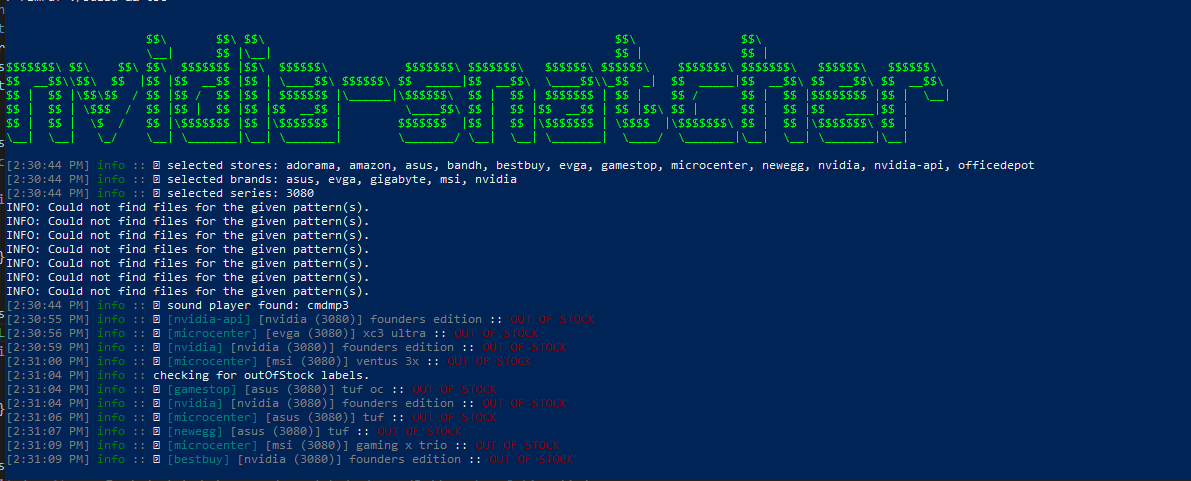
So if we just add the Not Available displayed to the outOfStock labels of the gamestop model, then that should do it, wouldn't it?
adolfox
on 30 Sep 2020
adolfox
on 30 Sep 2020
That seems to have worked.
I modefied that labels for gamestop.ts to include the outOfStock label,
labels: {
        inStock: {
            container: '.add-to-cart',
            text: ['add to cart']
        },
        outOfStock: {
            container: '.add-to-cart',
            text: ['not available']
        }
adolfox
on 30 Sep 2020
@adolfox That's exactly it! Nice job. I totally forgot we had label.outOfStock... Lol. Thanks for fixing this.
jef
on 30 Sep 2020
@jef you're welcome. Thank you for this great project!
adolfox
on 30 Sep 2020
Related issues
 zhirzzh
·
5Comments
zhirzzh
·
5Comments
 mhenry84
·
3Comments
mhenry84
·
3Comments
 lngchn
·
3Comments
lngchn
·
3Comments
 AlphaOmega2020
·
4Comments
AlphaOmega2020
·
4Comments
 millionhari
·
5Comments
millionhari
·
5Comments
Most helpful comment
@jef you're welcome. Thank you for this great project!