Streetcomplete: Recent map-rendering issues (disappearing maps, level-of-detail inconsistencies) Android 11
I'm on a Pixel 3, recently updated to Android 11. I'm using version 22.3 of StreetComplete, which I believe is the most recent. Until recently StreetComplete was working fine for me. But somewhere around when I updated from Android 10 to Android 11 -- unfortunately my memory is terrible and I am not _certain_ that it was at the exact same point -- StreetComplete stopped displaying maps. The little dot showing my location and orientation are there; quest markers are there; buttons for menu, zooming, etc., are there; but no roads, buildings, etc.
If I pan far enough, then eventually I find rectangular regions within which normal maps appear, and others where they don't.
If I zoom out far enough, roads and shading (for built-up/grassy/... areas) do eventually appear, even in the region that was blank, and if I zoom in on that region again, it is not longer blank. But its roads are just thin lines, there are no road names and no buildings, etc., as if it's drawing those small regions using data from a zoomed-out rendering. Sometimes -- it depends on what exact sequence of zooms and pans I do -- I appear to get two _different_ zoom levels' roads superimposed on one another. Sometimes zooming in will make the "coarser" roads disappear, and then zooming out again will bring them back (superimposed on the "finer" ones). Sometimes coarser and finer road paths coexist however far in I zoom. I don't think I've ever seen _three_ levels of detail showing at the same time.
Switching between light and dark themes while zoomed in to a "bad" region will make all the maps disappear again; then the same procedure described above will make them (partly, as above) come back. Switching theme again again makes the maps disappear again; I can repeat this ad infinitum.
I have tried power-cycling the device, and uninstalling and reinstalling StreetComplete. Neither appears to change this strange behaviour.
 gjm11
gjm11
All 18 comments
This sounds like you still have some map tiles (on low zoom) in your cache and the map loading does not work at all.
I kind of suspect that this is due to something in Android 11?
 westnordost
on 11 Sep 2020
westnordost
on 11 Sep 2020
This sounds like you still have some map tiles (on low zoom) in your cache and the map loading does not work at all.
It can be checked by uninstalling and installing StreetComplete again - if there is no map at all it would indicate that downloading is completely broken.
 matkoniecz
on 11 Sep 2020
matkoniecz
on 11 Sep 2020
I did uninstall and reinstall (both on general principles and because I was wondering about e.g. the possibility of corrupted cached rendered maps), and the behaviour above is what I got.
In particular, contra matkoniecz's speculation uninstalling and reinstalling _doesn't_ result in having literally no map at all.
(I realise that my earlier description was a little inaccurate. I said at the end "neither appears to change this strange behaviour", but actually I think I uninstalled and reinstalled before I first saw the weirder bits of the behaviour I described above. When I did it, I had only seen the complete absence of maps and hadn't panned or zoomed far enough to see anything different. So it's _possible_ that, e.g., before uninstalling and reinstalling there were no maps displayed anywhere. My guess, though, is that it didn't change anything.)
I share the suspicion that it's related to the Android 10 -> 11 transition. As I said, I _think_ the problems started when I upgraded but I am not certain of that.
When I do things in StreetComplete that seem like they ought to be fetching new map data, there's network traffic from my phone to 171.ip-217-182-130.eu and I'm pretty sure some responses with substantial payloads are coming back. (Only _pretty sure_ because my local network is NATted and my tcpdump-fu isn't the strongest.)
gjm11
on 11 Sep 2020
To confirm your suspicion, you could install an older version. Is the behavior the same?
westnordost
on 11 Sep 2020
Do you mean an older version of Android, or an older version of StreetComplete?
I am very much not enthusiastic about downgrading my phone's OS, even if there's a way to do it. (Is that unreasonably over-cautious? It just seems like a thing that could cause me grief in so many different ways.) I'll gladly try an older version of SC, but I'm not sure how to do that.
gjm11
on 11 Sep 2020
of StreetComplete
westnordost
on 12 Sep 2020
https://github.com/westnordost/StreetComplete/releases lists releases and allows you to download installable APK file. This part of GitHub is completely or nearly completely hidden on mobile.
Note that you need to enable settng to allow such installs, if you have never done it before.
matkoniecz
on 12 Sep 2020
I just updated to Android 11 and tiles are loading as expected (pixel 3 as well)
 callis
on 12 Sep 2020
callis
on 12 Sep 2020
I'm using Streetcomplete 22.3 and Android 9, and seem to have similar symptoms, which I have blamed on being off-line so missing map tiles in cache could not be downloaded. My maps are never completely empty, just parts missing, and zooming out and in again will make them re-appear so I haven't experienced it as a problem. I've also noticed thin roads, but not superimposed zoom levels (yet). Could it be related to the switch to JawgMaps (a great improvement!)?
 rhhsm
on 12 Sep 2020
rhhsm
on 12 Sep 2020
The switch to JawgMaps was in v21, which was released on June 29th. Is that around when you updated to Android 11, @gjm11?
If you want to test, you can install the apk from the 20.2 release. I don't know whether @Atrate is still running the old map server, but it should fall back to the very-outdated nextzen maps and thus work for testing, either way.
 smichel17
on 12 Sep 2020
smichel17
on 12 Sep 2020
I don't know whether @Atrate is still running the old map server
@smichel17 I think you wanted to mention @Akasch, not me
 Atrate
on 12 Sep 2020
Atrate
on 12 Sep 2020
Release 20.2 shows the same symptoms, for me. If anything, somewhat worse (i.e., more of the map is missing).
gjm11
on 12 Sep 2020
However, after upgrading back from 20.2 to 22.3 the problem appears to have gone away. I guess that's good news for me, but it may mean I can't get any further evidence to figure out what was broken :-).
gjm11
on 12 Sep 2020
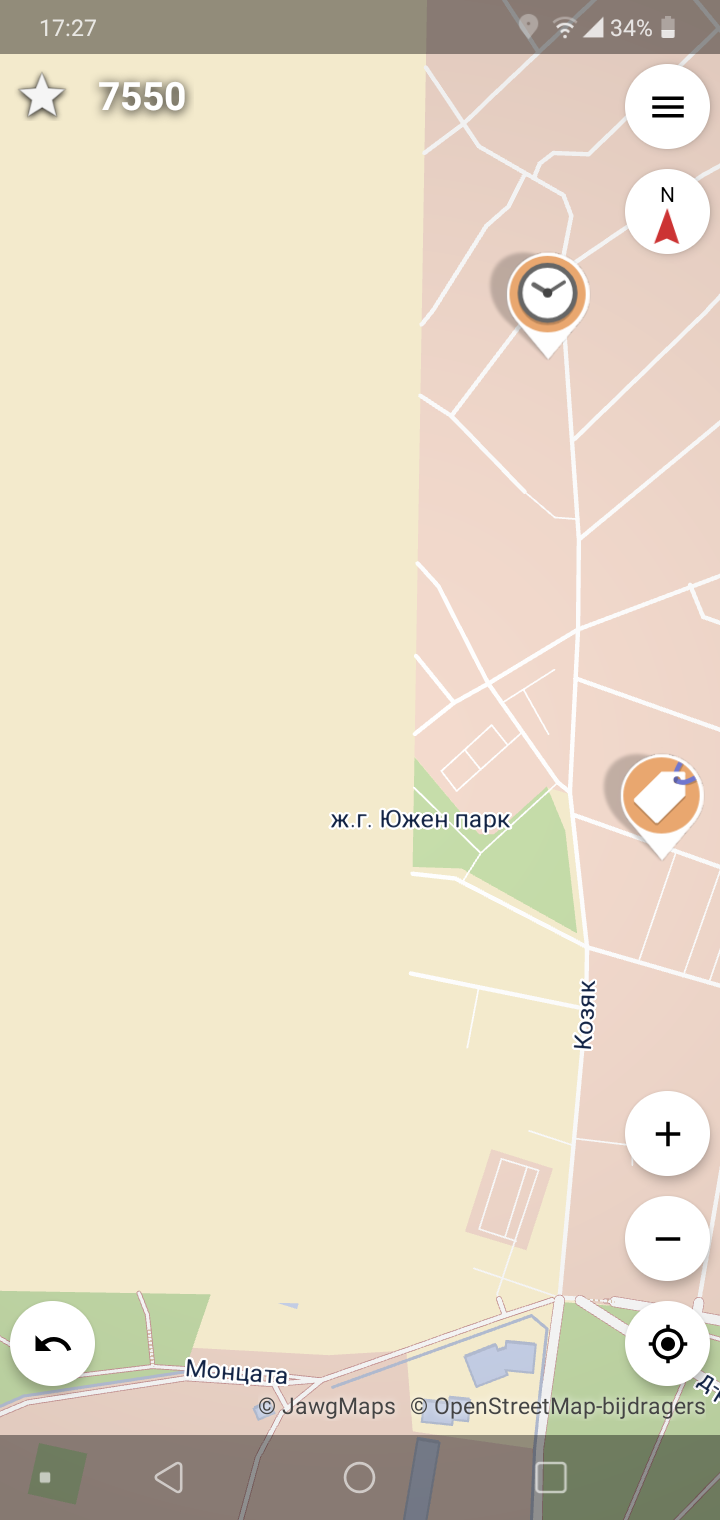
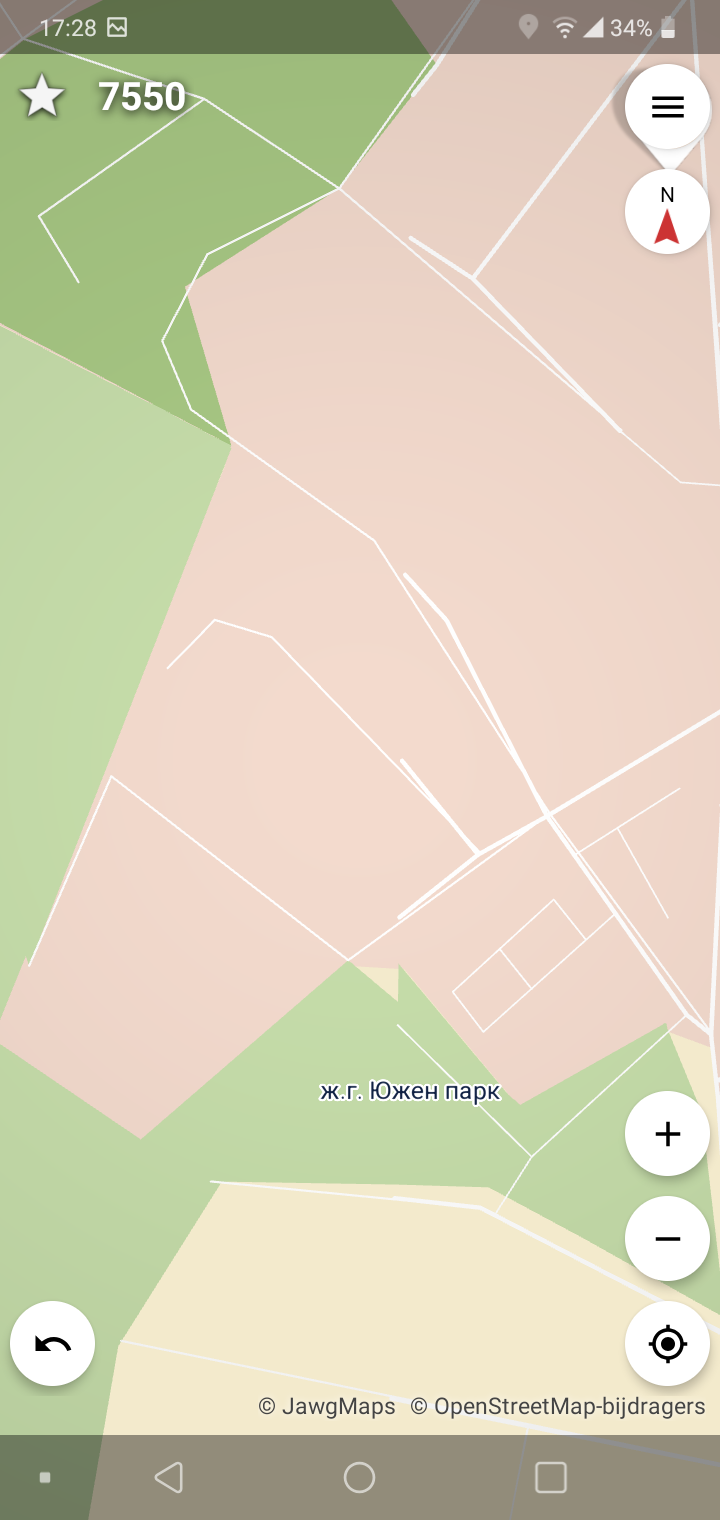
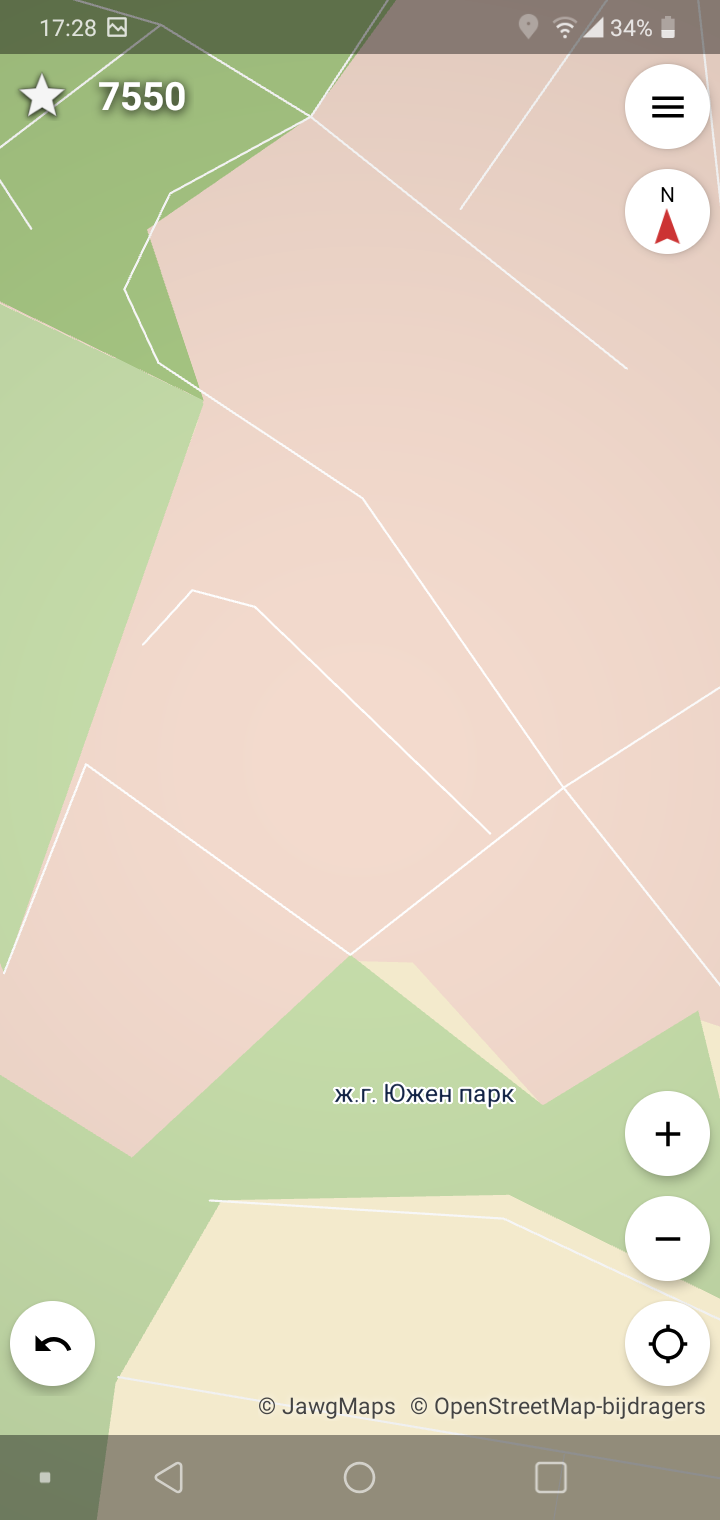
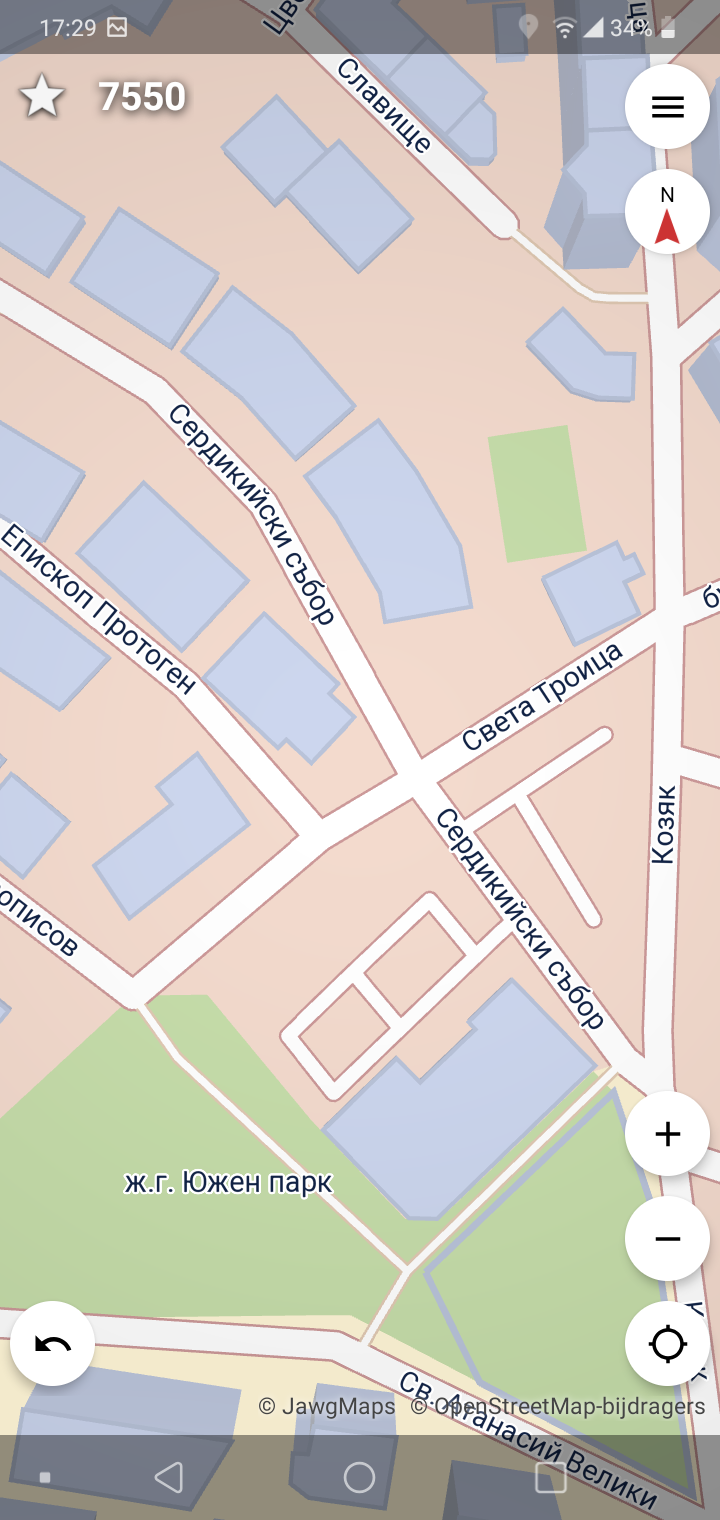
Hope these screenshots help: first shot where problem occurs, 2nd zooming in on trouble area, 3rd after zooming out and in again, 4th after app restart, using an LG Q60 on Android 9 being on WiFi
rhhsm
on 13 Sep 2020
The "bad" screenshots above look very similar to what I saw.
gjm11
on 13 Sep 2020
This is a feature of tangram-es: If the tiles are not available (yet) for the current zoom level, the ones from the lower zoom level(s) are shown instead. That's standard, Google etc also does this.
As for why both zoom levels are overlayed like this, I don't know, I figure that may be posted as a bug in their issue tracker here https://github.com/tangrams/tangram-es/issues . However, I'd consider this as a very minor problem, showing the tiles from another zoom level at the current zoom level is supposed to only show up for a few (hundred) ms, until the tile is loaded. A tile will be around 1-50 kB on jawg, so it really should be loaded in a blink of an eye.
But anyway, this is not the issue here, the issue is that the tiles don't seem to load at all. Debugging this will not be easy. Here are a few angles at which we might isolate the issue:
- Maybe the issues with loading are based on the location? (=Jawg somehow doesn't have the data cached or had problems generating it at all) Verifiable by looking at the same location as within the app using https://ent8r.github.io/streetcomplete-mapstyle - Do these tiles also not load?
- Run the app with a debugger attached and look for log messages that hint at that tangram-es cannot load certain tiles
westnordost
on 13 Sep 2020
No obvious sign of missing tiles in the region where I am in that web UI. But then, SC is behaving OK for me too now :-). If the problem comes back I'll look into debuggering the app.
gjm11
on 13 Sep 2020
I was going to say I feel like I've had similar slow responses since the switch to Jawg. Certainly when offline it takes a lot longer to time out and switch to my cached tiles than it used to.
But also at times when online they seem to load far more slowly. Both SC and the web app are currently very responsive again right now, but SC seemed slow a few hours ago.
 peternewman
on 19 Sep 2020
peternewman
on 19 Sep 2020
Related issues
 RubenKelevra
·
3Comments
RubenKelevra
·
3Comments
 ecksun
·
3Comments
RubenKelevra
·
4Comments
ecksun
·
3Comments
RubenKelevra
·
4Comments
 escoand
·
4Comments
matkoniecz
·
3Comments
escoand
·
4Comments
matkoniecz
·
3Comments
Most helpful comment
@smichel17 I think you wanted to mention @Akasch, not me