Streetcomplete: Show house/building name/number in AddBuildingType quest
Use case
When there are a row of buildings, with the 3D map and when zooming in it can be hard to ensure you've got the right one.
Proposed Solution
It currently prompts with "What kind of building is this?", it would be better if where possible it said "What kind of building is number 45?" or "What kind of building is Foo Cottage?" where that data is already available
 peternewman
All 9 comments
The house numbers are already shown on the map, if available.
 westnordost
on 20 Oct 2019
westnordost
on 20 Oct 2019
Yes, but that doesn't mean you're 100% sure exactly what you've clicked on at some zoom levels, see also the 3D examples here:
https://github.com/westnordost/StreetComplete/issues/1589#issuecomment-543804933
Given equivalent prompts appear for opening hours etc.
Also building names aren't shown on the map AFAIK.
peternewman
on 20 Oct 2019
But the view zooms into the object you clicked on. On this zoom level, housenumbers should be visible. And if not, the user can always scroll and zoom around to orient himself.
Not only the housenumber of the clicked building may be important to orient himself, but also neighbouring housenumbers or certain POIs and features. So, this is what the map is for, to give a help to locate oneself and the quest (one clicked on).
westnordost
on 20 Oct 2019
For me it zooms out when I select the quest, rather than in. The house numbers and quests also appear to be on the ground floor, rather than the roof of the 3D buildings, which personally I find doesn't help the clarity.
I find I have to be zoomed right in or half the quests disappear (I assume as they overlap each other).
I'd certainly agree many features can be used to orient/locate the subject of the quest, ideally for me they'd show one of these in this order of priority:
- Name (e.g. name of shop)
- House name
- House number
peternewman
on 20 Oct 2019
Well, it zooms in or out, so that the element for which the quest is asked is fully contained in the view. If it is a very large building, it will zoom out. But if it is very large, you won't need housenumbers anyway to identify which building it is.
Also, the entrances and thus the housenumbers are usually on the ground, so what is the problem with them not being on the roof?
westnordost
on 20 Oct 2019
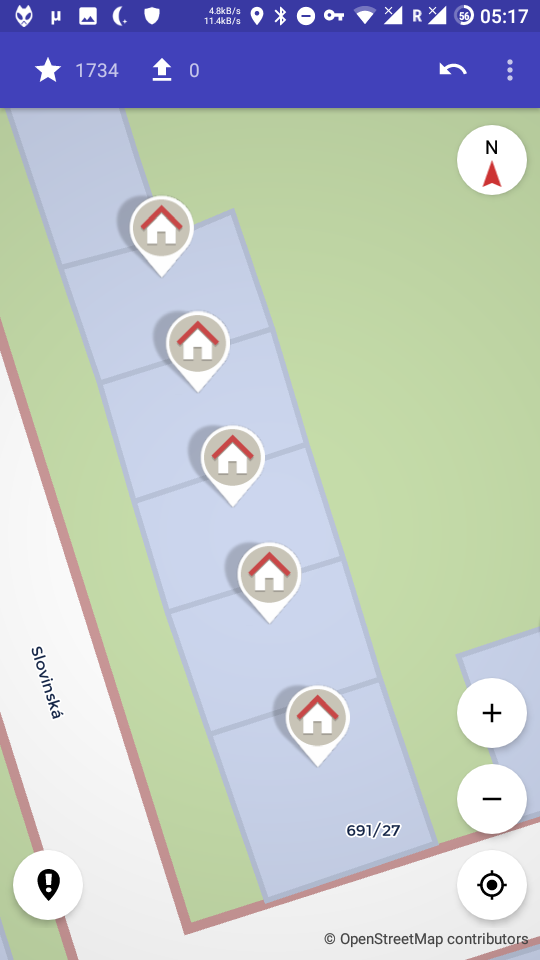
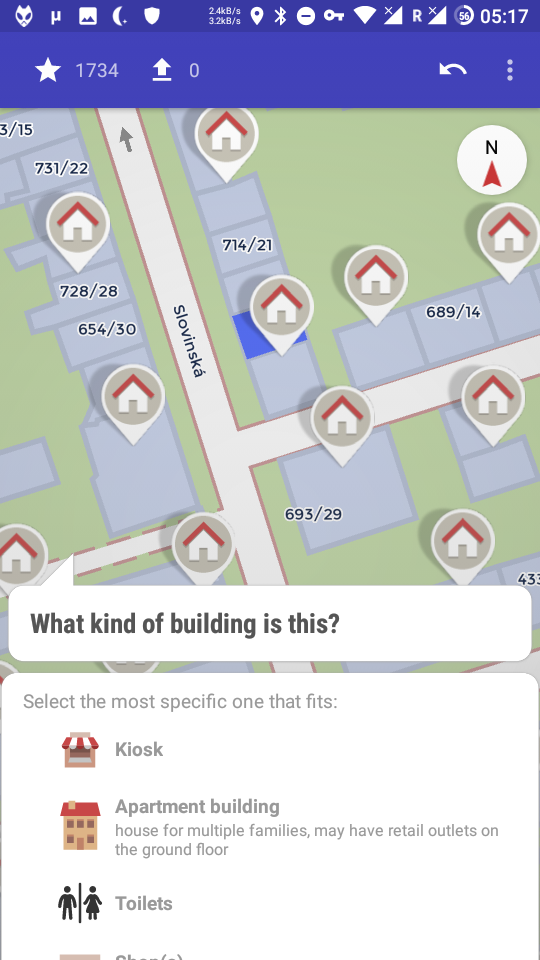
Here are two screenshots to show what I think is the problem (in 2D view, until now I didn't know a 3D view existed)
In the screenshots
a) the view is zoomed out when selecting the quest marker, but clearly not to show the building as it is already fully visible at maximum zoom. I am already used to this behaviour, but initially I found this very confusing as in some cases it makes me doubt whether I selected the intended building/quest marker.
b) the house number of the selected building is not visible. It is not visible at any zoom level, except when rotating the map (I often forget about this possibility). Here the number can also be determined from numbers of nearby buildings, but this is not always possible (any maybe not safe to do).
Having to sometimes do "map acrobatics" to get information on which building I actually selected is quite annoying.
 Helium314
on 1 Nov 2019
Helium314
on 1 Nov 2019
Also, the entrances and thus the housenumbers are usually on the ground, so what is the problem with them not being on the roof?
Just that with the 3D view and taller buildings/smaller screen it can be hard to tell.
Yeah as @Helium314 this roughly matches my experience.
peternewman
on 4 Nov 2019
I agree there is room for improvement in making sure that the user knows what building of a terrace he/she is editing at the moment. Either the house number of the selected building should be more prominent or it should be named in the question.
 Discostu36
on 10 Nov 2019
Discostu36
on 10 Nov 2019
Yeah, I've also been experiencing this. Sometimes I don't feel 100% sure when doing the quest about the amount of levels in a building about which building each one is. If I could look at the house number on the map and then irl on the building, it'd be 100% sure.
The icon always covers the house number on my end.
 thibaultmol
on 30 Nov 2019
thibaultmol
on 30 Nov 2019
Related issues
 MattWhilden
·
3Comments
MattWhilden
·
3Comments
 RubenKelevra
·
3Comments
RubenKelevra
·
3Comments
 rugk
·
3Comments
rugk
·
3Comments
 JulienPalard
·
3Comments
westnordost
·
3Comments
JulienPalard
·
3Comments
westnordost
·
3Comments