Streetcomplete: Photos attached to the notes are inaccessible
Look at this note : https://www.openstreetmap.org/note/1800085#map=19/45.76986/4.85585&layers=N
When we click on https://westnordost.de/p/3461.jpg we get '403 Forbidden'
Thanks :)
Versions affected
StreetComplete 12.0
 bristow
All 29 comments
Works for me. It is a picture of a glass door with opening hours, saying "Salon Climatise"
On June 3, 2019 12:23:13 PM GMT+02:00, bristow notifications@github.com wrote:
>
Look at this note :
https://www.openstreetmap.org/note/1800085#map=19/45.76986/4.85585&layers=N
When we click on https://westnordost.de/p/3461.jpg we get '403
Forbidden'Thanks :)
Versions affected
StreetComplete 12.0
 westnordost
on 3 Jun 2019
westnordost
on 3 Jun 2019
Works also for me. Can you try with other internet connection?
 matkoniecz
on 3 Jun 2019
matkoniecz
on 3 Jun 2019
It's ok on 4G with my smartphone but not with my internet service provider (Free) on my desktop. This is strange...
bristow
on 3 Jun 2019
This is a HTTPS connection, it should not be possible for the ISP to inject another response.
What I think what happened is: You clicked on the link in the note immediately after you created it. The link is only activated after the note has been published. You are still seeing the 403 because your browser cached the response.
The activation may take a moment, depending on the connection of your smartphone, the load on the OSM Api and the server my webspace is running on. I'd expect the activation to happen well below one second after the note was published but I never tested it. It consists of
- app tells server that pics linked in note X should be activated
- server queries OSM api for note X and looks for links to pics that should be activated
- server moves the pics in question from the temporary upload folder to their proper place
westnordost
on 3 Jun 2019
But actually, maybe I'm wrong. Because in the case I described you should have gotten a 404 Not Found.
westnordost
on 3 Jun 2019
I think you're wrong ;) because I created the note with my 4G connection and not with my desktop PC whose connection is blocked. Did you block some kind of IP on firewall ?
bristow
on 3 Jun 2019
Nothing of the sort. The pictures are simply in a normal directory within the web server httpdocs root. The .htaccess simply consists of Options -Indexes.
Could you try two things?:
- is it the same on another browser on your PC?
- can you open this picture on your PC? https://westnordost.de/p/11.jpg
westnordost
on 3 Jun 2019
I have already tested on Chromium and Brave, same error : 403 Forbidden - Nginx :(
I can't open https://westnordost.de/p/11.jpg, same error :(
bristow
on 3 Jun 2019
Can you access my blog https://westnordost.de/blog/ or this file? https://www.westnordost.de/streetcomplete/icon.png
westnordost
on 3 Jun 2019
nope :/ same error...
bristow
on 3 Jun 2019
But if you use another device in the same network, it works?
Can you use F12 (dev tools) in the network pane, to show some more detailed information about the request(s)?
(If you want, you can even export it as a curl command or as a HAR or so… notice the latter can contain personal information such as your IP, so better only share it privately to @westnordost.)
 rugk
on 3 Jun 2019
rugk
on 3 Jun 2019
What about https://westnordost.de/doesNotExist.jpg ? Should yield a 404
westnordost
on 3 Jun 2019
But if you use another device in the same network, it works?
Nope, same error on my laptop on the same network.
Can you use F12 (dev tools) in the network pane, to show some more detailed information about the request(s)?
like this ? https://framapic.org/tIaxqTzdIL7k/4t4IHZvhuB6H.png
(If you want, you can even export it as a curl command or as a HAR or so… notice the latter can contain personal information such as your IP, so better only share it privately to @westnordost.)
I can
What about https://westnordost.de/doesNotExist.jpg ? Should yield a 404
Also a 403... I think i have a problem with my ISP (https://www.free.fr/freebox/)
bristow
on 3 Jun 2019
Even an ISP should not be able to MitM HTTPS connections. (that's why I am so curious about this case) If you know how, could you try to check the certificate?
And possibly test https://mitm.watch/?
rugk
on 3 Jun 2019
And possibly test https://mitm.watch/?
i get :
No MITM!
This site detects encryption-removing MITM using logic from this paper.
Powered by Caddy.
bristow
on 3 Jun 2019
I changed something in the configuration of the webspace. Are the things accessible now?
westnordost
on 3 Jun 2019
Nope :(
bristow
on 3 Jun 2019
Phew, then I don't really know. Perhaps you could check with your ISP?
westnordost
on 3 Jun 2019
I could. Thanks !
bristow
on 3 Jun 2019
Actually, it may also be your ISP, aka webhoster, @westnordost. Because as said, @bristow's ISP should not be able to intercept HTTPS connections, so they can never, never, never present an nginx 403 error page…
rugk
on 3 Jun 2019
You are right, but I can't imagine that my webhoster's apache/ngnix config has some global "403 for these ip ranges" rules. Could the ISP add something to the communication (i.e. on a layer below, TCP/IP) that could lead to a request being rejected by the webserver based on another rule?
The webserver here has ModSecurity installed. I turned it off an hour ago to see if @bristow can access the host then, but he couldn't.
westnordost
on 3 Jun 2019
@bristow Can you click on green lock and select option for more info? Maybe there is some weird MITM attack and https connection is leading somewhere else?
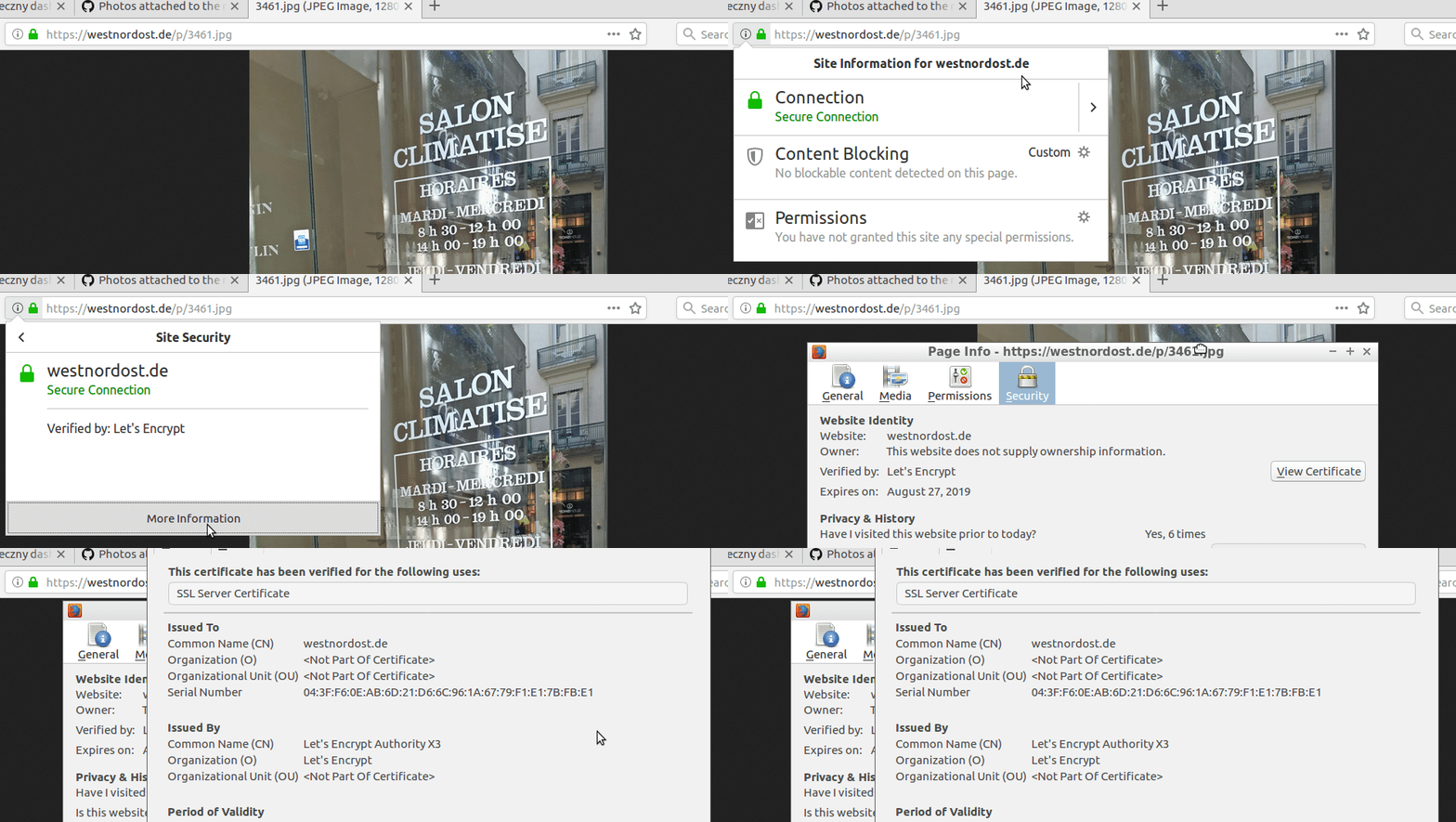
SHA 256 certificate fingerprint: 79:79:10:BE:C5:0C:38:C7:E5:5B:A3:28:CC:47:AE:F2:11:EF:69:75:C9:57:19:5E:29:AE:84:2F:9D:FA:6A:BA
Can you try connecting using Tor Browser/VPN? It bypasses some ISP filters/misconfigurations.
matkoniecz
on 4 Jun 2019
Hello,
Same prob. than @bristow (same ISP but ADSLx, same 403, also OK for 3-4G connexion). For others osmappers connected via the same ISP it's ok.
So, actually looks like IP range is blocked/blacklisted by RBL, such as spamhaus, for example. I had tested my fix&residential IP and obviously is in the spamhaus RBL :/
(not because I'm a spammer - I'm not! - but because, once one used a IP in the same range to spam :/// )
Unfortunately, it's a simple way to fight (unsuccessfully) against spammers...
--
deuzeffe, who hates spammers: a good spammer is a dead spammer. Period.
 deuzeffe
on 4 Jun 2019
deuzeffe
on 4 Jun 2019
"RBL"?
…so it seems to be an IP block, indeed…
whatever…
However, that means:
I can't imagine that my webhoster's apache/ngnix config has some global "403 for these ip ranges" rules
@westnordost – it seems this goes beyond your imagination… :wink:
rugk
on 4 Jun 2019
RBL stands for Real-time Blackhole List (for ex. https://en.wikipedia.org/wiki/DNSBL ) Commonly used by ISP/IAP... I don't know how exactly it's implemented but I know it's.
deuzeffe
on 4 Jun 2019
I found this in the Plesk configuration: https://docs.plesk.com/en-US/onyx/customer-guide/websites-and-domains/hosting-settings/web-server-settings/apache-and-nginx-settings/the-default-value-of-server-settings.72320/#denying-access-to-the-website
The default value means that Apache will use the corresponding directive from its server-wide configuration...
Only god knows what is in that server-wide configuration. So I entered a custom value.
Is westnordost.de now accessible for you?
westnordost
on 4 Jun 2019
@westnordost Yeah! It's ok for me right now, the site is accessible. Thx a lot!
deuzeffe
on 5 Jun 2019
Cool
westnordost
on 5 Jun 2019
Yeahh, it's ok for me too \o/
Thanks @westnordost
bristow
on 5 Jun 2019
Related issues
rugk
·
3Comments
 RubenKelevra
·
4Comments
RubenKelevra
·
4Comments
 lzmartinico
·
4Comments
lzmartinico
·
4Comments
 MattWhilden
·
3Comments
westnordost
·
3Comments
MattWhilden
·
3Comments
westnordost
·
3Comments