Code
# -*- coding: utf-8 -*-
import streamlit as st

import sys
import numpy
import pandas


st.title("Test russian: РУССКИЙ")

st.write(sys.stdout.encoding)
st.write("Test russian: русский")
Output:
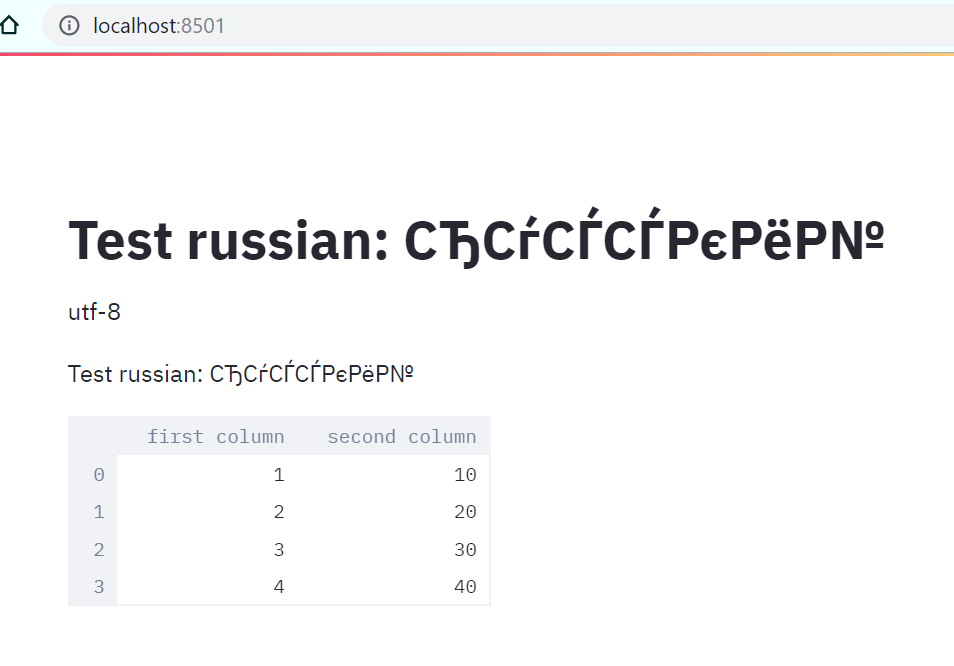
Looks like Windows-1251 encoding X UTF-8
Debug info
Streamlit version: Streamlit, version 0.48.1
Python version: Python 3.7.4
Using Conda? PipEnv? PyEnv? Pex? = WinPython
OS version: Microsoft Windows 10
Browser version: Google Chrome 77.0.3865.90
Thanks!
 thingumajig
All 3 comments
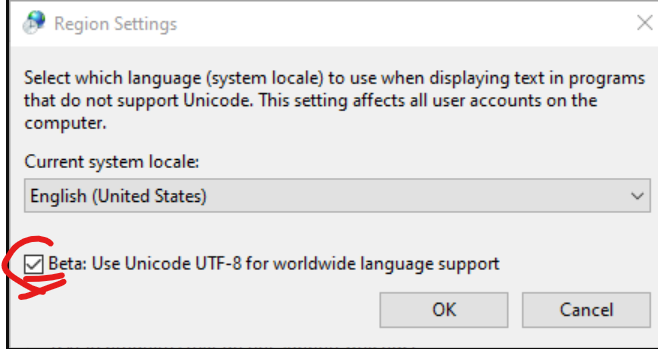
workaround 1(for Windows with win-1251 default system encoding):
st.title(str("русский текст".encode('windows-1251'), 'utf-8'))
Well, it looks like this is a problem with encoding in Windows 10.
thingumajig
on 15 Oct 2019
workaround 2:
thingumajig
on 15 Oct 2019
👍2
Cannot reproduce on Windows 10 using streamlit 0.58.0 (latest) in Python 3.7. Closing due to the age of this bug.
Please open a new bug if a similar problem comes up.
 nthmost
on 1 May 2020
nthmost
on 1 May 2020
Was this page helpful?
0 / 5 - 0 ratings
Related issues
 MarcSkovMadsen
·
3Comments
MarcSkovMadsen
·
3Comments
 tconkling
·
3Comments
tconkling
·
3Comments
 tomkomt
·
3Comments
tomkomt
·
3Comments
 isConic
·
3Comments
isConic
·
3Comments
 imneonizer
·
3Comments
imneonizer
·
3Comments
Most helpful comment
workaround 2:
