Streamlit: Add a File Picker Widget
Problem
Sometimes it's nice to be able to specify a file on the command line.
Solution
A file picker!
MVP
The file picker can be called as follows:
with st.file_input() as input:
  if input == None:
    st.warning('No file selected.')
  else:
    file_contents = input.read()
Possible additions
Down the line, we could imagine keyword args for filetypes and folder selection.
 treuille
All 40 comments
Requested in the discourse forum.
treuille
on 17 Sep 2019
There are two types of file pickers we should consider: one for files on the machine that is running the Streamlit server, and the other on the machine that is running the brower.
Off the top of my head, a possible API would be something like this:
# Lets you pick files in the machine where "streamlit run" was called,
# but limited to files in "./my_folder/".
# The folder argument is required.
# The type argument is optional.
filename = st.file_picker("Pick a file", folder="my_folder", type=("png", "jpg"))

# Lets you pick file using the browser's file picker.
# Maybe even supports drag/drop from your desktop!
# The type argument is optional.
file_bytes = st.file_uploader("Upload a file", type=("png", "jpg"))
What do you think?
 tvst
on 2 Oct 2019
tvst
on 2 Oct 2019
I like that API @tvst , although for st.file_uploader I would suggest returning a buffer rather than all the bytes at once.
treuille
on 3 Oct 2019
I would also need a file uploader for my use case.
User Story: As a user i can upload one or more excel or csv files and see the contents as a table or a chart. If possible I would like to just drag the file onto an area like the https://dash.plot.ly/dash-core-components/upload component.
Congratulations on the very nice product. Streamlit is the columbus egg thats solves
- all the problems of productionizing data science work into small tools and apps.
- rapid experimentation with users
- better experience of working in editor with one or more text files
and a lot of other pains.
Very, very well thought work flow. The caching idea is brilliant.
 MarcSkovMadsen
on 4 Oct 2019
MarcSkovMadsen
on 4 Oct 2019
This will be a great addition to Streamlit. File Picker is essential in data science, so this will be super cool, and it's much needed.
Another User Story:
Upload a text file to process it with a spaCy model for example, then download the results in a text file.
Thanks for the amazing product, and the great documentation. It's super awesome.
 mzeidhassan
on 5 Oct 2019
mzeidhassan
on 5 Oct 2019
@tvst looking your comments, you are right. Are two different widgets to create.
But, a possible option is create only one widget with both features. Something like this:

Maybe the "Pick from server" button only appears if you wrote a "folder" parameter.
My main goal here is to not create several widgets with similar features, that could be confused for user in the future.
 dcaminos
on 8 Oct 2019
dcaminos
on 8 Oct 2019
@dcaminos 👍 No. I think we should distinguish between these two use case.
My proposal would be to focus on file uploader
input_buffer = st.file_uploader("Upload a file", type=("png", "jpg"))
since the so called file_picker can already be pretty well approximated in Streamlit.
I also second that it would be awesome if we could have a drag-and-drop upload area!
However, before you go ahead @dcaminos , please know that @tvst should be the final decider of what's in scope for this issue.
treuille
on 8 Oct 2019
The solution on google colab is very easy to use I think.
from google.colab import files
uploaded = files.upload()
intake_sheet = ""

for fn in uploaded.keys():
       intake_sheet = fn

df_intake = pd.read_excel(intake_sheet)
It uploads the file to the server as a temporary asset. Once I have it in Pandas I can delete the file, or Colab will do that automatically at the end of the session.
Something like what @tvst is suggesting would be even better.
 naurojr
on 8 Oct 2019
naurojr
on 8 Oct 2019
any update on this ?
It is the only thing stopping me from productionising my model using streamlit. Any help is greatly appreciated.
 ajinkya933
on 17 Oct 2019
ajinkya933
on 17 Oct 2019
@tvst
I think your second option (upload using the browser) give final users the option to process their own data using the application.
I'm thinking in provide a web tool made by the machine learning team which can allow quality department to validate data and manually tag data.
They can upload a untagged csv file and visualize the data sample by sample in a webtool for tag and see the recommended tag (kind off reinforcement learning but for supervised models)
 RNogales94
on 17 Oct 2019
RNogales94
on 17 Oct 2019
This may be much, but I like drag and drop interfaces. Click to upload, or drag and drop. For my specific use case, people may be dragging images to create facial biometrics.
Edit:
I did some very basic digging around. Found this drag-and-drop interface for uploads.
https://www.dropzonejs.com/#new-video-out-now


From a glance, their demo is up to the design standards I've seen in streamlit.
 isConic
on 18 Oct 2019
isConic
on 18 Oct 2019
any update on this ?
We're working on this right now. My guess is it will be released in a couple of weeks, but don't hold me to it :wink:
This may be much, but I like drag and drop interfaces.
You're in luck! We use Base Web for our widgets and their file uploader works exactly how you propose: https://baseweb.design/components/file-uploader/
tvst
on 22 Oct 2019
Hi @tvst.
Does that mean that all the components at https://baseweb.design/ would be something that could be supported in Streamlit when you have the time/ resources to develop the integration with Streamlit?
And that right now the easiest request whenever we lack some component is really saying we need component X from that site?
MarcSkovMadsen
on 22 Oct 2019
Thanks for the great work guys. When will be this available?
 rohts-patil
on 22 Oct 2019
rohts-patil
on 22 Oct 2019
Just look the behaviour of your modern website upload files it could be from url or local system.
For the api i would appreciate sticking to Python base code, something like
image = st.upload() #parameter can be mode="r", buffer="1mb”, load_in_memory=True
If a path is a added, streamlit will automatically load that file into memory otherwise if a file is dropped over the widget it will directly load it into memory and after that its user choice to save it on to the server or anywhere.
 imneonizer
on 24 Oct 2019
imneonizer
on 24 Oct 2019
I think it's important that the file not be saved immediately to the server filesystem. I think it should either:
- return a bytes object
- return a file object (which, for example, would turn into byes with
.read()-- preferred!)
treuille
on 26 Oct 2019
Easy way to upload files now is use tkinter like
python
import tkinter as tk
from tkinter import filedialog
if st.button('Upload file'):
    root = tk.Tk()
    root.withdraw()
    file_path = filedialog.askopenfilename()
    st.image(file_path)
 g0lemXIV
on 3 Nov 2019
g0lemXIV
on 3 Nov 2019
@g0lemXIV I get this error on MAC OS terminal when I ran your code and pressed the upload file button:
2019-11-03 21:05:24.521 python[843:13407] WARNING: NSWindow drag regions should only be invalidated on the Main Thread! This will throw an exception in the future. Called from (
    0   AppKit                              0x00007fff331bf7f0 -[NSWindow(NSWindow_Theme) _postWindowNeedsToResetDragMarginsUnlessPostingDisabled] + 371
    1   AppKit                              0x00007fff331bcce1 -[NSWindow _initContent:styleMask:backing:defer:contentView:] + 1416
    2   AppKit                              0x00007fff33268fa4 -[NSPanel _initContent:styleMask:backing:defer:contentView:] + 50
    3   AppKit                              0x00007fff331bc753 -[NSWindow initWithContentRect:styleMask:backing:defer:] + 42
    4   AppKit                              0x00007fff33268f59 -[NSPanel initWithContentRect:styleMask:backing:defer:] + 64
    5   AppKit                              0x00007fff33b5261e -[NSSavePanel initWithContentRect:styleMask:backing:defer:] + 97
    6   AppKit                              0x00007fff33b5a828 -[NSOpenPanel initWithContentRect:styleMask:backing:defer:] + 151
    7   AppKit                              0x00007fff3345519a -[NSPanel init] + 75
    8   AppKit                              0x00007fff33b525b6 -[NSSavePanel init] + 80
    9   AppKit                              0x00007fff33843ef5 +[NSSavePanel(Instantiation) _crunchyRawUnbonedPanel] + 81
    10  libtk8.6.dylib                      0x000000011fdfc6b0 Tk_GetOpenFileObjCmd + 80
    11  libtcl8.6.dylib                     0x000000011fbb1b26 Tcl_EvalObjv + 342
    12  _tkinter.cpython-37m-darwin.so      0x000000011fb84572 Tkapp_Call + 210
    13  python                              0x0000000103f13c9e PyCFunction_Call + 174
    14  python                              0x000000010404db9d _PyEval_EvalFrameDefault + 46621
    15  python                              0x000000010404134a _PyEval_EvalCodeWithName + 410
    16  python                              0x0000000103f13313 _PyFunction_FastCallKeywords + 195
    17  python                              0x000000010404fc67 call_function + 183
    18  python                              0x000000010404c9ed _PyEval_EvalFrameDefault + 42093
    19  python                              0x000000010404134a _PyEval_EvalCodeWithName + 410
    20  python                              0x0000000103f13313 _PyFunction_FastCallKeywords + 195
    21  python                              0x000000010404fc67 call_function + 183
    22  python                              0x000000010404ca83 _PyEval_EvalFrameDefault + 42243
    23  python                              0x000000010404134a _PyEval_EvalCodeWithName + 410
    24  python                              0x000000010403bd7b builtin_exec + 347
    25  python                              0x0000000103f13446 _PyMethodDef_RawFastCallKeywords + 230
    26  python                              0x000000010404fce2 call_function + 306
    27  python                              0x000000010404d9c5 _PyEval_EvalFrameDefault + 46149
    28  python                              0x0000000103f12be5 function_code_fastcall + 117
    29  python                              0x000000010404fc67 call_function + 183
    30  python                              0x000000010404c9ed _PyEval_EvalFrameDefault + 42093
    31  python                              0x0000000103f12be5 function_code_fastcall + 117
    32  python                              0x0000000103f16002 method_call + 130
    33  python                              0x0000000103f13a82 PyObject_Call + 130
    34  python                              0x000000010404dbf2 _PyEval_EvalFrameDefault + 46706
    35  python                              0x0000000103f12be5 function_code_fastcall + 117
    36  python                              0x000000010404fc67 call_function + 183
    37  python                              0x000000010404c9ed _PyEval_EvalFrameDefault + 42093
    38  python                              0x0000000103f12be5 function_code_fastcall + 117
    39  python                              0x000000010404fc67 call_function + 183
    40  python                              0x000000010404c9ed _PyEval_EvalFrameDefault + 42093
    41  python                              0x0000000103f12be5 function_code_fastcall + 117
    42  python                              0x0000000103f16002 method_call + 130
    43  python                              0x0000000103f13a82 PyObject_Call + 130
    44  python                              0x000000010413189b t_bootstrap + 123
    45  python                              0x00000001040b8937 pythread_wrapper + 39
    46  libsystem_pthread.dylib             0x00007fff6d434d76 _pthread_start + 125
    47  libsystem_pthread.dylib             0x00007fff6d4315d7 thread_start + 15
)
+1 for this feature, we definitely need it in our projects! @tvst any idea when it will be available?
Thanks for the awesome work !
 mkinet
on 4 Nov 2019
mkinet
on 4 Nov 2019
I need upload
 sssdjj
on 4 Nov 2019
sssdjj
on 4 Nov 2019
Problem
Sometimes it's nice to be able to specify a file on the command line.
Solution
A file picker!
MVP
The file picker can be called as follows:
with st.file_input() as input:
  if input == None:
    st.warning('No file selected.')
  else:
    file_contents = input.read()
Possible additions
Down the line, we could imagine keyword args for filetypes and folder selection.
do you have this function?
sssdjj
on 4 Nov 2019
@sssdjj
This function is not there yet.
There is possibly a functional pull request for this feature that is being worked out right now.
Check it out: https://github.com/streamlit/streamlit/pull/488
isConic
on 6 Nov 2019
I'm sure there are many security concerns with this feature and that it's non-trivial to implement but this is the main thing I'm missing from the otherwise wonderful workflow that has been streamlit thus far.
My hope is to use streamlit to demo deep learning models, in which the input is typically an image, audio or video file. Copy+pasting a base64 string into a text input isn't sufficiently user friendly for my target users.
 carlthome
on 28 Nov 2019
carlthome
on 28 Nov 2019
Uploading [text, csv] file feature is needed. Any solution, please share. Appreciate in advance
 asghar3166
on 30 Nov 2019
asghar3166
on 30 Nov 2019
Any update here? Really need a file uploader func
 universewill
on 2 Dec 2019
universewill
on 2 Dec 2019
0.51.0 have upload?
sssdjj
on 2 Dec 2019
@dcaminos I see that you've closed this. Has this feature been merged? Or was it de-prioritized?
isConic
on 17 Dec 2019
@isConic merged via https://github.com/streamlit/streamlit/pull/488
 jrhone
on 17 Dec 2019
jrhone
on 17 Dec 2019
@sssdjj and @isConic : The file picker was released in Streamlit 0.52. Happy new year! 🎆
treuille
on 31 Dec 2019
Wow, this turned out pretty great. Thanks for everyone who worked on this!
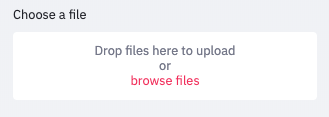
Minimal example:
uploaded_file = st.file_uploader("Choose a file", type=['txt', 'jpg'])
if uploaded_file is not None:
    # do stuff
- Text files will be of type
io.StringIO - Binary files will be of type
io.ByteIO
 pietz
on 6 Jan 2020
pietz
on 6 Jan 2020
Hi, thanks for the great work! Is it also possible to select a folder in a similar way?
 samuelefiorini
on 9 Jan 2020
samuelefiorini
on 9 Jan 2020
I would appreciate being able to select a folder too if possible. Right now it seems that dropping a folder into the widget selects the contents of the folder. Would be great if it could instead return a path!
 armstrys
on 9 Jan 2020
armstrys
on 9 Jan 2020
is it possible to increase the max file size?
 sbajew
on 15 Jan 2020
sbajew
on 15 Jan 2020
is it possible to increase the max file size?
By default, uploaded files are limited to 50MB but you can configure that using the server.maxUploadSize config option.
 karthickrajas
on 19 Jan 2020
karthickrajas
on 19 Jan 2020
Hi,
Thanks for the amazing feature. really great.!
I just have one doubt, instead of loading the file, can i just get the filename with the filepath alone?
Regards,
Karthick
karthickrajas
on 19 Jan 2020
I would appreciate being able to select a folder too if possible. Right now it seems that dropping a folder into the widget selects the contents of the folder. Would be great if it could instead return a path!
This would be great for me as well, as I want to run a script over all the files that are placed in a folder chosen by the user.
 bvandijkman
on 23 Jan 2020
bvandijkman
on 23 Jan 2020
This is awesome! I've spent an embarrassing number of hours trying to figure out a way to upload files from my local computer onto the deployed app! I'm glad I ran into this! It's exactly what I needed, and now my app works as intended! :)
 vbucaj
on 28 Jan 2020
vbucaj
on 28 Jan 2020
Very nice feature! Is it possible to retrieve the path of the file, instead of the file itself?
 H4dr1en
on 30 Jan 2020
H4dr1en
on 30 Jan 2020
Very nice feature! Is it possible to retrieve the path of the file, instead of the file itself?
Would be very useful to get the file path.
 jierice
on 28 Feb 2020
jierice
on 28 Feb 2020
Amazing job you guys! My project is finaly coming around with streamlit! You have absolutely changed the game!!!
 60nocolus
on 9 Sep 2020
60nocolus
on 9 Sep 2020
Related issues
 matthew-trava
·
3Comments
matthew-trava
·
3Comments
 randyzwitch
·
3Comments
imneonizer
·
3Comments
randyzwitch
·
3Comments
imneonizer
·
3Comments
 tconkling
·
3Comments
tconkling
·
3Comments
 alelasantillan
·
3Comments
alelasantillan
·
3Comments
Most helpful comment
any update on this ?
It is the only thing stopping me from productionising my model using streamlit. Any help is greatly appreciated.