Streamlink: vaughnlive plugin is buggy
Checklist
- [x] This is a bug report.
- [x] This is a feature request.
- [ ] This is a plugin (improvement) request.
- [x] I have read the contribution guidelines.
Description
vaughnlive streams may not work all the time as it shows not found
Expected / Actual behavior
...
Reproduction steps / Explicit stream URLs to test
- vaughnlive.tv/sherming66
Environment details
Operating system and version: Windows 7
Streamlink and Python version: 0.6.0
Comments, logs, screenshots, etc.
 bobvargas
All 104 comments
Could you please include what is printed out on the console when it does not work? Would you also be able to run it with -l debug and comment back what it says, there should be quite a bit if debug information.
 beardypig
on 24 Jun 2017
beardypig
on 24 Jun 2017
it prints out connection failed message sometimes when I open a vaughnlive stream.
bobvargas
on 24 Jun 2017
When it happens again can you copy the full message here, and if possible use the -l debug option as that will give us a much better idea of what is going wrong.
beardypig
on 24 Jun 2017
ok thanks. @beardypig
bobvargas
on 24 Jun 2017
Vaughnlive recently switched to a HTML player from Flash, so that could be part of the issue. It says "no playable streams"
I got no extra meaningful output by applying the debug flag, but I could have done it incorrectly.
Edit: The correct syntax is:
streamlink -l debug http://vaughnlive.tv/newzviewz/old best
Might as well add it to all my .bat bookmarks.
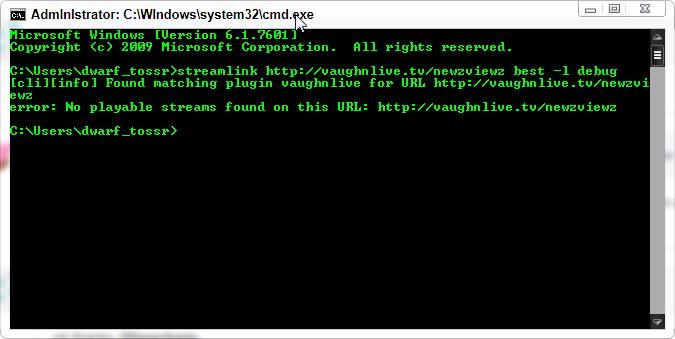
Will monitor this with interest. Thanks for looking!
 techNeffect
on 28 Jun 2017
techNeffect
on 28 Jun 2017
Ah OK, I didn't know that - I haven't actually been able to check the website. Sounds like we might need a rewrite of the plugin if they have finally stopped using flash!
beardypig
on 28 Jun 2017
Seems they are still broadcasting a flash stream. If one appends /old to any Vaughnlive URL it'll access a flash version of the stream that'll work with Streamlink. Don't know how long it'll work.
Edit: Worked for about 4 days?
techNeffect
on 28 Jun 2017
I can attest to techNeffect's comment. If you attach /old to the URL, it works immediately but fails with the mentioned above error if you don't.
 RedPenguin2
on 28 Jun 2017
RedPenguin2
on 28 Jun 2017
For me, it stopped working yesterday. This is the message I'm receiving. Curiously, even when I'm not using the '/old' appendix, the website still uses a Flash Player (on Firefox, at least):
C:\>streamlink vaughnlive.tv/erobtv/old live
[cli][info] Found matching plugin vaughnlive for URL vaughnlive.tv/erobtv/old
[plugin.vaughnlive][info] Found player_version=0.1.1.796, info_url_domain=mvn.va
ughnsoft.net, info_url_path=None
[plugin.vaughnlive][error] Could not detect info_url_path
error: No playable streams found on this URL: vaughnlive.tv/erobtv/old
 EFEVE
on 3 Jul 2017
EFEVE
on 3 Jul 2017
Looks like the player has changed more than expected. I'll take a look at the html player soon :-)
beardypig
on 3 Jul 2017
@beardypig Thanks a lot for you effort!
EFEVE
on 3 Jul 2017
If it's any help, a buddy of mine is reporting that the /old with livestreamer 1.12.2 is working still with /old but streamlink is not.
RedPenguin2
on 3 Jul 2017
Getting the same error as @EFEVE though it still seems to be pulling up the flash player whenever I go to the site (on chrome) even without having the "/old" prefix. Hope this can be fixed soonish as I despise the vaughnlive site.
 JourneyOver
on 4 Jul 2017
JourneyOver
on 4 Jul 2017
@JourneyOver I despise vaughnlive and their constantly changing crappy design choices! (though this change is to HTML5 so that's nice) :)
 gravyboat
on 4 Jul 2017
gravyboat
on 4 Jul 2017
Looks like the HTML5 player use WebSocket protocol (WSS) to get the m3u8 url.
Example:
Connect to > wss://sapi-ws-1x02.vaughnlive.tv
Send > MVN LOAD2 #vl-jandjtrip
Response > ACK2 #vl-jandjtrip;70;CjAMPHqs2EVfoZ9FyKUI1vQehFWS5sNS;5940d648b3929;0;1;1;0;ord
And the m3u8 url will be: 5940d648b3929.streamlock.net/live/live_jandjtrip/playlist.m3u8?CjAMPHqs2EVfoZ9FyKUI1vQehFWS5sNS
 ghost
on 5 Jul 2017
ghost
on 5 Jul 2017
Vaughnlive is back to using /old on the http website to access flash, but it no longer works in streamlink as others have said. Defaults to HTML 5 when using browser as normal.
When they reverted back to flash player a few days ago you could use /hls to access the HTML 5 player. It may do so again, so that may help in your testing if so.
Current output, targeting /old site:

Thanks for looking, as always.
techNeffect
on 5 Jul 2017
Looks like they had an updated noting everyone should swap over for html5 by June 26th: https://blog.vaughnsoft.com/2017/06/17/video-encoder-settings/ so the plugin will need to be reworked. This is actually a pretty big improvement considering the headache vaughnlive has been in the past.
gravyboat
on 5 Jul 2017
For whatever it's worth, I tried with @techNeffect method of using /hls and got a different error.
C:\>streamlink vaughnlive.tv/erobtv/hls live
[cli][info] Found matching plugin vaughnlive for URL vaughnlive.tv/erobtv/hls
error: No playable streams found on this URL: vaughnlive.tv/erobtv/hls
Hey @beardypig and @techNeffect when the vaughnlive plugin is gonna be fixed because i hate using flash player on vaughnlive site because it really slows down the pc and uses up a lot of cpu usage. Plz help me guys thanks.
bobvargas
on 7 Jul 2017
@bobvargas Someone will fix it when they have time to do so. Please remember that we are unpaid volunteers and this is an open source project that people work on in their spare time. If you would like to place a bounty on this issue feel free to do so here: https://www.bountysource.com/issues/46548041-vaughnlive-plugin-is-buggy. Otherwise it's all down to when someone has the time and interest to fix it.
gravyboat
on 7 Jul 2017
@bobvargas, @gravyboat has already explained this in one of your other threads:
https://github.com/streamlink/streamlink/issues/315#issuecomment-269572638
As someone who's opened a couple of issues here, you could consider supporting the people who are spending their time on solving these issues. Apart from that, Streamlink is still an open source software project with a permissive license, which means that you can always fix plugins or any kind of bug by yourself and contribute back to the project if you want to.
 bastimeyer
on 7 Jul 2017
bastimeyer
on 7 Jul 2017
ok thanks guys.
bobvargas
on 8 Jul 2017
Hi there,
I have found a temporary solution until masters @beardypig and @gravyboat can fix the problem with streamlink plugin.
In order to play vaughnlive streams, just use the /old url and livestreamer with this script. Example of command:
livestreamer --plugin-dirs "Directory where vaughnlive.py file is found" http://vaughnlive.tv/newzviewz/old worst | vlc -

Hope this helps :D
 skilleek
on 11 Jul 2017
skilleek
on 11 Jul 2017
so @skilleek method works for the time being, you don't need to download livestreamer at all though.
what you can do is download the script from his link and put it in the plugins folder for streamlink (Default for me was "C:Program Files (x86)Streamlinkpkgsstreamlinkplugins"), rename the old plugin to vaughnlive.py.bak (or just replace the old script with the one from the script above) and then go into the new script and replace
from livestreamer.plugin import Plugin
from livestreamer.plugin.api import http, validate
from livestreamer.stream import RTMPStream
to
from streamlink.plugin import Plugin
from streamlink.plugin.api import http, validate
from streamlink.stream import RTMPStream
@skilleek method works perfectly, even more so with @JourneyOver 's correction, you don't even need to put '/old' at the end of the link.
EFEVE
on 11 Jul 2017
It's broken again after today's update. The script returns with the error "No data returned from stream" now. I decompiled VaughnSoftPlayer.swf and it seems changes have been made in the way the player obtains the streaming server URL and the stream token. I believe it no longer uses INFO_URL to get this information. Instead, it uses an external call to MvnApi.getFlashData(). The output of this function can be seen on the console when loading a channel page, it looks like this:
VTrace: flashData: 5940d648b3929;1tn5MjdACmQRLjmaJtWdPdMV7LeIDupG
The part before the semicolon is the encoded streaming server IP and the part after it is the token. The correspondence between encoded and plain server IP is readily available from the decompiled source but I don't know if there is a way to call MvnApi.getFlashData() from a Python script, especially if this is prevented by the settings in crossdomain.xml.
Of course, this only applies to the flash player which may soon be deprecated altogether.
 fadster
on 13 Jul 2017
fadster
on 13 Jul 2017
@fadster Yeah if we're going to fix it then it might as well be changed to no longer support the flash player, moving to an html5 player is the first thing that vaughnlive has done in a while that hasn't been annoying in terms of Streamlink functionality. Thanks for putting the time in to take a look and see what's up with it!
gravyboat
on 13 Jul 2017
@gravyboat Well, flash or html5, all we really want is a stream URL to pass to an external player. :smile: You're welcome! I'll report back if I find anything useful.
fadster
on 13 Jul 2017
bet once they do finally move everything over to the html5 player they are still going to try and fuck with livestreamer/streamlink a ton just because they want their stupid ad money :/
JourneyOver
on 13 Jul 2017
@JourneyOver I can't really blame them for wanting to stay fed with the hard work they're doing. It's one of the reasons we encourage people to donate to streaming services they like when possible. Without those ads/donations/subscriptions the services won't exist for us to help people stream!
gravyboat
on 13 Jul 2017
And it's completely broken now
 kargaroc
on 16 Jul 2017
kargaroc
on 16 Jul 2017
@kargaroc Yeah they probably phased out the flash player completely in favor of their html5 player.
gravyboat
on 16 Jul 2017
Actually it still begs for me to install Flash at the moment. Being on Linux, I have no way of watching their streams anymore until this plugin gets fixed or replaced, or they actually enable their HTML5 player.
kargaroc
on 16 Jul 2017
@kargaroc Yeah if you aren't willing to make Flash happen and their HTML5 player doesn't work properly for you there's not much we can do. If someone wants to update the plugin they'll say so. You can also place a bounty on this issue if you would like: https://www.bountysource.com/issues/46548041-vaughnlive-plugin-is-buggy
gravyboat
on 16 Jul 2017
@kargaroc I know what you mean there.
Technically Chrome on Linux is supposedly supposed to have Flash but it doesn't always seem to be properly detected by various websites which act like you don't have Flash and need an upgrade.
To remedy this and it has worked for me for Vaughlive in the past is, use Opera Mini for Linux if you do want to watch Vaughlive streams on your Linux PC in the mean time.
RedPenguin2
on 16 Jul 2017
They have indeed reverted to the flash player on the main site but the embeds use the html5 player. The old INFO_URL used by the streamlink plugin to get the stream URL now returns a 404 so that mechanism seems to have been phased out altogether. Even though the new implementation might make things a bit more difficult, I'm fairly certain we can still get this information but I haven't looked much into it. The comment made by @RosadinTV regarding the way the html5 player gets the m3u8 URL could be our most promising avenue.
fadster
on 17 Jul 2017
Guys,
With the modifications they have been making, now it's possible to catch it again, just add the referer:
streamlink --http-header "Referer=http://vaughnlive.tv/newzviewz" "hls://https://hls-ord-2a.vaughnsoft.net/nyc/live/live_newzviewz/chunklist.m3u8" best

Hopefully this will be a more permanent solution. I am glad to help you all and encourage people to keep collaborating to improve streamlink :D
skilleek
on 17 Jul 2017
I'm working on an updated version of the plugin using the new websocket API. newzviewz is actually a special case and handled slog differently to some of the other channels. Some channels are only available via rtmp and not hls, but some support both. Hopefully I'll PR an updated plugin in the next couple of days.
beardypig
on 17 Jul 2017
@skilleek How do you find the server for a given channel? I got a 404 when I tried your method on other channels that have been switched to hls (eg. kingthehilltv1).
fadster
on 17 Jul 2017
Most streams are on all servers, but you need to know the ingest part. In the case of newzviewz it's nyc, and for kingthehilltv1 it's ord, so
streamlink --http-header "Referer=http://vaughnlive.tv/kingthehilltv1" "hls://https://hls-ord-2a.vaughnsoft.net/ord/live/live_kingthehilltv1/chunklist.m3u8" best
should work. To find out the ingest part, you need to consult the API :)
beardypig
on 17 Jul 2017
@beardypig Thanks! I don't know if there's a better way to find out but I got the info from looking at the console output on a channel page.
fadster
on 17 Jul 2017
Yep, you can get it from the console - for the plugin it will use the API :)
beardypig
on 17 Jul 2017
how about sherming66 url? i tried to stream it.
bobvargas
on 18 Jul 2017
@bobvargas Look at the console output in your browser, you'll find all the info you need.
streamlink --http-header "Referer=http://vaughnlive.tv/sherming66" "hls://https://hls-ord-2a.vaughnsoft.net/ord/live/live_sherming66/chunklist.m3u8" best
ok i'll try thanks
bobvargas
on 18 Jul 2017
yep it works thank you @fadster.
bobvargas
on 18 Jul 2017
@fadster It is working ^^. Same here, ありがとう :)
 Bluebuster116
on 18 Jul 2017
Bluebuster116
on 18 Jul 2017
Looks like they also fixed the exploit url as well :(
Hey @fadster sometimes the url you gave (streamlink --http-header "Referer=http://vaughnlive.tv/newzviewz" "hls://https://hls-ord-2a.vaughnsoft.net/nyc/live/live_newzviewz/chunklist.m3u8" best) can sometimes bring up a 404 error other times it may work. Hopefully a full plugin fix would resolve it soon.
Oh btw vaughnlive on streamlink is fully broken because of no flash player version appearing at all :(
C:UsersBob>streamlink vaughnlive.tv/sherming66 live
[cli][info] Found matching plugin vaughnlive for URL vaughnlive.tv/sherming66
error: No playable streams found on this URL: vaughnlive.tv/sherming66 and the url you gave return an error...
C:UsersBob>streamlink --http-header "Referer=http://vaughnlive.tv/sherming66"
"hls://https://hls-ord-2a.vaughnsoft.net/ord/live/live_sherming66/chunklist.m3u8
" best
[cli][info] Found matching plugin stream for URL hls://https://hls-ord-2a.vaughn
soft.net/ord/live/live_sherming66/chunklist.m3u8
[cli][info] Available streams: live (worst, best)
[cli][info] Opening stream: live (hls)
[cli][error] Try 1/1: Could not open stream
ble to open URL: https://hls-ord-2a.vaughnsoft.net/ord/live/live_sherming66/chun
klist.m3u8 (404 Client Error: Not Found for url: https://hls-ord-2a.vaughnsoft.n
et/ord/live/live_sherming66/chunklist.m3u8))
error: Could not open stream
I don't know if vaughnlive has officially gone all html5 or what. let me know if there's a fix soon
bobvargas
on 18 Jul 2017
@bobvargas The error you're getting just means the stream is currently offline.
fadster
on 19 Jul 2017
@fadster just kidding i found the problem it was (streamlink --http-header "Referer=http://vaughnlive.tv/sherming66" "hls://https://hls-ord-2a.vaughnsoft.net/den/live/live_sherming66/chunklist.m3u8" best) not (streamlink --http-header "Referer=http://vaughnlive.tv/sherming66" "hls://https://hls-ord-2a.vaughnsoft.net/ord/live/live_sherming66/chunklist.m3u8" best) now it finally works sorry @fadster for the other post I made eariler.
bobvargas
on 19 Jul 2017
The stream is on a different ingest server now so the URL changed. As was mentioned in previous comments, you can get this information by looking at the console output in your browser's developer tools. The command for that stream is now:
streamlink --http-header "Referer=http://vaughnlive.tv/sherming66" "hls://https://hls-ord-2a.vaughnsoft.net/den/live/live_sherming66/chunklist.m3u8" best
Note the change from ord to den, as indicated by the following line printed on the console when you load the channel's page:
>>> hlsServer: hls-ord-2a.vaughnsoft.net/den
streamlink now seems to need hlsvariant:// instead of hls://:
[cli][error] Try 1/1: Could not open stream <HLSStream('https://hls-ord-4a.vaughnsoft.net/den/live/live_sherming9/playlist.m3u8')> (Could not open stream: Attempted to play a variant playlist, use 'hlsvariant://https://hls-ord-4a.vaughnsoft.net/den/live/live_sherming9/playlist.m3u8' instead)
 rtega
on 19 Jul 2017
rtega
on 19 Jul 2017
@rtega for playlist.m3u8, yes you will need to use hlsvariant, but if you use the chunklist.m3u8 url you will need to use hls.
beardypig
on 19 Jul 2017
Just to quickly explain hls:// vs hlsvariant:// for anybody, because I was confused for a second when I first seen it, but hls:// is for a single bitrate/resolutions playlist while hlsvariant:// is for a playlist with multiple bitrates/resolutions.
You can tell if you open the m3u8 in a text editor if it is single or variant.
RedPenguin2
on 19 Jul 2017
just to let you know @fadster's vaughnlive url treak also works with livestreamer.
However some questions to ask do Vaughnlive flash url version works though?
And if using the new url exploit does it doss the broadcaster?
bobvargas
on 19 Jul 2017
@bobvargas you mean the rtmp URLs? They still exist, at least for the channels I have tried, but getting the rtmp URL is not as simple.
Using the rtmp or hls stream will not doss the broadcaster, the broadcasts stream to vl and then vl re-stream it to you. The broadcaster only sends the stream once, so 0 or a 1,000 viewers makes no difference to the broadcaster.
beardypig
on 20 Jul 2017
Any progress made to fix vaughnlive stream yet?
Oh Btw sometimes some vaughnlive broadcasters can have multiple servers working besides the main one.
Example
hlsServer: hls-ord-2a.vaughnsoft.net/ord


I tried it multiple vaughnlive servers and sometimes these 3 servers work even if it not ord.
Well here's something to think about @fadster @beardypig let's use to following url
C:UsersSUS>streamlink --http-header "Referer=http://vaughnlive.tv/sherming66"
"hls://https://sherming66;7;100;itojBxGRAWsyyUozOddeW75NufwmPLdO;594140c69edad;0
;1;1;0;ord
if this work it may use to stream the flash player version as well... plz post.
Well here's something to think about @fadster @beardypig let's use to following url
C:UsersSUS>streamlink --http-header "Referer=http://vaughnlive.tv/sherming66"
"hls://https://sherming66;7;100;itojBxGRAWsyyUozOddeW75NufwmPLdO;594140c69edad;0
;1;1;0;ord
if this work it may use to stream the flash player version as well...
Hey @beardypig How do you find the rtmp url on vaughnlive plz help me.
bobvargas
on 22 Jul 2017
@bobvargas Please don't tag people in two comments like that (edit instead), and don't close this as it isn't fixed. Please remember this is an unpaid 'job' we do on the side, and we all have lives to live.
gravyboat
on 23 Jul 2017
@bobvargas please wait a few days while I complete the plugin.
beardypig
on 23 Jul 2017
@gravyboat sorry about that.
And one last thing the url that @fadster given was a html 5 version of the stream. Hopefully the fixed plugin would still use rtmp (flash streams) because the html 5 version still have buffering issues for a channel.
bobvargas
on 23 Jul 2017
@bobvargas The new version won't support flash as far as I know (@beardypig can probably confirm). Vaughn is basically EOL'ing their flash stuff.
gravyboat
on 23 Jul 2017
The site is now defaulting to a new flash player. The html5 player is still accessible by adding /hls to a channel's URL (https://www.facebook.com/thevaughn/posts/10159028932310640).
Note that for some channels I've had to use hlsvariant with playlist.m3u8 as hls with chunklist.m3u8 was timing out. This could just be a transient glitch though.
fadster
on 26 Jul 2017
Hi @Fadster i was wondering do you have a url fix for rtmp flash streams on vaughnlive because the html5 streams keeps buffering every 15 minutes. Even your hls method still has buffering issue because of html 5 servers/ player of vaughnlive plz give us a flash rtmp streams url thanks.
bobvargas
on 26 Jul 2017
@fadster which channels did you have to use the playlist.m3u8 url for?
beardypig
on 26 Jul 2017
@beardypig It turns out the timeout was actually occurring with both chunklist.m3u8 and playlist.m3u8. Some channels seem to require several attempts, for example https://vaughnlive.tv/1investigator/hls. 504 errors can be seen on the browser console while the html5 player shows "Still searching for stream" before it eventually works. https://vaughnlive.tv/lmshows_mws/hls is another channel where I saw this problem.
By the way, I noticed the html5 player (and possibly the new flash player as well) alternates between several servers for the stream segment requests. I wonder if this helps with buffering issues and, if so, if we can replicate this behavior with Streamlink.
@bobvargas I think this is now resolved with #1117! :smiley:
fadster
on 26 Jul 2017
I hadn't noticed it switching severs for the segments, I'll have to take a closer look. The flash player is rtmp only and has been cut down a lot from previous versions, it's a really basic rtmp player wrapper now. It doesn't switch servers, as far as I can tell...
beardypig
on 26 Jul 2017
Thanks @fadster and @beardypig for the new version of vaughnlive plugin fix. But however does the new version supports the old rtmp stream like vaughnlive.tv/sherming66/old? hopefully it fixes that Thank you guys.
bobvargas
on 26 Jul 2017
@bobvargas, yes it does support the rtmp streams. It should work on the standard, /hls, /flash, and /old URLs - they are actually all the same as far as the plugin is concerned.
beardypig
on 27 Jul 2017
@beardypig and that vaughnlive plugin is included in a nightly build made of 7/26/17?
bobvargas
on 27 Jul 2017
No. It has not been merged yet. If you want to try it, you will have to install it manually and the extra dependency.
beardypig
on 27 Jul 2017
On that note, if anyone using vaughnlive can try the plugin from this PR: https://github.com/streamlink/streamlink/pull/1117 that would be great.
gravyboat
on 27 Jul 2017
@beardypig According to the printouts on the console, both players make regular requests (every 3 to 5 seconds) to several servers while playing the stream. Note the change in hlsServer for the html5 player and streamServer for the flash player with every call. Of course, these are only printed messages so a closer look at the actual code would be needed to conclude the players are actually switching servers during playback.
By the way, the timeouts have been occurring more frequently today for some reason. This also occurs with the html5 player on the site itself so it's not a Streamlink issue. For the time being, my workaround is to wrap the command in a shell loop. If I'm not mistaken, there's also a Streamlink parameter for specifying a number of retries but I haven't tried that.
Thanks for your work on the fix! One question, when one of the flash URLs is specified with the updated plugin, is the rtmp stream used? I ask because you said all the URLs are the same as far as the plugin is concerned.
@bobvargas I haven't done anything, all the credit goes to @beardypig! :smiley:
fadster
on 27 Jul 2017
OK, I had seen the console logs for the changing stream URLs, and where it changes in the code - you can see different results if you look at the websocket connection in the browser debugger. I haven't noticed the URL being used by the player to actually change - but maybe if it fails at any point it will switch over. This might be more tricky to handle as streamlink is written in a way that assumes that the stream URL stays constant, and it takes a bit of work to get it to do differently.
It doesn't matter which URL you use, streamlink will find both hls (if available) and rtmp streams.
beardypig
on 27 Jul 2017
Lol you guys are having to jump through so many hoops. By the way, don't get used to the HLS URLs working much longer. New stream security system is coming :) Keep up the great work guys!
 whatscuffedsitehomie
on 27 Jul 2017
whatscuffedsitehomie
on 27 Jul 2017
Not too many hoops for vaughnlive, the latest changes have made it a bit easier. Adding DRM would be a blocker, but otherwise it's a fun challenge - but maybe we'll get fed up if it changes too many times.
I do recommend anyone that uses vaughnlive a lot become a VIP member, no one likes ads or flash but it does cost money to run :)
beardypig
on 27 Jul 2017
I can tell you it doesn't play from multiple servers during playback. And there is intentionally no stream playback security on the HLS servers right now. The timeouts you experience are caused by upstream problems which also contributes to the buffering several experience via the HTML5 player, hence a new Flash player was put in place while HTML5 playback issues are sorted. Also HLS may be scrapped entirely in favor of better tech.
whatscuffedsitehomie
on 27 Jul 2017
I suspected it was an upstream issue for the HLS streams. I noticed that the token is not required for chunk.m3u8 only for playlist.m3u8, but the token is required for the RTMP stream anyway. I eagerly await the new security measures challenge :)
beardypig
on 27 Jul 2017
My main issue with the site's players is the lack of essential controls such as aspect ratio selection. In many cases, the player (particularly flash) forces a wrong aspect ratio. Also, the old flash player had a control bar at the bottom that effectively shrunk the display area when viewing full screen.
fadster
on 27 Jul 2017
The aspect ratio is based on the encoder, however it sometimes glitches out. And on the new player it will soon have overlay controls for full screen as well as double click to fullscreen/minimize. All in due time! And yeah the control bar on the old player in full screen is annoying and stupid.
EDIT: Oh you mean quality selection aka transcoding. That is insanely expensive. You think VaughnSoft is made of money? Geez man haha.
whatscuffedsitehomie
on 27 Jul 2017
Well, 4:3 streams are stretched to 16:9 when using the flash player, but are displayed correctly with the html5 player.
By the way, since the new flash player was rolled out, I haven't seen much buffering on the html5 player. Is it possible the servers weren't able to handle the load of the HLS streams?
fadster
on 27 Jul 2017
Oddly enough the Flash player uses the same servers as the HTML5 player. What I've noticed is Flash handles buffering of streams far better on noisy networks than the HTML5 player does. Couple that with the video server software being used to generate the HLS streams (which also delivers the Flash streams) being overpriced bloated crap, and you have yourselves a shit sandwich to delight upon.
whatscuffedsitehomie
on 27 Jul 2017
Sounds tasty! I wish you the best of luck sorting out all the issues. For the past two days at least, things have been running much more smoothly it seems. Out of curiosity, if you don't mind my asking, what server software are you using?
fadster
on 27 Jul 2017
It rhyme's with Bowser.
whatscuffedsitehomie
on 27 Jul 2017
I will leave you with this hint about the upcoming playback security I'm working on...
Don't grind the clutch, homie!
whatscuffedsitehomie
on 27 Jul 2017
I imagine the vast majority of viewers use the site's players so I'm not sure it's worth the trouble! If the new player is robust, has a good set of features (eg. aspect ratio selection, clean full screen mode, etc.) and isn't a resource hog, there will be less incentive to find alternatives.
fadster
on 27 Jul 2017
Unfortunately that's not the case. It's costing VaughnSoft thousands of dollars each month in bandwidth from those that bypass our video player. VaughnSoft isn't some mega corporation with infinite money like Twitch, YouTube, etc. So it really sucks. In fact just last night there was over 14,000 on one server because someone bypassed the site player. That server was doing over 7Gbps outbound on a server that costs several thousand each month. Painful to say the least.
whatscuffedsitehomie
on 27 Jul 2017
14000 viewers? Wouldn't the load on the servers be the same regardless of the player used?
fadster
on 27 Jul 2017
Load would be evenly distributed plus lost ad revenue. I know, ads are evil, etc, etc. But that's what makes this service a reality.
whatscuffedsitehomie
on 27 Jul 2017
That's a lot. I take it that was using the HLS streams and someone just picked whichever server and everyone used that? The HLS URLs are easy to distribute because they don't change too frequently. I'm going to drop HLS streams from the PR, they are too easily abused and you dudes seem cool.
If you like we can require users to login if they wanna use streamlink with vaughnlive?
beardypig
on 27 Jul 2017
I can't argue numbers with you, I don't have the data. I've always assumed only an insignificant minority used alternative players but I may be wrong.
fadster
on 27 Jul 2017
I imagine there was some sports game being broadcast on one of the channels, and someone got the HLS URL and posted it to some forum... or something similar.
beardypig
on 27 Jul 2017
@beardypig Yup that's exactly what happened. Honestly the biggest issue is the lack of revenue due to the cost created by the alternative players. It seems petty, I know, but like I said VaughnSoft isn't exactly able to print money like Amazon and Google lol. No investors, bootstrapped company. We rely on VIPs and ad revenue. The non business side of me thinks it's really cool seeing people sort of reverse engineer my work haha.
@fadster That's basically what happened. And it sucks because it screws over the legitimate site users because that's less bandwidth for them to use while on the site.
whatscuffedsitehomie
on 27 Jul 2017
@whatscuffedsitehomie you forward engineered it, I reverse engineered it... well, enough of it to get it to work. If I can do it, someone else can too. The new flash player was much more compact that the previous version, much easier to decompile ;) And Chrome dev tools makes it super easy to breakpoint the JS code.
As a courtesy, I have dropped HLS support from the plugin PR - I hope it whoever published the stream URL didn't use the information discussed here.
As for stream security, as you are using websockets for the new API I suspect you'll want to continue using that (as you probably invested quite a bit of time in to it, and it already works). If you do, I suspect you'll generate an auth token (similar to how you do now). But, the token will expire after some time unless it is refreshed by the user staying connected to the websocket and replying to the PING (or similar) messages. That way they won't be able to distribute the HLS URL because you need the token and you need it to remain valid for the URL to work. Maybe the same method would even work for RTMP streams.
beardypig
on 27 Jul 2017
@whatscuffedsitehomie If you need us to implement something like requiring users to login as @beardypig noted please let us know, if more drastic measures need to be taken we're happy to discuss those as well. We're not exactly getting rich off of supporting Streamlink either and we have no incentive to try and harm sites for financial gain or otherwise. The last thing we want to do with this project is kill streaming services (one of the reasons we note supporting these sites in our Readme) as opposed to providing an alternative way to watch content.
gravyboat
on 27 Jul 2017
@whatscuffedsitehomie Regarding your edit above: No, not quality selection. I was talking about a setting for the video's aspect ratio (4:3, 16:9, etc.), as implemented in players like vlc for example.
fadster
on 27 Jul 2017
seems m3u8 link has been changed...any ideas?
 c769214
on 31 Jul 2017
c769214
on 31 Jul 2017
funny to see a guy whose main income is a pirate stream of faux news complain about ripping lol
 L2501
on 2 Aug 2017
L2501
on 2 Aug 2017
@L2501 omg thank you. I've been fighting the temptation to point that out for almost a week now and I really didn't want to upset anybody. But now that somebody has pointed out the elephant in the room, yeah the "Misc" section is riddled with other people's hard work. It's completely true bandwidth costs money and ads truly are a great way to pay for something without actually paying for it, but there is a lot of traffic being generated and money being passed around thanks to all of the content other people have created. What would the current traffic and profits look like had that content never been there in the first place? And it's very bizarre to see people guilt trip, or at the very least mildly shame, others for not wanting to watch ads amidst this huge free for all. Like somehow that is the most immoral thing going on.
I like to think I can be quite sympathetic on a great many topics, but come on, let's cut the crap here. This would be like if I was complaining about the cost of rent when I've got 20 roommates making meth in the back. You would be right to feel unsympathetic towards me, even if I'm not making it myself.
And just to clarify, ads aren't the reason people like me love livestreamer/streamlink. I would be marginally okay with watching short ads so long as I got to watch them through a low resource standalone player like VLC, rather than being forcibly tethered to flash, html5 or any other high resource demanding web player. The problem is the video players, not the ads.
 techmouse
on 2 Aug 2017
techmouse
on 2 Aug 2017
@techmouse To me at least it's that we need to do OUR best to do what is right when we can for people using the service legitimately. Simply because someone else is doing something shady (which is one of the reasons I only use Streamlink to stream direct sources such as Twitch, Youtube, Mixer, Crunchyroll, etc.) by re-streaming content doesn't mean we have to spite them on top of it. Let's be honest, 75% of the plugins would have to be cut if we disallowed sites that had the potential to be re-streaming instead of streaming original content/commentary.
There may only be one legitimate streamer on Vaughnlive, I don't know, I don't use the site, but is it fair of us to negatively impact that one person who might rely on their income from this source? I don't think so. I would rather we take action to protect a single individual using a streaming platform as their source of income/anti-depressant/whatever than allow that platform to be shut down because of shady re-streams which our tool allows to be abused. Those streams are on the site maintainer to address. It's a tough spot to be in for sure.
Edit: @techmouse Also never be concerned about upsetting someone, the whole point of issues is to discuss topics like this.
gravyboat
on 2 Aug 2017
@gravyboat As long as money can literally mean the difference between living well and dying of disease and malnutrition, I find it very hard to see how negatively impacting the average person's source of income can be a good thing. If our bank accounts were merely a scoreboard, it would be a different situation. But that's not the case. Food costs money. So we'll always agree on that.
And it definitely is a tough spot to be in. At the end of the day, all of these streaming services are essentially reinventing television, and that's bad because television is a dying model. Nobody likes watching the ads there either. I know this is an unpopular opinion, but if I had to pay for Family Guy to stay on the air, it would have been dead in the water by season 4. As unpopular as that is, it serves as an example to the chances ad revenue gives. Something that ordinarily had no chance is now able to go on. And on and on and on. So I'm not necessarily against ads. I just feel they should be a matter of choice, rather than being forced, or even guilt tripped on to people.
I really hope I wasn't coming across as being judgmental or entitled earlier. It just bugs me when I see people playing the pity/guilt card when, odds are, the vast majority of us here probably have far more of a reason to complain about our income and shouldn't be shamed for not wanting to watch ads after a long day of dealing with life.
techmouse
on 2 Aug 2017
@techmouse Nah you didn't come across as either of those things. I agree with you, I would never try to guilt anyone into watching ads either since I refuse to watch ads myself and apologize if any of my comments came across that way. I guess my goal is to try and ensure we're doing the best job we can as a team. Then no one can ever blame Streamlink for bandwidth usage, or their site not being profitable, etc. If we can stay in that realm while continuing to provide one of the best streaming tools around I feel like we're in as good a place as we can be.
gravyboat
on 2 Aug 2017
Hi
I was wondering if the issues has been resolved yet.
I am currently encountering this problem and just wondering if it was me or not? (cause I'm quite new to this)
streamlink -l debug http://vaughnlive.tv/sherming00 best
[cli][info] Found matching plugin vaughnlive for URL http://vaughnlive.tv/sherming00
error: Unable to open URL: http://vaughnlive.tv/sherming00 (403 Client Error: Forbidden for url: https://vaughnlive.tv/sherming00)
Thank you!
 maruparu
on 3 Aug 2017
maruparu
on 3 Aug 2017
@maruparu There was a PR opened to fix it: https://github.com/streamlink/streamlink/pull/1117 it just hasn't been merged into master so it isn't available in stable/nightly yet.
gravyboat
on 3 Aug 2017
 Xan-5131
on 30 Aug 2017
Xan-5131
on 30 Aug 2017
Related issues
ghost
·
69Comments
 whady
·
35Comments
whady
·
35Comments
 cdrage
·
34Comments
cdrage
·
43Comments
JourneyOver
·
60Comments
cdrage
·
34Comments
cdrage
·
43Comments
JourneyOver
·
60Comments
Most helpful comment
@bobvargas, @gravyboat has already explained this in one of your other threads:
https://github.com/streamlink/streamlink/issues/315#issuecomment-269572638
As someone who's opened a couple of issues here, you could consider supporting the people who are spending their time on solving these issues. Apart from that, Streamlink is still an open source software project with a permissive license, which means that you can always fix plugins or any kind of bug by yourself and contribute back to the project if you want to.