Storybook: When start script is using NODE_ENV=production , the storybook is not able to navigate between each component
Describe the bug
storybook/react v6.0.28 : When start script is using NODE_ENV=production , the storybook is not able to navigate between each component
To Reproduce
Steps to reproduce the behavior:
- define startup script in package json with below command
"scripts": {
 "storybook": "NODE_ENV=production start-storybook  -p 6006"
}
- run below command in terminal
yarn run storybook open http://localhost:6006 in your browser
navigate between each component or different component story by clicking the left menu
Expected behavior
Storybook are able to navigate to the target component or the target component's story
Screenshots
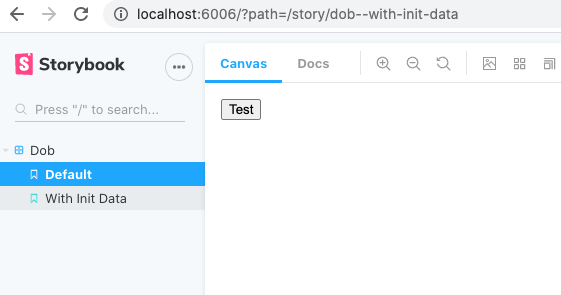
Above image show that the url has already change to second story, but the screen and the active menu item still keep on the first story
 stanleyyuenyiu
All 3 comments
If you're running 6.0, try running with --no-dll. Otherwise try upgrading to 6.1:
npx sb upgrade --prerelease
 shilman
on 6 Nov 2020
shilman
on 6 Nov 2020
Thanks, --no-dll solve the issue, we can close the issue, but may i know why --no-dll solve the issue?
stanleyyuenyiu
on 6 Nov 2020
@stanleyyuenyiu The short answer is I don't actually know why --no-dll solves it. The long answer is that --no-dll disables webpack DLLs, which can sometimes cause library version mismatches (e.g. user code is running React 17 and DLL is running React 16), and this can cause difficult-to-debug runtime errors. We are getting rid of webpack DLLs completely in 6.1: #12637
shilman
on 6 Nov 2020
Related issues
 levithomason
·
3Comments
levithomason
·
3Comments
 MrOrz
·
3Comments
MrOrz
·
3Comments
 tomitrescak
·
3Comments
tomitrescak
·
3Comments
 tirli
·
3Comments
tirli
·
3Comments
 alexanbj
·
3Comments
alexanbj
·
3Comments