Storybook: Initial Welcome screen does not display - just blank page shown
Describe the bug
Initial Welcome screen does not display - just blank page shown
I am trying to install Storybook into a clean 'create-react-app'. I follow the installation steps but only get a blank page instead of the Welcome Screen when localhost:6006 opens in the browser.
To ensure it is nothing to do with my own React app I have tried using a clean create-react-app and have the same issue.
To Reproduce
- Install clean create-react app with
npx create-react-app storybook - Go to project directory with
cd storybook - Install goes fine, and on
npm run startthe standard create-react-app starter page is displayed at localhost:3000. - Type
npx -p @storybook/cli sb initto install Storybook for React - Type
npm run storybook - The browser launches and opens localhost:6006 but only a blank page is shown (same on Chrome and Brave browsers).
It appears that Storybook started ok:
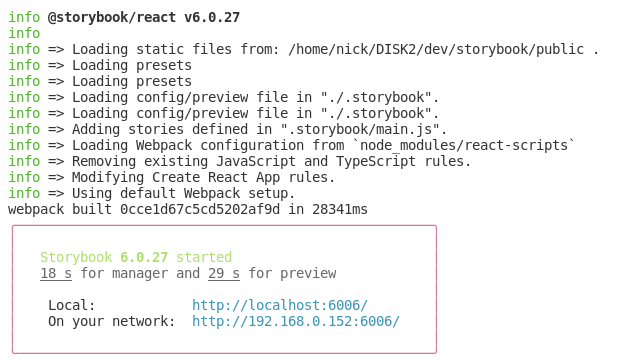
I also tried exactly the same steps above but in step 4 used npx sb init but this results in the same issue.
Expected behavior
I am using absolutely standard app with no changes and follow the generic install instructions to the letter, so I would expect to see the Welcome Screen.
System
Please paste the results of npx sb@next info here.
Environment Info:
System:
OS: Linux 4.19 Debian GNU/Linux 10 (buster) 10 (buster)
CPU: (4) x64 Intel(R) Core(TM) i7-5557U CPU @ 3.10GHz
Binaries:
Node: 12.19.0 - /usr/bin/node
npm: 6.14.8 - /usr/bin/npm
Browsers:
Chrome: 81.0.4044.122
Firefox: 78.3.0esr
npmPackages:
@storybook/addon-actions: ^6.0.27 => 6.0.27
@storybook/addon-essentials: ^6.0.27 => 6.0.27
@storybook/addon-links: ^6.0.27 => 6.0.27
@storybook/node-logger: ^6.0.27 => 6.0.27
@storybook/preset-create-react-app: ^3.1.4 => 3.1.4
@storybook/react: ^6.0.27 => 6.0.27
Any help much appreciated.
 nsclong
All 6 comments
I am also running into the same issue. For the past few days I've tried clean installs, comparing/pulling files from the git repo, even trying to run it on yarn, npx, and npm. I've had @alexoshin run it on his laptop as well and we've both run into the same issues. Blank screen for Storybook but the react app itself runs fine.
Here is my environment info as well:
Environment Info:
System:
OS: Linux 4.16 GalliumOS 3.1 (Bismuth)
CPU: (2) x64 Intel(R) Celeron(R) 2957U @ 1.40GHz
Binaries:
Node: 14.9.0 - ~/.nvm/versions/node/v14.9.0/bin/node
Yarn: 1.22.5 - /usr/bin/yarn
npm: 6.14.8 - ~/.nvm/versions/node/v14.9.0/bin/npm
Browsers:
Firefox: 81.0.2 (I've also tried Chromium)
npmPackages:
@storybook/addon-actions: ^6.0.27 => 6.0.27
@storybook/addon-essentials: ^6.0.27 => 6.0.27
@storybook/addon-links: ^6.0.27 => 6.0.27
@storybook/cli: ^6.0.27 => 6.0.27
@storybook/node-logger: ^6.0.27 => 6.0.27
@storybook/preset-create-react-app: ^3.1.4 => 3.1.4
@storybook/react: ^6.0.27 => 6.0.27
 Kkim50
on 24 Oct 2020
Kkim50
on 24 Oct 2020
I was able to resolve it on my end. When you run the npx sb init command, you need to install all the peer dependencies that give you warnings. Here's an example warning that likely pops up:
npm WARN @storybook/[email protected] requires a peer of react@^16.8.0 but none is installed. You must install peer dependencies yourself.
To install this particular dependency, you can use npm install react@^16.8.0.
Here's a final list of every dependency that I installed to get it working:
react@^16.8.0
typescript@>=2.8.0
[email protected]
react-is@^16.8.0
Once you install these, rerun npx sb init -f in your project directory, then npm run storybook should work. Hope this helps!
 alexoshin
on 24 Oct 2020
alexoshin
on 24 Oct 2020
Steps that worked for me:
Change directory into taskbox or wherever your react app is located:
cd taskbox
Plug in the following command:
npm install react@^16.8.0 typescript@>=2.8.0 [email protected] react-is@^16.8.0
I still get a whole bunch of warnings but it runs!! :D
Thank you so much @alexoshin
Kkim50
on 24 Oct 2020
Thank you @alexoshin. That worked.
nsclong
on 24 Oct 2020
I have same problems, not fixed
Brand new project just for testing, using Create react app, (it loads react 17) .
Got Blank screen also after downgrading to react 16.8
I suppose there should be some fix on sb init
this is my system:
Environment Info:
System:
OS: macOS 10.15.6
CPU: (8) x64 Intel(R) Core(TM) i7-7820HQ CPU @ 2.90GHz
Binaries:
Node: 10.15.3 - /usr/local/bin/node
Yarn: 1.22.5 - ~/.yarn/bin/yarn
npm: 6.13.0 - /usr/local/bin/npm
Browsers:
Chrome: 86.0.4240.111
Firefox: 69.0.3
Safari: 13.1.2
npmPackages:
@storybook/addon-actions: ^6.0.27 => 6.0.27
@storybook/addon-essentials: ^6.0.27 => 6.0.27
@storybook/addon-links: ^6.0.27 => 6.0.27
@storybook/node-logger: ^6.0.27 => 6.0.27
@storybook/preset-create-react-app: ^3.1.4 => 3.1.4
@storybook/react: ^6.0.27 => 6.0.27
npmGlobalPackages:
@storybook/cli: 3.4.8
 giorgioongithub
on 24 Oct 2020
giorgioongithub
on 24 Oct 2020
Solutions tracked in #12408
 shilman
on 25 Oct 2020
shilman
on 25 Oct 2020
Related issues
 wahengchang
·
3Comments
shilman
·
3Comments
wahengchang
·
3Comments
shilman
·
3Comments
 oriSomething
·
3Comments
oriSomething
·
3Comments
 alexanbj
·
3Comments
alexanbj
·
3Comments
 dnlsandiego
·
3Comments
dnlsandiego
·
3Comments
Most helpful comment
I was able to resolve it on my end. When you run the
npx sb initcommand, you need to install all the peer dependencies that give you warnings. Here's an example warning that likely pops up:To install this particular dependency, you can use
npm install react@^16.8.0.Here's a final list of every dependency that I installed to get it working:
Once you install these, rerun
npx sb init -fin your project directory, thennpm run storybookshould work. Hope this helps!