Storybook: "Show Code" not showing code, but only initially rendered outcome
Describe the bug
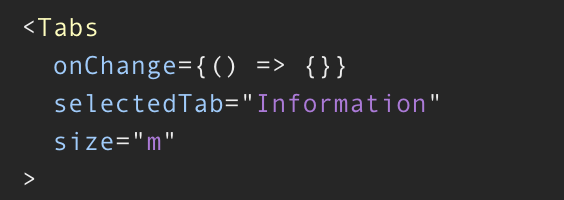
The "Show Code" feature (storysource/docgen) doesn't actually show the code of the Story, instead it just shows the outcome of the first render.
This is a problem because developers can't learn about the actual usage of the Story subject.
To Reproduce
Steps to reproduce the behavior:
- Create a Story
- Add any component that receives props.
- Have the props non-static (such as a state variable, or anonymous function)
- View the Story in Storybook and click on "Show Code".
Expected behavior
Possible outcome:
<Tabs value={value} onChange={handleChange} aria-label="simple tabs example">
Screenshots
Outcome of "Show Code":
Code snippets
Actual code behind above screenshot:
<Tabs onChange={(event, value) => setSelectedTab(value)} selectedTab={selectedTab} {...props}>
        <Tab value={TabNames.Information} label={TabNames.Information} />
        <Tab value={TabNames.Events} label={TabNames.Events} />
        <Tab value={TabNames.Contact} label={TabNames.Contact} />
</Tabs>
System
Environment Info:
System:
OS: macOS Mojave 10.14.6
CPU: (12) x64 Intel(R) Core(TM) i7-9750H CPU @ 2.60GHz
Binaries:
Node: 12.13.0 - ~/.nvm/versions/node/v12.13.0/bin/node
Yarn: 1.13.0 - /usr/local/bin/yarn
npm: 6.12.0 - ~/.nvm/versions/node/v12.13.0/bin/npm
Browsers:
Chrome: 86.0.4240.80
Safari: 14.0
 Tzurz
Tzurz
All 10 comments
You can force it to show the story's original source by setting the docs.source.type story parameter to code: https://storybook.js.org/docs/react/writing-docs/doc-blocks#docspage-1
 shilman
on 22 Oct 2020
shilman
on 22 Oct 2020
Brilliant, it works! Thank you very much @shilman .
Tzurz
on 22 Oct 2020
@shilman If I wanted to have each story that is a named export have independent code snippets, is there a way to do that?
export const base = () => { // story }

export const withSomething = () => { // story }

// how can you have individual code sources for base and withSomething?
 JeffWeim
on 29 Oct 2020
JeffWeim
on 29 Oct 2020
@JeffWeim i've just pushed a pull request (#12941) to address a related issue. In your case you would use a story parameter. Below is the snippet i used for the documentation pull request mentioned and how to use it at a story level:
import React from "react";

import { Button } from "./Button";

// some function to demonstrate the behavior
const someFunction = (someValue) => {
  return `i am a ${someValue}`;
};

export default {
  title: "Button",
  component: Button,
  argTypes: {
    backgroundColor: { control: "color" },
  },
  // sets the source type at a component level to type of code to display the full contents of the ExampleStory
  /*  parameters: {
    docs: {
      source: {
        type: "code",
      },
    },
  }, */
};

export const ExampleStory = (args) => {
  // destructure the label from the args object
  const { label } = args;
  //
  // assigns the function result to a variable and pass it as a prop into the component
  const functionResult = someFunction(label);
  return <Button {...args} label={functionResult} />;
};

ExampleStory.args = {
  primary: true,
  size: "small",
  label: "button",
};

// sets the source type at a story level to type of code to display the full contents of the ExampleStory
ExampleStory.parameters = {
  docs: {
    source: {
      type: "code",
    },
  },
};
See if it helps with your case.
Stay safe
 jonniebigodes
on 29 Oct 2020
jonniebigodes
on 29 Oct 2020
@jonniebigodes source.type is auto by default. auto is a heuristic which uses dynamic for args stories and code for no-args stories. so @JeffWeim shouldn't need to do anything special unless his stories accept args.
shilman
on 1 Nov 2020
@shilman I should have given more details in my initial question. From what I understand, a story's file that is written using CSF can have multiple named exports which get shown individually in the UI. However, it seems the CSF still needs a default export. Within that I know that I can alter some of the settings. For example, here is a default export I'm currently using:
const code = `
  <Button />
`

export const base = () => { // story }

export const withSomething = () => { // story }

export default {
  component: Button,
  title: 'Components/Button',
  parameters: {
    design: {
      type: 'figma',
      url: '' // url here
    },
    docs: {
      description: {
        component: '' // description here
      },
      source: {
        code // Can this code snippet vary between `base` and `withSomething`?
      }
    }
  }
}
Because I'm defining the source snippet in the default export, that code source snippet will be applied across all of the named exports shown in the UI, which is not what I'm looking to do.
The named exports have variations in how the component gets used so the code source snippets are going to vary. Back to my original question, is it possible to have a CSF file with multiple named exports (which each get a "show code" button in the UI) have independent source snippets? (Sorry if I'm just missing something from the docs, I just haven't yet been able to find an example of this)
const baseCode = `
  <Button>Base Button</Button
`

const withSomethingCode = `
  <Button disabled color="light">With Something Button</Button
`
👆 can you do something like this in a CSF file?
JeffWeim
on 1 Nov 2020
@JeffWeim Parameters are hierarchical so you can set them globally, at the component level, or at the story level. Here's how to override for a story:
export const Foo = ...
Foo.parameters = {
  docs: {
    source: {
      code: 'bar'
    }
  }
}
https://storybook.js.org/docs/react/writing-stories/parameters
shilman
on 1 Nov 2020
@shilman Thank you that helps!
JeffWeim
on 2 Nov 2020
@shilman Is there a way to get updated controls values in code snippet with docs.source.type = code similar to docs.source.type = auto ?
 riyalohia
on 29 Nov 2020
riyalohia
on 29 Nov 2020
@riyalohia nope. Parameters are static. We plan to do more with this in future iterations of the source block..
shilman
on 29 Nov 2020
Related issues
 zvictor
·
3Comments
zvictor
·
3Comments
 xogeny
·
3Comments
xogeny
·
3Comments
 Jonovono
·
3Comments
Jonovono
·
3Comments
 purplecones
·
3Comments
purplecones
·
3Comments
 tomitrescak
·
3Comments
tomitrescak
·
3Comments
Most helpful comment
You can force it to show the story's original source by setting the
docs.source.typestory parameter tocode: https://storybook.js.org/docs/react/writing-docs/doc-blocks#docspage-1