Storybook: New version notification blocks content
Describe the bug
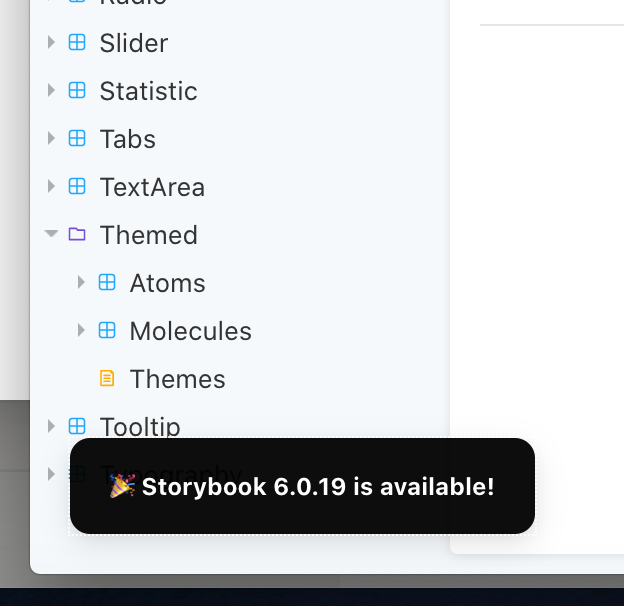
The notification in the bottom left corner that says "Storybook
To Reproduce
Steps to reproduce the behavior:
It's always there.
Expected behavior
A clear and concise description of what you expected to happen.
I would like to be able to close the notification.
Screenshots
If applicable, add screenshots to help explain your problem.
Code snippets
If applicable, add code samples to help explain your problem.
System:
Please paste the results of npx sb@next info here.
Environment Info:
System:
OS: macOS 10.15.5
CPU: (12) x64 Intel(R) Core(TM) i7-9750H CPU @ 2.60GHz
Binaries:
Node: 10.16.3 - ~/.nvm/versions/node/v10.16.3/bin/node
Yarn: 1.22.0 - /usr/local/bin/yarn
npm: 6.9.0 - ~/.nvm/versions/node/v10.16.3/bin/npm
Browsers:
Chrome: 84.0.4147.135
Firefox: 80.0
Safari: 13.1.1
npmPackages:
@storybook/addon-a11y: ^5.3.19 => 5.3.19
@storybook/addon-actions: ^5.3.19 => 5.3.19
@storybook/addon-docs: ^5.3.19 => 5.3.19
@storybook/addon-essentials: ^5.3.19 => 5.3.19
@storybook/addon-knobs: ^5.3.19 => 5.3.19
@storybook/addons: 5.3.19 => 5.3.19
Additional context
Add any other context about the problem here.
 AlexandraBeautyman
All 7 comments
Good catch, will fix. As a workaround, if you click on it it'll take you to the upgrade page and then it shouldn't show up again for another 3+ months when we release 6.1.x.
 shilman
on 28 Aug 2020
shilman
on 28 Aug 2020
I guess this could be fixed by adding a close button in the notification that would dismiss the notification without navigating to the upgrade page.
@shilman Are you happy with me trying to implement that solution or did you have anything else in mind?
 Tomastomaslol
on 29 Aug 2020
Tomastomaslol
on 29 Aug 2020
@Tomastomaslol That's exactly what I had in mind and I'd be thrilled if you took a crack at it!
shilman
on 29 Aug 2020
I opened a pull request https://github.com/storybookjs/storybook/pull/12320 with a proposed fix. If you got a couple of minutes please let me know what you think of it!
Have a great day! 🙂
Tomastomaslol
on 30 Aug 2020
@Tomastomaslol Thanks so much for that, it's a really big issue since 6.x came out.
@shilman Not sure if you're the one to ask but I'd appreciate if this could be released on 5.x branch, it's very annoying to have that notification showing every time I start storybook without an ability to dismiss it permanently.
Also I'd love to have a flag to stop showing it entirely as migrating from 5.x to 6.x isn't very simple and it can take a while for organizations to implement, I don't want to get reminded of a task I've planned a few months ahead to the future every time I start the project.
 morsdyce
on 30 Aug 2020
morsdyce
on 30 Aug 2020
@morsdyce The intended behavior was that clicking on the notification takes you to the upgrade page and then the notification wouldn't be shown again until the next MINOR release. Clearly not working that way and we'll get a fix in soon. Thanks for your patience!
shilman
on 30 Aug 2020
¡Ay Caramba!! I just released https://github.com/storybookjs/storybook/releases/tag/v6.1.0-alpha.28 containing PR #12320 that references this issue. Upgrade today to the @next NPM tag to try it out!
npx sb upgrade --prerelease
Closing this issue. Please re-open if you think there's still more to do.
shilman
on 23 Oct 2020
Related issues
 firaskrichi
·
61Comments
firaskrichi
·
61Comments
 ilyaulyanov
·
100Comments
ilyaulyanov
·
100Comments
![dependencies[bot] picture](https://avatars1.githubusercontent.com/in/2310?v=4&s=40) dependencies[bot]
·
142Comments
dependencies[bot]
·
142Comments
 Gongreg
·
58Comments
Gongreg
·
58Comments
 ChucKN0risK
·
74Comments
ChucKN0risK
·
74Comments