Storybook: ArgTypes `defaultValue` displaying as blank in preview.
Describe the bug
Providing a value for the defaultValue key in the ArgType object results in nothing being displayed on preview.
To Reproduce
Steps to reproduce the behavior:
- Create a new story with a similar structure as the code snippet below.
- Build storybook and view the component.
Expected behavior
The value of devaultValue would appear under the Default section of the Controls addon.
Screenshots

Code snippets
import { action } from '@storybook/addon-actions'
import { Button } from '../src/button'

export default {
  title: 'Button',
  component: Button,
  argTypes: {
    type: {
      defaultValue: 'primary', // does not display on preview
      description: 'type description',
      control: {
        type: 'select',
        options: ['primary', 'secondary', 'tertiary'],
      },
    },
    children: {
      defaultValue: 'Button text', // does not display on preview
      description: 'children description',
    },
  },
}

const Template = (args) => <Button onClick={action('onClick')} {...args} />

export const Default = Template.bind({})
Default.args = {
  type: 'primary',
  children: 'Button text',
}
System:
Environment Info:

  System:
    OS: macOS 10.15.6
    CPU: (8) x64 Intel(R) Core(TM) i7-4870HQ CPU @ 2.50GHz
  Binaries:
    Node: 14.0.0 - /usr/local/bin/node
    Yarn: 1.22.4 - /usr/local/bin/yarn
    npm: 6.14.7 - /usr/local/bin/npm
  Browsers:
    Chrome: 84.0.4147.125
    Firefox: 78.0.2
    Safari: 13.1.2
  npmPackages:
    @storybook/addon-actions: ^6.0.5 => 6.0.5
    @storybook/addon-essentials: ^6.0.5 => 6.0.5
    @storybook/addon-knobs: ^6.0.5 => 6.0.5
    @storybook/addon-links: ^6.0.5 => 6.0.5
    @storybook/addon-storysource: ^6.0.5 => 6.0.5
    @storybook/addons: ^6.0.5 => 6.0.5
    @storybook/react: ^6.0.5 => 6.0.5
    @storybook/storybook-deployer: ^2.8.6 => 2.8.6
    @storybook/theming: ^6.0.5 => 6.0.5
 SamSverko
All 5 comments
Not sure if this is a bug, but I had to add a table property for it to works on my storybook.
Here's an example:
```js
export default {
title: 'Accordion',
component: Accordion,
argTypes: {
isExpanded: {
control: "boolean",
defaultValue: false,
description: "if true, acoordion is expanded on render",
table: {
type: { summary: 'boolean' },
defaultValue: { summary: false },
}
},
},
}
 marie-maxime
on 13 Aug 2020
marie-maxime
on 13 Aug 2020
@marie-maxime What you've pasted is correct. However, the ArgsTable should probably also use the argType.defaultValue field if argType.table.defaultValue is not specified, so I plan to fix that in a patch release.
 shilman
on 13 Aug 2020
shilman
on 13 Aug 2020
Thank you for the alternative @marie-maxime , I'm using that for now until I figure out what I'm doing wrong. The summary does have different styling than description.
I found this helpful table that details the argTypes values. It includes the table portion. I see that description is provided, but not defaultValue.
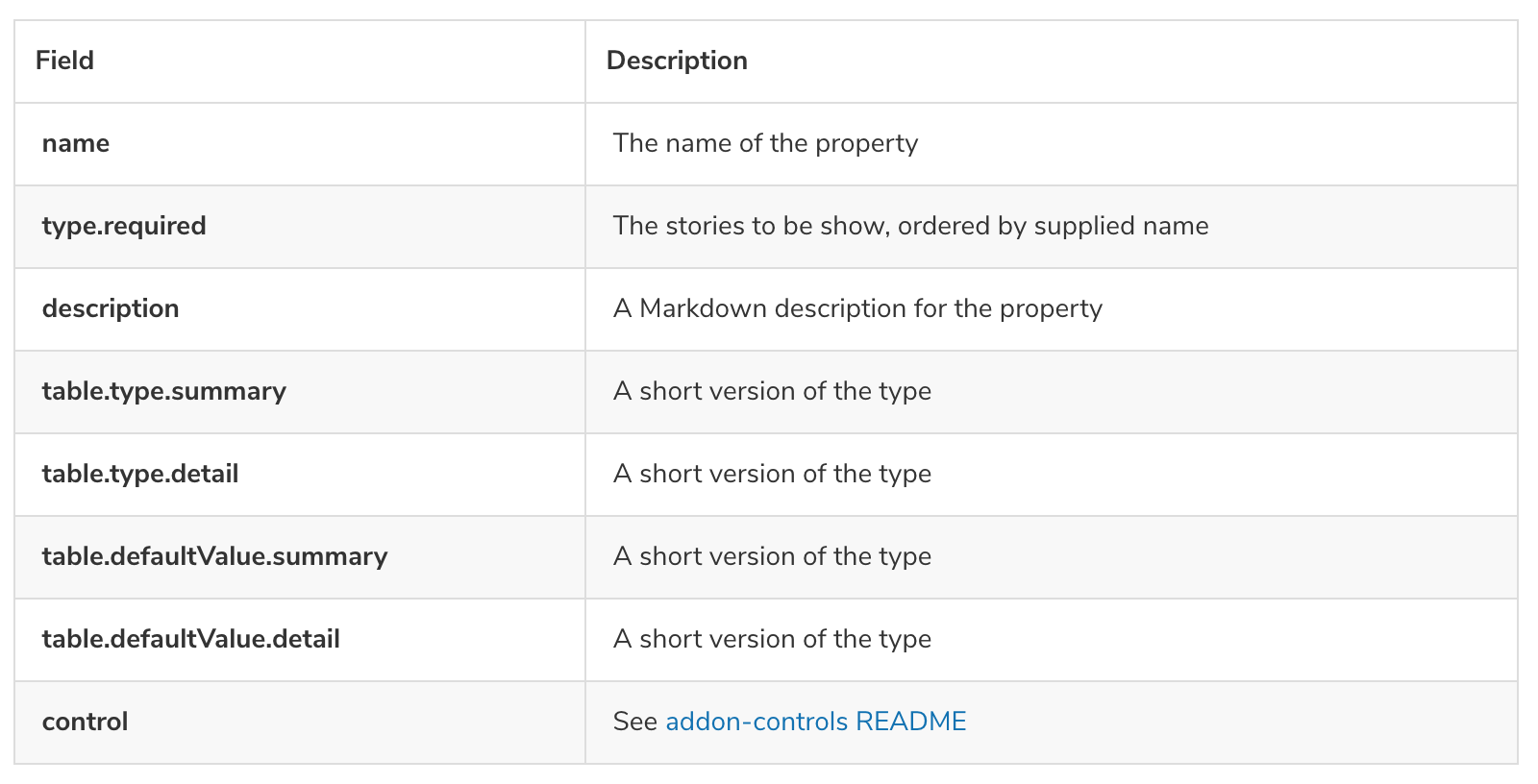
The summary is styled to look like code, or some form of highlighting.

SamSverko
on 13 Aug 2020
Having the same issue with angular and compodoc when using ArgsTable block.
 feerzlay
on 14 Aug 2020
feerzlay
on 14 Aug 2020
The same problem. When I'm using
Component.argTypes = {
  someProp: {
    defaultValue: 'm', // does not display in Controls panel
    description:
      'Some text', // works
  }
}

 anna-tsukanova
on 5 Oct 2020
anna-tsukanova
on 5 Oct 2020
Related issues
 xogeny
·
3Comments
xogeny
·
3Comments
 sakulstra
·
3Comments
sakulstra
·
3Comments
 dnlsandiego
·
3Comments
shilman
·
3Comments
dnlsandiego
·
3Comments
shilman
·
3Comments
 arunoda
·
3Comments
arunoda
·
3Comments
Most helpful comment
@marie-maxime What you've pasted is correct. However, the
ArgsTableshould probably also use theargType.defaultValuefield ifargType.table.defaultValueis not specified, so I plan to fix that in a patch release.