Storybook: Storybook 6 wrong style order with material ui
Describe the bug
After upgrading to storybook 6 from version 5.3 material (v4.11.0) styles are overwritten by default ones. This is not consistent some components work fine. I am using create react app with typescript.
Screenshots
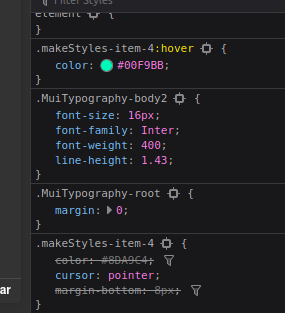
Code snippets
main.js
module.exports = {
  stories:['../src/**/*.stories.tsx'],
  addons: [
    '@storybook/preset-create-react-app',
    '@storybook/addon-actions/register',
    '@storybook/addon-knobs/register',
    '@storybook/addon-viewport/register',
    '@storybook/addon-storysource'
  ]
}
preview.js
import { addDecorator, addParameters } from '@storybook/react'
import { muiTheme } from 'storybook-addon-material-ui'
import { themes } from '@storybook/theming'
import { theme } from '../src/static/theme'

addDecorator(muiTheme([theme]))
addParameters({
  backgrounds: [
    { name: 'dark', value: '#202020', default: true },
    { name: 'light', value: '#FFFFFF' }
  ],
  options: { theme: themes.dark }
})
I found some issues with exact problem but fix does not work https://github.com/mui-org/material-ui/issues/14348
Edit: After change on hot reload styles works in correct order.
 NorbertBodziony
All 3 comments
So i fixed that by adding :
addDecorator(storyFn => (
  <StylesProvider injectFirst>
      { storyFn() }
  </StylesProvider>
))
Instead of
export const withStylesDecorator = storyFn => (
  <StylesProvider injectFirst>{storyFn()}</StylesProvider>
)
and
addDecorator(withStylesDecorator)
No idea why it works.
NorbertBodziony
on 11 Aug 2020
Hi everyone! Seems like there hasn't been much going on in this issue lately. If there are still questions, comments, or bugs, please feel free to continue the discussion. Unfortunately, we don't have time to get to every issue. We are always open to contributions so please send us a pull request if you would like to help. Inactive issues will be closed after 30 days. Thanks!
![stale[bot] picture](https://avatars3.githubusercontent.com/in/1724?v=4&s=40) stale[bot]
on 2 Sep 2020
stale[bot]
on 2 Sep 2020
Hey there, it's me again! I am going close this issue to help our maintainers focus on the current development roadmap instead. If the issue mentioned is still a concern, please open a new ticket and mention this old one. Cheers and thanks for using Storybook!
stale[bot]
on 4 Oct 2020
Related issues
 MrOrz
·
3Comments
MrOrz
·
3Comments
 ZigGreen
·
3Comments
ZigGreen
·
3Comments
 oriSomething
·
3Comments
oriSomething
·
3Comments
 purplecones
·
3Comments
purplecones
·
3Comments
 rpersaud
·
3Comments
rpersaud
·
3Comments