Storybook: Ember storybook fails to load
Thank you for storybook and for making it available to Ember developers. I truly appreciate your hard work! 🙏.
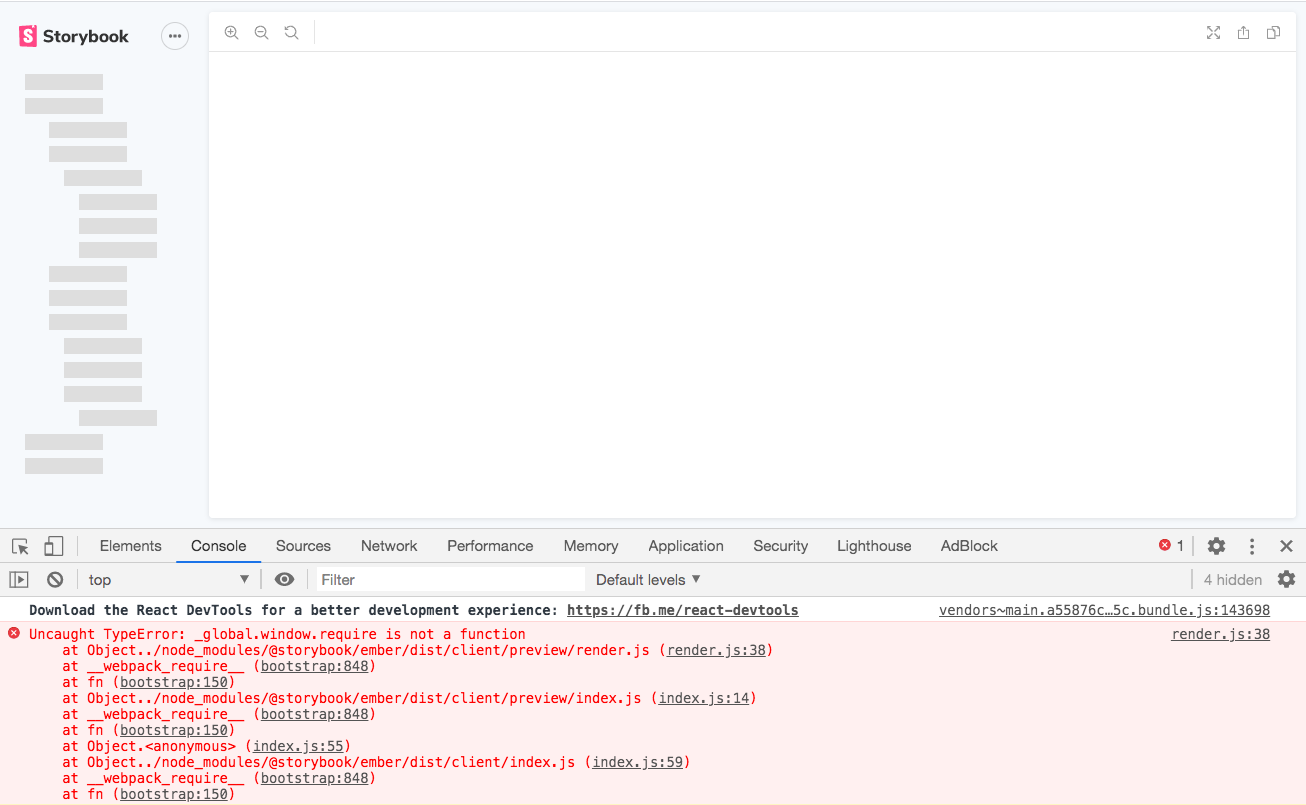
Following the instructions in the preview Ember Storybook docs (linked from here) – Storybook fails to load any stories and throws an Uncaught TypeError: _global.window.require is not a function error in the browser's devtools console and an UnhandledPromiseRejectionWarning: TypeError: Cannot read property 'content' of undefined error in terminal output.
To Reproduce
Steps to reproduce the behavior:
- npx -p @storybook/cli sb init
- ember install @storybook/ember-cli-storybook
- yarn add npm-run-all --dev
- yarn run storybook-dev
- See error output below in the terminal:
Generating files needed by Storybook
Parsing /var/folders/_g/523m8m6x61sbcb4njnb1hyp40000gn/T/broccoli-22146h3FNcpLocEzE/out-753-append_ember_auto_import_analyzer/index.html
(node:22146) UnhandledPromiseRejectionWarning: TypeError: Cannot read property 'content' of undefined
    at removeRootURL (/Users/bfitch/src/icisstaff/facesheet/node_modules/@storybook/ember-cli-storybook/util.js:57:64)
    at parse (/Users/bfitch/src/icisstaff/facesheet/node_modules/@storybook/ember-cli-storybook/util.js:93:10)
    at Class.outputReady (/Users/bfitch/src/icisstaff/facesheet/node_modules/@storybook/ember-cli-storybook/index.js:84:26)
    at addonPromises.project.addons.reduce (/Users/bfitch/src/icisstaff/facesheet/node_modules/ember-cli/lib/models/builder.js:183:28)
    at Array.reduce (<anonymous>)
    at Builder.processAddonBuildSteps (/Users/bfitch/src/icisstaff/facesheet/node_modules/ember-cli/lib/models/builder.js:180:43)
    at tryCatcher (/Users/bfitch/src/icisstaff/facesheet/node_modules/ember-cli/node_modules/rsvp/dist/rsvp.js:326:21)
    at invokeCallback (/Users/bfitch/src/icisstaff/facesheet/node_modules/ember-cli/node_modules/rsvp/dist/rsvp.js:498:33)
    at publish (/Users/bfitch/src/icisstaff/facesheet/node_modules/ember-cli/node_modules/rsvp/dist/rsvp.js:484:9)
    at flush (/Users/bfitch/src/icisstaff/facesheet/node_modules/ember-cli/node_modules/rsvp/dist/rsvp.js:2441:7)
    at process._tickCallback (internal/process/next_tick.js:61:11)
(node:22146) UnhandledPromiseRejectionWarning: Unhandled promise rejection. This error originated either by throwing inside of an async function without a catch block, or by rejecting a promise which was not handled with .catch(). (rejection id: 2)
(node:22146) [DEP0018] DeprecationWarning: Unhandled promise rejections are deprecated. In the future, promise rejections that are not handled will terminate the Node.js process with a non-zero exit code.
- Open
http://localhost:6006/in a browser - See the error below in the Javascript console:
render.js:38 Uncaught TypeError: _global.window.require is not a function
    at Object../node_modules/@storybook/ember/dist/client/preview/render.js (render.js:38)
    at __webpack_require__ (bootstrap:848)
    at fn (bootstrap:150)
    at Object../node_modules/@storybook/ember/dist/client/preview/index.js (index.js:14)
    at __webpack_require__ (bootstrap:848)
    at fn (bootstrap:150)
    at Object.<anonymous> (index.js:55)
    at Object../node_modules/@storybook/ember/dist/client/index.js (index.js:59)
    at __webpack_require__ (bootstrap:848)
    at fn (bootstrap:150)
Expected behavior
I expect the example stories in the /stories directory to load.
System:
Environment Info:

  System:
    OS: macOS High Sierra 10.13.6
    CPU: (4) x64 Intel(R) Core(TM) i7-5557U CPU @ 3.10GHz
  Binaries:
    Node: 10.15.0 - ~/.nodenv/versions/10.15.0/bin/node
    Yarn: 1.22.4 - /usr/local/bin/yarn
    npm: 5.1.0 - ~/src/icisstaff/facesheet/node_modules/.bin/npm
  Browsers:
    Chrome: 83.0.4103.116
  npmPackages:
    @storybook/addon-actions: ^5.3.19 => 5.3.19
    @storybook/addon-links: ^5.3.19 => 5.3.19
    @storybook/addons: ^5.3.19 => 5.3.19
    @storybook/ember: ^5.3.19 => 5.3.19
    @storybook/ember-cli-storybook: ^0.2.1 => 0.2.1
Additional context
- I created an issue in the ember-cli-storybook repo and did some initial debugging here: https://github.com/storybookjs/ember-cli-storybook/issues/42
- This issue was extracted from this comment: https://github.com/storybookjs/storybook/issues/10074#issuecomment-647770743
 bfitch
All 13 comments
In my case the path is generated incorrectly in preview-head.html. See issue here https://github.com/storybookjs/storybook/issues/11235. Is your path in preview-head.html incorrect as well?
 gvocale
on 23 Jun 2020
gvocale
on 23 Jun 2020
@gvocale In my case preview-head.html is generated, but the file is empty.
bfitch
on 23 Jun 2020
@bfitch can you try running ember s in one window (wait till the server is up) and then run npx start-storybook -p 6006 -s dist in a separate window.
 ddoria921
on 24 Jun 2020
ddoria921
on 24 Jun 2020
@ddoria921 When I run ember s I get:
Generating files needed by Storybook
Parsing /var/folders/_g/523m8m6x61sbcb4njnb1hyp40000gn/T/broccoli-495606ZRxaeaeYYu1/out-753-append_ember_auto_import_analyzer/index.html
(node:49560) UnhandledPromiseRejectionWarning: TypeError: Cannot read property 'content' of undefined
as reported here and above.
When I run npx start-storybook -p 6006 -s dist in another terminal window, I get:
as reported above.
Thanks for your help debugging this.
bfitch
on 24 Jun 2020
@bfitch Huh, interesting...
I'm running the following versions and it's working fine.
    "@storybook/ember": "^5.3.18",
    "@storybook/ember-cli-storybook": "^0.2.1",
    "ember-source": "~3.17.0",
what version are you on?
ddoria921
on 24 Jun 2020
@ddoria921
node: 10.15.0
ember-source: 3.15.0
@storybook/ember: 5.3.19
@storybook/ember-cli-storybook: 0.2.1
yarn global add [email protected]~/.config/yarn/global/node_modules/ember-cli/bin/ember -v
ember-cli: 3.15.2
node: 10.15.0
os: darwin x64
~/.config/yarn/global/node_modules/ember-cli/bin/ember new storybook-test --yarncd storybook-testnpx -p @storybook/cli sb initember install @storybook/ember-cli-storybookember sIn another terminal window:
npx start-storybook -p 6006 -s dist
Loaded the example stories. I will repeat these steps in my existing app to see if it loads correctly.
bfitch
on 26 Jun 2020
Sorry for the radio silence on this issue. I've been checking it on and off and compared it to my notes.
Issuing ember -v ( as i have already installed the cli when i started working on the documentation) yelds the following:
ember-cli: 3.17.0
node: 12.15.0
os: win32 x64
When i started the work on this i saw this exact same error. And i might be completely off base here, but when the user issues npm run storybook-dev which contains the following: npm-run-all --aggregate-output --continue-on-error --parallel start storybook, it will sometimes obfuscates the output and one thinks that everything is built when it isn't actually. The tasks are running in parallel but storybook will complete first as it's using webpack and it's way faster than the ember bundler (brocolli).

It will then continue to open the browser window and try to display Storybook with the default stories that are included when you initialize it on your project, but the build on ember's side has not yet finished.
My workaround this, was to change the storybook-dev script to:
"storybook-dev": "npm-run-all --continue-on-error --parallel start storybook",
That takes care of part of it, also changed the storybook script to the following:
"storybook": "start-storybook -p 6006 -s dist --ci",
What this is doing is put Storybook in CI mode, at the lack of a better analogy. With that i'm able to get a functional initial Storybook. You can read more about the options here, wait for the complete build to go through, both Storybook and the app it self and open a browser window to http://localhost:6006.
I tried this once again on a fresh app and it worked. Go to the extent of removing preview.head.html and .env files 10 times and run the script again and each time as soon as i saw DEPRECATION: Upgrade ember-cli-inject-live-reload version to 1.10.0 or above on my console i was good to go and it worked.
I know that this is not a "silver bullet" (pardon the bad pun), but the workaround that seemed to do the trick.
Also sorry for not having a concrete answer for this issue. I'm going to update the pr shortly and incorporate these changes and run them by the remainder elements of the team if they're ok with it.
Stay safe
 jonniebigodes
on 28 Jun 2020
jonniebigodes
on 28 Jun 2020
Interesting.. thanks for the explanation! It also explains why I never ran into the issue myself. My process has always been to start the ember server ember s and then run the storybook command npx start-storybook -p 6006 -s dist once I saw the ember server was up and running.
ddoria921
on 28 Jun 2020
Thanks for following up @jonniebigodes 🙏.
I'm still suck with the error I reported here: https://github.com/storybookjs/ember-cli-storybook/issues/42.
I think my issue is a little different than the race condition you had, as I'm not able to even get past running ember s.
Can you help me understand what the ember-cli-storybook generator is dong with .storybook/preview-head.html? I believe ember s is failing because the ember-cli addon isn't loading prevew-head.html correctly (or able to generate it at all).
bfitch
on 30 Jun 2020
@bfitch no need to thank. Glad that i was able to give some insights on the issue at hand.
I'll take a look on your other issue shortly and see if i possibly can come up with a solution for it.
Do you mind waiting a bit longer while i triage it?
Stay safe
jonniebigodes
on 1 Jul 2020
Hi everyone! Seems like there hasn't been much going on in this issue lately. If there are still questions, comments, or bugs, please feel free to continue the discussion. Unfortunately, we don't have time to get to every issue. We are always open to contributions so please send us a pull request if you would like to help. Inactive issues will be closed after 30 days. Thanks!
![stale[bot] picture](https://avatars3.githubusercontent.com/in/1724?v=4&s=40) stale[bot]
on 25 Jul 2020
stale[bot]
on 25 Jul 2020
Hey there, it's me again! I am going close this issue to help our maintainers focus on the current development roadmap instead. If the issue mentioned is still a concern, please open a new ticket and mention this old one. Cheers and thanks for using Storybook!
stale[bot]
on 24 Aug 2020
Related issues
 oriSomething
·
3Comments
oriSomething
·
3Comments
 tlrobinson
·
3Comments
tlrobinson
·
3Comments
 shilman
·
3Comments
shilman
·
3Comments
 alexanbj
·
3Comments
alexanbj
·
3Comments
 dnlsandiego
·
3Comments
dnlsandiego
·
3Comments