Storybook: addon-controls 6.0.0-beta.20 difficultly with fully-custom-args angular cli
Describe the bug
I'm trying to get the full custom args count example to work, shown here.
Struggling to get it to work within my angular cli. I feel like I'm very close but getting the following error Unexpected value 'undefined' declared by the module 'DynamicModule' on both Story1 and Story2 when tested independently. I've just shown both variants of what I'm trying here to give a better idea of where I am at / what I have tried.
Ideally I'd like it to work with Story1 variant.
Expected behavior
I want to replicate the demo at: https://github.com/storybookjs/storybook/tree/next/addons/controls#fully-custom-args where the component is repeated.
I couldn't see any examples of this within the angular-cli example project found here.
Screenshots

Code snippets
playground.stories.ts
import { PlaygroundComponent } from "./playground.component";
import { action } from "@storybook/addon-actions";
import { moduleMetadata } from "@storybook/angular";
import { CUSTOM_ELEMENTS_SCHEMA } from "@angular/core";
import range from "lodash/range";

interface StoryProps {
  text?: string;
  count?: number;
}

export default {
  title: "10 - Playground/Button",
  excludeStories: /.*Data$/,
  component: PlaygroundComponent,
  parameters: {
    componentSubtitle:
      "Desc",
    docs: {
      iframeHeight: 100,
    },
  },
  decorators: [
    moduleMetadata({
      schemas: [CUSTOM_ELEMENTS_SCHEMA],
      declarations: [PlaygroundComponent],
    }),
  ],
};

/** DECLARE STORIES */
export const Story1 = (args: Story1Props) =>
  range(args.count).map((i) => ({
    component: PlaygroundComponent,
    props: {
      text: args.text,
    },
  }));

export const Story2 = (args: StoryProps) =>
  range(args.count).map((i) => ({
    component: PlaygroundComponent,
    props: {
      text: args.text
    },
    template: `
      <app-playground
        [text]="text">
      </app-playground>`,
  }));

Story1.storyName = "Default";
Story1.args = { text: "Story1", count: 3 };
Story1.argTypes = {
  count: { control: { type: "range", min: 0, max: 20 } },
};

Story2.storyName = "Default2";
Story2.args = { text: "Story2", count: 3 };
Story2.argTypes = {
  count: { control: { type: "range", min: 0, max: 20 } },
};
System:
Environment Info:
System:
OS: macOS High Sierra 10.13.6
CPU: (4) x64 Intel(R) Core(TM) i5-5257U CPU @ 2.70GHz
Binaries:
Node: 10.15.1 - /usr/local/bin/node
npm: 6.14.4 - /usr/local/bin/npm
Browsers:
Chrome: 83.0.4103.61
Firefox: 76.0.1
Safari: 13.0.4
npmPackages:
@storybook/addon-a11y: ^6.0.0-beta.20 => 6.0.0-beta.20
@storybook/addon-actions: ^6.0.0-beta.20 => 6.0.0-beta.20
@storybook/addon-controls: ^6.0.0-beta.20 => 6.0.0-beta.20
@storybook/addon-docs: ^6.0.0-beta.20 => 6.0.0-beta.20
@storybook/addon-jest: ^6.0.0-beta.20 => 6.0.0-beta.20
@storybook/addon-knobs: ^6.0.0-beta.20 => 6.0.0-beta.20
@storybook/addon-links: ^6.0.0-beta.20 => 6.0.0-beta.20
@storybook/addon-storyshots: ^6.0.0-beta.20 => 6.0.0-beta.20
@storybook/addon-viewport: ^6.0.0-beta.20 => 6.0.0-beta.20
@storybook/addons: ^6.0.0-beta.20 => 6.0.0-beta.20
@storybook/angular: ^6.0.0-beta.20 => 6.0.0-beta.20
@storybook/storybook-deployer: ^2.8.6 => 2.8.6
 chrisj-skinner
All 9 comments
@matheo is this something you can help with?
 shilman
on 3 Jun 2020
shilman
on 3 Jun 2020
@chrisj-skinner I've never seen that kind of StoryFn before, using range is to define an array of Components inside a Story? I guess there are other ways to accomplish that. @storybook/angular expects a StoryFn.component or StoryFn.template to create the Story component. This error happens when this is not set, and this range is returning an array instead an StoryFn() => object.
@shilman I take advantage of this issue to ask you if the Story.parameters.argTypes is supposed to be merged recursively, because I just want to extend/override some fields but my Story overrides the whole object :( can we fix that? or there's something I'm missing?
 matheo
on 3 Jun 2020
matheo
on 3 Jun 2020
@matheo should be merged recursively. if you have a repro, i can look at why it's not working that way -- possibly a bug
shilman
on 3 Jun 2020
@shilman ah, I see that it works with the latest CSF format,
storiesOf API seems to override the original object.
@chrisj-skinner to multiplicate a component like that with @storybook/angular I guess we need an ngFor inside a single Story because currently it doesn't support an array. I just realized that the react handler can support it, but angular doesn't.
matheo
on 3 Jun 2020
@matheo Ah ok. My use case for this would be when developing a card component. For example: like this. The required number of cards would be unknown in the final project - eg there might be a 'show more' pulling in more cards
With the range and count control, I could show to the wider team in UX / UI review how it would look like with 3, 5, 7 10 card etc.
I thought it would be a nice addition. Hence I wouldn't want the ngfor within the component itself but I suppose we could have it wrapping the story. I'll give it a go and feedback here
chrisj-skinner
on 4 Jun 2020
@matheo @shilman I got the following to work - thanks.
export const Story = (args: Story1Props) => ({
  component: PlaygroundComponent,
  props: {
    text: args.text,
    count: [...Array(args.count).keys()],
  },
  template: `
      <app-playground *ngFor="let i of count"
        [text]="text">
      </app-playground>`,
});
Nice, that's the Angular way right now :)
matheo
on 4 Jun 2020
@matheo @shilman created a PR with updates to the docs https://github.com/storybookjs/storybook/pull/11037
chrisj-skinner
on 4 Jun 2020
@shilman @matheo Am I missing something but has this solutions has been removed from 6.0 docs?
https://github.com/storybookjs/storybook/tree/next/addons/controls & https://storybook.js.org/docs/angular/essentials/controls
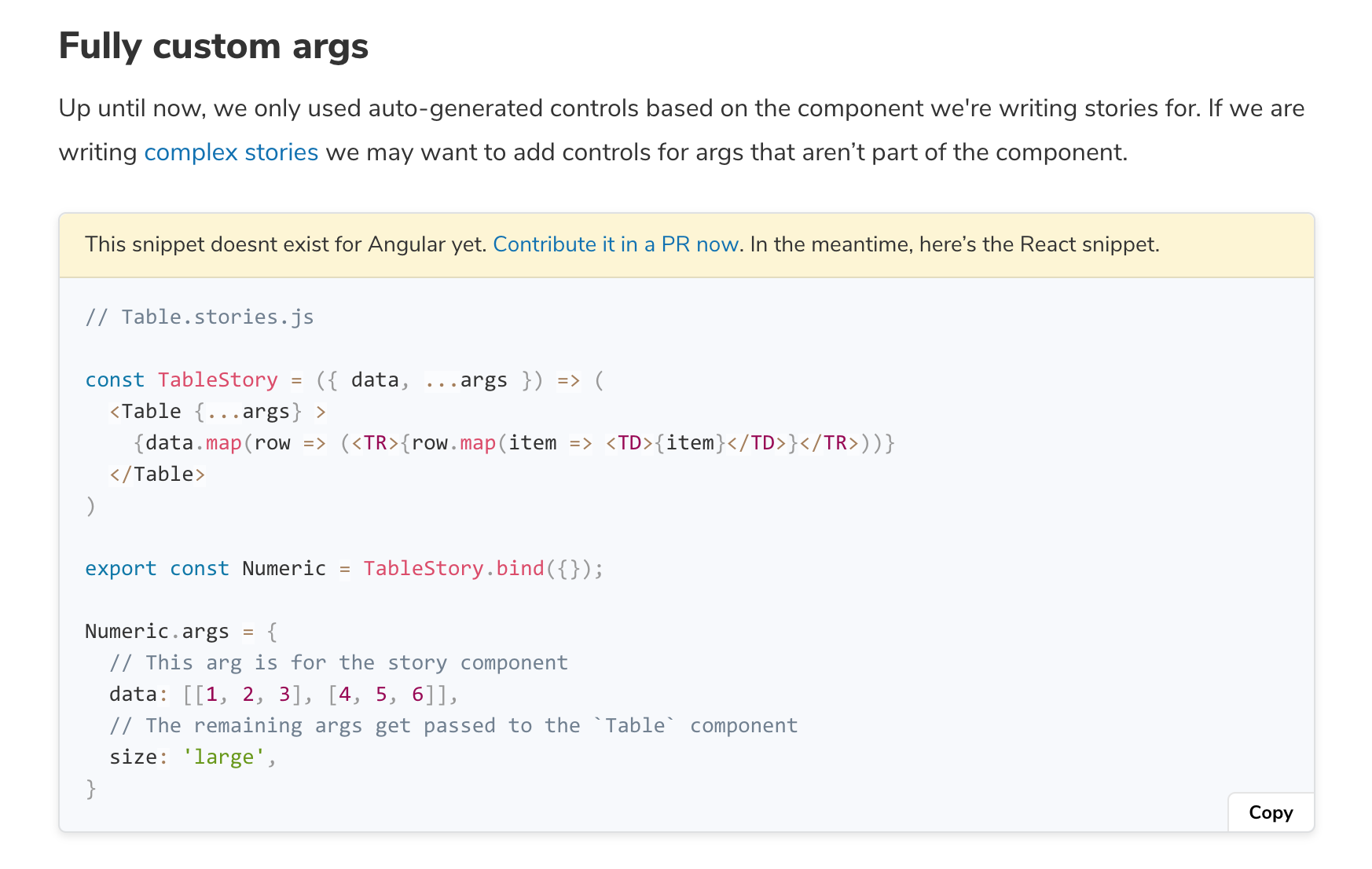
This seams quite disheartening if it has, seeing as the above screenshot is asking for contributions..... (again)
chrisj-skinner
on 29 Aug 2020
Related issues
![dependencies[bot] picture](https://avatars1.githubusercontent.com/in/2310?v=4&s=40) dependencies[bot]
·
142Comments
dependencies[bot]
·
142Comments
 maraisr
·
119Comments
maraisr
·
119Comments
 ChucKN0risK
·
74Comments
ChucKN0risK
·
74Comments
 hckhanh
·
69Comments
hckhanh
·
69Comments
 hansthinhle
·
57Comments
hansthinhle
·
57Comments
Most helpful comment
@matheo @shilman created a PR with updates to the docs https://github.com/storybookjs/storybook/pull/11037