Storybook: This story has tests configured, but no file was found - addons/jest v6.0.0-beta.19
Describe the bug
I'm seeing the following message within storybook jest addon v6.0.0-beta.19
This story has tests configured, but no file was found
I followed the install guide at: https://github.com/storybookjs/storybook/tree/next/addons/jest and have jest configured already.
Tests are all passing when running jest in the command line
Following the angular example here but still seeing the above message.
Expected behavior
To see tests as per https://storybooks-official.netlify.app/?path=/story/addons-jest--withtests
Screenshots

Code snippets
preview.ts
import { setCompodocJson } from "@storybook/addon-docs/angular";
import docJson from "../documentation.json";
setCompodocJson(docJson);
import { addParameters } from "@storybook/angular";
import { addDecorator } from "@storybook/angular";
import { withTests } from "@storybook/addon-jest";
import * as results from "../.jest-test-results.json";

addDecorator(
  withTests({
    results,
    filesExt: "((\\.specs?)|(\\.tests?))?(\\.ts)?$",
  })
);

addParameters({
  options: {
    storySort: (a, b) =>
      a[1].kind === b[1].kind
        ? 0
        : a[1].id.localeCompare(b[1].id, undefined, { numeric: true }),
    /**
     * display the top-level grouping as a "root" in the sidebar
     * @type {Boolean}
     */
    showRoots: true,
  },
  a11y: {
    element: "#root",
    config: {},
    options: {},
    manual: true,
  },
});
button.stories.ts
import { ButtonComponent } from "./button.component";
import { withKnobs } from "@storybook/addon-knobs";

export default {
  title: "3 - Components/My Button",
  component: ButtonComponent,
  parameters: {
    componentSubtitle:
      "Desc",
    docs: {
      iframeHeight: 100,
    },
  },
  decorators: [withKnobs],
};

export const Story1 = () => ({
  component: ButtonComponent,
  props: {
    text: text("text", "Hello Storybook"),
});

Story1.storyName = "Button";
Story1.parameters = {
  jest: "button.component",
};
System:
Environment Info:
System:
OS: macOS High Sierra 10.13.6
CPU: (4) x64 Intel(R) Core(TM) i5-5257U CPU @ 2.70GHz
Binaries:
Node: 10.15.1 - /usr/local/bin/node
npm: 6.14.4 - /usr/local/bin/npm
Browsers:
Chrome: 83.0.4103.61
Firefox: 76.0.1
Safari: 13.0.4
npmPackages:
@storybook/addon-a11y: ^6.0.0-beta.19 => 6.0.0-beta.19
@storybook/addon-actions: ^6.0.0-beta.19 => 6.0.0-beta.19
@storybook/addon-docs: ^6.0.0-beta.19 => 6.0.0-beta.19
@storybook/addon-jest: ^6.0.0-beta.19 => 6.0.0-beta.19
@storybook/addon-knobs: ^6.0.0-beta.19 => 6.0.0-beta.19
@storybook/addon-links: ^6.0.0-beta.19 => 6.0.0-beta.19
@storybook/addon-storyshots: ^6.0.0-beta.19 => 6.0.0-beta.19
@storybook/addon-viewport: ^6.0.0-beta.19 => 6.0.0-beta.19
@storybook/addons: ^6.0.0-beta.19 => 6.0.0-beta.19
@storybook/angular: ^6.0.0-beta.19 => 6.0.0-beta.19
Additional context
.jest-test-results is getting generated and referenced correctly in preview.ts - no errors in the console
I also viewed the .jest-test-results to try and see how the reference was being made and then tried some variants of Story1.parameters = {... listed below, just in case I missed something
but none of which worked.
Story1.parameters = {
  jest: "button.component.ts",
};
Story1.parameters = {
  jest: "button.component.spec",
};


md5-3f2edeed242f2305c5153791c7d9c08b


Story1.parameters = {
  jest: "button.component.spec.ts",
};


md5-3f2edeed242f2305c5153791c7d9c08b


Story1.parameters = {
  jest: "ButtonComponent",
};
 chrisj-skinner
All 10 comments
Here's a working example from our repo: https://github.com/storybookjs/storybook/blob/next/examples/official-storybook/stories/addon-jest.stories.js
 shilman
on 1 Jun 2020
shilman
on 1 Jun 2020
Hi @shilman - thanks but I get the following error when using that method
Cannot find module '../../../../.jest-test-results.json'. Consider using '--resolveJsonModule' to import module with '.json' extension
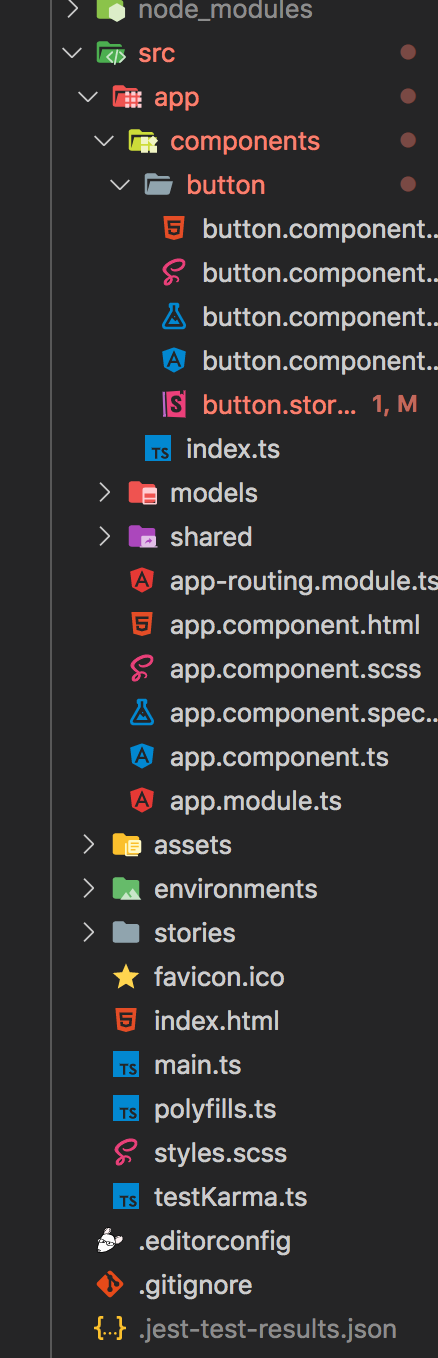
My .storybook/typings.d.ts file
declare module "*.md" {
const content: string;
export default content;
}
declare module "*.json" {
const value: any;
export default value;
}
I wanted to avoid importing .jest-test-results.json into every file (as shown at https://github.com/storybookjs/storybook/blob/next/examples/official-storybook/stories/addon-jest.stories.js)
Or in order to avoid importing .jest-test-results.json in each story, add the decorator in your .storybook/preview.js and results will display for stories that you have set the jest parameter on:
And prefer to use the angular suggested method here: https://github.com/storybookjs/storybook/tree/next/addons/jest#usage-with-angular
chrisj-skinner
on 2 Jun 2020
@shilman Any movement on this? I'm still struggling to get this working. Thanks
@pixelass Do you have a similar issue?
chrisj-skinner
on 12 Jun 2020
@chrisj-skinner:
I managed to get it configured. Sadly I don't know what the real issue was. This is the setting that worked for us. (Somewhat extracted from here: https://github.com/storybookjs/storybook/issues/10992#issuecomment-636666000)
/* ... imports */
import results from "./button.testresults.json"; // maybe the name was crucial?
export default {
component: Button,
title: "Atoms/Button",
decorators: [withTests({ results })],
parameters: {
jest: ["button"], // maybe the name was crucial?
},
};
 pixelass
on 12 Jun 2020
pixelass
on 12 Jun 2020
@chrisj-skinner
I was having the same issue, and resolved Consider using '--resolveJsonModule', by adding the following to Angular tsconfig.json to allow import of json...
"compilerOptions": {
...
"resolveJsonModule": true,
"allowSyntheticDefaultImports": true,
It seems that preview.ts doesn't add the withTests globally to the decorators so the workaround is to import results and add jest: [testname] into the story locally
 richgenres
on 12 Jun 2020
richgenres
on 12 Jun 2020
@richgenres @pixelass Thanks - got it working now.
@shilman - who maintains this addon? Possibly worth a mention.
chrisj-skinner
on 14 Jun 2020
Also found that the following approach makes it possible to declare in preview.js only and not in every story.
It seams the recommended approach mentioned in the angular section of the docs here is not needed / incorrect. import results from '../.jest-test-results.json'; should be used instead of import * as results from '../.jest-test-results.json'; within the preview.js file
preview.js
...
import results from '../.jest-test-results.json';

addDecorator(
  withTests({
    results,
    filesExt: '((\\.specs?)|(\\.tests?))?(\\.ts)?$'
  })
);
Then in every story - given that you have a demo.component.spec.ts
export default {
  title: 'Demo',
  ...
  parameters: {
    ...
    jest: ['demo.component']
  }
...
@shilman PR created: https://github.com/storybookjs/storybook/pull/11313
chrisj-skinner
on 25 Jun 2020
Hi everyone! Seems like there hasn't been much going on in this issue lately. If there are still questions, comments, or bugs, please feel free to continue the discussion. Unfortunately, we don't have time to get to every issue. We are always open to contributions so please send us a pull request if you would like to help. Inactive issues will be closed after 30 days. Thanks!
![stale[bot] picture](https://avatars3.githubusercontent.com/in/1724?v=4&s=40) stale[bot]
on 18 Jul 2020
stale[bot]
on 18 Jul 2020
Hey there, it's me again! I am going close this issue to help our maintainers focus on the current development roadmap instead. If the issue mentioned is still a concern, please open a new ticket and mention this old one. Cheers and thanks for using Storybook!
stale[bot]
on 22 Aug 2020
Related issues
 zvictor
·
3Comments
zvictor
·
3Comments
 tlrobinson
·
3Comments
tlrobinson
·
3Comments
 wahengchang
·
3Comments
wahengchang
·
3Comments
 purplecones
·
3Comments
purplecones
·
3Comments
 MrOrz
·
3Comments
MrOrz
·
3Comments
Most helpful comment
Also found that the following approach makes it possible to declare in
preview.jsonly and not in every story.It seams the recommended approach mentioned in the angular section of the docs here is not needed / incorrect.
import results from '../.jest-test-results.json';should be used instead ofimport * as results from '../.jest-test-results.json';within thepreview.jsfilepreview.js
Then in every story - given that you have a
demo.component.spec.ts