Storybook: Controls: boolean control throws a red warning
Describe the bug
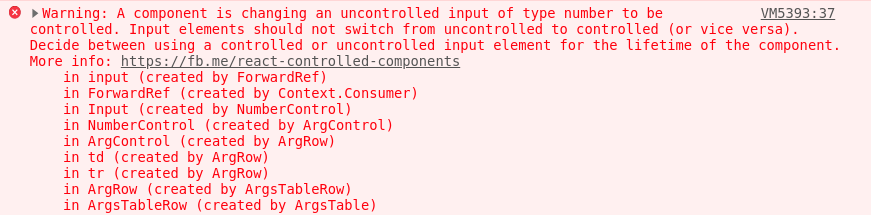
Playing with "@storybook/addon-controls": "6.0.0-beta.17" I got this warning after clicking a boolean control, which is the inverseColors input (at the beggining of the screenshot):

Upcoming clicks in the checkbox doesn't throw this,
as it seems that the checkbox is already changed to controlled.
System:
Environment Info:

  System:
    OS: Linux 5.4 Ubuntu 20.04 LTS (Focal Fossa)
    CPU: (12) x64 Intel(R) Core(TM) i7-9750H CPU @ 2.60GHz
  Binaries:
    Node: 10.18.0 - ~/.nvm/versions/node/v10.18.0/bin/node
    Yarn: 1.22.4 - /usr/bin/yarn
    npm: 6.14.2 - ~/.nvm/versions/node/v10.18.0/bin/npm
  Browsers:
    Chrome: 83.0.4103.61
    Firefox: 76.0.1
  npmPackages:
    @storybook/addon-a11y: 6.0.0-beta.17 => 6.0.0-beta.17
    @storybook/addon-actions: 6.0.0-beta.17 => 6.0.0-beta.17
    @storybook/addon-controls: 6.0.0-beta.17 => 6.0.0-beta.17
    @storybook/addon-docs: 6.0.0-beta.17 => 6.0.0-beta.17
    @storybook/addon-links: 6.0.0-beta.17 => 6.0.0-beta.17
    @storybook/addon-viewport: 6.0.0-beta.17 => 6.0.0-beta.17
    @storybook/addons: 6.0.0-beta.17 => 6.0.0-beta.17
    @storybook/angular: 6.0.0-beta.17 => 6.0.0-beta.17
    @storybook/cli: 6.0.0-beta.17 => 6.0.0-beta.17
    @storybook/source-loader: 6.0.0-beta.17 => 6.0.0-beta.17
 matheo
All 17 comments
The same happened with a number control:
matheo
on 29 May 2020
Do you have a public repro for this, or can you add one to official-storybook? I played around with this for a minute in next (beta.22) and couldn't repro in https://raw.githubusercontent.com/storybookjs/storybook/next/examples/official-storybook/stories/addon-docs/props.stories.mdx
 shilman
on 7 Jun 2020
shilman
on 7 Jun 2020
@shilman wooops,
I forked the ControlsPanel with the exact same code and registered a panel just like @storybook/addon-controls. I thought it should behave the same as the official plugin, but it doesn't then :(
matheo
on 7 Jun 2020
@matheo hmmm did you try recently? might have gotten fixed since you filed this through some other change, since i've been messing with this code a bunch
shilman
on 7 Jun 2020
yeah, I just compared the code of addon-controls and my fork, and they are basically the same.
I will dig a little bit in the argTypes of the controls that are failing to see if there's something missing there.
matheo
on 7 Jun 2020
Thanks! It wouldn't surprise me if there was still a bug, just having trouble repro-ing it! 😄
shilman
on 8 Jun 2020
@matheo I found a repro case in examples/angular-cli, so I don't need one anymore. Fix coming soon!
shilman
on 9 Jun 2020
I checked some stories of angular-cli and there was no error thrown, so I got surprised :P
matheo
on 9 Jun 2020
Hi everyone! Seems like there hasn't been much going on in this issue lately. If there are still questions, comments, or bugs, please feel free to continue the discussion. Unfortunately, we don't have time to get to every issue. We are always open to contributions so please send us a pull request if you would like to help. Inactive issues will be closed after 30 days. Thanks!
![stale[bot] picture](https://avatars3.githubusercontent.com/in/1724?v=4&s=40) stale[bot]
on 3 Jul 2020
stale[bot]
on 3 Jul 2020
ZOMG!! I just released https://github.com/storybookjs/storybook/releases/tag/v6.0.21 containing PR #12322 that references this issue. Upgrade today to try it out!
Closing this issue. Please re-open if you think there's still more to do.
shilman
on 31 Aug 2020
I updated to v6.0.21 and this is still happening for me.
 gregfagan
on 31 Aug 2020
gregfagan
on 31 Aug 2020
@gregfagan Do you have a repro repo you can share?
shilman
on 31 Aug 2020
@gregfagan Do you have a repro repo you can share?
Sorry, not at the moment; this is in a private repo
gregfagan
on 31 Aug 2020
Actually this might have been a stale cache or some other problem. It is no longer throwing errors for my. My mistake.
gregfagan
on 4 Sep 2020
The same problem with 6.1.0-rc.0.
...
        rotate: {
            description: 'Повернуть элемент (не работает в IE 9)',
            table: {
                type: {
                    summary: 'number'
                },
                defaultValue: {
                    summary: 0
                }
            },
            control: {
                type: 'number'
            }
        },
...
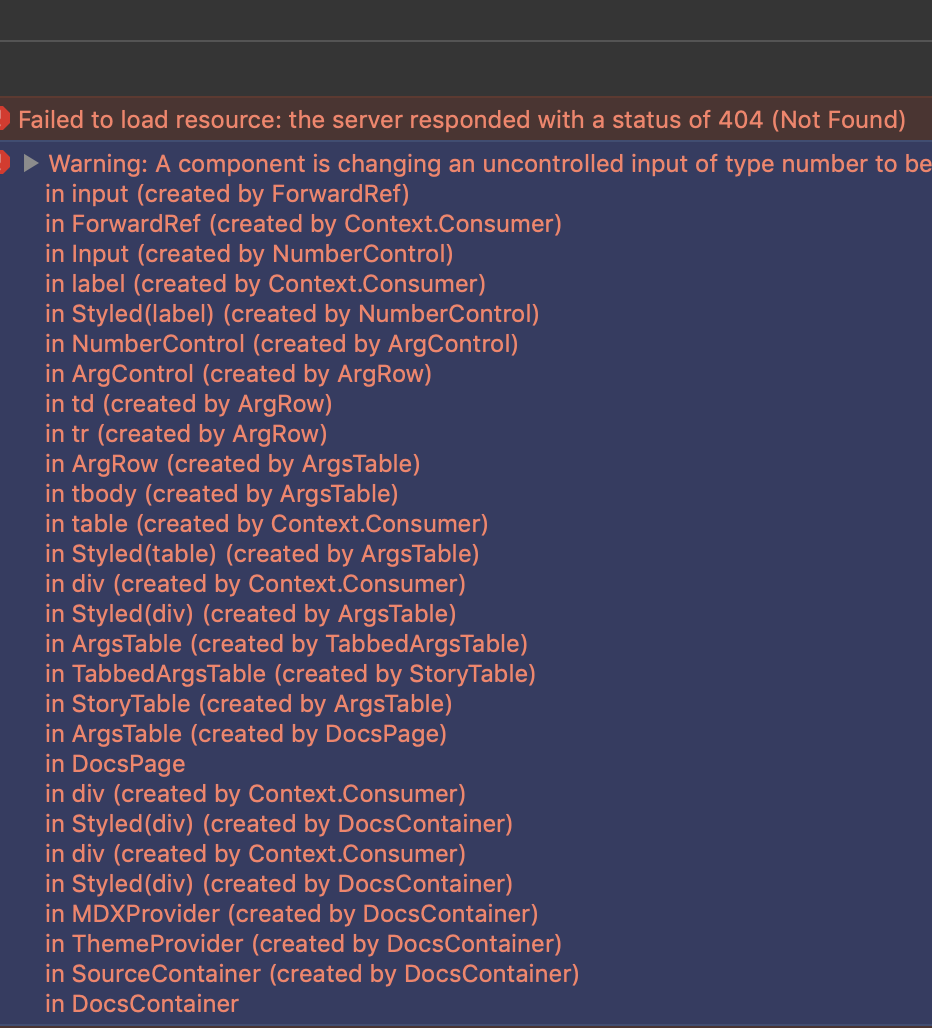
 monolithed
on 12 Nov 2020
monolithed
on 12 Nov 2020
@monolithed does it fix it to add:
        rotate: {
            description: 'Повернуть элемент (не работает в IE 9)',
            defaultValue: 0,
            table: { ... },
            control: { ... },
        }
@shilman, I have already tried it before. it can be reproduced with the simplest component:
const Input = ({...props}) => (<Input {...props} />);

...
        value: {
            description: 'Input',
            defaultValue: 0,
            table: {
                type: {
                    summary: 'number'
                },
            },
            control: {
                type: 'number'
            }
        }
...
Related issues
 ilias-t
·
73Comments
ilias-t
·
73Comments
 Olian04
·
78Comments
Olian04
·
78Comments
 EdenTurgeman
·
81Comments
EdenTurgeman
·
81Comments
 ChucKN0risK
·
74Comments
ChucKN0risK
·
74Comments
 aericson
·
97Comments
aericson
·
97Comments