Storybook: [v6.0.0-beta.13] Invalid hook call with Ref's Forwarded Hooked Component
Describe the bug
A clear and concise description of what the bug is.
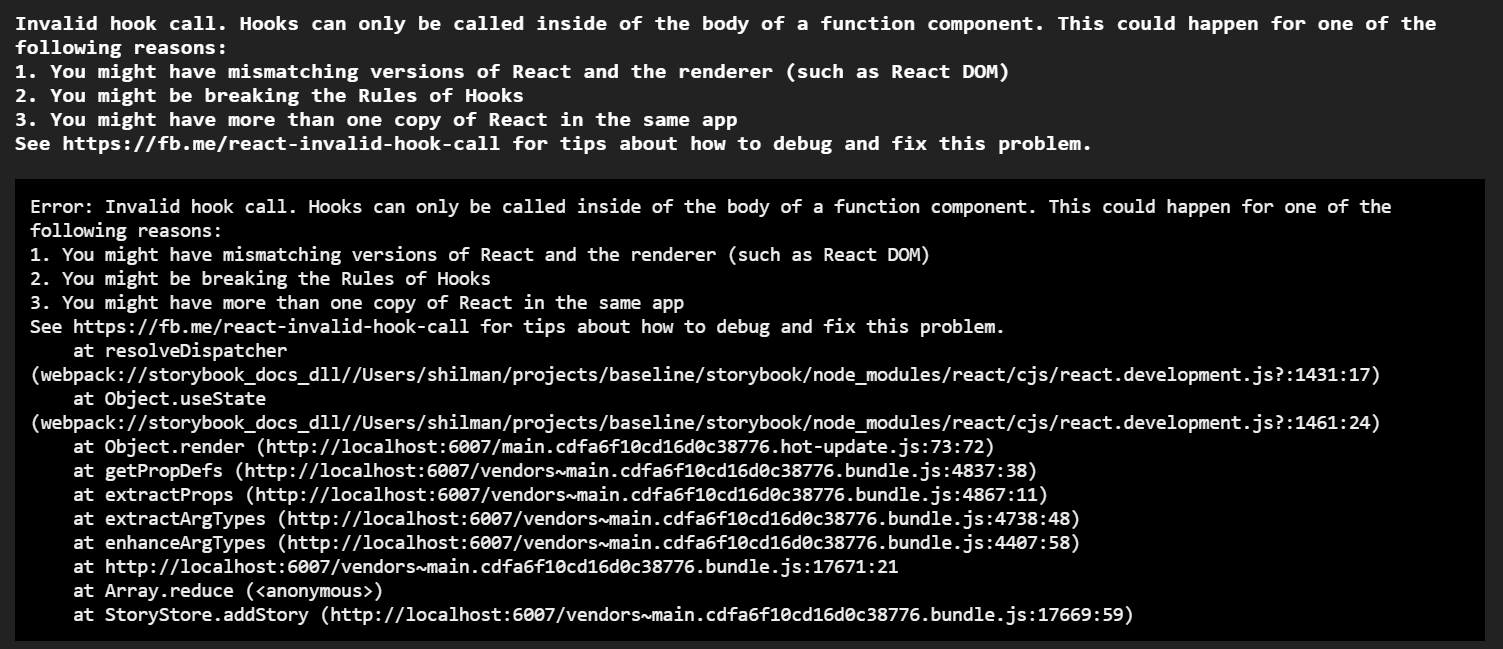
Related to #10655
To Reproduce
Didn't reproduced inside the monorepo.
- Create project with react then
npx @storybook/cli@next init - Add tsconfig.json
- Install @storybook/addon-docs
- Create component
import * as React from "react";

const ForwardedHookedButton = React.forwardRef((props, ref) => {
  const [count, setCount] = React.useState(0);
  return (
    <button ref={ref} onClick={() => setCount(count + 1)} {...props}>
      {`label ${count}`}
    </button>
  );
});

export default ForwardedHookedButton;
Create Story
import React from "react";
import Button from "./Button";

export default {
  title: "Button",
  component: Button,
};

export const Failed = () => <Button />;
It should display error on startup
 tooppaaa
All 21 comments
Removing the render of the forwardRef provide good results.
https://github.com/storybookjs/storybook/blob/next/addons/docs/src/frameworks/react/extractProps.ts#L28
From Simple props to
export interface BaseComplexForwardRefProps {
  base: string;
}
export interface ComplexForwardRefProps extends BaseComplexForwardRefProps {
  extended: string;
}
export const ComplexForwardRefHooked = React.forwardRef<
  HTMLSpanElement,
  ComplexForwardRefProps
>(({ base = "default", extended, ...props }, ref) => {
  const [count, setCount] = React.useState(0);
  return (
    <>
      <button onClick={() => setCount((c) => c + 1)}>Increment {count}</button>
      <span ref={ref}>{base}</span>
      <span ref={ref}>{extended}</span>
    </>
  );
});
With a story
import React from "react";
import { ComplexForwardRefHooked, ComplexForwardRefProps } from "./Components";

export default {
  title: "ComplexForwardRefHooked",
  component: ComplexForwardRefHooked,
};

export const Success = (props: ComplexForwardRefProps) => (
  <ComplexForwardRefHooked {...props} />
);
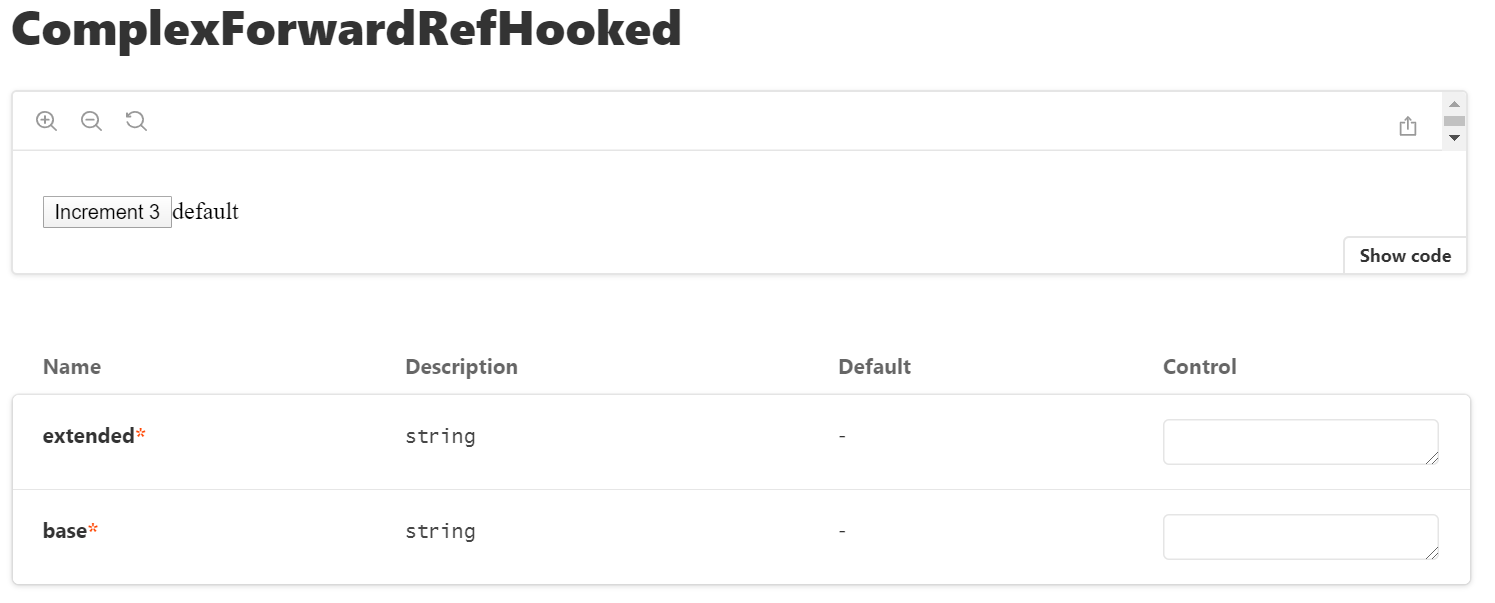
Not sure of the impacts if I remove this line.
tooppaaa
on 23 May 2020
Hi,
This is a comment from the other issue that was closed. It is not for the 6th beta version but decided to write it here as well instead of opening a new issue. Please let me know if I should do otherwise.
The same error occurs when trying to use any kind of code block. For example having the following snippet in a MDX file:
function randomFunction() {
  console.log(42);
}
is resulting in Invalid hook call error.
React version 16.13.1, Storybook version 5.3.18.
Error stack trace:
<SyntaxHighlighter> component:
    in SyntaxHighlighter
    in Styled(SyntaxHighlighter)
    in Source (created by CodeOrSourceMdx)
    in CodeOrSourceMdx (created by MDXCreateElement)
    in MDXCreateElement (at documentation.story.mdx:214)
    in pre
    in Styled(pre)
    in pre (created by MDXCreateElement)
    in MDXCreateElement (at documentation.story.mdx:214)
    in wrapper (created by MDXCreateElement)
    in MDXCreateElement (at documentation.story.mdx:25)
    in MDXContent (at documentation.story.mdx:399)
    in AddContext (at documentation.story.mdx:399)
    in page
    in div
    in Styled(div) (created by DocsContainer)
    in div
    in Styled(div) (created by DocsContainer)
    in MDXProvider (created by DocsContainer)
    in ThemeProvider (created by DocsContainer)
 belev
on 11 Jun 2020
belev
on 11 Jun 2020
I get this same error in version 6.0.0-beta.25 for each story that uses useState. For instance:
import React, { useState } from 'react';
import Checkbox from '.';
import { boolean, button } from '@storybook/addon-knobs';

export default {
  title: 'Forms/Checkbox',
  component: Checkbox
};

export const Default = () => {
  const [checked, setChecked] = useState(false);

  const handleChange = e => setChecked(e.target.checked);

  const disabled = boolean('Disabled', false);

  return (
    <Checkbox
      name="checkbox"
      checked={checked}
      disabled={disabled}
      onChange={handleChange}
    />
  );
};
If I enable Docs it's even worse, then I get the same error but no stories are displayed at all.
 jbanulso
on 12 Jun 2020
jbanulso
on 12 Jun 2020
@jbanulso are you using any decorators? What packages do you have installed?
 shilman
on 12 Jun 2020
shilman
on 12 Jun 2020
@shilman let's see, these are the storybook-related packages I have installed:
"@sambego/storybook-styles": "^1.0.0",
"@storybook/addon-a11y": "^6.0.0-beta.25",
"@storybook/addon-actions": "^6.0.0-beta.25",
"@storybook/addon-controls": "6.0.0-beta.25",
"@storybook/addon-docs": "^6.0.0-beta.25",
"@storybook/addon-knobs": "^6.0.0-beta.25",
"@storybook/addon-links": "^6.0.0-beta.25",
"@storybook/addon-toolbars": "6.0.0-beta.25",
"@storybook/addon-viewport": "^6.0.0-beta.25",
"@storybook/addons": "^6.0.0-beta.25",
"@storybook/react": "^6.0.0-beta.25",
"@storybook/theming": "^6.0.0-beta.25",
"apollo-storybook-react": "^0.2.3",
"react": "^16.13.1",
"react-dom": "^16.13.1",
Then I have some decorators set up like this in preview.js (theming works great with addon-toolbars btw, great addition):
import { addDecorator, addParameters } from '@storybook/react';
import styles from '@sambego/storybook-styles';
import { withKnobs } from '@storybook/addon-knobs';

import withThemeProvider from './withThemeProvider';
import { managerTheme } from './manager';

addDecorator(
  styles({
    // ...some styles
  })
);

addDecorator(withKnobs);

addParameters({
  options: {
    showRoots: true,
    sortStoriesByKind: true,
    storySort: (a, b) => a[1].id.localeCompare(b[1].id)
  },
  docs: {
    theme: managerTheme
  }
});

addDecorator(withThemeProvider);

export const globalArgTypes = {
  theme: {
    name: 'Theme',
    description: 'Global theme for components',
    defaultValue: 'default',
    toolbar: {
      icon: 'circlehollow',
      items: [
        {
          value: 'default',
          title: 'Default'
        }
      ]
    }
  }
};
And in case it helps, this is my main.js:
const path = require('path');

module.exports = {
  stories: ['../**/*.stories.js'],
  addons: [
    '@storybook/addon-links',
    '@storybook/addon-viewport',
    '@storybook/addon-knobs',
    '@storybook/addon-actions',
    '@storybook/addon-a11y',
    '@storybook/addon-docs',
    '@storybook/addon-controls',
    '@storybook/addon-toolbars'
  ],
  webpack: async config => {
    // `mode` has a value of 'DEVELOPMENT' or 'PRODUCTION'
    // You can change the configuration based on that.
    // 'PRODUCTION' is used when building the static version of storybook.

    // Make whatever fine-grained changes you need
    config.resolve.alias = {
      ...config.resolve.alias,
      // some aliasing
    };

    config.module.rules = [
      ...config.module.rules,
      {
        test: /\.graphql|\.mdx$/,
        loader: 'raw-loader'
      }
    ];

    // Return the altered config
    return config;
  }
};
Could be worth noting that it used to work fine with one of the 6.0.0-alpha.x versions. Also, I've already tried deleting node_modules and yarn.lock to make sure the dependencies are the right ones.
jbanulso
on 12 Jun 2020
@jbanulso try the following edit just for debugging purposes:
export default {
  title: 'Forms/Checkbox',
  component: Checkbox,
  decorators: [(StoryFn) => <StoryFn />]
};
@shilman cool, that made the story work as expected 😮
jbanulso
on 12 Jun 2020
Well that's a workaround. I'm not sure about the proper fix yet. cc @tmeasday
shilman
on 12 Jun 2020
@shilman interesting... is it something fundamentally wrong in my setup/components that could be causing this problem? Oh and fyi, adding the decorator fixes the issue with using hooks, but trying to enable Docs still breaks.
jbanulso
on 12 Jun 2020
@jbanulso the issue is that all the decorators call storyFn(). the decorator you added calls <StoryFn />, which wraps the output of storyFn() in a React.createElement. Without that wrapper, hooks can fail. I'm not sure about the exact situations that trigger this. Anyway it's something that's come up a bunch, and would be nice to figure out a definitive solution for, but we're not there yet.
shilman
on 12 Jun 2020
@shilman cool, thanks for taking the time to answer. You guys are doing a great job! 🚀
jbanulso
on 12 Jun 2020
@shilman can we make a simple reproduction of this problem? Is it something like?:
export Story = () => { useState(); return ‘foo’ };
Story.decorators = [(s) => s())]
Can someone try that on a vanilla app with the latest beta and turn the decorator on/off? What is the exact behaviour?
 tmeasday
on 13 Jun 2020
tmeasday
on 13 Jun 2020
@jbanulso - I think the problem that you were having stemmed from this package/line: https://github.com/Sambego/storybook-styles/blob/157b88e580ace4c366298bf216d137cd38bd9688/src/index.js#L7
Does the issue occur if you remove @shilman's work around and disable that package?
tmeasday
on 15 Jun 2020
@tooppaaa -- I can't figure out what's different in between the two examples you posted. Am I missing something? The code seems equivalent from a react perspective.
tmeasday
on 15 Jun 2020
@tmeasday There are small differences (maybe useless ones) but agreed they're all equivalent from a react perspective.
(props, ref) vs { a, b, ...props }, ref)
Second would fail when calling component.render() (My first fix was to add an empty object: component.render({}))
interface A extends B
There's a known issue with one of the typescript docgen with extending interfaces, just wanted to try.
I've seen it but I manage to work around it (can't remember how through).
I've got a potential fix.
https://github.com/storybookjs/storybook/pull/11154/files
tooppaaa
on 15 Jun 2020
@jbanulso - I think the problem that you were having stemmed from this package/line: https://github.com/Sambego/storybook-styles/blob/157b88e580ace4c366298bf216d137cd38bd9688/src/index.js#L7
Does the issue occur if you remove @shilman's work around and disable that package?
@tmeasday you are right indeed, that package was the culprit.
However, that didn't explain the issue with Docs not working, so I went on and tested component per component, until I found out that Storybook will completely break with Docs enabled if there are stories that are not exported as React components. As an example:
// Exported as HOC
const Component = props => <div {...props} />;
export default withTheme(Component);

// Exported as Styled Component
const Heading = styled.h1`
  // styles
`;
export default Heading;
Redefining the exports as below will fix it, but I'd prefer not to change my components to make Docs work.
// These will work

const ThemedComponent = withTheme(Component);
export default props => <ThemedComponent {...props} />;

//
const Heading = styled.h1`
  // styles
`;
export default props => <Heading {...props} />;
Gadzooks!! I just released https://github.com/storybookjs/storybook/releases/tag/v6.0.0-beta.28 containing PR #11154 that references this issue. Upgrade today to try it out!
You can find this prerelease on the @next NPM tag.
Closing this issue. Please re-open if you think there's still more to do.
shilman
on 15 Jun 2020
@shilman It looks like my previous comment it's still an issue in 6.0.0-beta.28. Should this issue be reopened?
jbanulso
on 15 Jun 2020
@jbanulso can you open a new issue? that looks unrelated to the original issue here
shilman
on 15 Jun 2020
@shilman will do 👍
jbanulso
on 15 Jun 2020
See #11176
jbanulso
on 15 Jun 2020
Related issues
 arunoda
·
3Comments
arunoda
·
3Comments
 tlrobinson
·
3Comments
tlrobinson
·
3Comments
 tirli
·
3Comments
shilman
·
3Comments
tirli
·
3Comments
shilman
·
3Comments
 sakulstra
·
3Comments
sakulstra
·
3Comments