Storybook: Cannot find module '@storybook/angular/demo'.
Describe the bug
I'm following the tutorioal that I've founded on https://storybook.js.org/docs/guides/guide-angular/ and implementing this example https://medium.com/angular-in-depth/how-to-build-a-component-library-with-angular-and-storybook-718278ab976 at the moment to execute the npm run storybook command appears like is executing everything but almost at the finish appearse the next messages.
ERROR in C:/Users/30202775/Documents/Visual Studio 2019/Repos/LibraryPoc/ng-ui/src/stories/index.stories.ts
ERROR in C:/Users/30202775/Documents/Visual Studio 2019/Repos/LibraryPoc/ng-ui/src/stories/index.stories.ts(1,24):
TS2307: Cannot find module '@storybook/angular/demo'.
Expected behavior
the expected behavior is that the app will run.
System:
Environment Info:
System:
OS: Windows 10 10.0.17763
CPU: (8) x64 Intel(R) Core(TM) i5-8350U CPU @ 1.70GHz
Binaries:
Node: 10.16.3 - C:\Program Files\nodejs\node.EXE
npm: 6.14.5 - ~\AppData\Roaming\npm\npm.CMD
npmPackages:
@storybook/addon-actions: ^5.3.18 => 5.3.18
@storybook/addon-links: ^5.3.18 => 5.3.18
@storybook/addon-notes: ^5.3.18 => 5.3.18
@storybook/addons: ^5.3.18 => 5.3.18
@storybook/angular: ^5.3.18 => 5.3.18
Additional context
Angular CLI

 wcorderolara
All 14 comments
Same problem here
 witwit
on 9 Jun 2020
witwit
on 9 Jun 2020
Same problem here
 lyx383982759
on 21 Jun 2020
lyx383982759
on 21 Jun 2020
@kroeder @matheo any idea what's going on here?
 shilman
on 22 Jun 2020
shilman
on 22 Jun 2020
I have a workaround:
In src/stories/0-Welcome.stories.ts, replace:
import { Welcome } from '@storybook/angular/demo'; with
import Welcome from '@storybook/angular/dist/demo/welcome.component';
In src/stories/1-Button.stories.ts, replace:
import { action } from '@storybook/addon-actions'; with
import { action } from '@storybook/addon-actions/dist/preview/action';
and
import { linkTo } from '@storybook/addon-links'; with
import { linkTo } from '@storybook/addon-links/dist/preview';
and
import { Button } from '@storybook/angular/demo'; with
import Button from '@storybook/angular/dist/demo/button.component';
Still needs to be fixed, but this got me started.
 adbenson
on 23 Jun 2020
adbenson
on 23 Jun 2020
@adbenson I've worked with import { linkTo } from '@storybook/addon-links' without problems.
But I have no idea why the exported components could not work with this demo.js entrypoint:
/* eslint-disable global-require */
module.exports = {
  Welcome: require('./dist/demo/welcome.component').default,
  Button: require('./dist/demo/button.component').default,
};
 matheo
on 23 Jun 2020
matheo
on 23 Jun 2020
Why the fuck do they keep storybook with a bug like that?
 LeandroCarolino01
on 18 Jul 2020
LeandroCarolino01
on 18 Jul 2020
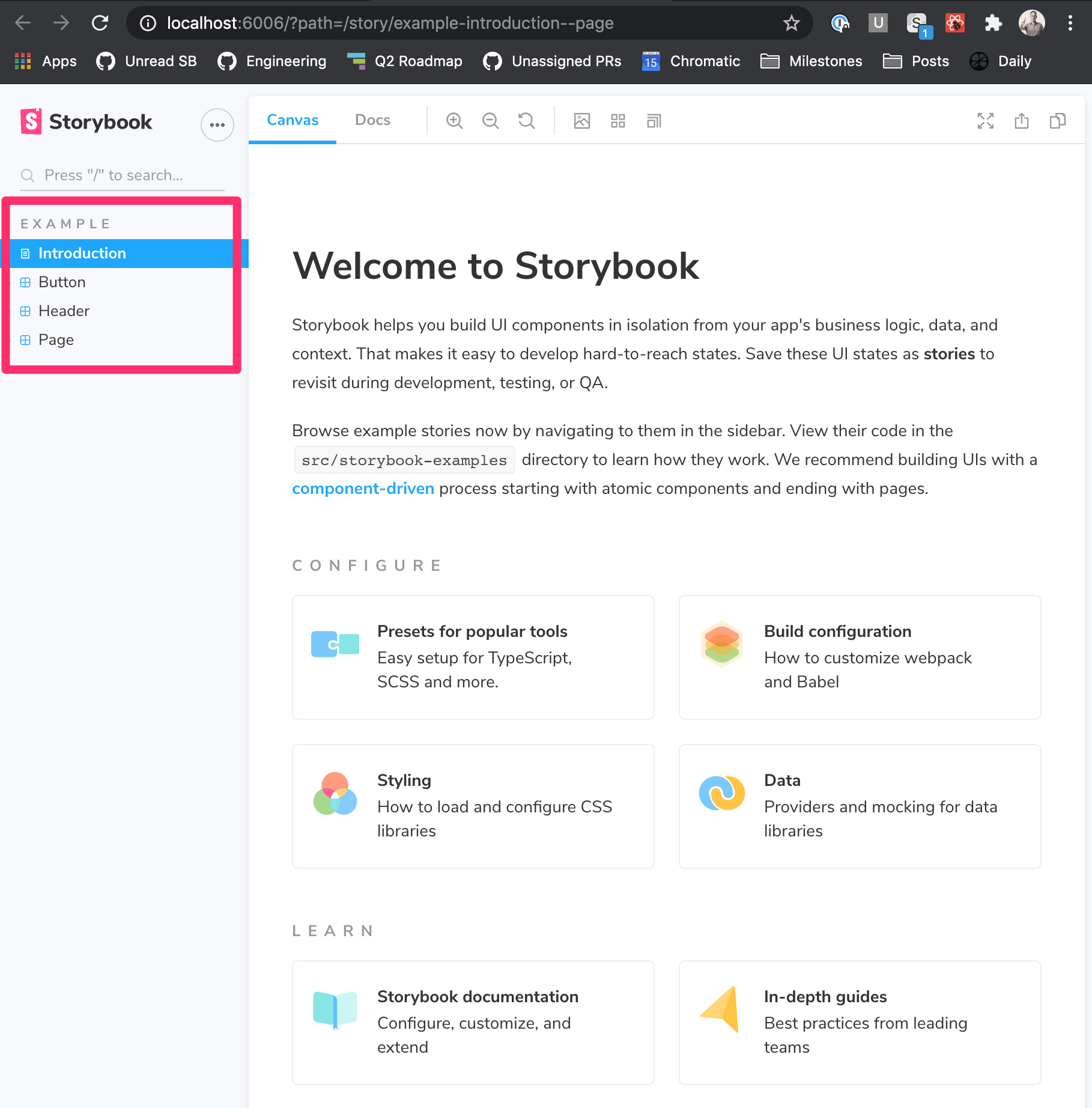
We are getting rid of the demo components in 6.0, which is currently in RC. If you create a new angular project and run:
npx sb@next init
You'll get a beautiful Angular storybook with a Button, Header, Page, Intro documentation and current best practices for writing your stories.
shilman
on 18 Jul 2020
still getting an error when running npm run storybook....
LeandroCarolino01
on 19 Jul 2020
@LeandroCarolino01 in SB6 with a fresh install?
shilman
on 19 Jul 2020
[14:50:23] No configuration file found, switching to CLI flags.
[14:50:23] "./tsconfig.base.json" file was not found in the current directory
npm ERR! code ELIFECYCLE
npm ERR! errno 1
npm ERR! [email protected] docs:json: compodoc -p ./tsconfig.base.json -e json -d .
npm ERR! Exit status 1
npm ERR!
npm ERR! Failed at the [email protected] docs:json script.
npm ERR! This is probably not a problem with npm. There is likely additional logging output above.
npm ERR! A complete log of this run can be found in:
npm ERR! /Users/leandrocarolino/.npm/_logs/2020-07-19T12_50_23_579Z-debug.log
npm ERR! code ELIFECYCLE
npm ERR! errno 1
npm ERR! [email protected] storybook: npm run docs:json && start-storybook -p 6006
npm ERR! Exit status 1
npm ERR!
npm ERR! Failed at the [email protected] storybook script.
npm ERR! This is probably not a problem with npm. There is likely additional logging output above.
npm ERR! A complete log of this run can be found in:
npm ERR! /Users/leandrocarolino/.npm/_logs/2020-07-19T12_50_23_606Z-debug.log
this is the error i am getting...
LeandroCarolino01
on 19 Jul 2020
@LeandroCarolino01 seems like a separate issue. continuing the conversation here: https://github.com/storybookjs/storybook/issues/11609
shilman
on 19 Jul 2020
I tried the solution proposed in Stackoverflow
It worked for me.
The explicit declaration in _typings.d.ts_ made it work
declare module '@storybook/angular/demo'
 vinothmdev
on 25 Jul 2020
vinothmdev
on 25 Jul 2020
Hi everyone! Seems like there hasn't been much going on in this issue lately. If there are still questions, comments, or bugs, please feel free to continue the discussion. Unfortunately, we don't have time to get to every issue. We are always open to contributions so please send us a pull request if you would like to help. Inactive issues will be closed after 30 days. Thanks!
![stale[bot] picture](https://avatars3.githubusercontent.com/in/1724?v=4&s=40) stale[bot]
on 16 Aug 2020
stale[bot]
on 16 Aug 2020
Hey there, it's me again! I am going close this issue to help our maintainers focus on the current development roadmap instead. If the issue mentioned is still a concern, please open a new ticket and mention this old one. Cheers and thanks for using Storybook!
stale[bot]
on 20 Sep 2020
Related issues
 zvictor
·
3Comments
zvictor
·
3Comments
 miljan-aleksic
·
3Comments
miljan-aleksic
·
3Comments
 wahengchang
·
3Comments
wahengchang
·
3Comments
 arunoda
·
3Comments
arunoda
·
3Comments
 tomitrescak
·
3Comments
tomitrescak
·
3Comments
Most helpful comment
I have a workaround:
In
src/stories/0-Welcome.stories.ts, replace:import { Welcome } from '@storybook/angular/demo';withimport Welcome from '@storybook/angular/dist/demo/welcome.component';In
src/stories/1-Button.stories.ts, replace:import { action } from '@storybook/addon-actions';withimport { action } from '@storybook/addon-actions/dist/preview/action';and
import { linkTo } from '@storybook/addon-links';withimport { linkTo } from '@storybook/addon-links/dist/preview';and
import { Button } from '@storybook/angular/demo';withimport Button from '@storybook/angular/dist/demo/button.component';Still needs to be fixed, but this got me started.