Storybook: Initial page load shows "No Preview" instead of correct Story
Describe the bug
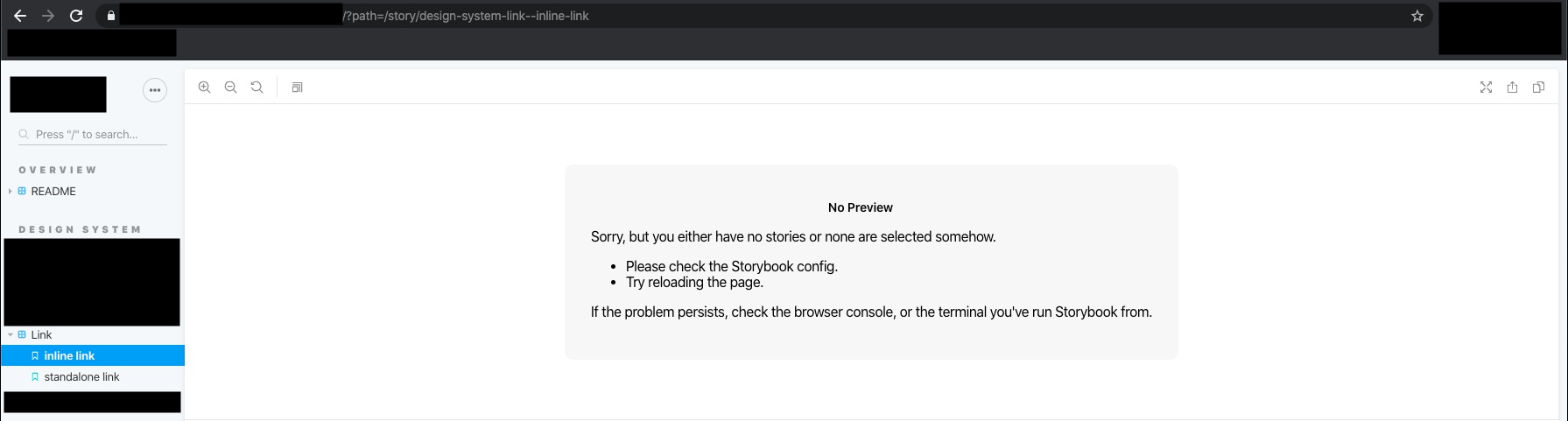
On my Production instance of Storybook, I always see "No Preview" on the initial page load.
To Reproduce
Steps to reproduce the behavior:
- Go to a production Storybook instance
- Make sure the path is set for a Story that exists
Defect: A "No Preview" block appears in the iframe instead of the Story.
This doesn't happen when I run start-storybook or build-storybook && http-server locally.
Expected behavior
The Story shows up
Screenshots
Code snippets
I see a few debug messages in the production instance that I don't see locally:
vendors~main.{hash}.bundle.js:1 message arrived at manager storyRender
vendors~main.{hash}.bundle.js:1 message arrived at preview channelCreated
vendors~main.{hash}.bundle.js:1 message arrived at manager setStories {stories: {…}}
[Violation] 'message' handler took 370ms
vendors~main.{hash}.bundle.js:1 message arrived at manager storyMissing _undefined_
vendors~main.{hash}.bundle.js:1 message arrived at manager storyUnchanged {id: undefined, revision: 0, kind: undefined, name: undefined, viewMode: undefined}
vendors~main.{hash}.bundle.js:1 message arrived at manager storiesConfigured
I'm happy to share other bits of config or my preview if necessary.
System:
Please paste the results of npx -p @storybook/cli@next sb info here.
  System:
    OS: macOS 10.15.4
    CPU: (4) x64 Intel(R) Core(TM) i5-7267U CPU @ 3.10GHz
  Binaries:
    Node: 8.14.0 - ~/.nvm/versions/node/v8.14.0/bin/node
    Yarn: 1.17.3 - ~/src/mono/ts/lite/node_modules/.bin/yarn
    npm: 6.4.1 - ~/.nvm/versions/node/v8.14.0/bin/npm
  Browsers:
    Chrome: 80.0.3987.149
    Firefox: 73.0.1
    Safari: 13.1
  npmPackages:
    @storybook/addon-actions: 5.3.14 => 5.3.14
    @storybook/addon-contexts: 5.3.14 => 5.3.14
    @storybook/addon-knobs: 5.3.14 => 5.3.14
    @storybook/addon-storysource: 5.3.14 => 5.3.14
    @storybook/addon-viewport: 5.3.14 => 5.3.14
    @storybook/preset-typescript: 1.2.0 => 1.2.0
    @storybook/react: 5.3.14 => 5.3.14
    @storybook/theming: 5.3.14 => 5.3.14
Additional context
I've recently updated Storybook to 5.3, but this issue has happened for a _long_ time before that. There are a few things I tried - none of which worked:
- Migrate custom storybook.config to use the new
webpackFinalapi inmain.ts - Refactor Stories from old format to CSF
- Refactor Stories old hierarchy naming format to new
/-only format
One other thing - if I set an invalid path like ?path=INVALID_LOL, then Storybook properly redirects to the default 'Overview' story. However, if I refresh the page once I land on that default story, I see "No Preview" again. It appears like this redirect fixes the race condition.
Any help would be greatly appreciated. I haven't delved into the innards of Storybook much yet, but it seems like my bundles might be really heavy and causing a race condition when initially loading the stories.
 jdmoody
All 4 comments
Please share a minimal reproduction and we'd be happy to help
 shilman
on 31 Mar 2020
shilman
on 31 Mar 2020
Hi everyone! Seems like there hasn't been much going on in this issue lately. If there are still questions, comments, or bugs, please feel free to continue the discussion. Unfortunately, we don't have time to get to every issue. We are always open to contributions so please send us a pull request if you would like to help. Inactive issues will be closed after 30 days. Thanks!
![stale[bot] picture](https://avatars3.githubusercontent.com/in/1724?v=4&s=40) stale[bot]
on 23 Apr 2020
stale[bot]
on 23 Apr 2020
Hey there, it's me again! I am going close this issue to help our maintainers focus on the current development roadmap instead. If the issue mentioned is still a concern, please open a new ticket and mention this old one. Cheers and thanks for using Storybook!
stale[bot]
on 23 May 2020
I had a similar issue and it turned out that npx serve was causing an issue with an iframe, basically giving me a 301 redirect which dropped the query string. By using npx http-server instead, I could solve this.
 nielsboecker-zuhlke
on 17 Sep 2020
nielsboecker-zuhlke
on 17 Sep 2020
Related issues
 tirli
·
3Comments
tirli
·
3Comments
 tlrobinson
·
3Comments
shilman
·
3Comments
tlrobinson
·
3Comments
shilman
·
3Comments
 oriSomething
·
3Comments
oriSomething
·
3Comments
 xogeny
·
3Comments
xogeny
·
3Comments
Most helpful comment
I had a similar issue and it turned out that
npx servewas causing an issue with an iframe, basically giving me a 301 redirect which dropped the query string. By usingnpx http-serverinstead, I could solve this.