Storybook: Incorrect Highlight.js implementation
Describe the bug
ℹ️ NOTE: I realize this bug will probably pretty low on your list of priorities, but I figured I would bring it to your attention. Hopefully this doesn't come across as needless complaining.
I was scratching my head, as to why the Storybook code examples were inherting my inline code color, rather than the Highlight.js theme. When I finally figured it out, I felt like I should file a ticket.
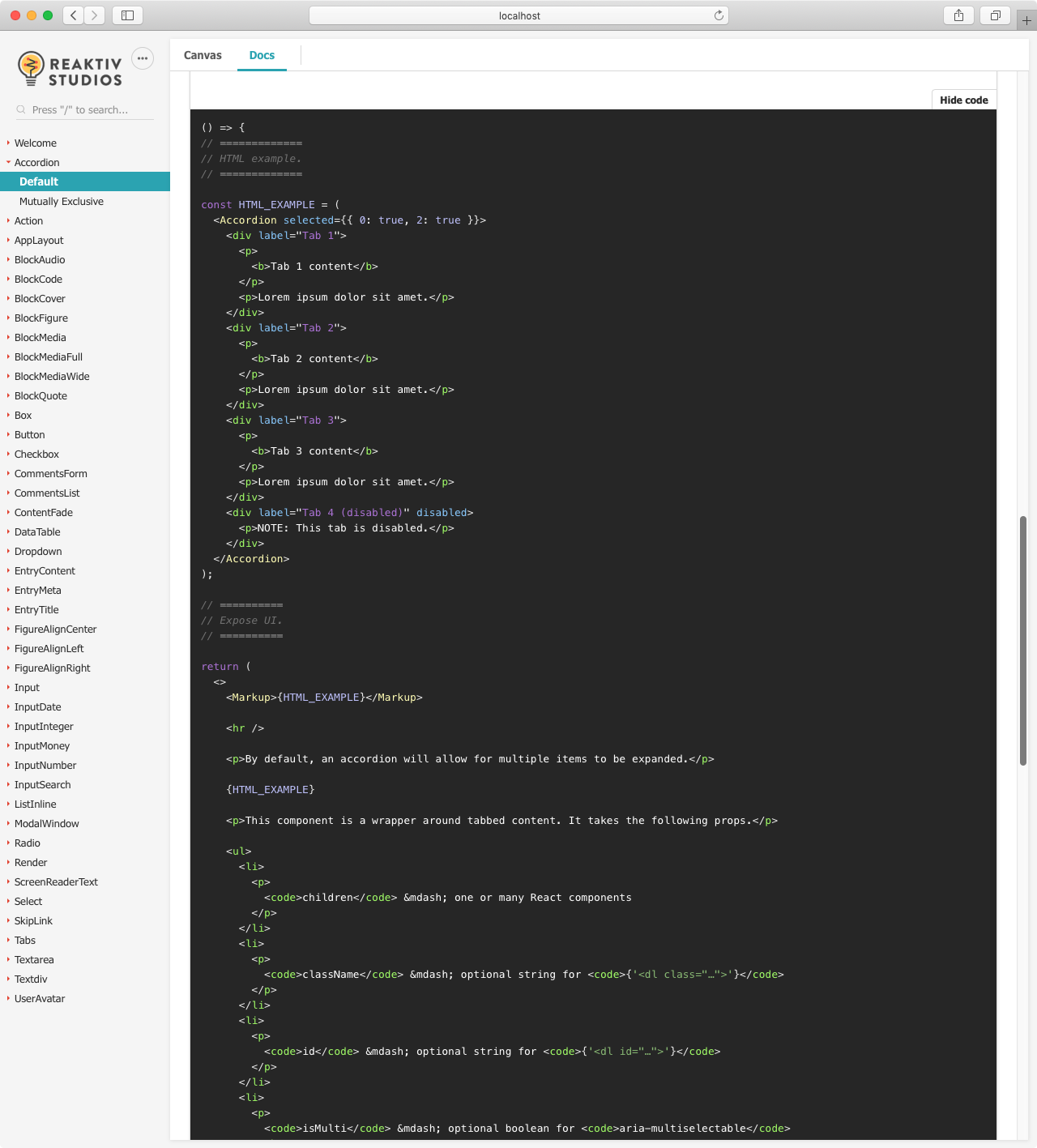
When I expanded the "show code" area on a Storybook docs page, I noticed that the hljs class has been applied to the <pre> tag.
<pre class="hljs">
  <code>…</code>
</pre>
However, this differs from how Highlight.js will typically parse a page when running hljs.initHighlightingOnLoad().
After running that, the DOM ends up looking like this.
<pre>
  <code class="hljs">…</code>
</pre>
To reproduce
Steps to reproduce the behavior:
Go here…
https://ui.reaktivstudios.com/storybook/?path=/docs/accordion--default
Click the "docs" tab
Click the "show HTML" button
^ This is my own implementation of Highlight.js as a component, to show generated HTML as needed. Inspect the DOM in dev tools, note thatclass="hljs"is on the<code>tag.Click the "show code" button
^ This is Storybook's@storybook/addon-docsimplementation. Inspect the DOM in dev tools, note thatclass="hljs"is on the<pre>tag.For reference, compare this against the Highlight.js project home page, where
class="hljs"is being added to the<code>tag.
Expected behavior
I expect Highlight.js in Storybook to be consistent with other implementations.
Screenshots
Here are screenshots of what initially led me down this debugging path, versus how it looks now after figuring out a fix.
| BEFORE | AFTER |
| :- | :- |
|  |
|  |
|
Code snippets
When I expand the "show code" area on the docs page, I see that the hljs class has been applied to the <pre> tag.
<pre class="hljs css-ETC">
  <code class="css-ETC">
</pre>
System:
System:
  OS: macOS Mojave 10.14.6
  CPU: (12) x64 Intel(R) Core(TM) i7-9750H CPU @ 2.60GHz

Binaries:
  Node: 10.16.3 - ~/.nvm/versions/node/v10.16.3/bin/node
  Yarn: 1.21.1 - ~/.yarn/bin/yarn
  npm: 6.9.0 - ~/.nvm/versions/node/v10.16.3/bin/npm

Browsers:
  Chrome: 80.0.3987.149
  Firefox: 74.0
  Safari: 13.1

npmPackages:
  @storybook/addon-a11y: ^5.3.17 => 5.3.17
  @storybook/addon-actions: ^5.3.17 => 5.3.17
  @storybook/addon-docs: ^5.3.17 => 5.3.17
  @storybook/addon-links: ^5.3.17 => 5.3.17
  @storybook/addon-viewport: ^5.3.17 => 5.3.17
  @storybook/addons: ^5.3.17 => 5.3.17
  @storybook/preset-create-react-app: ^2.0.0 => 2.0.0
  @storybook/react: ^5.3.17 => 5.3.17
Additional context
I found a pretty simple workaound, by adjusting my CSS (Sass) slightly.
Here's what ended up fixing things for me. Note the last area of the code.
// ==========================
// `<pre>` and `<code>` tags.
// ==========================

pre,
code,
code .token[class],
code .token.comment[class] {
  font-family: $font-family-mono;
  font-style: normal;
}

// ==============
// `<code>` tags.
// ==============

code {
  color: color(inline-code);
}

pre > code,
pre > code[class] {
  outline: 0;

  border-radius: $code-border-radius;
  display: block;

  font-size: 13px;
  tab-size: 2;

  padding: 1em;
  overflow-x: auto;
}

pre > code:focus {
  box-shadow: $code-box-shadow-focus;
}

// ====================================
// Default colors, without Highlight.js
// ====================================

pre > code:not(.hljs) {
  background-color: color(block-code-background);
  color: color(block-code);
}

// =======================================
// Fix incorrect Storybook implementation.
// =======================================

[class] > pre.hljs[class] {
  & {
    line-height: $line-height-default;
    overflow: hidden;
    padding: 0;
    white-space: pre;
  }

  & > code {
    background-color: transparent;
    border-radius: 0;
  }
}
 nathansmith
All 5 comments
Wow, that's a pretty big difference! Any chance you might be able to put together a fix?
 shilman
on 26 Mar 2020
shilman
on 26 Mar 2020
cc: @shilman
Sure, I can try go to come up with a fix tomorrow.
👍
nathansmith
on 26 Mar 2020
Thanks! That code has a lot of tentacles in our codebase, and I'm not sure why it's implemented like that (cc @ndelangen @domyen?) so it maybe easier to just patch over it
shilman
on 26 Mar 2020
the hljs class should simply be removed, AFAIK it does nothing.
Perhaps someone added it to make it easier to overload the styling of the syntaxhighlighter? Likely it's just added from ReactSyntaxHighlighter, assuming people will use global styles (which we don't)
 ndelangen
on 26 Mar 2020
ndelangen
on 26 Mar 2020
Sorry for the delay. I did not get to this as soon as I had hoped. I had some time to dig further today, and I think I found the culprit.
As Norbert predicted, it is indeed coming from the ReactSyntaxHighlighter internals.
Specifically, this line…
https://github.com/conorhastings/react-syntax-highlighter/blob/master/src/highlight.js#L330
const preProps = useInlineStyles
  ? Object.assign({}, rest, {
    style: Object.assign({}, defaultPreStyle, customStyle)
  })
  : Object.assign({}, rest, { className: 'hljs' });
I think Michael is right. It is probably much easier to gloss over with project specific CSS than expect the implementation to change in an upstream dependency. For the sake of backwards compatibility, it is not a problem worth fixing.
It is funny, because I initially thought hljs.initHighlightingOnLoad() would be adding its class to <pre> as well. It seems like a logical assumption, as the topmost ancestor of a code block.
In fact, before filing this ticket — as a self sanity check — I had to verify my own implementation to see if it matched the Highlight.js demo site, or if I had it backwards myself.
🤪
nathansmith
on 27 Mar 2020
Related issues
 firaskrichi
·
61Comments
firaskrichi
·
61Comments
 dmmarmol
·
57Comments
dmmarmol
·
57Comments
 joeruello
·
79Comments
joeruello
·
79Comments
 p3k
·
61Comments
p3k
·
61Comments
 Olian04
·
78Comments
Olian04
·
78Comments
Most helpful comment
Sorry for the delay. I did not get to this as soon as I had hoped. I had some time to dig further today, and I think I found the culprit.
As Norbert predicted, it is indeed coming from the
ReactSyntaxHighlighterinternals.Specifically, this line…
I think Michael is right. It is probably much easier to gloss over with project specific CSS than expect the implementation to change in an upstream dependency. For the sake of backwards compatibility, it is not a problem worth fixing.
It is funny, because I initially thought
hljs.initHighlightingOnLoad()would be adding its class to<pre>as well. It seems like a logical assumption, as the topmost ancestor of a code block.In fact, before filing this ticket — as a self sanity check — I had to verify my own implementation to see if it matched the Highlight.js demo site, or if I had it backwards myself.
🤪