Storybook: Storybook Addon Actions slow output and short freezing UI
Describe the bug
I have Setup Storybook for a Component Library. I implement some action e.g. to a Button Component then the output in action Console come maybe 1 or 2sec later and in the meantime the complete UI freezes.
Firefox is more worse than Chrome.
Facts:
- Typescript
- React with Hooks and no class Components
- styled-components
- Storybook 5.3.13 -> CSF Format and MDX Support (At this Time i have only the Introduction Site in MDX so no Components inside)
- Storybook packages:
- actions 5.3.13
- console 1.2.1
- docs 5.3.13
- knobs 5.3.13
- links 5.3.13
- addons 5.3.13
- preset-create-react-app 1.5.2
- react 5.3.13
- theming 5.3.13
- themeprovider-storybook 1.3.0
To Reproduce
Every action i click have the same Problem. More when i only start Storybook but its also there when i build Storybook.
.storybook Folder:
- config.jsx
- main.js
- yourStyle.css
- yourTheme.js
Expected behavior
Fast action like in demo and no freezing of UI
Code snippets
config.jsx
import React from 'react';
import { configure, addDecorator, addParameters } from '@storybook/react';
import { withThemesProvider } from 'themeprovider-storybook';
import yourTheme from './yourTheme';
import { brightTheme, GlobalStyle } from '../src';
import './yourStyle.css';

import { setConsoleOptions } from '@storybook/addon-console';

const themes = [brightTheme];
const withGlobalStyles = (storyFn) => {
  return (
    <>
      <GlobalStyle />
      {storyFn()}
    </>
  );
};

addParameters({
  options: {
    theme: yourTheme,
    storySort: (a, b) => {
      if (a[1].kind === 'Introduction') {
        return -1;
      } else if (b[1].kind === 'Introduction') {
        return 1;
      }

      return 0;
    },
  },
});

addDecorator(withThemesProvider(themes));
addDecorator(withGlobalStyles);

setConsoleOptions({ panelExclude: [] });
main.js
const path = require('path');

module.exports = {
  stories: ['../src/**/*.stories.(tsx|mdx)'],
  addons: [
    '@storybook/addon-actions',
    '@storybook/addon-links',
    '@storybook/addon-knobs/register',
    'themeprovider-storybook',
    {
      name: '@storybook/preset-create-react-app',
      options: {
        tsDocgenLoaderOptions: {
          tsconfigPath: path.resolve(__dirname, '../tsconfig.json'),
        },
      },
    },
    {
      name: '@storybook/addon-docs',
      options: {
        configureJSX: true,
      },
    },
  ],
};
yourStyle.css
.MgHui {
  height: unset !important;
}
yourTheme.js
import { create } from '@storybook/theming';
import logo from './some_storybook.png';

export default create({
  base: 'light',

  colorPrimary: '#0388D1',
  colorSecondary: '#B0BEC5',

  // UI
  appBg: 'white',
  appContentBg: 'white',
  appBorderColor: '#0388D1',
  appBorderRadius: 4,

  // Typography
  fontBase: '"Open Sans", sans-serif',
  fontCode: 'monospace',

  // Text colors
  textColor: '#3D4A57',
  textInverseColor: 'rgba(255,255,255,0.1)',

  // Toolbar default and active colors
  barTextColor: 'white',
  barSelectedColor: 'white',
  barBg: '#0388D1',

  // Form colors
  inputBg: 'white',
  inputBorder: '#B0BEC5',
  inputTextColor: '#3D4A57',
  inputBorderRadius: 4,

  brandTitle: 'SOME GUI Library Storybook',
  brandImage: logo,
});
System:
Environment Info:
System:
OS: Windows 10 10.0.18362
CPU: (8) x64 Intel(R) Core(TM) i7-6820HQ CPU @ 2.70GHz
Binaries:
Node: 12.13.1 - C:\Program Files\nodejs\node.EXE
Yarn: 1.22.0 - C:\Program Files (x86)\Yarn\bin\yarn.CMD
npm: 6.13.7 - C:\Program Files\nodejs\npm.CMD
Browsers:
Edge: 44.18362.449.0
Browsers is not the truth i use:
Main Browser: Firefox -> 72.0.1
Secondary Browser: Chrome -> 79.0.3945.117
Additional context
The Component Library is private but please tell me when u need more Information about it.
 dkleber89
All 7 comments
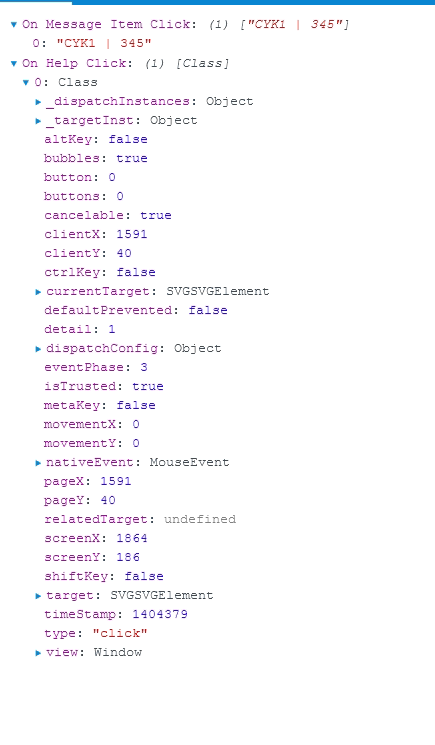
Right after i post the Issue i observe a behaviour -> It's slow when a Event Parameter was given to the action (For example -> I connect directly to a onClick property of HTML Element); When i only give maybe nothing in parameters or only a String then its fast.
On Message Item Click -> FAST like expected
ON Help Click -> very SLOW
dkleber89
on 25 Feb 2020
@dkleber89 can you try configuring the depth to be something small (1? 2? 3?) and see if that fixes it?
https://github.com/storybookjs/storybook/tree/master/addons/actions#configuration
 shilman
on 26 Feb 2020
shilman
on 26 Feb 2020
@shilman thanks for the hint -> It solves my problem. For my usage of Actions a depth of 3 is more than enough.
Maybe it would be better when the default value are smaller than 10. I think for the most of the usages 3 will be more than enough. And then the People doesn´t run in this issue.
dkleber89
on 26 Feb 2020
@dkleber89 Good point. Any chance you can put together a small PR with that change and a note in MIGRATION.md?
shilman
on 26 Feb 2020
Sure :-)
dkleber89
on 26 Feb 2020
Hmm... Faster than me ... Thanks
dkleber89
on 28 Feb 2020
Just curious, where is the serialization taking place? Is it happening in @storybook/addon-actions or @storybook/channels?
 samholmes
on 3 Jun 2020
samholmes
on 3 Jun 2020
Related issues
shilman
·
3Comments
 MrOrz
·
3Comments
MrOrz
·
3Comments
 Jonovono
·
3Comments
Jonovono
·
3Comments
 alexanbj
·
3Comments
alexanbj
·
3Comments
 zvictor
·
3Comments
zvictor
·
3Comments
Most helpful comment
@shilman thanks for the hint -> It solves my problem. For my usage of Actions a depth of 3 is more than enough.
Maybe it would be better when the default value are smaller than 10. I think for the most of the usages 3 will be more than enough. And then the People doesn´t run in this issue.