Storybook: 【Docs】Are you thinking of adding a "Storybook for Web Component"?
Is your feature request related to a problem? Please describe.
I want a Web Component guide like Storybook for React.
https://github.com/storybookjs/storybook/tree/next/app/web-components alone is not enough.
Describe the solution you'd like
add a document page for Storybook for Web Component.
 sakito21
All 24 comments
please add it, we are trying to set up Storybook with Web Components and it is very difficult with currently available information and not working examples
 ghost
on 7 Feb 2020
ghost
on 7 Feb 2020
cc @daKmoR
 shilman
on 7 Feb 2020
shilman
on 7 Feb 2020
so having a separate docu page with a more "tutorial like" structure? are these docs part of the mono repo or are they somewhere else?
 daKmoR
on 14 Feb 2020
daKmoR
on 14 Feb 2020
@daKmoR Yeah most frameworks have one. I think they're mostly based on the original guide for React:
https://github.com/storybookjs/storybook/blob/master/docs/src/pages/guides/guide-react/index.md
(I hope to upgrade all of these after 6.0 is released, but in the meantime it would be great to bring web-components up to parity with the rest)
shilman
on 14 Feb 2020
I will be happy to contribute from the perspective of someone who is new and what should be explained as it is easy to forget about pain points when you work with something for a long time and many things become obvious :) so catch me before I will forget with what I'm struggling with ;-)
ghost
on 14 Feb 2020
@sabniew Pull requests welcome!!
shilman
on 14 Feb 2020
@shilman
There seems to be no movement, so I would like to create a PR.
sakito21
on 26 Aug 2020
It's in progress here: https://storybook.js.org/docs/web-components/get-started/introduction
@sakito21 PRs welcome for web component-specific code snippets
shilman
on 26 Aug 2020
I'm really confused. Storybook advertises compatibility with Web Components, but I can't find any examples of
- how to define a slot in a story (a dynamic slot, that could be edited with a knob/control that is, there are examples of hard-coded slots)
- how to pass a function to a component (since Web Components only use HTML Attributes as an API, and you'd normally do this with a DOM API, I can't seem to find a way to do it that doesn't involve eval()... My use-case is passing a validator to a form input)
I hope I don't sound angry. I'm not. I am quite confused, though. I assume I must be missing something really obvious...
 thomasqbrady
on 5 Nov 2020
thomasqbrady
on 5 Nov 2020
@daKmoR can you help @thomasqbrady out?
shilman
on 6 Nov 2020
the web components packages is using lit-html for rendering. That way you can use javascript template to add js into the html code.
that way you can use some DOM Apis in a declarative way.
if we take the knobs example from the html story
() => {
  const name = text('Name', 'John Doe');
  const container = document.createElement('p');
  container.textContent = name;
  return container;
}
then you could write it like this
() => html`
  <p>${text('Name', 'John Doe')}</p>
`
soo with ${...} you change into the "javascript mode" - that way you can also assign functions, or basically anything that could be assigned via a property
() => {
  function myFunction() {
    // do something
  }
  return html`
    <my-component .functionProperty=${myFunction}></my-component>
  `;
}
It dawns on me now that I'm not using the Web Components package. I'm using the HTML package, and importing my Stencil's dist packages. I'll try again with the Web Components package and these instructions. Thank you @daKmoR & @shilman
thomasqbrady
on 6 Nov 2020
@daKmoR with the Web Components template setup it looks like I've got everything I need to define javascript inputs. Thank you. I'm still not seeing how to define a slot, though. For instance, for a button component which takes its label contents as a slot, how would I reference that input within a Template? I.e.:
const Template = (args) => {
  return html`<my-example-button disabled=${ args.disabled }>
      ${ // how do I reference the slot content here? }
    </my-example-button>
  `;
}
@daKmoR actually, this Web Components template setup is not any different from what I have before, in terms of functionality. I can assign an object/array/function to an input attribute, as you did above, but...
- It's not binding the function, just running it once and populating its output to the template (which is not what I am trying to do with my validator... I want to be able to pass a function that gets run each time input occurs, not once at the instantiation of the component)
- It still doesn't work with objects/arrays. I can see by looking at the DOM in Storybook that it attempted to write an object/array to the HTML attribute, but my Web Component does not observe that the value was ever populated, because it only expects two forms of input: HTML attributes (which can only be in string format) or DOM assignments (which support objects/arrays/functions).
I was hoping lit-html had some magic that would allow me to specify a template input as an attribute assignment and detect that it actually needed to be assigned via DOM API.
So, to sum up, here's everything I'm looking for:
//my-dropdown.* - (pseudo-code)
onInput(newValue) {
  let isValid = this.validator(newValue);
  ...
}
...
<details>
  <summary>
    <slot></slot>
  </summary>
...
  { this.options.map((option, index) =>
    <li>{option.label}</li>
  }
...
//my-dropdown.stories.js
<my-dropdown
  options=${ // Need: I need to be able to pass an Array here. I could add an input that takes serialized JSON as an input, but this would be my only use-case for that. I can’t be the only one running into this problem. I’m guessing I’m just overlooking something obvious. }
  validator=${ // Need: I need to be able to pass a Function here that my component can run at will. Or is it convention not to do these sorts of things “live” in Storybook? }
  ...
>
  ${ // Nice-to-have: Some way of specifying slot inputs that I can edit in the Storybook add ons, which would ideally support plain text AND markup }
</my-dropdown>
import { html, unsafeHTML } form 'lit-html';

const Template = (args) => {
  const optionsArray = [{ name: 'foo' }, { name: 'bar' }];
  const someSafeHtml = html`<p>I am XSS safe</p>`;
  const someUnsafeHtml = `<p>I am NOT XSS safe</p>`;

  return html`
    <my-dropdown
      // Note: you will need to remove all those comments as they will break the template literal
      // setting a property needs the `.` in front
      .options=${['foo', 'bar']} // hardcoded
      .options=${optionsArray} // or get the data from somewhere (could be local/knobs/args/...)
    >
      ${someSafeHtml}
      ${unsafeHTML(someUnsafeHtml)}
    </my-example-button>
  `;
}
Docs for which types you can set like attribute, property, events, ... https://lit-html.polymer-project.org/guide/template-reference#binding-types
Docs to unsafeHTML
daKmoR
on 10 Nov 2020
@daKmoR you are a gentleman and a scholar. I thank you.
To think it was just a couple of dots holding me up all this time. 🤦
Is this mentioned somewhere in the Storybook for Web Components docs that I overlooked, or could a PR where I add it be my penance?
thomasqbrady
on 10 Nov 2020
@daKmoR one more question (which I'll include in my docs PR offer): what about named slots? I have a couple working examples now (because of your help) in which I'm passing the content of a slot via the args interface, but I'm not able to pass a named slot with the same method. What happens is the markup gets passed through to the component, and ends up in an un-rendered part of the Shadow DOM, and the slot remains empty (I'm guessing because the HTML isn't attached to the DOM by the time the Web Components lifecycle is looking for slot contents?).
Here's what it looks like:
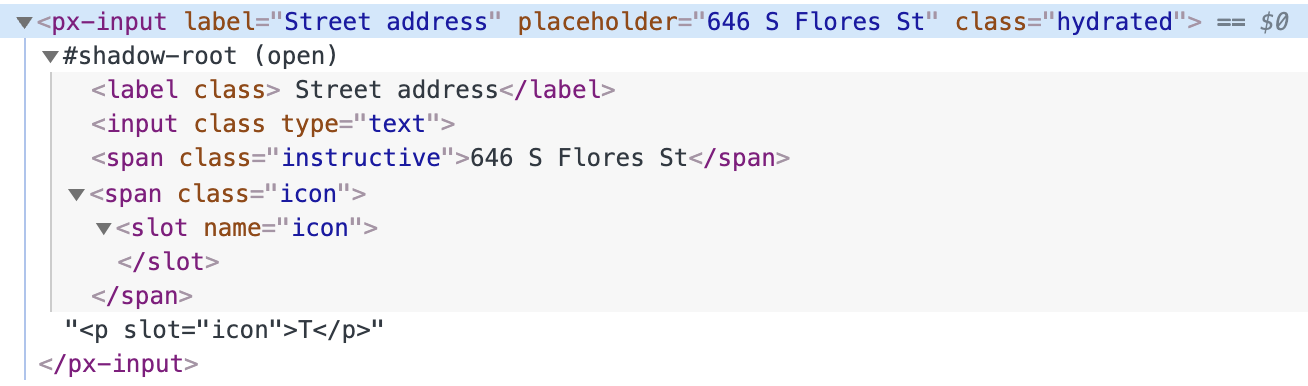
That P tag would realistically be a px-icon tag in my case, but I tried a plain P tag to demonstrate plain markup wasn't even making it through.
EDIT
Looks like using document.createElement, rather than html (as in your someSafeHtml example above) lets me set named slots. Seems strange, as I thought that's what html did...
Using a utility function like this is working:
function htmlToElem(html) {
  let temp = document.createElement('template');
  html = html.trim();
  temp.innerHTML = html;
  return temp.content.firstChild;
}

const Template = (args) => {
  let safeHTML = htmlToElem(args.content);
  return html`
    <px-input label=${ args.label } placeholder=${ args.placeholder }>
      ${ safeHTML }
    </px-input>
  `;
}

export const Input = Template.bind({});
Input.args = {
  label: 'Street address',
  placeholder: '646 S Flores St',
  content: `<px-icon-pin-drop slot="icon"></px-icon-pin-drop>`
}
unsafeHTML is basically the same as your htmlToElem 😬
https://github.com/Polymer/lit-html/blob/master/src/directives/unsafe-html.ts#L49
so you can use it like so
const Template = (args) => {
  return html`
    <px-input label=${ args.label } placeholder=${ args.placeholder }>
      ${unsafeHTML(args.content)}
    </px-input>
  `;
}
PS: be sure to import unsafeHTML
daKmoR
on 10 Nov 2020
Ah! My mistake! I totally overlooked the call to unsafeHTML in the template, and just thought the difference between the variables someSafeHtml and someUnsafeHtml was that the latter didn't call html.
So, thank you, AGAIN, and again I'll ask if this could be added to the docs somewhere, and if I could be helpful with that, in gratitude to your help here.
thomasqbrady
on 10 Nov 2020
@daKmoR hmm... unsafeHTML isn't exported by lit-html according to my error output and this page in their API docs: https://lit-html.polymer-project.org/api/index.html
Not exported here: https://github.com/Polymer/lit-html/blob/master/src/lit-html.ts
How is that import working for you?
thomasqbrady
on 10 Nov 2020
if you open the docs for unsafeHTML you will see the import in the example.
it's
import {unsafeHTML} from 'lit-html/directives/unsafe-html.js';
Ah, thanks. That was not easy to find (I did try), but in case someone else comes along looking: https://lit-html.polymer-project.org/guide/template-reference#unsafehtml
thomasqbrady
on 10 Nov 2020
I linked it here https://github.com/storybookjs/storybook/issues/9693#issuecomment-724539986 😅
Docs to unsafeHTML
daKmoR
on 10 Nov 2020
🤦 You did, indeed.
thomasqbrady
on 10 Nov 2020
Related issues
 tomitrescak
·
3Comments
tomitrescak
·
3Comments
 purplecones
·
3Comments
purplecones
·
3Comments
 rpersaud
·
3Comments
rpersaud
·
3Comments
 Jonovono
·
3Comments
Jonovono
·
3Comments
 xogeny
·
3Comments
xogeny
·
3Comments