Storybook: Import order wrongly causing "Element type is invalid" errors in stories
Description
When using a component import/export entry-point for terse imports throughout the application the order of imports can cause unexpected errors in Storybook only; not in the yarn start environment or compiled application. The error is:
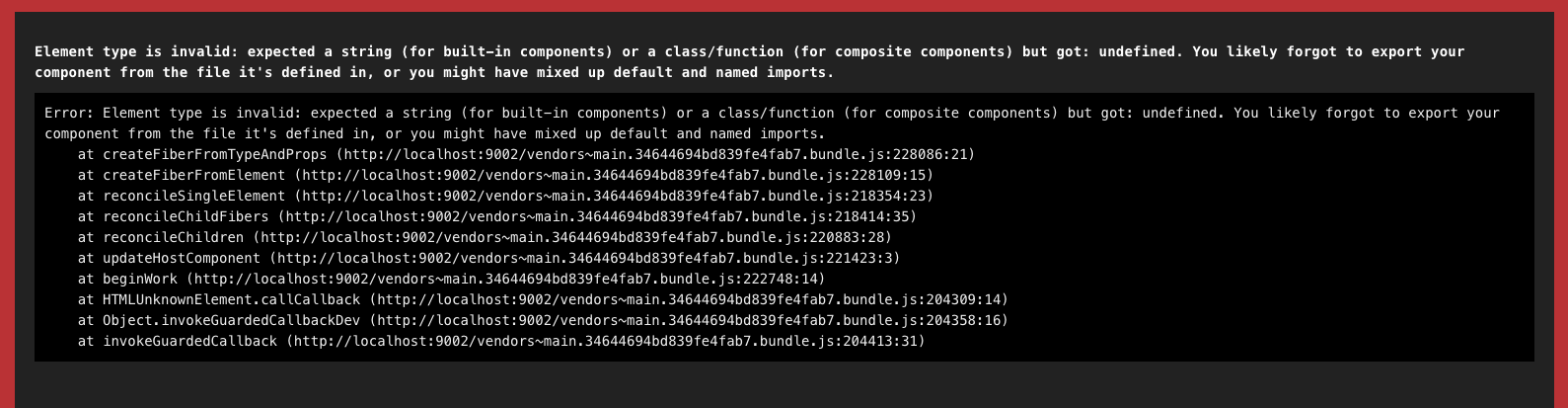
Element type is invalid: expected a string (for built-in components) or a class/function (for composite components) but got: undefined. You likely forgot to export your component from the file it's defined in, or you might have mixed up default and named imports.
Imagine we have a components/ directory, in which we have an import/export entry-point index.js and each component has its own directory A/ and B/.
src/components/index.js:
// This order causes no errors in `yarn start` but causes an error in the story for component A
import { A } from "./A";
import { B } from "./B";
// This order causes no errors anywhere
// import { B } from "./B";
// import { A } from "./A";

// It doesn't matter in which order we export (A,B or B,A), only the order of the import causes the error
export { A, B };
This behaviour only appears to affect a component if it itself imports another component which appears below itself in the import/export entry-point.
For example in the above example component A itself imports component B to use within its render, and the only way to avoid the error in the story for component A is to remove component B from it or to swap the order of the imports in src/components/index.js.
Reproduction repo below for simpler demonstration.
To Reproduce
I understand that the description may be a little confusing to follow so I have created a barebones CRA + Storybook + 2 components reproduction repository which also causes the error.
Reproduction: https://github.com/chrisdunnbirch/storybook-import-bug
- Clone
[email protected]:chrisdunnbirch/storybook-import-bug.git - Run
yarn install - Run
yarn storybook - Check
A > Storyin Storybook (should render with above error)
a. Runyarn start(should render as expected: "AB") - Comment lines 4-5 and uncomment lines 8-9 in
src/components/index.js - Check
A > Storyin Storybook (should render as expected: "AB")
Expected behavior
The story renders without error, as expected based on the behaviour of the yarn start environment and compiled application.
System
I first noticed this in a large TypeScript project which at the time had 5.3.0-rc.10 installed and the issue is still present in 5.3.6. The example reproduction repo above is the absolute barebones CRA + Storybook + 2 components with no TypeScript.
Additional context
It is worth noting that I have added a .env with NODE_PATH=src to recreate the behaviour of absolute imports that the CRA TypeScript preset allows by default.
 chrisdunnbirch
All 24 comments
@chrisdunnbirch thanks a lot for the detailed report and reproduction sample.
It is a strange issue, not sure whats the root cause.
However, wouldn't it be better practice to isolate your stories anyway
Ie
import { A } from ‘./index’
 atanasster
on 18 Jan 2020
atanasster
on 18 Jan 2020
As a reference point, Here is a similar use case as yours, and i am avoiding circular references inside the repo:
atanasster
on 18 Jan 2020
However, wouldn't it be better practice to isolate your stories anyway
Ie
import { A } from ‘./index’
Maybe it is, I don't really know. It seems to make sense that that is a good idea.
There are often cases where I need to import multiple components for use in a story and whereever possible I prefer to keep my code clean. For example import { A, D, M, N } from "components"; is much cleaner than:
import { A } from "./";
import { D } from "../D";
import { M } from "../M";
import { N } from "../N";
Regardless of what is best practice, I've been using Storybook for around a year and this error has only just begun wrongly appearing so should probably be fixed in case others may encounter it.
chrisdunnbirch
on 21 Jan 2020
@chrisdunnbirch - i meant only internally in the library to import { A} from ‘../A/A’; to avoid circular references. For users of the library they would still import from the index file.
I meant that i am just never sure how webpack will deal with such circular references and try to avoid them internally. In this specific case, i am not even sure its a storybook issue but rather a bundler issue.
atanasster
on 21 Jan 2020
@atanasster I'm not sure what you mean by library, do you mean internally within Storybook? I think I'm confused because in my specific case our components are not in a separate library, they are in the same project as the application itself so "internally in the library" and "users of the library" is the same thing.
To clarify, do you mean that any component which is exported from src/components/index.js should never import ... from "components"?
chrisdunnbirch
on 21 Jan 2020
ah, sorry for confusing.
Yes, I meant that if A is exported from 'src/components/index.js', it should not import from that same file but instead do a relative import.
atanasster
on 21 Jan 2020
Webpack should figure everything out for you but yeah that seems like a sensible approach in general.
It is worth noting again, for anyone reading now, that the error doesn't appear in either the development or production application. It only appears in Storybook (wrongly I believe).
chrisdunnbirch
on 21 Jan 2020
Yeah, I think something changed in 5.3 (maybe in preset-cra? cc @mrmckeb) that is causing these kinds of idiosyncrasies to show up all of a sudden.
 shilman
on 21 Jan 2020
shilman
on 21 Jan 2020
Hi everyone! Seems like there hasn't been much going on in this issue lately. If there are still questions, comments, or bugs, please feel free to continue the discussion. Unfortunately, we don't have time to get to every issue. We are always open to contributions so please send us a pull request if you would like to help. Inactive issues will be closed after 30 days. Thanks!
![stale[bot] picture](https://avatars3.githubusercontent.com/in/1724?v=4&s=40) stale[bot]
on 11 Feb 2020
stale[bot]
on 11 Feb 2020
Hey there, it's me again! I am going close this issue to help our maintainers focus on the current development roadmap instead. If the issue mentioned is still a concern, please open a new ticket and mention this old one. Cheers and thanks for using Storybook!
stale[bot]
on 12 Mar 2020
I am experiencing this issue as well after upgrading from Storybook 3.4.11 to 5.2.8
For now, I have worked around the issue by importing each component from its directory rather than the component index file I had defined.
Before
import { MyButton, MyIcon, MyColourPicker } from '../';
After
import MyButton from '../../../MyButton';
import MyIcon from '../../../MyIcon';
import MyColourPicker from '../../../MyColourPicker';
In my project, I believe the issue is caused by MyIcon being a dependency of MyColourPicker as well as being imported as a sibling component.
As the OP has said, this worked fine in previous versions and works outside of SB as well.
 nocarroll
on 22 Jun 2020
nocarroll
on 22 Jun 2020
Hi @nocarroll, can you provide details about your Storybook config? Could there be duplicate Babel plugins/presets?
 mrmckeb
on 22 Jun 2020
mrmckeb
on 22 Jun 2020
Hi @mrmckeb here are the babel and storybook related packages in my package.json
    "@babel/core": "7.3.4",
    "@babel/plugin-proposal-class-properties": "7.10.1",
    "@babel/preset-env": "7.3.4",
    "@babel/preset-react": "7.0.0",
    "@storybook/addon-actions": "5.3.19",
    "@storybook/addon-info": "5.3.19",
    "@storybook/addon-knobs": "5.3.19",
    "@storybook/addon-options": "5.3.19",
    "@storybook/addons": "5.3.19",
    "@storybook/react": "5.3.19",
    "babel-eslint": "10.0.2",
    "babel-loader": "8.1.0",
    "babel-plugin-import": "1.11.0",
and this is my .babelrc
{
    "presets": [
        [
            "@babel/preset-env",
            {
                "modules": false,
                "targets": {
                    "browsers": [
                        "last 2 versions"
                    ]
                }
            }
        ],
        "@babel/preset-react"
    ],
    "plugins": [
        [
            "@babel/plugin-proposal-class-properties",
            {
                "spec": true
            }
        ],
        [
            "import",
            {
                "libraryName": "antd",
                "style": "css"
            }
        ]
    ],
    "env": {
        "test": {
          "presets": ["@babel/preset-env", "@babel/preset-react"]
        }
    }
}
The .babelrc is unchanged from when I was running Storybook 3.4.11 except for swapping "transform-class-properties" for "@babel/plugin-proposal-class-properties"
I think the spec option is not actually read by the plugin but I included it since it's still in my WIP branch for upgrading to Storybook 5.
nocarroll
on 23 Jun 2020
Hi @nocarroll, I can definitely see presets/plugins that would be duplicates in this setup. Is this a project Babel config or for Storybook?
@shilman We'll probably need to add some automatic filtering of duplicate plugins/presets in future... I'm not sure of the best way to do that now though.
mrmckeb
on 23 Jun 2020
The babel config is for our Storybook app only.
Would this have been an incorrect setup under v3 as well?
nocarroll
on 23 Jun 2020
@nocarroll I would need to look, but basically you're including a bunch of presets that are now included by default. By doing that, both get loaded and that's why the app is breaking. Maybe try without a Babel config, and see if it builds? If not, add the presets you think are missing? That would probably be the easiest path IMO!
mrmckeb
on 23 Jun 2020
@mrmckeb interesting, I saw the same thing happening with webpack loaders after upgrading v3 -> v5, though I managed to figure out that removing the custom declarations solved the issue in that case.
I'll try your suggestion, thanks for the replies.
nocarroll
on 23 Jun 2020
@mrmckeb i think we can detect & warn?
shilman
on 23 Jun 2020
@mrmckeb Just to follow up, I removed the presets from my .babelrc keeping only the test setup and the loader for antd. The app runs fine like this, which is great, but I'm still getting the same error as before when importing from the component index file (as detailed in https://github.com/storybookjs/storybook/issues/9516#issuecomment-647451558)
// .babelrc
{
    "plugins": [
        [
            "import",
            {
                "libraryName": "antd",
                "style": "css"
            }
        ]
    ],
    "env": {
        "test": {
          "presets": ["@babel/preset-env", "@babel/preset-react"]
        }
    }
}
Error when importing from shared component index
nocarroll
on 23 Jun 2020
Interesting - sorry you're still hitting this @nocarroll. Are you able to share a small reproduction? Even privately?
mrmckeb
on 24 Jun 2020
@mrmckeb I'll see about putting something together. It likely won't be for a few days since it's not blocking my work at the moment.
nocarroll
on 24 Jun 2020
No problem, if it's by the weekend - that's perfect as I have a lot more free time then ;)
mrmckeb
on 24 Jun 2020
I am having a similar issue after copying over my components into a new project and installing a fresh StoryBook. The SB version in both projects is 5.3.19. One works perfectly with the same components and structure, and the other is failing with Element type is invalid error, only in StoryBook (the app is fine).
The way I import the modules is very similar to what @chrisdunnbirch described. The issue is only with a Button component that imports a Progress component. All other modules work fine, even those that import other components. The syntax is the same in every module.
Directory structure
components
+--- index.js
+--- button
     +--- button.js
     +--- button.stories.js
     +--- index.js
+--- progress
     +--- progress.js
     +--- progress.stories.js
     +--- index.js
…
Button module
// components/button/button.js

import React from 'react'
import { Progress } from '..'

export function Button({ inProgress = false, label }) {
  return (
    <button>
      <span>{label}</span>
      {inProgress && <Progress />}
    </button>
  )
}
// components/button/index.js

export { Button } from './button'
Progress module
// components/progress/progress.js

import React from 'react'

export function Progress() {
  return (
    <svg viewBox="0 0 50 10">
      <circle cx="5" cy="5" r="5" />
      <circle cx="25" cy="5" r="5" />
      <circle cx="45" cy="5" r="5" />
    </svg>
  )
}
// components/progress/index.js

export { Progress } from './progress'
Top level index
// components/index.js

export { Button } from './button'
export { Progress } from './progress'
…
The story
The failing story file looks like this:
// components/button/button.stories.js

import React from 'react'
import { Screen, Section, Button } from '..'

export default {
  title: 'Button',
  component: Button,
}

export const Basic = () => (
  <Screen>
    <Section>
      <Button label="Register" />
      <Button label="Register" inProgress />
    </Section>
  </Screen>
)
Workaround 1A
If I import the Button to the story more directly, it works…
// components/button/button.stories.js

import { Button } from './button'
import { Screen, Section } from '..'
…
…but only if I also remove the export from the top-level index file:
// components/index.js

// export { Button } from './button'
export { Progress } from './progress'
…
Workaround 1B
It also works if no modules are imported from the index file:
// components/button/button.stories.js

import { Screen } from '../screen'
import { Section } from '../section'
import { Button } from './button'
…
Workaround 2
Another way is to change how the Button module imports Progress:
// components/button/button.js

…
import { Progress } from '../progress'
…
Workaround 3
It also works if the story doesn’t activate the the Progress module (so it doesn’t get rendered):
// components/button/button.stories.js

import React from 'react'
import { Screen, Section, Button } from '..'

export default {
  title: 'Button',
  component: Button,
}

export const Basic = () => (
  <Screen>
    <Section>
      <Button label="Register" />
      // <Button label="Register" inProgress />
    </Section>
  </Screen>
)
Replicating the button
I wanted to see what happens if I create a new Button module with the same code
but different name (Butt). The stories failed for both (they both existed in the project at the same time, so that I saw two errored stories while the rest were all good).
I also renamed Butt to Label, but the error stayed.
Changing Progress to another component
It seems it doesn’t matter if Button imports Progress or another component.
The error happened with other components too. For example:
// components/button/button.js

import React from 'react'
import { Section } from '..'

export function Button({ inProgress = false, label }) {
  return (
    <button>
      <span>{label}</span>
      {inProgress && <Section />}
    </button>
  )
}
 vajdagabor
on 29 Jun 2020
vajdagabor
on 29 Jun 2020
Also having this problem on Storybook 6
 Jack-Works
on 15 Sep 2020
Jack-Works
on 15 Sep 2020
Related issues
 wahengchang
·
3Comments
wahengchang
·
3Comments
 oriSomething
·
3Comments
oriSomething
·
3Comments
 tlrobinson
·
3Comments
tlrobinson
·
3Comments
 xogeny
·
3Comments
xogeny
·
3Comments
 sakulstra
·
3Comments
sakulstra
·
3Comments
Most helpful comment
Also having this problem on Storybook 6