Storybook: Unexpected Token (with JSX syntax)
Describe the bug
SyntaxError: Unexpected token
To Reproduce
.jestregister-context.js
import registerRequireContextHook from "babel-plugin-require-context-hook/register";
registerRequireContextHook();
.storybookaddons.js
import "@storybook/addon-actions/register";
.storybookconfig.js
`import { configure } from "@storybook/react";
import { configureActions } from "@storybook/addon-actions";
const req = require.context("../stories", true, /.stories.js$/);
function loadStories() {
req.keys().forEach(filename => req(filename));
}
configure(loadStories, module);
configureActions({
depth: 100,
limit: 20
});
`
jest.config
module.exports = {
  setupFiles: ["<rootDir>/.jest/register-context.js"],
  transform: {
    "^.+\\.jsx?$": ["babel-jest", { presets: ["@babel/preset-env"] }]
  }
};
package.json
"babel": {
    "env": {
      "test": {
        "plugins": [
          "require-context-hook"
        ]
      }
    }
  },
GitHub repository
https://github.com/rexkenley/d365DatetimeBox
Screenshots

System:
System:
OS: Windows 10 10.0.18363
CPU: (12) x64 Intel(R) Core(TM) i7-8700 CPU @ 3.20GHz
Binaries:
Node: 13.1.0 - C:Program Filesnodejsnode.EXE
npm: 6.12.1 - C:Program Filesnodejsnpm.CMD
Browsers:
Edge: 44.18362.449.0
 rexkenley
All 4 comments
Do you need https://babeljs.io/docs/en/babel-preset-react
 shilman
on 7 Jan 2020
shilman
on 7 Jan 2020
Thank you shilman, that solved it. But now I get a new error
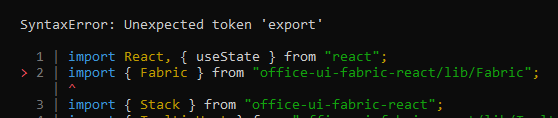
Update: Actually this is a documented issue that is resolved by using a moduleNameMapper
https://github.com/OfficeDev/office-ui-fabric-react/blob/master/6.0_RELEASE_NOTES.md#lib-commonjs
rexkenley
on 7 Jan 2020
@shilman Thanks for your help. I am closing this issue as resolved.
rexkenley
on 7 Jan 2020
Per storybook docs, you may need to create the .babelrc inside your .storybook folder https://storybook.js.org/docs/configurations/custom-babel-config/
 remjx
on 28 Jan 2020
remjx
on 28 Jan 2020
Related issues
 ZigGreen
·
3Comments
ZigGreen
·
3Comments
 tomitrescak
·
3Comments
shilman
·
3Comments
tomitrescak
·
3Comments
shilman
·
3Comments
 MrOrz
·
3Comments
MrOrz
·
3Comments
 tirli
·
3Comments
tirli
·
3Comments