Storybook: "Jest did not exit one second after the test run has completed." addon-storyshots-puppeteer 5.3.0-rc.1
I migrated addon-storyshots & addon-storyshots-puppeteer from 5.2.8 to 5.3.0-rc.1
Storyshots.test.ts
import initStoryshots from '@storybook/addon-storyshots';
import { imageSnapshot } from '@storybook/addon-storyshots-puppeteer';
import {
    ...
    selectPage,
    ...
} from './pages';
import puppeteer, { Page } from 'puppeteer';

const beforeScreenshot = (page: Page, { context: { kind, story } }): Promise<void | {}> => {
    switch (kind) {
        ...
        case 'MUI/Select':
            return selectPage(page);
        ...
        default:
            return defaultPage(page);
    }
};
const getCustomBrowser = () =>
    puppeteer.launch({
        ignoreDefaultArgs: ['--hide-scrollbars'],
    });

// @ts-ignore
const storybookUrl = global.__STORYBOOK_URL__;

initStoryshots({
    suite: 'Image storyshots',
    test: imageSnapshot({
        storybookUrl,
        beforeScreenshot,
        getCustomBrowser,
    }),
    storyKindRegex: /^((?!.*?NoTest).)*$/,
});
Got the message:
"Jest did not exit one second after the test run has completed.
This usually means that there are asynchronous operations that weren't stopped in your tests. Consider running Jest with --detectOpenHandles to troubleshoot this issue."
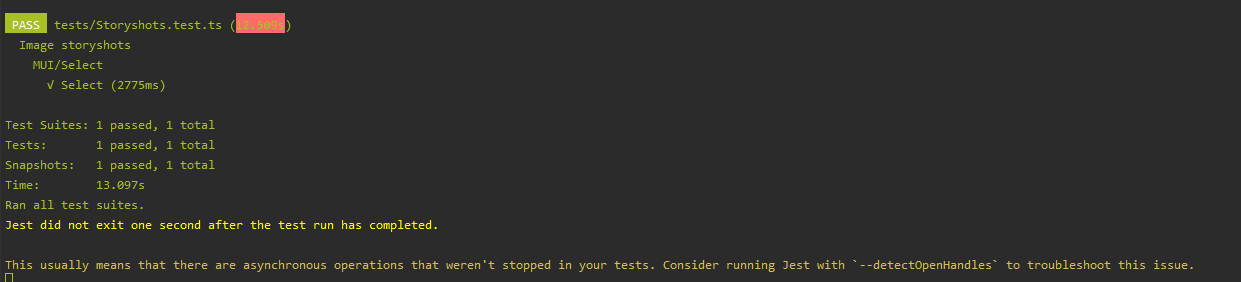
Can't realise should I add "done()" somewhere in my configuration?
 NikolayVolkovR
All 2 comments
Hi,
i run into the same issue. As far as i can say, by using the getCustomBrowser function, the current instance of the browser will not be closed after all tests are ran.
I have modified your example as follows:
import initStoryshots from '@storybook/addon-storyshots';
import { imageSnapshot } from '@storybook/addon-storyshots-puppeteer';
import {
    ...
    selectPage,
    ...
} from './pages';
import puppeteer, { Page } from 'puppeteer';

let browser = null;

afterAll(async () => {
  await browser.close();
});

const beforeScreenshot = (page: Page, { context: { kind, story } }): Promise<void | {}> => {
    switch (kind) {
        ...
        case 'MUI/Select':
            return selectPage(page);
        ...
        default:
            return defaultPage(page);
    }
};
const getCustomBrowser = async () => {
    browser = await puppeteer.launch({
        ignoreDefaultArgs: ['--hide-scrollbars'],
    });
    return browser;
};

// @ts-ignore
const storybookUrl = global.__STORYBOOK_URL__;

initStoryshots({
    suite: 'Image storyshots',
    test: imageSnapshot({
        storybookUrl,
        beforeScreenshot,
        getCustomBrowser,
    }),
    storyKindRegex: /^((?!.*?NoTest).)*$/,
});
I have a similar solution that works for me.
Regards
 preventdefault
on 10 Jan 2020
preventdefault
on 10 Jan 2020
🚀1
👍1
@preventdefault That works, thank you!
NikolayVolkovR
on 13 Jan 2020
Was this page helpful?
0 / 5 - 0 ratings
Related issues
 tomitrescak
·
3Comments
tomitrescak
·
3Comments
 MrOrz
·
3Comments
MrOrz
·
3Comments
 rpersaud
·
3Comments
rpersaud
·
3Comments
 miljan-aleksic
·
3Comments
miljan-aleksic
·
3Comments
 tirli
·
3Comments
tirli
·
3Comments
Most helpful comment
Hi,
i run into the same issue. As far as i can say, by using the getCustomBrowser function, the current instance of the browser will not be closed after all tests are ran.
I have modified your example as follows:
I have a similar solution that works for me.
Regards