Storybook: React-Native 5.3.0-beta.6 shouldPersistSelection not working
Describe the bug
Always resetting selection uppon emulator refresh
To Reproduce
Steps to reproduce the behaviour:
- Go to story 2
- Refresh emulator
- First Story in the list will be displayed.
Expected behaviour
When shouldPersistSelection is set to true, it should keep the selection on story 2 when reloading emulator.
Additional context
Was working on 5.2.6 we upgraded to 5.3.0-beta.6 for the addon panel bug fix.
 wilau2
All 9 comments
Hi everyone! Seems like there hasn't been much going on in this issue lately. If there are still questions, comments, or bugs, please feel free to continue the discussion. Unfortunately, we don't have time to get to every issue. We are always open to contributions so please send us a pull request if you would like to help. Inactive issues will be closed after 30 days. Thanks!
![stale[bot] picture](https://avatars3.githubusercontent.com/in/1724?v=4&s=40) stale[bot]
on 16 Dec 2019
stale[bot]
on 16 Dec 2019
Hi everyone! Seems like there hasn't been much going on in this issue lately. If there are still questions, comments, or bugs, please feel free to continue the discussion. Unfortunately, we don't have time to get to every issue. We are always open to contributions so please send us a pull request if you would like to help. Inactive issues will be closed after 30 days. Thanks!
stale[bot]
on 8 Jan 2020
It is working well in my case in v5.3.x.
 JeffGuKang
on 16 Jan 2020
JeffGuKang
on 16 Jan 2020
Nice! Closing 😂
 shilman
on 16 Jan 2020
shilman
on 16 Jan 2020
@shilman @JeffGuKang I just tried in our project and we are facing this issue after moving from v5.2.8 to v5.3.7. We would like to upgrade to solve #8613 but we blocked by this issue.
On Android and iOS, after opening Storybook it always shows the first story after reloading the page even if we added the shouldPersistSelection: true flag to getStorybookUI({ ... });. On v5.2.8 we didn't have this issue.
If you need it, I could try to create a new project to reproduce the issue.
 jimmyfortinx
on 20 Jan 2020
jimmyfortinx
on 20 Jan 2020
Finally, I took the time to create the repository where I was able to reproduce the issue.
https://github.com/jimmyfortinx/storybook-bug-rn
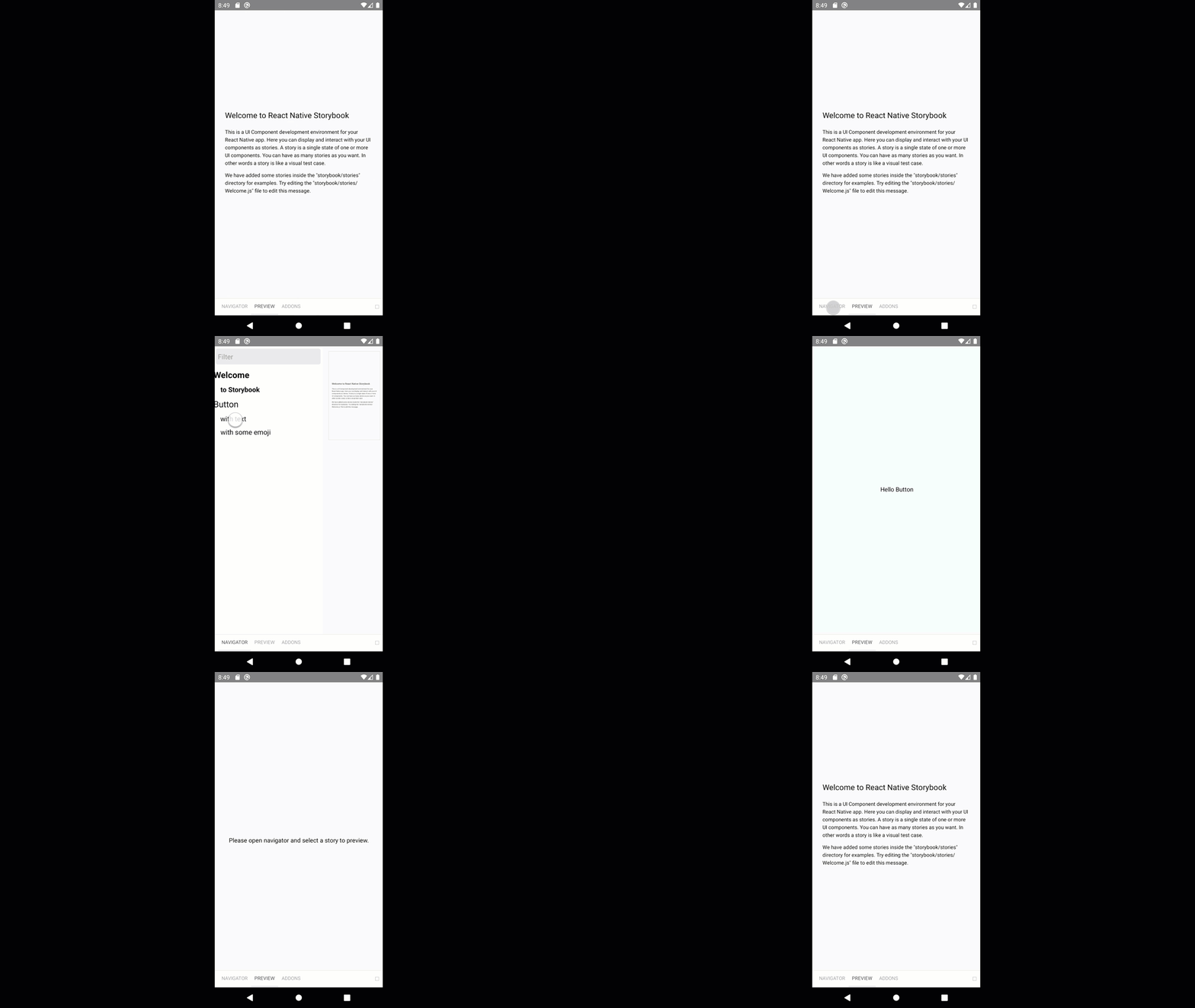
And to help understand the issue I did record a short video where we see the issue (at the end we have been redirected to Welcome/to Storybook screen instead of Button/with Text screen):
jimmyfortinx
on 21 Jan 2020
I think this is due to the fact that asyncStorage is not added by default anymore.
Adding this fixed it for me.
https://github.com/storybookjs/storybook/blob/next/MIGRATION.md#react-native-async-storage
either
//React Native <= v0.59
getStorybookUI({
  ...
  asyncStorage: require('@react-native-community/async-storage').default
});
or
//React Native > v0.59
getStorybookUI({
  ...
  asyncStorage: require('react-native').AsyncStorage
});
depending on your version.
 Renji3
on 8 Jun 2020
Renji3
on 8 Jun 2020
@Renji3 Thanks, I didn't see that part in the documentation. It worked well :D
jimmyfortinx
on 18 Jun 2020
@Renji3
Good point.
Recommend to use https://react-native-community.github.io/async-storage/ always.
And require('react-native').AsyncStorage is deprecated RN >= v0.59. You made a mistake writing the version.
JeffGuKang
on 19 Jun 2020
Related issues
 MrOrz
·
3Comments
MrOrz
·
3Comments
 tirli
·
3Comments
tirli
·
3Comments
 purplecones
·
3Comments
purplecones
·
3Comments
 miljan-aleksic
·
3Comments
miljan-aleksic
·
3Comments
 dnlsandiego
·
3Comments
dnlsandiego
·
3Comments