Storybook: Addon-docs: Bad source for CSF with MDX Docs
Is your feature request related to a problem? Please describe.
When using MDX with stories defined in CSF, the Show Code button does not display the actual code, but only the imported method name.
Describe the solution you'd like
As with CSF or full MDX, I would expect the Show Code button to display the actual story reference code.
Describe alternatives you've considered
From the recipe pages there's two other options I've considered:
Pure MDX. This works, however it seems like you give up a lot of the benefits of the CSF: its portability and ability to be written in plain JS/JSX, with all its benefits.
CSF only. This also works, but you obviously don't get the benefit of being able to define longer documentation. Especially interspersed within specific stories.
Are you able to assist bring the feature to reality?
Potentially.
Additional context
Reference to the Issue discussion here: https://github.com/storybookjs/storybook/issues/8377#issuecomment-540839675
_MDX with story defined in CSF_

<Preview>
  <Story name="Secondary">{stories.secondary()}</Story>
</Preview>
_Just CSF_

export const secondary = () => (
  <Button variant="secondary">Click me</Button>
);
 DigTheDoug
All 15 comments
Hi everyone! Seems like there hasn't been much going on in this issue lately. If there are still questions, comments, or bugs, please feel free to continue the discussion. Unfortunately, we don't have time to get to every issue. We are always open to contributions so please send us a pull request if you would like to help. Inactive issues will be closed after 30 days. Thanks!
![stale[bot] picture](https://avatars3.githubusercontent.com/in/1724?v=4&s=40) stale[bot]
on 7 Nov 2019
stale[bot]
on 7 Nov 2019
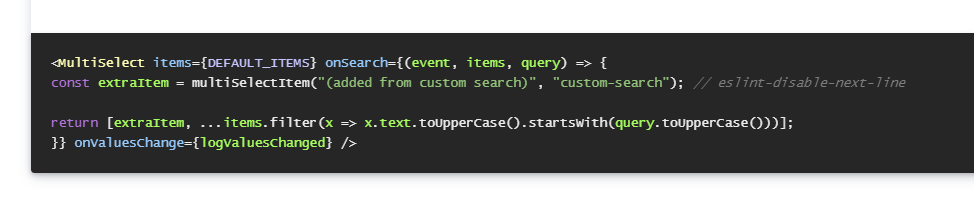
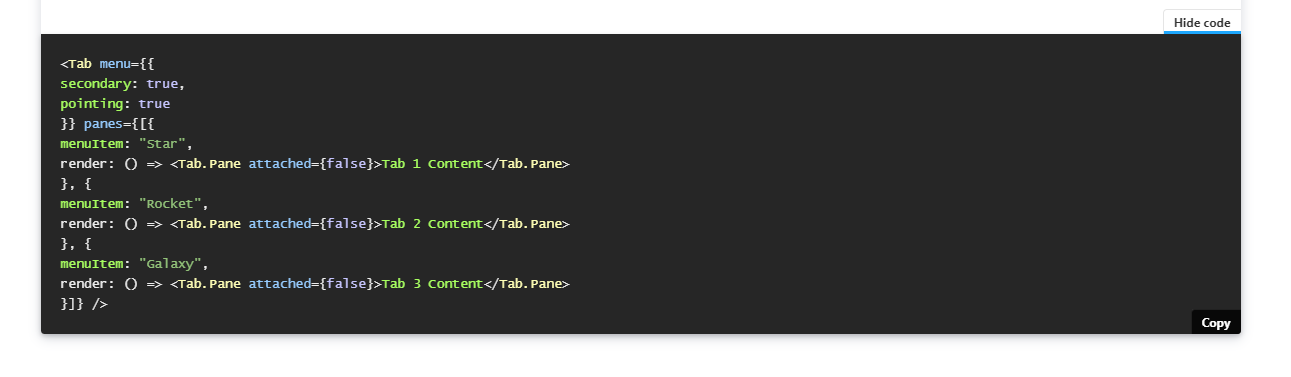
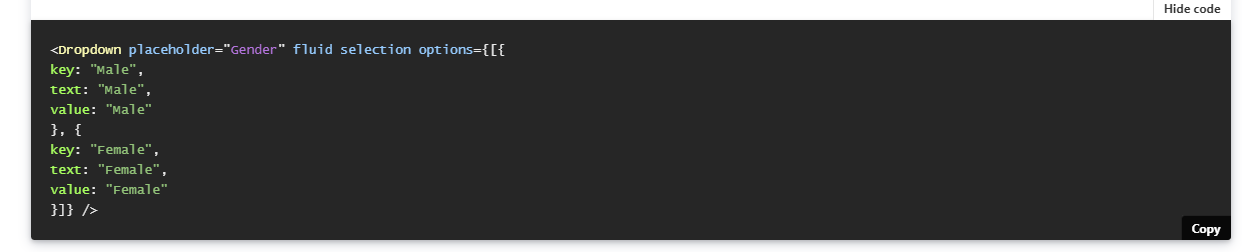
Another example..
The following:
<Preview>
    <Story name="custom search">
        <MultiSelect
            items={DEFAULT_ITEMS}
            onSearch={(event, items, query) => {
                const extraItem = multiSelectItem("(added from custom search)", "custom-search");
                // eslint-disable-next-line
                return [extraItem, ...items.filter(x => x.text.toUpperCase().startsWith(query.toUpperCase()))];
            }}
            onValuesChange={logValuesChanged}
        />
    </Story>
</Preview>
Is displayed as:
 patricklafrance
on 29 Nov 2019
patricklafrance
on 29 Nov 2019
patricklafrance
on 4 Dec 2019
Would love to see this soon 👀
 ByeBye-Sama
on 20 Jun 2020
ByeBye-Sama
on 20 Jun 2020
Huzzah!! I just released https://github.com/storybookjs/storybook/releases/tag/v6.0.0-beta.38 containing PR #11332 that references this issue. Upgrade today to try it out!
You can find this prerelease on the @next NPM tag.
Closing this issue. Please re-open if you think there's still more to do.
 shilman
on 30 Jun 2020
shilman
on 30 Jun 2020
Another fix here https://github.com/storybookjs/storybook/pull/11752 available in 6.0.0-rc.21.
shilman
on 2 Aug 2020
I'm still struggling with the original issue. I just started upgrading to Storybook 6.0 last week and at the same time migrating stories to CSF/MDX. I got excited when I started work today and saw an update but updated to 6.0.0-rc.24 this morning and still have the issue.
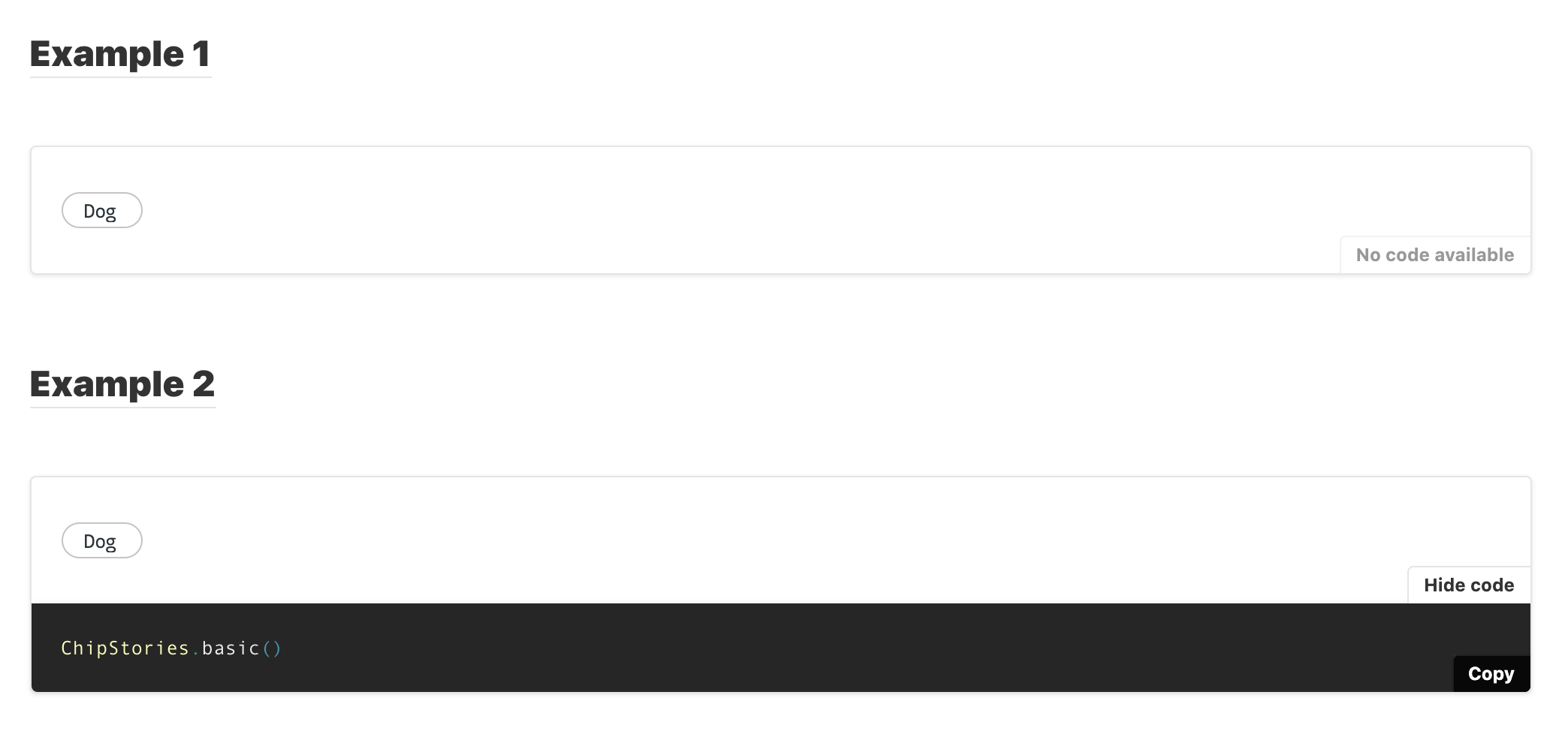
I tried both ways of writing the story
## Example 1
<Preview withSource='open'>
  <Story story={ChipStories.basic} name="Example 1"/>
</Preview>

## Example 2
<Preview withSource='open'>
  <Story name="Example 2">
  {ChipStories.basic()}
  </Story>
</Preview>
but get this where there is no code example at all for the first one
Not sure if maybe my config somewhere is wrong. Here is my .storybook/main.js
module.exports = {
  "stories": [
    "../src/**/**/*.stories.@(js|jsx|ts|tsx|mdx)"
  ],
  "addons": [
    {
      name: '@storybook/addon-docs',
      options: {
        configureJSX: true,
        babelOptions: {},
        sourceLoaderOptions: null
      }
    },
    "@storybook/addon-links",
    "@storybook/addon-essentials",
    "@storybook/preset-create-react-app"
  ]
}
Also of note, the actual component itself is written in Typescript, & a pure MDX story with no CSF works as expected.
 kyleBeikirch
on 3 Aug 2020
kyleBeikirch
on 3 Aug 2020
@kyleBeikirch Did you take a look at #11752
shilman
on 3 Aug 2020
@shilman would that not be Example #1 in my code where no code example shows up?
I didn't include the import statements in that example but here is the full thing
import { Meta, Story, Preview, ArgsTable } from '@storybook/addon-docs/blocks'
import Chip from './index'
import * as ChipStories from './Chip.stories.js';

<Meta title="Molecules/Chips" component={Chip}/>

# Chips
Chips are compact elements that represent an input, attribute, or action.


## Example 1
<Preview withSource='open'>
  <Story story={ChipStories.basic} name="Example 1"/>
</Preview>

## Example 2
<Preview withSource='open'>
  <Story name="Example 2">
  {ChipStories.basic()}
  </Story>
</Preview>


# Props
<ArgsTable of={Chip} />
@kyleBeikirch sorry my bad. i missed your "example 1", which is the recommended way to write the story. do you have a public repro i can look at?
shilman
on 3 Aug 2020
@shilman It's all in a private, company-owned repo, but let me try to get a reproducible live code example for ya.
kyleBeikirch
on 3 Aug 2020
@shilman was able to reproduce here as well - https://github.com/kyleBeikirch/storybook-test
kyleBeikirch
on 3 Aug 2020
@kyleBeikirch this line disables the source loader. remove it and restart storybook and you should be able to see the source. in fact you should be able to remove the options altogether...
https://github.com/kyleBeikirch/storybook-test/blob/master/.storybook/main.js#L11
shilman
on 4 Aug 2020
@shilman That was it, I knew it was a config somewhere! The code example is showing up although it renders as
() => <TestChip label={'Dog'} /> Ideally it would just be <TestChip label={'Dog'} />
Is that some config option as well?
I'm sure you are quite busy in prep for the official 6.0 release. This remaining quirk is minor so not a big deal and a nice to have for me.
Thanks for all your help!
kyleBeikirch
on 4 Aug 2020
Yes! You can get the dynamically rendered source in two different ways:
- Convert it to an args story
- Set the
docs.source.typeparameter to 'dynamic' (default is 'auto')
shilman
on 4 Aug 2020
Related issues
 Jonovono
·
3Comments
Jonovono
·
3Comments
 MrOrz
·
3Comments
MrOrz
·
3Comments
 wahengchang
·
3Comments
wahengchang
·
3Comments
 alexanbj
·
3Comments
alexanbj
·
3Comments
 tlrobinson
·
3Comments
tlrobinson
·
3Comments
Most helpful comment
Yes! You can get the dynamically rendered source in two different ways:
docs.source.typeparameter to 'dynamic' (default is 'auto')