Storybook: Missing details on custom event using actions addon
Hi,
just wanted to ask if there is any way of displaying additional details from the custom event in the actions panel.
This is the event details I see when logged to the console:
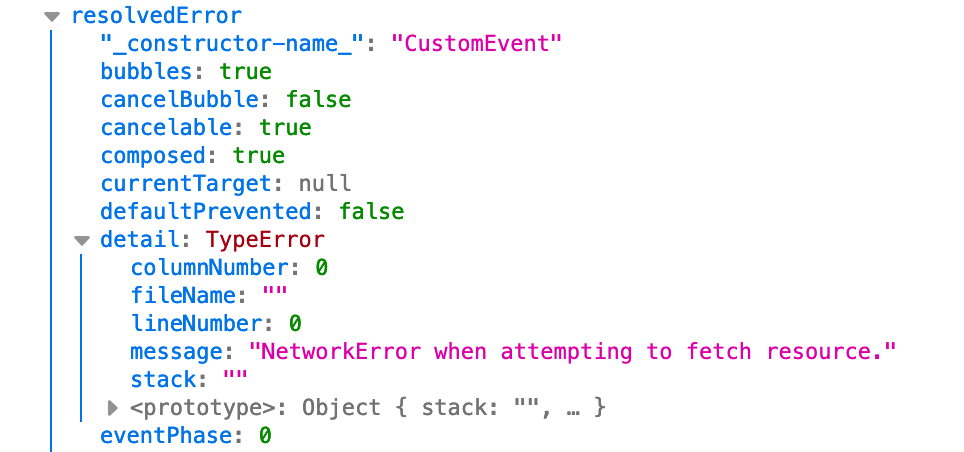
This is the event details I seen in the actions panel:
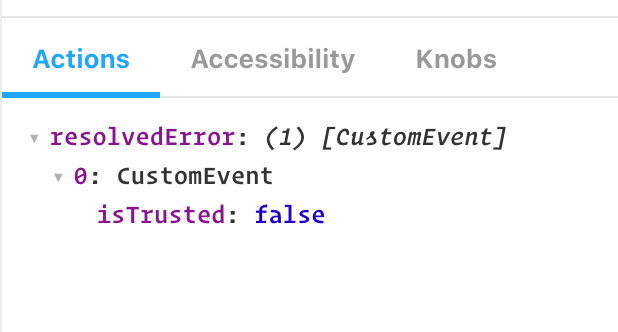
As you can see there is only isTrusted property. I'm using the html version of storybook with a webcomponent written in stencilJS.
 hrobarikt
All 21 comments
@shilman Hello, I am also having this issue and am very interested in any suggestions and solutions you might have. Thanks
 ssbelle
on 11 Oct 2019
ssbelle
on 11 Oct 2019
@hrobarikt did you ever find a solution?
ssbelle
on 14 Oct 2019
@hrobarikt did you ever find a solution?
As a quick workaround, you can try another addon @storybook/addon-console in which you can output the console log into the actions panel as well. But it is still not outputting the whole object and you need to specify the exact property that you wanna log (in my case event.detail.message).
hrobarikt
on 15 Oct 2019
@hrobarikt did you ever find a solution?
As a quick workaround, you can try another addon @storybook/addon-console in which you can output the console log into the actions panel as well. But it is still not outputting the whole object and you need to specify the exact property that you wanna log (in my case event.detail.message).
Thanks, yeah I had tried that addon a few days ago, and while it does show the event payload it shows each log beginning with 'console'. I have yet to find a way to replace the 'console' with something more verbose such as the name of the event. Did you manage to customize the console addon in that way @hrobarikt ?
ssbelle
on 16 Oct 2019
@shilman is there any additional information on this? Is it possible to get the payload for a custom event using the action add on?
ssbelle
on 30 Oct 2019
I don't know. I don't maintain the actions addon. cc @ndelangen
 shilman
on 31 Oct 2019
shilman
on 31 Oct 2019
Does this help?
https://storybookjs-next.now.sh/official-storybook/?path=/story/addons-actions--all-types
(click the button that says "SyntheticEvent")
 ndelangen
on 21 Nov 2019
ndelangen
on 21 Nov 2019
Hi everyone! Seems like there hasn't been much going on in this issue lately. If there are still questions, comments, or bugs, please feel free to continue the discussion. Unfortunately, we don't have time to get to every issue. We are always open to contributions so please send us a pull request if you would like to help. Inactive issues will be closed after 30 days. Thanks!
![stale[bot] picture](https://avatars3.githubusercontent.com/in/1724?v=4&s=40) stale[bot]
on 12 Dec 2019
stale[bot]
on 12 Dec 2019
Hey there, it's me again! I am going close this issue to help our maintainers focus on the current development roadmap instead. If the issue mentioned is still a concern, please open a new ticket and mention this old one. Cheers and thanks for using Storybook!
stale[bot]
on 11 Jan 2020
Hello everyone, any news about this issue?
 matteobarone
on 27 Feb 2020
matteobarone
on 27 Feb 2020
Is this problem specific to Stencil?
ndelangen
on 27 Feb 2020
@ndelangen apparently not.
Seems related to native JS custom events, but also in my case I'm exporting web components through Stencil. I don't know if this is relevant.
implementation:
window.addEventListener('myCustomEvent', action('logMyEvent'));
output:
logMyEvent: (1) [CustomEvent]
  0: CustomEvent
    isTrusted: false
the console.log output is:
isTrusted: false
detail: {myDetail: 97815, ...}
type: "myCustomEvent"
target: my-tag.hydrated
currentTarget: null
eventPhase: 0
bubbles: true
cancelable: true
defaultPrevented: false
composed: true
timeStamp: 17609.72000000038
srcElement: my-tag.hydrated
returnValue: true
cancelBubble: false
path: (6) [...]
_constructor-name_: "CustomEvent"
Would be great if the addon could output also the other data.
Thanks for your time.
matteobarone
on 27 Feb 2020
@matteobarone I created a work around for custom events, it is here https://www.npmjs.com/package/storybook-events-logger let me know if you need help implementing!
ssbelle
on 7 Mar 2020
FWIW, this problem isn't only related to Stencil, I have a completely vanilla web component library and am experiencing this issue as well.
 calebdwilliams
on 12 Mar 2020
calebdwilliams
on 12 Mar 2020
@calebdwilliams I was using web components as well and my npm package gives us the full data payload like so:
event_name Payload(event.data.payload): >
otherdata: "whatever is passed in data payload"
other: "whatever else is in the data payload "
ssbelle
on 12 Mar 2020
@ssbelle, how are your events constructed? I'm just using CustomEvent and event.detail, with your package payload was null.
calebdwilliams
on 12 Mar 2020
@calebdwilliams
export function logEvent(e) {
const id = uuid();
const formattedEvent = {
id,
data: {
name: e.type,
payload: e.detail
}
};
hope that answers your question! I'll update the readme shortly to make it more clear, let me know if it works for you!
If it helps to look at the src code here https://github.com/ssbelle/storybook-events-logger/tree/master/src/components
Let me know if you run into anything else
ssbelle
on 12 Mar 2020
@ssbelle Yea it is working for me ;);) Thanks a lot!
If you could also add Typescript, would be perfect.
And maybe storybook will include it in one of their official addons.
matteobarone
on 16 Mar 2020
Seems like the same issue as #8544
 urish
on 7 Apr 2020
urish
on 7 Apr 2020
@ssbelle - How to use https://www.npmjs.com/package/storybook-events-logger. can u share example
 SunilSalve
on 29 May 2020
SunilSalve
on 29 May 2020
Here is a solution to this problem: https://stackoverflow.com/questions/13333683/javascript-customevent-detail-not-getting-passed
 AGrabovajFitA
on 26 Jun 2020
AGrabovajFitA
on 26 Jun 2020
Related issues
 dnlsandiego
·
3Comments
dnlsandiego
·
3Comments
 miljan-aleksic
·
3Comments
miljan-aleksic
·
3Comments
 alexanbj
·
3Comments
shilman
·
3Comments
alexanbj
·
3Comments
shilman
·
3Comments
 wahengchang
·
3Comments
wahengchang
·
3Comments
Most helpful comment
@matteobarone I created a work around for custom events, it is here https://www.npmjs.com/package/storybook-events-logger let me know if you need help implementing!