Storybook: URL params don't work with addParameters
Describe the bug
When using the ?full=1 query parameter, Storybook displays in full screen mode as expected. However, if I use addParameters() in config.ts this seems to override the query parameter and Storybook is not displayed in full screen mode. This occurs even if I don't set the isFullscreen option
To Reproduce
Steps to reproduce the behavior:
- Open a story in Storybook
- Add the URL parameter
full=1 - Observe: story is displayed in fullscreen mode
- In config.ts, add the following:
addParameters({
    options: {
        isToolshown: false,
    },
})
- Open a story in Storybook
- Add the URL parameter
full=1 - Observe: story is not displayed in fullscreen mode
Expected behavior
I would expect the URL param full=1 to be respected even if global parameters are added in config.ts. Moreover, I would expect the URL parameters to override the global parameters.
System:
  System:
    OS: macOS 10.14.6
    CPU: (4) x64 Intel(R) Core(TM) i5-4278U CPU @ 2.60GHz
  Binaries:
    Node: 10.16.3 - ~/.nvm/versions/node/v10.16.3/bin/node
    Yarn: 1.17.3 - /usr/local/bin/yarn
    npm: 6.9.0 - ~/.nvm/versions/node/v10.16.3/bin/npm
  Browsers:
    Chrome: 77.0.3865.90
    Firefox: 67.0
    Safari: 13.0
 SiAdcock
All 12 comments
@SiAdcock , I have similar demand with you, my situation is to hide the tool panel when it is published as document.
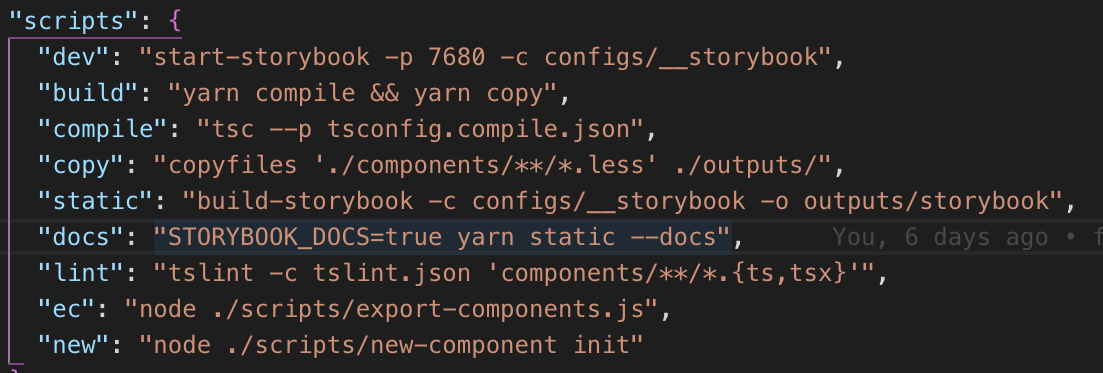
My solution is to define a process.env argument like the code below
const isDocs = process.env.STORYBOOK_DOCS === "true";
addDecorator(withA11y);
addParameters({
options: {
showPanel: !isDocs,
panelPosition: "right",
isToolshown: !isDocs,
theme: {
...zhenguoTheme,
brandTitle: `${packageName} ${packageVersion}`
}
}
});
and the script is like this
 Uyarn
on 24 Sep 2019
Uyarn
on 24 Sep 2019
Good shout @Uyarn, something like this would work for me too!
I'll keep this issue open, because I still think it's a bug, but your workaround is very useful, thanks so much 😄
SiAdcock
on 24 Sep 2019
@SiAdcock , definitely, this is just a compatible workaround . Let's wait for the official fix from storybook 😄
Uyarn
on 24 Sep 2019
Hi everyone! Seems like there hasn't been much going on in this issue lately. If there are still questions, comments, or bugs, please feel free to continue the discussion. Unfortunately, we don't have time to get to every issue. We are always open to contributions so please send us a pull request if you would like to help. Inactive issues will be closed after 30 days. Thanks!
![stale[bot] picture](https://avatars3.githubusercontent.com/in/1724?v=4&s=40) stale[bot]
on 15 Oct 2019
stale[bot]
on 15 Oct 2019
Hello, this is still a valid issue for us. The woarkaround means you need to host storybook application twice - once normalny with menu and secondly in fullscreen mode. It is not a good solution.
Can you look into it? Thanks
 ecl1ps
on 1 Nov 2019
ecl1ps
on 1 Nov 2019
Hi everyone! Seems like there hasn't been much going on in this issue lately. If there are still questions, comments, or bugs, please feel free to continue the discussion. Unfortunately, we don't have time to get to every issue. We are always open to contributions so please send us a pull request if you would like to help. Inactive issues will be closed after 30 days. Thanks!
stale[bot]
on 22 Nov 2019
cc @ndelangen
 shilman
on 25 Nov 2019
shilman
on 25 Nov 2019
Hi everyone! Seems like there hasn't been much going on in this issue lately. If there are still questions, comments, or bugs, please feel free to continue the discussion. Unfortunately, we don't have time to get to every issue. We are always open to contributions so please send us a pull request if you would like to help. Inactive issues will be closed after 30 days. Thanks!
stale[bot]
on 16 Dec 2019
I'm currently working around the issue like so, for those interested:
manager-head.html
<script>
  var { searchParams } = new URL(location.href);
</script>
searchParams.js
const { searchParams } = parent;
const get = name => searchParams?.get(name);
const truthy = value => value && ['1', 'true'].includes(value);
const is = name => truthy(get(name));

export const isFullscreen = is('full') ?? false;
export const showNav = is('nav') ?? true;
export const showPanel = is('panel') ?? true;
export const isToolshown = is('tool') ?? true;
config.js
import { isFullscreen, isToolshown, showNav, showPanel } from './searchParams';

addParameters({
  options: {
    isFullscreen,
    isToolshown,
    showNav,
    showPanel,
  },
});
I'd love native support along with documentation though!
 rabelloo
on 24 Dec 2019
rabelloo
on 24 Dec 2019
hey @rabelloo ,
I am trying to get storybook working for my component.
My implementation->
componentDidMount(){
gets userName and userId from the url using window.location.search
//example www.xyz.com/userName=foo&userId=bar
and saves them in state
this.setState({userName, userId,});
}
render(){
return(
userName is {this.state.userName} userId is {this.state.userId}
how do i pass this using storybook.
I know how to pass props via storybook.
but since this is coming from the url i cant use props.
 Aftab22
on 24 Dec 2019
Aftab22
on 24 Dec 2019
Hi everyone! Seems like there hasn't been much going on in this issue lately. If there are still questions, comments, or bugs, please feel free to continue the discussion. Unfortunately, we don't have time to get to every issue. We are always open to contributions so please send us a pull request if you would like to help. Inactive issues will be closed after 30 days. Thanks!
stale[bot]
on 14 Jan 2020
Hey there, it's me again! I am going close this issue to help our maintainers focus on the current development roadmap instead. If the issue mentioned is still a concern, please open a new ticket and mention this old one. Cheers and thanks for using Storybook!
stale[bot]
on 13 Feb 2020
Related issues
 tomitrescak
·
3Comments
tomitrescak
·
3Comments
 miljan-aleksic
·
3Comments
miljan-aleksic
·
3Comments
 alexanbj
·
3Comments
alexanbj
·
3Comments
 tirli
·
3Comments
tirli
·
3Comments
 tlrobinson
·
3Comments
tlrobinson
·
3Comments
Most helpful comment
I'm currently working around the issue like so, for those interested:
manager-head.htmlsearchParams.jsconfig.jsI'd love native support along with documentation though!