Storybook: @storybook/addon-docs issue pulling description for "Enum" flow types
Describe the bug
This is under the assumption that flow is supported...if not then i guess we can close this!
Using flow typing, docs seems to be unable to pick up on "enum values" for example:
type Props = {
    ListItemProps: Object, // description shows up as object, as expected
    textAlignment?: 'left' | 'right' | 'center' // no description
}
i noticed this in the docs
Badge.propTypes = {
  status: PropTypes.oneOf(['positive', 'negative', 'neutral', 'error', 'warning']),
};
But i'd rather not use prop types since i'm using flow
To Reproduce
Have an "enum type" (an 'or' separated list of strings) in flow, note that the description doesn't show up as the possible options described in the flow types
Expected behavior
Given the above example, the description for textAlignment should show up as left, right, center given it was typed in a flow type
Screenshots
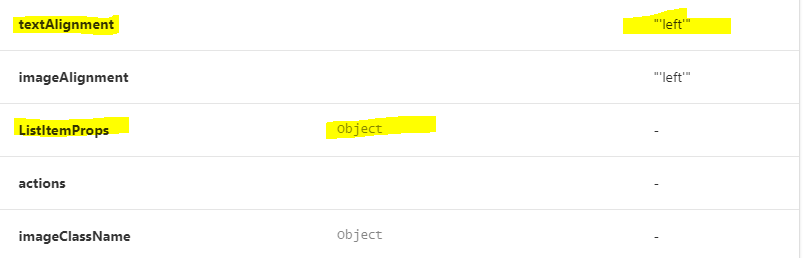
System:
 System:
    OS: Windows 10
    CPU: (12) x64 Intel(R) Core(TM) i7-8750H CPU @ 2.20GHz
  Binaries:
    Node: 12.4.0 - C:\Program Files\nodejs\node.EXE
    npm: 6.9.0 - C:\Program Files\nodejs\npm.CMD
  Browsers:
    Edge: 44.18362.267.0
  npmPackages:
    @storybook/addon-actions: ^5.2.1 => 5.2.1
    @storybook/addon-docs: ^5.2.1 => 5.2.1
    @storybook/addon-knobs: ^5.2.1 => 5.2.1
    @storybook/addon-links: ^5.2.1 => 5.2.1
    @storybook/addons: ^5.2.1 => 5.2.1
    @storybook/react: ^5.2.1 => 5.2.1
Additional context
Maybe Flow was never intended to be supported? But it seems to be working for types like string, Object, number, etc.
 aleccaputo
All 23 comments
We don't explicitly support flow yet, but I'd like to if somebody from the community would be willing to take it on.
 shilman
on 19 Sep 2019
shilman
on 19 Sep 2019
@shilman i'd like to take a crack at this. Mind assigning it to me?
aleccaputo
on 6 Oct 2019
Of course @aleccaputo! Thanks for taking it on! 🙏
shilman
on 6 Oct 2019
@aleccaputo How did you even get the prop table to populate? I have never gotten that to work. Would love to know what the config looks like, especially since react-docgen supports flow.
 kevinSuttle
on 16 Oct 2019
kevinSuttle
on 16 Oct 2019
@shilman What would it entail for Docs to support flow?
kevinSuttle
on 16 Oct 2019
@kevinSuttle
here's the component. Sorry haven't gotten a chance to start on this...yarn doesn't like that my user directory has a space in it
type Props = {
    ListItemProps?: Object,
    actions?: Node | Array<Node>,
    imageClassName?: Object,
    imageUri: string,
    justify?: GridJustification,
    make: string,
    model: string,
    msrp?: string,
    primaryText?: Node | Array<Node>,
    vehicleTextClassName?: Object,
    vehicleTextVariant?: ThemeStyle,
    vin?: string,
    year: string | number,
    vehicleImageFirst?: boolean,
    textAlignment?: 'left' | 'right' | 'center',
    imageAlignment?: 'left' | 'right' | 'center'
};

const VehicleListItem = (
    {
        ListItemProps,
        actions,
        imageUri,
        justify = 'flex-start',
        make,
        model,
        msrp,
        primaryText,
        vehicleTextClassName,
        vehicleTextVariant = 'body1',
        vin,
        year,
        imageClassName,
        vehicleImageFirst = true,
        textAlignment = 'left',
        imageAlignment = 'left'
    }: Props) => {
...
@kevinSuttle If I knew the answer to that question, Docs would support flow. Somebody who cares about flow just needs to dig through the chain, figure out where it's breaking, and fix it. I'd imagine it's a trivial change.
shilman
on 17 Oct 2019
Hi everyone! Seems like there hasn't been much going on in this issue lately. If there are still questions, comments, or bugs, please feel free to continue the discussion. Unfortunately, we don't have time to get to every issue. We are always open to contributions so please send us a pull request if you would like to help. Inactive issues will be closed after 30 days. Thanks!
![stale[bot] picture](https://avatars3.githubusercontent.com/in/1724?v=4&s=40) stale[bot]
on 7 Nov 2019
stale[bot]
on 7 Nov 2019
@aleccaputo it should work now, can you try?
 patricklafrance
on 22 Nov 2019
patricklafrance
on 22 Nov 2019
Hi everyone! Seems like there hasn't been much going on in this issue lately. If there are still questions, comments, or bugs, please feel free to continue the discussion. Unfortunately, we don't have time to get to every issue. We are always open to contributions so please send us a pull request if you would like to help. Inactive issues will be closed after 30 days. Thanks!
stale[bot]
on 13 Dec 2019
Hi @patricklafrance I've tried this with 5.3.0-rc8 and am only seeing part of the component property info that should be derived from defaultProps + Flow's prop type.
I have a component such as:
export type ButtonProps = {
  /** The button's label */
  label: string,
}
const Button = (props: ButtonProps) => {
 return (<button>{props.label}</button>);
}
Button.defaultProps = {
}
The Docs tab renders a prop table starting with this html:
<table class="docblock-propstable css-1u9rxqo">
but my Button label does not show up as a row in the table as I would expect. If I define other props in the Flow type and provide a defaultProps value for them, then the defaultProps value _does_ show in the docblock-propstable.
To use the example from @aleccaputo , if I add to prop types: textAlignment?: 'left' | 'right' | 'center' // no description and then to defaultProps: textAlignment: 'left', I see:


So it seems Docs table is pulling prop values from defaultProps but not the Flow prop type.
 techieshark
on 4 Jan 2020
techieshark
on 4 Jan 2020
@techieshark can you try with rc7 please?
In rc8 we switched to react-docgen v5. Just want to make sure this is not a regression from their part.
patricklafrance
on 4 Jan 2020
Hi @patricklafrance I've just now tried with rc7, as well as rc12 and neither results in any the issue as described above remains in both cases (no improvement).
techieshark
on 10 Jan 2020
This seems to work fine with the latest storybook v5.3.3
 palashkaria
on 16 Jan 2020
palashkaria
on 16 Jan 2020
WOOT! @techieshark can you confirm?
shilman
on 16 Jan 2020
@shilman sadly, no.
I've just tried with v5.3.3 and 5.3.6 but am not seeing any change; as described before, I'm finding that the Docs tab props table pulls info from the static defaultProps rather than anything from the Flow prop type.
techieshark
on 18 Jan 2020
Hi everyone! Seems like there hasn't been much going on in this issue lately. If there are still questions, comments, or bugs, please feel free to continue the discussion. Unfortunately, we don't have time to get to every issue. We are always open to contributions so please send us a pull request if you would like to help. Inactive issues will be closed after 30 days. Thanks!
stale[bot]
on 29 Feb 2020
Actually this seems to work in 5.3.17 ✨
techieshark
on 26 Mar 2020
@techieshark that's great news. any idea what changed? i'm not sure there have been any intentionally related changes in the interim.
if possible, can you run yarn storybook --debug-webpack before and after? it might shed some light on things and help other flow users. thanks!
shilman
on 26 Mar 2020
@shilman I think last time I tried 5.3 I missed the migration instructions. I suspect having preset-create-react-app or possibly one of the other two addons below did the trick. Apologies for the confusion earlier!
Here's my .storybook/main.js config file now (which works) for reference -
module.exports = {
  stories: ['../src/**/*.stories.js'],
  addons:
  [
    '@storybook/addon-docs/preset',
    '@storybook/preset-create-react-app',
    'storybook-addon-react-docgen',
    ...
   ]
}
Cool! FYI, you can remove /preset from the end of @storybook/addon-docs and it looks a little cleaner 😄
shilman
on 29 Mar 2020
Hi everyone! Seems like there hasn't been much going on in this issue lately. If there are still questions, comments, or bugs, please feel free to continue the discussion. Unfortunately, we don't have time to get to every issue. We are always open to contributions so please send us a pull request if you would like to help. Inactive issues will be closed after 30 days. Thanks!
stale[bot]
on 19 Apr 2020
Hey there, it's me again! I am going close this issue to help our maintainers focus on the current development roadmap instead. If the issue mentioned is still a concern, please open a new ticket and mention this old one. Cheers and thanks for using Storybook!
stale[bot]
on 19 May 2020
Related issues
 xogeny
·
3Comments
xogeny
·
3Comments
 alexanbj
·
3Comments
alexanbj
·
3Comments
 MrOrz
·
3Comments
MrOrz
·
3Comments
 purplecones
·
3Comments
purplecones
·
3Comments
 arunoda
·
3Comments
arunoda
·
3Comments