Storybook: [Help Needed] ZoneAwarePromise `(window|global).Promise` has been overwritten
Hi, I got Storybook successful setup with Angular 7 on a MacOS 10.14.5, but couldn't get Storyshots working.
Below is the error I got, as you can see, my other Jest tests were running fine without any problems, but Storyshots won't generate snapshots from the stories, looks like global["Promise"] was overwritten by es.promise.js.
I tried fiddling around with the files in node_modules/@storybook/addon-storyshots/dist/frameworks/angular/loader.js, and make sure zone.js was imported after es.promise.js, but still no avail.
Any clues? Thanks!
...

  ● Storyshots › Another Button › button with link to another story

    Zone.js has detected that ZoneAwarePromise `(window|global).Promise` has been overwritten.
    Most likely cause is that a Promise polyfill has been loaded after Zone.js (Polyfilling Promise api is not necessary when zone.js is loaded. If you must load one, do so before loading zone.js.)

      at Function.Object.<anonymous>.Zone.assertZonePatched (node_modules/zone.js/dist/zone.js:58:23)
      at new NgZone (../packages/core/src/zone/ng_zone.ts:123:10)
      at TestBedViewEngine._initIfNeeded (../../packages/core/testing/src/test_bed.ts:408:20)
      at TestBedViewEngine.createComponent (../../packages/core/testing/src/test_bed.ts:594:10)
      at Function.TestBedViewEngine.createComponent (../../packages/core/testing/src/test_bed.ts:247:36)
      at _testing.TestBed.compileComponents.then (node_modules/@storybook/addon-storyshots/dist/frameworks/angular/renderTree.js:56:35)
      at node_modules/@storybook/addon-storyshots/node_modules/core-js/modules/es.promise.js:105:22
      at flush (node_modules/@storybook/addon-storyshots/node_modules/core-js/internals/microtask.js:26:9)

Test Suites: 1 failed, 18 passed, 19 total
Tests:       8 failed, 126 passed, 134 total
Snapshots:   0 total
Time:        28.119s, estimated 30s
Ran all test suites.
 ezforw
All 25 comments
Running into the same problem with Angular 8, Storyshots v5.1.9
 iMarv
on 17 Jul 2019
iMarv
on 17 Jul 2019
Just gonna bump it as this is a serious issue for us.
iMarv
on 7 Aug 2019
Have you tried the latest 5.2-beta? Worth a try if you haven't. There are some other angular-related fixes in there, tho I don't know the status of this one.
 shilman
on 8 Aug 2019
shilman
on 8 Aug 2019
@shilman i'm getting the same error after running npx -p @storybook/cli@next sb init --type angular as suggested here https://github.com/storybookjs/storybook/issues/6804.
Our app is on Angular 8.0.1
Will debug this further tomorrow.
 aroget
on 22 Aug 2019
aroget
on 22 Aug 2019
storybook v5.0.11 works fine on Angular 8.0.1
aroget
on 29 Aug 2019
Hi everyone! Seems like there hasn't been much going on in this issue lately. If there are still questions, comments, or bugs, please feel free to continue the discussion. Unfortunately, we don't have time to get to every issue. We are always open to contributions so please send us a pull request if you would like to help. Inactive issues will be closed after 30 days. Thanks!
![stale[bot] picture](https://avatars3.githubusercontent.com/in/1724?v=4&s=40) stale[bot]
on 19 Sep 2019
stale[bot]
on 19 Sep 2019
Still stuck here :-( is there going to be an update on this?
 ruudyroon
on 30 Sep 2019
ruudyroon
on 30 Sep 2019
Hello,
I try to write an addon but got a similar error:
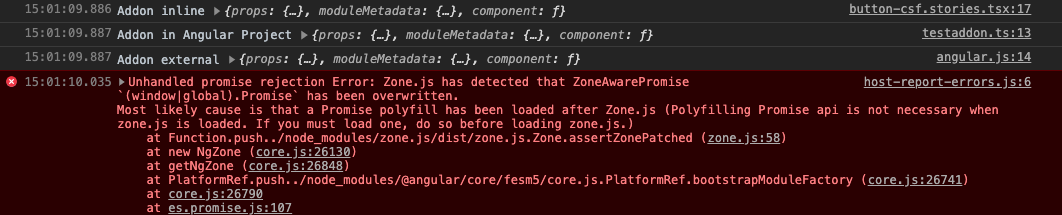
host-report-errors.js:6 Unhandled promise rejection Error: Zone.js has detected that ZoneAwarePromise `(window|global).Promise` has been overwritten.
Most likely cause is that a Promise polyfill has been loaded after Zone.js (Polyfilling Promise api is not necessary when zone.js is loaded. If you must load one, do so before loading zone.js.)
    at Function.push../node_modules/zone.js/dist/zone.js.Zone.assertZonePatched (zone.js:58)
    at new NgZone (core.js:26130)
    at getNgZone (core.js:26848)
    at PlatformRef.push../node_modules/@angular/core/fesm5/core.js.PlatformRef.bootstrapModuleFactory (core.js:26741)
    at core.js:26790
    at es.promise.js:107
My addon (does nothing at the moment) defined in an external package (throws error):
// angular.js

import {makeDecorator} from "@storybook/addons";

export const testAddonExternal = makeDecorator({
    name: "testAddon",
    parameterName: "testAddon",
    skipIfNoParametersOrOptions: false,
    allowDeprecatedUsage: false,
    wrapper: (getStory, context, settings) => {
        const story = getStory(context);
        console.log("Addon external", story);
        return story;
    }
});
// angular.d.ts (also external package)

import {testAddonExternal as test} from './angular';
export const testAddonExternal = test;
My Story (in Angular Project):
// button.stories.tsx

import {  testAddon } from "../../../../../../test/testaddon";
import { testAddonInLib } from "@storybook/addon-testaddon/angular";

const section = {
  component: ButtonComponent,
  title: "Button-CSF",
  moduleMetadata: {
    declarations: [ButtonComponent],
    imports: [CommonModule]
  },
  decorators: [
     // working
     testAddonInline,

    // working
    testAddon,

    // throws: Unhandled promise rejection Error
    testAddonExternal
  ]
};
export default section;

const normalButton = {
  component: ButtonComponent,
  props: defaultProps
};
testAddonInline: Addon defined inside of my Story File (working)
// button.stories.tsx

// same addon code but inline in the same file as the story (is working)
const testAddonInline = makeDecorator({
  name: "testAddon",
  parameterName: "testAddon",
  skipIfNoParametersOrOptions: false,
  allowDeprecatedUsage: false,
  wrapper: (getStory: StoryGetter, context: StoryContext, settings: WrapperSettings) => {
    const story = getStory(context);
    console.log("Addon inline", story);
    return story;
  }
});
testAddon: I also tested to write my addon inside of my Angular Project and used it in the story (working)
// testaddon.ts

import { makeDecorator } from "@storybook/addons";

export const testAddon = makeDecorator({
  name: "testAddon",
  parameterName: "testAddon",
  skipIfNoParametersOrOptions: false,
  allowDeprecatedUsage: false,
  wrapper: (getStory, context, settings) => {
    const story = getStory(context);
    console.log("Addon in Angular Project", story);
    return story;
  }
});
My addons defined inside of the angular project are working. The external loded addon produces also the console output but then throws the error:
Tried storybook (and /addon) version 5.2.4 and ^5.3.0-alpha.23
Found a solution: I must pack my addon as tarball and install it instead of using npm link or install via symlink. Somehow core-js is loaded twice, first in angular and then in my addon even though it's not used directly there (but installed in node_modules).
 philippone
on 20 Oct 2019
philippone
on 20 Oct 2019
Ping. Issue still exists on Storybook 5.2.5 and Angular 8.2.12
 markushall
on 1 Nov 2019
markushall
on 1 Nov 2019
I am using this workaround until this gets fixed properly:
Object.defineProperty(global, "Promise", {
    writable: false,
    value: global.Promise
});
Placed last in my Jest setup file it makes (the Zone patched) Promise read-only, silently ignoring any further patching/polyfill attempts. Sure it is a hack and may have unwanted side effects, but it seems to do the job for me at least.
markushall
on 4 Nov 2019
Hi everyone! Seems like there hasn't been much going on in this issue lately. If there are still questions, comments, or bugs, please feel free to continue the discussion. Unfortunately, we don't have time to get to every issue. We are always open to contributions so please send us a pull request if you would like to help. Inactive issues will be closed after 30 days. Thanks!
stale[bot]
on 26 Nov 2019
Ping. Still happening on v.5.3.0-beta.31
aroget
on 18 Dec 2019
@aroget want to take a shot at fixing this?
shilman
on 20 Dec 2019
Hi everyone! Seems like there hasn't been much going on in this issue lately. If there are still questions, comments, or bugs, please feel free to continue the discussion. Unfortunately, we don't have time to get to every issue. We are always open to contributions so please send us a pull request if you would like to help. Inactive issues will be closed after 30 days. Thanks!
stale[bot]
on 10 Jan 2020
Ping. Still happening on v.5.3.3. :)
 costalvaro
on 15 Jan 2020
costalvaro
on 15 Jan 2020
I am facing the same issue with storybook v5.3.7 and angular 8.2.14 :(
 Roen00
on 20 Jan 2020
Roen00
on 20 Jan 2020
I am facing the same issue with storybook v5.3.7 and angular 8.2.14 :(
Did you try using @markushall workaround?
Sure it's not perfect but at least it permits to move on. ;)
costalvaro
on 20 Jan 2020
@costalvaro I am not really sure where exactly I need to put it.
I am not using Jest.
Roen00
on 20 Jan 2020
@markushall could u help?
Roen00
on 27 Jan 2020
Hi everyone! Seems like there hasn't been much going on in this issue lately. If there are still questions, comments, or bugs, please feel free to continue the discussion. Unfortunately, we don't have time to get to every issue. We are always open to contributions so please send us a pull request if you would like to help. Inactive issues will be closed after 30 days. Thanks!
stale[bot]
on 17 Feb 2020
The issue is still there :(
Roen00
on 17 Feb 2020
Hi everyone! Seems like there hasn't been much going on in this issue lately. If there are still questions, comments, or bugs, please feel free to continue the discussion. Unfortunately, we don't have time to get to every issue. We are always open to contributions so please send us a pull request if you would like to help. Inactive issues will be closed after 30 days. Thanks!
stale[bot]
on 9 Mar 2020
After upgrading our app to @angular v9.0.7 and @storybook v.5.3.17 this issue is now resolved on our end.
Thanks!
aroget
on 23 Mar 2020
Hi everyone! Seems like there hasn't been much going on in this issue lately. If there are still questions, comments, or bugs, please feel free to continue the discussion. Unfortunately, we don't have time to get to every issue. We are always open to contributions so please send us a pull request if you would like to help. Inactive issues will be closed after 30 days. Thanks!
stale[bot]
on 13 Apr 2020
Hey there, it's me again! I am going close this issue to help our maintainers focus on the current development roadmap instead. If the issue mentioned is still a concern, please open a new ticket and mention this old one. Cheers and thanks for using Storybook!
stale[bot]
on 13 May 2020
Related issues
 zvictor
·
3Comments
zvictor
·
3Comments
 sakulstra
·
3Comments
sakulstra
·
3Comments
 xogeny
·
3Comments
xogeny
·
3Comments
 levithomason
·
3Comments
levithomason
·
3Comments
 miljan-aleksic
·
3Comments
miljan-aleksic
·
3Comments
Most helpful comment
Just gonna bump it as this is a serious issue for us.